Markets let shoppers in other countries buy from your store in their own currency, with their own prices, delivery options and content, while India keeps today's checkout with cash on delivery. Open Settings › Markets (also a tile under Delivery in Settings). Anyone who can see settings can look; changes need the settings right.
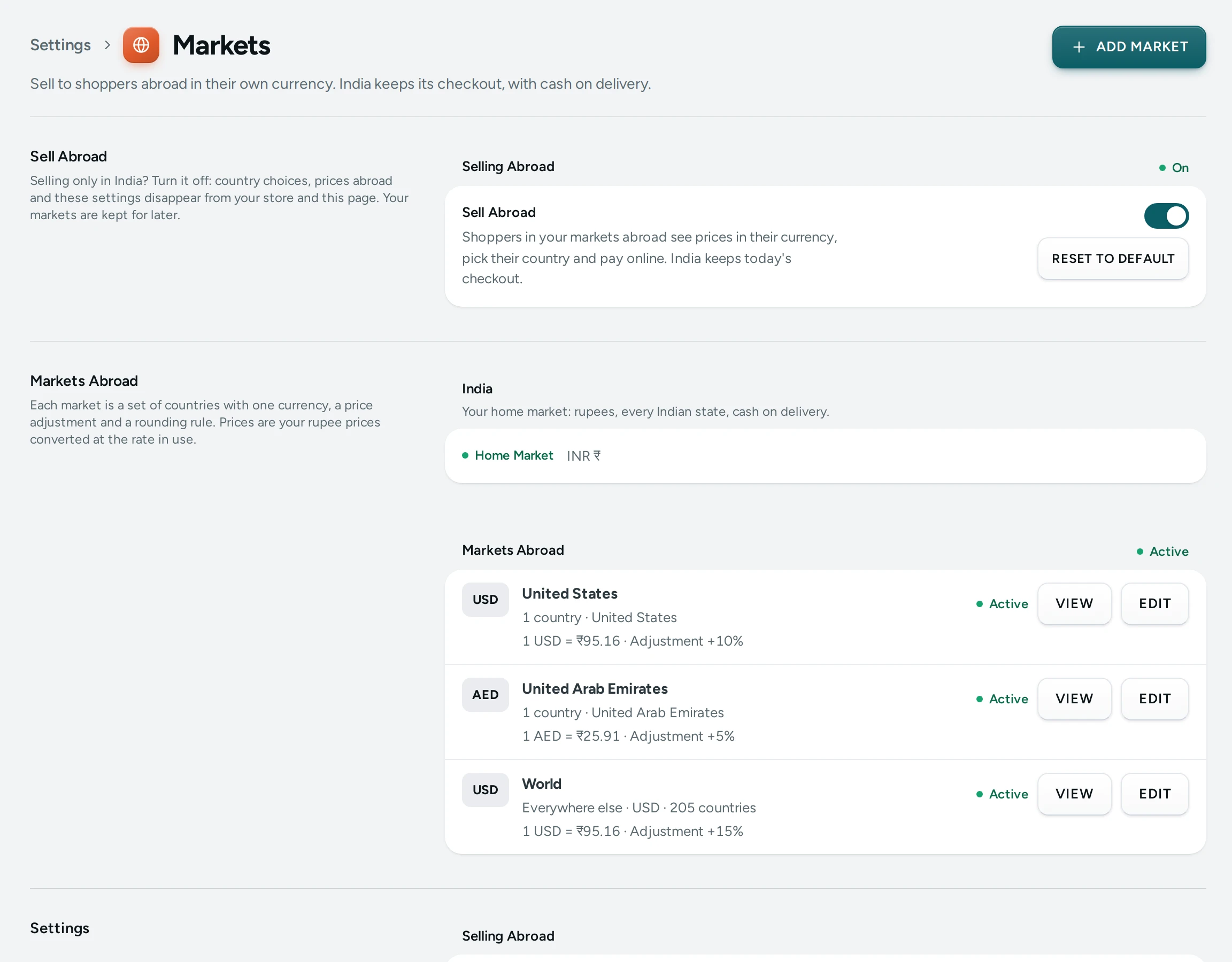
Markets are different from prices in other currencies in Languages and Currencies: those show a converted price as a guide while the shopper still pays in rupees. A market is real selling abroad: its own prices, checkout, card payment in its currency and an export invoice.
Start Selling Abroad
Switch on Sell Abroad at the top of the page. While it is off, your store is India-only: no country choice, no lookup of where visitors are, and no Show In control anywhere. Your markets are kept for later.
| Setting | What It Does | Default |
|---|---|---|
| Sell Abroad | Shoppers in your markets abroad see prices in their currency, pick their country and pay online. | Off |
| The Visitor's Country | Suggest its prices once, Open in their market, or Do nothing. A visitor's own choice of country always wins. | Suggest its prices once |
| Content Follows the Visitor's Country | Sections, messages and offers made for some countries show to visitors browsing from there before they pick a country. | On |
| Duties Notice at Checkout | Checkout abroad says that import duties and taxes may be charged on delivery by the shopper's country. | On |
Search engines and link previews always get your India pages (or a market's own address, below): the store never guesses a country for them.
Add a Market
- Press ADD MARKET.
- Give it a name (for example "United States"), choose its currency, an adjustment (from −50% to +200% on your rupee prices) and a price ending (to the cent, whole numbers, .99 or .95).
- Pick its countries (a country belongs to one market only), or switch on Everywhere Else for one market that holds every country no other market names.
- The sheet shows what a ₹1,000 product sells for there. Save.
India is always your home market: rupees, every state, cash on delivery. A store may have up to 10 markets abroad unless Mercayo changes the limit. Each market shows Active or paused; a paused market keeps its countries and settings.
Prices are converted at Mercayo's rate for the day, or at a rate you fix in Languages and Currencies. A currency whose rate is too old is hidden rather than showing a wrong price.
A Market's Page
VIEW on a market opens its page, which shows everything made for it:
- Delivery: its delivery zones abroad, and any of its countries with no zone yet (SHIPPING SETTINGS opens them). A shopper in a country without a zone cannot order.
- Offers Made for It and Content Made for It: offers, sections, announcement messages, menu links, pages, posts and popups shown there and not in India.
- Search Engines: the market's own address (such as /en-us/) and its Google and Meta product feeds.
- Prices: its adjustment and its rules (below).
- The products it does not sell.
Prices per Market
The most specific price wins:
- a fixed price for a variant in that market, in its currency;
- a rule for the product, then a collection it is in, then a category it is in: an adjustment from −50% to +200%, with its own price ending or the market's;
- the market's own adjustment.
On the market's page, ADD RULE picks products, collections or categories. DOWNLOAD SPREADSHEET gives every variant with its rupee price, what the rules give and its fixed price; fill in fixed prices and UPLOAD SPREADSHEET. The file is checked whole and tells you how many prices it sets, removes or leaves alone, or which rows to fix, before APPLY. A product's Prices Abroad card sets one product's prices market by market.
The product page, the bag, the order and the card charge all use the same price, to the cent.
Limit Things by Country
Things can be limited by country with Show In: everyone, India only, outside India, chosen markets or countries, or everyone except some.
- In the Page Editor, a section's Show In sits beside Show On. ADD A VERSION FOR ANOTHER COUNTRY copies a section for the countries you pick, and the original then shows everywhere else. Preview as in the toolbar shows the page as a visitor from India, from one country of each market, or from another country would see it.
- An announcement message has Show this message in; a menu link Show this link in; pages, posts and popups have their own.
- An offer's Show In card (in the Discount Editor) makes it India-only or for chosen markets. It is then shown and given only there; a code typed from the wrong country says which country it is for.
- A product's Sell In card: every market, India only, or left out of chosen markets. A product left out is not listed, found or sold there.
Promises that hold only in India, such as cash on delivery, are never shown to a visitor in a market abroad, and "Free delivery over …" uses the market's own figure.
Checkout, Payment and GST Abroad
Checkout abroad asks for an email, a phone with its country code and the address in that country's format, offers your delivery options abroad with their days, and is paid by card in the market's currency through your own Razorpay account. Cash on delivery, gift cards, store credit and gift wrap are India-only.
Each order abroad is an export. With a current LUT ARN and LUT Valid Until in Invoice Settings, it is invoiced without IGST; otherwise with IGST. Exports go on the export sheet of your GSTR-1. The courier integration books parcels within India only, so book exports with your own courier.
Questions
Do I need a market for every country? No. Make markets for the countries you want to price differently, then one Everywhere Else market for the rest.
Will my India pages change? No. Indian shoppers see the same store and checkout; a section or offer made for other countries is simply not shown in India.
What do search engines see? Your India pages at your usual addresses, and each market's pages at its own address, each naming the others, so a search in the US can open the US page in dollars.