This screen connects your ads and analytics accounts, and sets how your store asks shoppers for consent and how it behaves as an app on phones. "Connect your ads and analytics. Every tag waits for the shopper's consent in the cookie banner, as India's DPDP Act asks, and none of them slows your pages: they load after the page is shown." Open Settings › Pixels, Cookies and App. Anyone who can see settings can look; changes need the settings right.
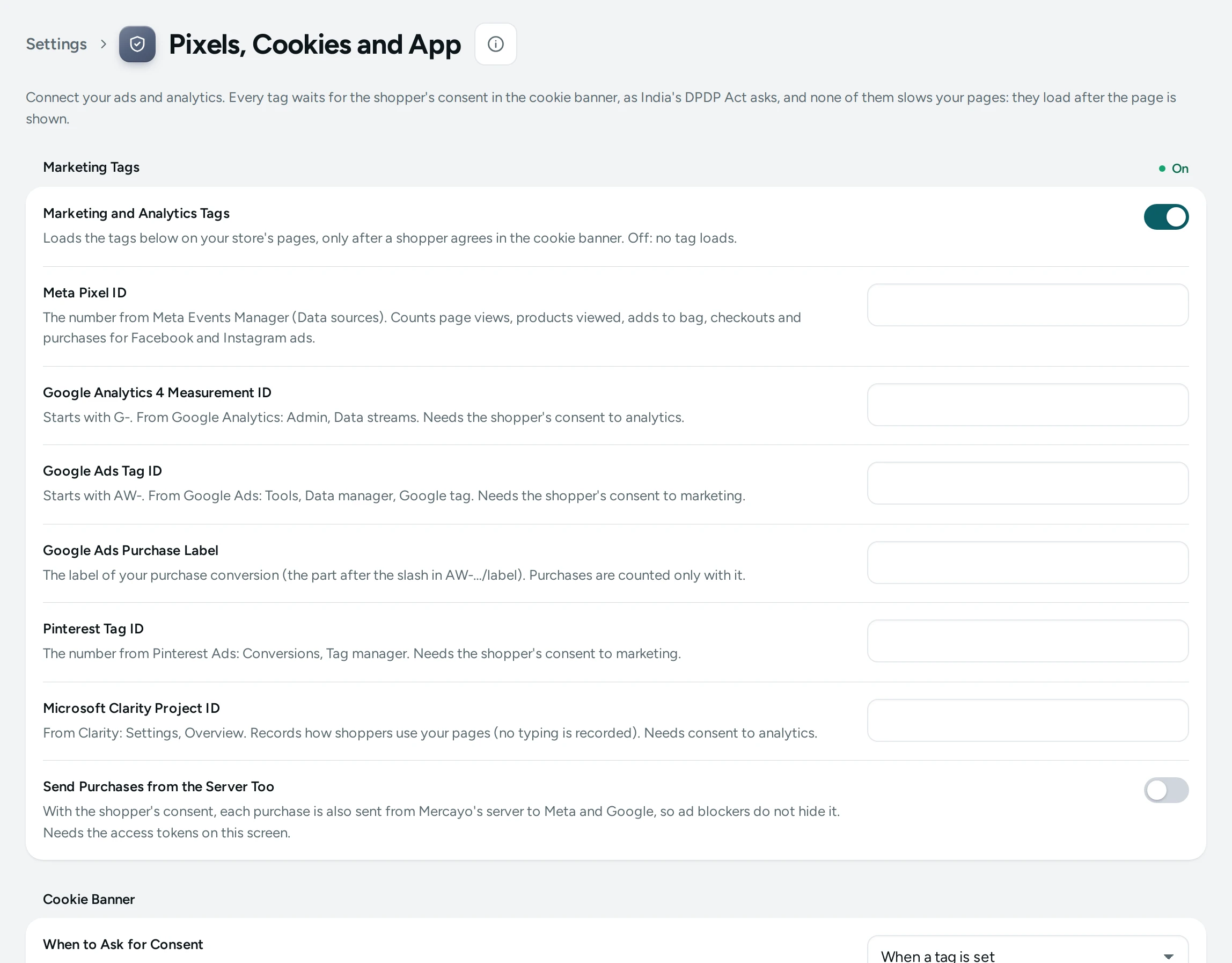
Marketing Tags
| Setting | What It Does | Default |
|---|---|---|
| Marketing and Analytics Tags | The main switch: loads your tags, only after a shopper agrees in the cookie banner. Off: no tag loads | On |
| Send Purchases from the Server Too | Each consented purchase is also sent from Mercayo's server to every tag with a server connection, so ad blockers do not hide it | Off |
Your Tags
Add every account you use, even several of one kind, such as your own Meta pixel and an agency's. ADD TAG opens the list of platforms; pick one, paste its ID (its shape is checked before it is saved) and give it a name only your team sees. Each row has its own switch: off, the tag stays in your list but does not load.
| Platform | ID | Consent Needed | Server Connection |
|---|---|---|---|
| Meta Pixel | Pixel ID, 10 to 20 digits (Events Manager) | Marketing | Conversions API |
| Google Analytics 4 | Measurement ID, starts with G- | Analytics | Measurement Protocol |
| Google Ads | Tag ID, starts with AW-, and its conversion labels | Marketing | |
| Google Tag Manager | Container ID, starts with GTM- | Marketing | |
| TikTok Pixel | Pixel code (Ads Manager, Events) | Marketing | Events API |
| Snapchat Pixel | Pixel ID (Events Manager) | Marketing | Conversions API |
| Pinterest Tag | Tag ID, 10 to 16 digits | Marketing | |
| Microsoft Clarity | Project ID (one per store) | Analytics | |
| Microsoft Advertising | UET tag ID, 5 to 12 digits | Marketing |
Every tag gets every page view, product viewed, add to bag, checkout started and purchase. For Google Ads, give the Conversion Labels of the events you count (the part after the slash in AW-…/label); an event is counted only with its label. Tag Manager gets the same events in its data layer, named as Google Analytics 4 names them. Tags from other platforms inside a Tag Manager container load only when that platform is also in your list.
REMOVE TAG takes a tag away; UNDO in the note that follows puts it back. Mercayo may limit how many tags a store has (the list shows "4 of 20").
Server Connections
Open a Meta, Google Analytics 4, TikTok or Snapchat tag to connect it from the server: paste its token and SAVE TOKEN. It is stored encrypted and never shown again, only "Set, ends in …", with REPLACE and REMOVE TOKEN. Each tag shows its last 30 days: sent, waiting and not sent.
| Token | Where to Find It |
|---|---|
| Conversions API Access Token | Meta Events Manager: your pixel, Settings, Conversions API, Generate access token |
| Measurement Protocol API Secret | Google Analytics: Admin, Data streams, your stream, Measurement Protocol API secrets, Create |
| Events API Access Token | TikTok Events Manager: your pixel, Settings, Events API, Generate access token |
| Conversions API Token | Snapchat Events Manager: your pixel, Conversions API, Generate token |
SEND TEST EVENT sends one test event: Meta and TikTok need the Test Event Code (so the test is not counted as a sale), Snapchat checks it without counting. Google offers no such check for Analytics 4. Purchases go from the server only with Send Purchases from the Server Too on, and only for shoppers who consented to the tag's kind; every platform gets the same order number as the browser tag, so a purchase counts once.
Cookie Banner
| Setting | What It Does | Default |
|---|---|---|
| When to Ask for Consent | When a tag is set: the banner shows only while a marketing or analytics tag is set. Always: on every store page until the shopper chooses | When a tag is set |
| Days a Choice Is Kept | After this many days the banner asks again (30 to 395) | 180 |
Shoppers choose analytics and marketing separately, and can change their choice any time from Cookie Choices at the foot of every page. Describe your tags in your privacy policy.
Home Screen App
| Setting | What It Does | Default |
|---|---|---|
| Add to Home Screen | Phones can add your store to the home screen with its own name, colours and icon, and shoppers who lose their connection see a friendly offline page | On |
| Suggest Adding to the Home Screen | After a shopper has seen a few pages, a small note offers to add the store. Never at checkout, in the bag or the account, and at most once a month | On |
The icon and colours come from your Theme editor's logo and favicon.
Mercayo Controls
Mercayo may lock any of these settings for your store; a locked one shows Mercayo's note and cannot be changed here.
Questions
Why does my Meta pixel show no events?
Open your store in a private window, accept marketing in the cookie banner, and browse. Tags never load before consent. Check the ID and that the tag's switch is on.
Can I add two Meta pixels?
Yes. Add each one with ADD TAG; both get every event, and each can have its own Conversions API token.
Do I need the server tokens?
No; they are optional. They recover purchases that ad blockers or browser privacy features hide from the browser tag.
Does the cookie banner show if I have no tags?
Not with When a tag is set (the default). Choose Always if you want it anyway.