India reads in many languages. With Languages and Currencies your store can be read in Hindi and other Indian languages, each at its own address, and shoppers abroad can see prices in their currency as a guide. "The languages shoppers can read your store in, and the currencies they can see prices in. Orders are always paid in rupees." Open Settings › Languages and Currencies. Anyone who can see settings can look; changes need the settings right.
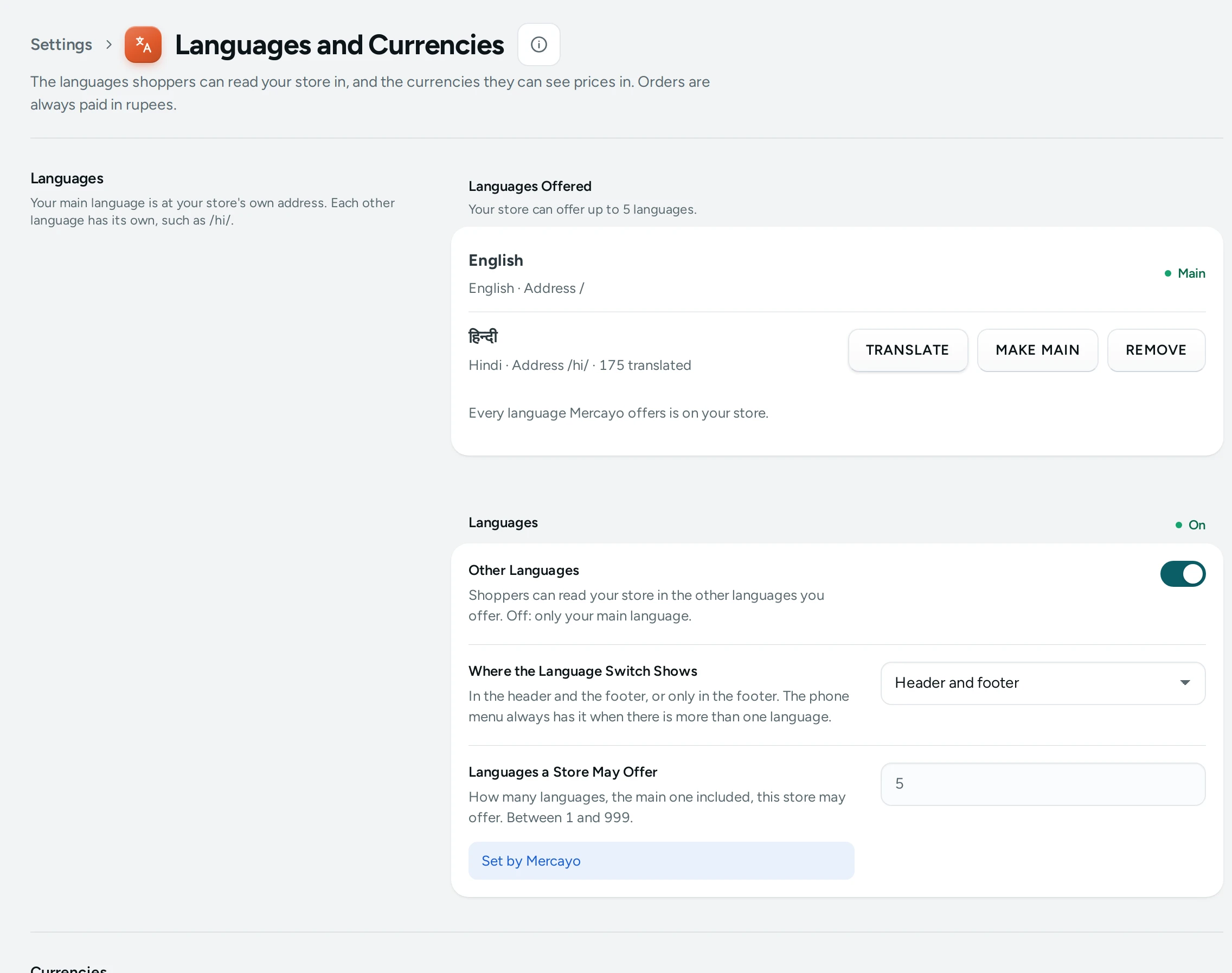
Languages
"Your main language is at your store's own address. Each other language has its own, such as /hi/."
- The Main language is at your plain addresses (
/products/aura-bloom-case). Every other language is under its code (/hi/products/aura-bloom-case), so each page has exactly one address per language and search engines can list both. - Add a Language lists the languages Mercayo has switched on, from India's 23 (Hindi, Bengali, Marathi, Telugu, Tamil, Gujarati, Kannada, Malayalam, Odia, Punjabi, Urdu, Assamese and more). Pick one and press ADD. "Every language Mercayo offers is on your store." when there are none left.
- Each language shows its Address and how much is translated, with Translate to fill in your content.
- MAKE MAIN makes another language the main one: "Your store's own address will show Hindi; every other language moves under its own address. Links people saved keep working."
- REMOVE: "Shoppers will no longer see your store in Hindi. Its translations are kept: add it again and they come back."
- "Your store can offer up to 5 languages." (the main one included; Mercayo sets the limit for your store).
Languages Offered (Settings)
| Setting | What It Does | Default |
|---|---|---|
| Other Languages | Shoppers can read your store in the other languages you offer. Off: only your main language | On |
| Where the Language Switch Shows | Header and footer, or Footer only. The phone menu always has it when there is more than one language | Header and footer |
When off: "Other languages are off. Turn on Other languages below to offer more than your main language."
What Gets Translated
Two different things:
- Buttons and Messages: your store's own words (ADD TO BAG, checkout labels, messages). "Mercayo translates them, and you can change any under Localization." Mercayo provides reviewed Hindi for the store's key words; any word not translated yet shows in English. Open Localization to change any word. See Localization.
- Translate Your Content: product names and descriptions, collections, categories, pages and menus. These are yours to translate: TRANSLATE opens Translate, which shows what is done and what is out of date.
Currencies
"Shoppers can pick one to see prices in it as a guide. Checkout and every order stay in rupees."
- Turn on Prices in Other Currencies (off by default).
- Under Currencies Shown, add and order the currencies (US dollar, euro, pound, dirham…). The default list is USD, EUR, GBP and AED.
- Choose Exchange Rates: Mercayo's daily rates ("Mercayo's rate, updated …") or My own rates. For your own, type Rupees for 1 of the currency (for example 83.40) and SAVE RATE; CLEAR goes back to Mercayo's.
Each currency is Shown or Not Shown. A currency with no rate is not shown ("No rate yet: shoppers do not see this currency until there is one."), and a rate older than Mercayo's limit (72 hours by default) is not used, so a shopper never sees an old price.
What Shoppers See
- A language switch in the header and footer (or footer only), and in the phone menu. Choosing Hindi opens the same page under
/hi/. - A currency picker beside it, when on. Prices show converted as a guide; the bag, checkout, invoice and payment stay in rupees.
Questions
Will my store be listed in Google in Hindi?
Each language has its own address, with the right language and alternate-language tags for search engines, so it can be.
Do I have to translate everything before adding a language?
No. Untranslated content shows in your main language until you translate it. Translate your best sellers and home page first.
Can shoppers pay in dollars?
No. Payments, orders and invoices are always in rupees; other currencies are a guide.