Courier Rates shows what your own courier account charges, read straight from it: a Rate Calculator for one parcel and a Rate Card of the cheapest and the fastest courier for every zone and weight. Use it to set fair delivery charges for shoppers, to see what a heavy COD parcel to the North East really costs, or to choose the couriers for a courier rule. Reading prices never books anything. Open it from Settings › Shipping and Delivery › Courier rates, or from Courier Rates on the Courier Rules page. People who can see settings or orders can open it.
What You See
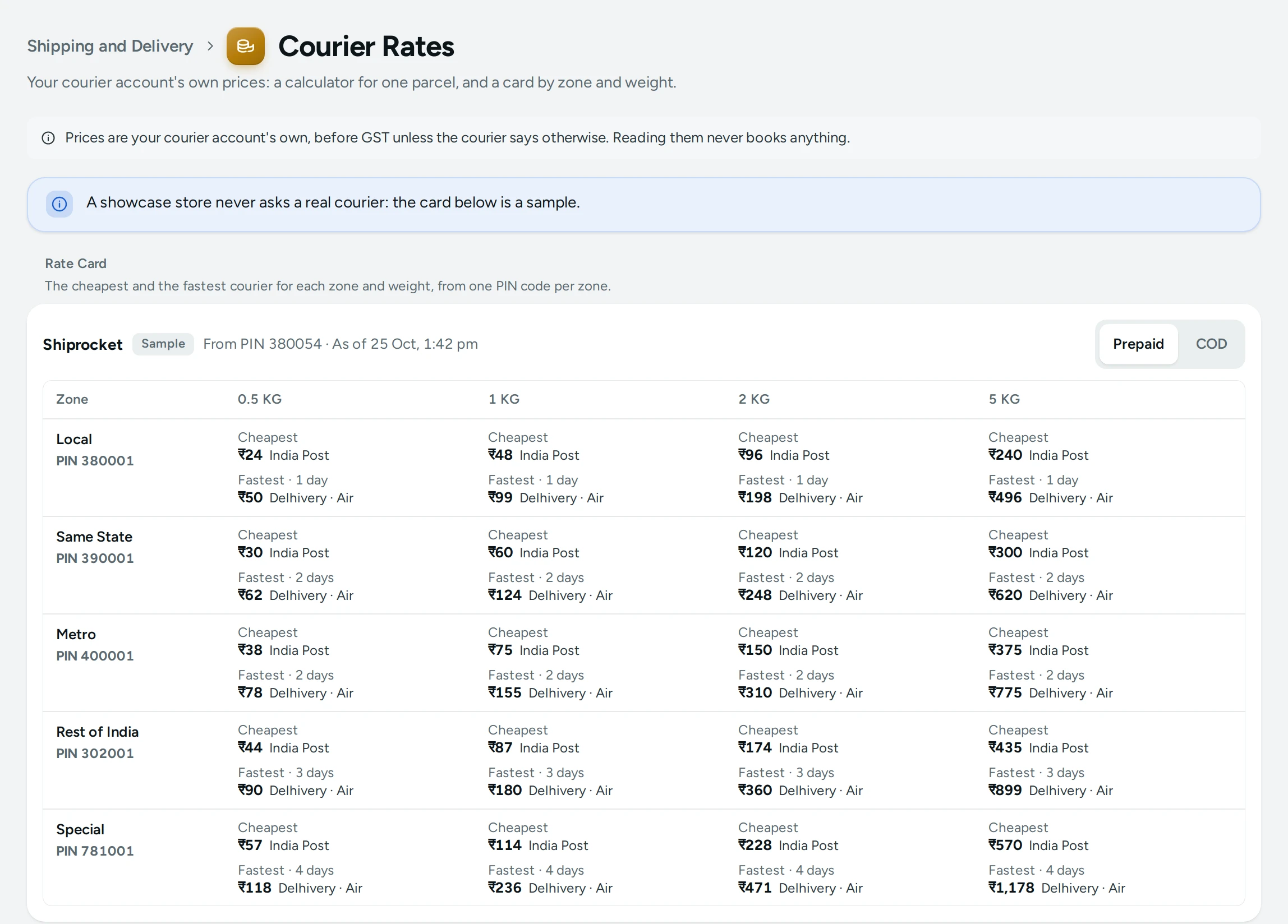
The title Courier Rates, with "Your courier account's own prices: a calculator for one parcel, and a card by zone and weight.", and the note: "Prices are your courier account's own, before GST unless the courier says otherwise. Reading them never books anything."
Without a connected courier account, the page says "Connect a courier account to see your own prices." with CONNECT AN ACCOUNT. A demo store never asks a real courier: its card is a sample, marked Sample.
Rate Calculator
- Type the Destination PIN and the Weight (kg); add a Box Size (cm, optional) as Length, Breadth and Height.
- Choose the Payment (cash on delivery or prepaid) and type the Order Value.
- Press GET PRICES.
The answer starts with where it goes from and to ("From Ahmedabad, PIN 380054", "To 781001 · Special"), then, for each connected account, every courier it offers for that parcel:
| Column | What It Shows |
|---|---|
| Courier | The courier and its service |
| Freight | The courier's charge to carry it |
| COD Charge | The charge for collecting cash, for a COD parcel |
| If Returned | What a return to you (RTO) would cost |
| Price | The total the account quotes |
| Delivery | The days it takes |
A figure the courier did not send shows Not given. Your Rules Pick marks the courier your Courier Rules would choose for that parcel, among the couriers of your default account (the one that makes your labels). When a rule says to wait for you, the answer says "Your rule “…” allows none of these: it waits for you."
Rate Card
"The cheapest and the fastest courier for each zone and weight, from one PIN code per zone." The card has a row per zone (Local, Same State, Metro, Rest of India, Special), each with the PIN code it was priced for, and a column per weight: 0.5 KG, 1 KG, 2 KG and 5 KG. Each cell shows the Cheapest courier with its price and the Fastest with its price and days, or Not served. Switch between Prepaid and COD at the top. The card says when it was made ("As of 25 Oct, 1:42 pm") and from which pickup PIN code.
Refresh the Card
Press REFRESH. Mercayo asks your account about 40 price questions ("About 40 price questions to your account, never a booking. Once every 15 minutes at most.") and the card is redrawn: "Rate card refreshed". Pressing again within 15 minutes says "The rate card was refreshed a moment ago. Try again in 15 minutes." If some answers do not come, the card shows what it has and says "Some prices did not load; REFRESH later for the rest." Nothing refreshes the card on its own.
Good to Know
- The zones are worked out from your pickup PIN code, the same way Courier Rules do: Local is your pickup's city, Same State the rest of your state, Metro the six metro cities, Special the North East, Jammu and Kashmir, Ladakh, Andaman and Nicobar and Lakshadweep.
- What a shopper pays for delivery is set in Shipping and Delivery, not here. Use these prices to decide it.
- What you are finally charged for a parcel is on your courier account's own invoice; compare it with your orders in Profit and Loss.
- A courier account that needs reconnecting shows "Reconnect this account to see its prices."
Questions
Does GET PRICES or REFRESH cost anything?
No. Both ask your courier account the same price questions it answers before any booking. Nothing is booked, cancelled or changed in your account.
Why does a cell say Not served?
None of your account's couriers serves that zone's PIN code at that weight and payment. Try another weight, or check that COD is offered there.
Are these prices with GST?
They are your courier account's own figures, before GST unless the courier says otherwise.
Why does the card show prices from one PIN code per zone?
Prices within a zone are usually the same, so one representative PIN code per zone keeps the card to about 40 questions. Use the calculator for an exact PIN code.