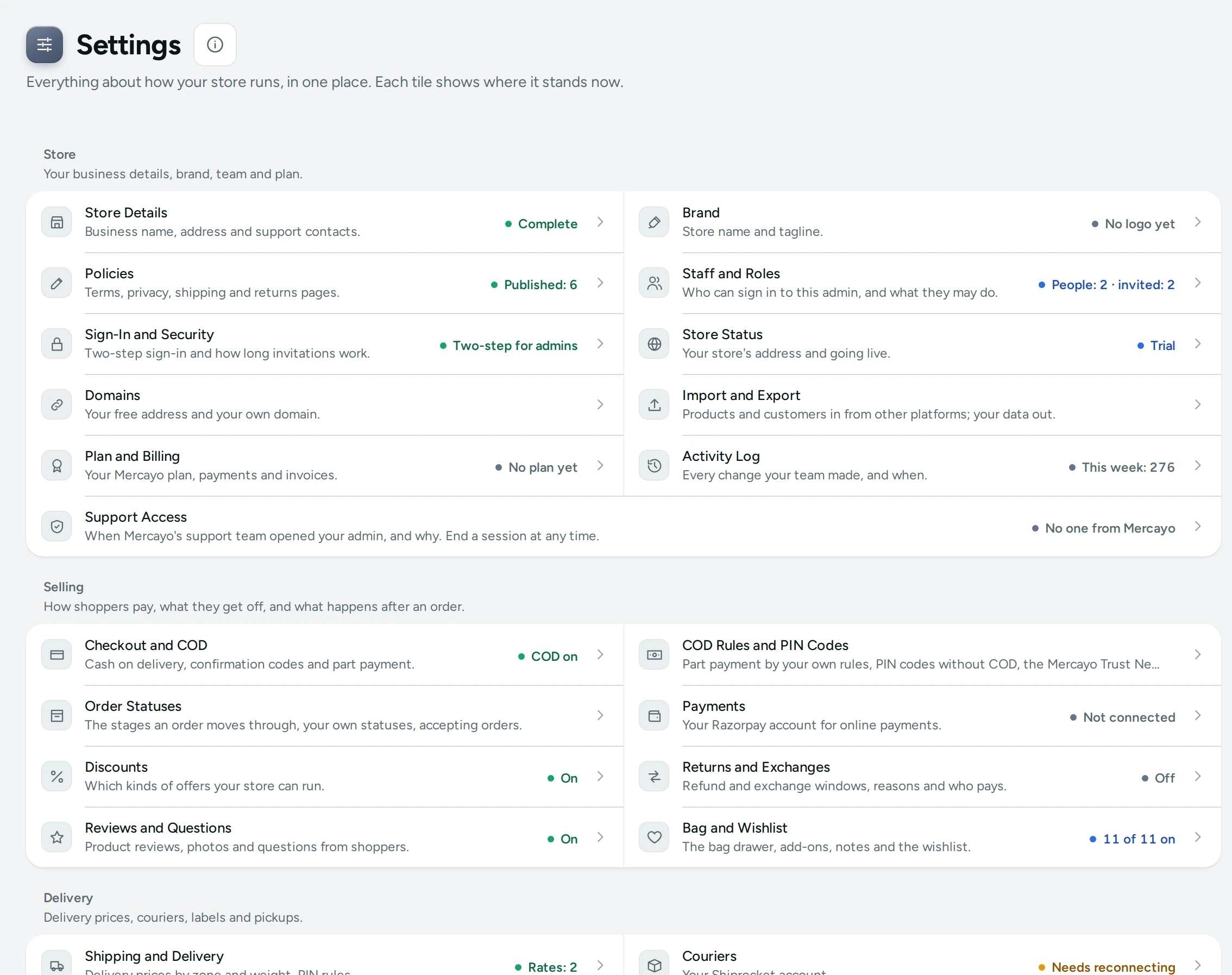
Settings is where you decide how your store works: how shoppers pay, what delivery costs, how GST is charged, who on your team can do what, and what your store sends to shoppers. Instead of one long page, the Settings home shows a set of tiles in seven groups, and each tile opens its own page. Every tile carries a small status, so you can see at a glance that cash on delivery is on with a ₹49 fee, or that you have no delivery prices yet. Settings is pinned at the bottom of the side menu; on a phone it is in the More sheet, under Store.
Who Can Open Settings
Settings appears in the menu for anyone whose role includes at least one of these rights: see settings, change payment settings, see the team, see the activity log, see the plan and invoices, or see notification credits. In practice that is the store's owner and its admins. The preset staff roles (Catalog Editor, Customer Support, Marketer, Order Manager) include none of these rights, so a person with only those roles does not see Settings at all. A custom role you make with one of these rights sees Settings, with only the tiles that right opens.
Each tile shows only to people who may open it. When someone opens Settings but no tile is theirs, the page says: "Your role does not include these settings. Ask the store owner if you need them."
The Groups and Their Tiles
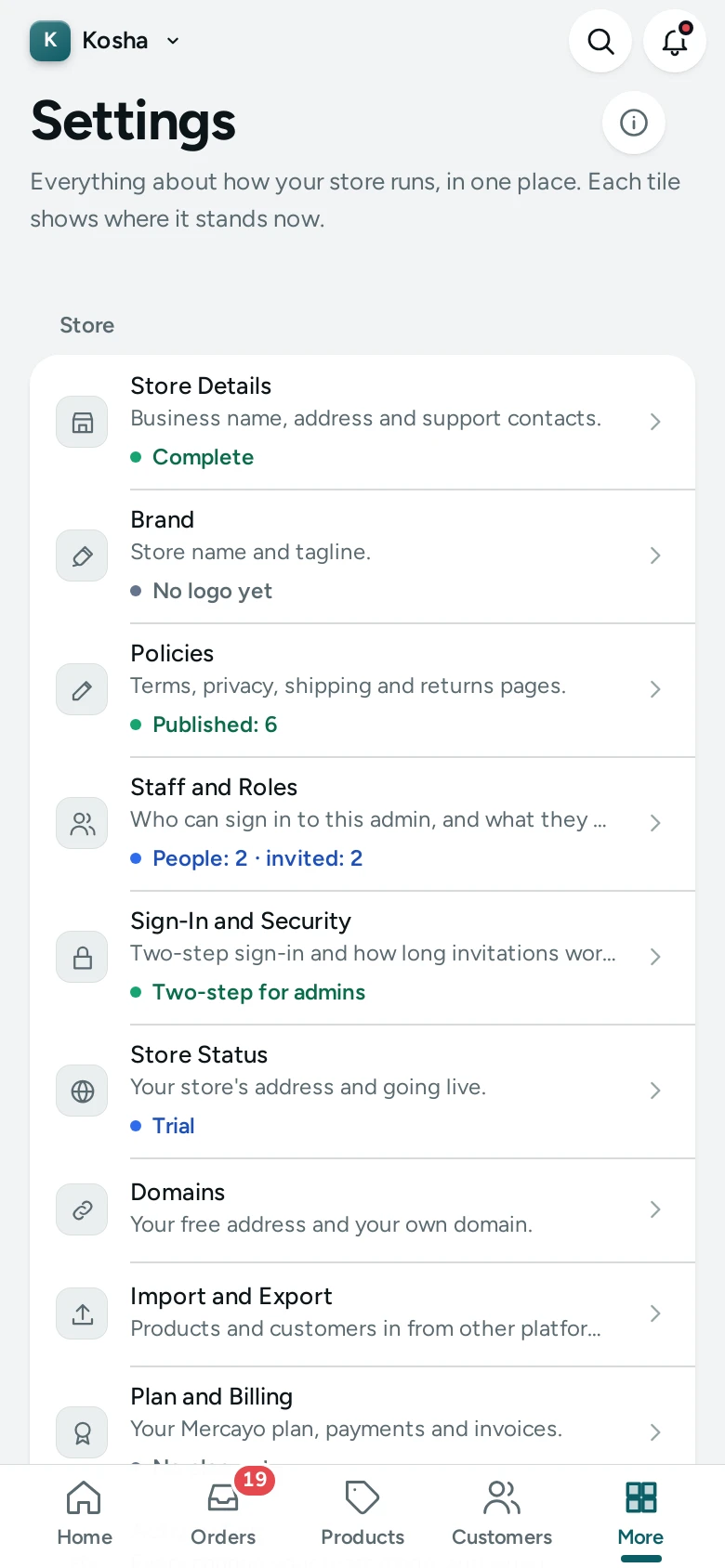
The page title reads Settings, with the line "Everything about how your store runs, in one place. Each tile shows where it stands now." Below it are the groups, each with a heading and one sentence.
Store
"Your business details, brand, team and plan."
| Tile | What It Opens | Status It Shows |
|---|---|---|
| Store Details | Business name, address and support contacts | Complete, or Details missing |
| Brand | Store name and tagline | Logo set, or No logo yet |
| Policies | Terms, privacy, shipping and returns pages | Published: 6, or None published |
| Staff and Roles | Who can sign in to this admin, and what they may do | People: 3, People: 3 · invited: 1, or 2 of 2 accounts |
| Sign-In and Security | Two-step sign-in and how long invitations work | Two-step for admins, Two-step for everyone, Two-step: owner only or Two-step optional |
| Store Status | Your store's address and going live | Not live yet, Trial or Live |
| Domains | Your free address and your own domain | (no status) |
| Import and Export | Products and customers in from other platforms; your data out | (no status) |
| Plan and Billing | Your Mercayo plan, payments and invoices | Plan: and your plan's name, or No plan yet |
| Activity Log | Every change your team made, and when | This week: 12, or No changes this week |
| Support Access | When Mercayo's team may look into your store | Mercayo is signed in, or No one from Mercayo |
Selling
"How shoppers pay, what they get off, and what happens after an order."
| Tile | What It Opens | Status It Shows |
|---|---|---|
| Checkout and COD | Cash on delivery, confirmation codes and part payment | COD on · ₹49 fee, COD on or COD off |
| Payments | Your Razorpay account for online payments | Live, Test mode or Not connected |
| Discounts | Which kinds of offers your store can run | On or Off |
| Returns and Exchanges | Refund and exchange windows, reasons and who pays | On or Off (exchanges) |
| Reviews and Questions | Product reviews, photos and questions from shoppers | On or Off |
| Bag and Wishlist | The bag drawer, add-ons, notes and the wishlist | How many of its switches are on, like 3 of 7 on |
Delivery
"Delivery prices, couriers, labels and pickups."
| Tile | What It Opens | Status It Shows |
|---|---|---|
| Shipping and Delivery | Delivery prices by zone and weight, PIN rules | Rates: 4, or No delivery prices |
| Couriers | Your Shiprocket or Shipway account | Connected: 1, Needs reconnecting or Not connected |
| Labels and Pickups | Courier choice, label size and parcel size | How many of its switches are on |
Tax
"GST, HSN rates and your invoices."
| Tile | What It Opens | Status It Shows |
|---|---|---|
| Taxes | Your GSTIN, home state and HSN rates | GST registered, or No GSTIN yet |
| Invoices | Invoice numbers and when invoices are made | How many of its switches are on |
Customers
"Shopper accounts, rewards, credit and gift cards."
| Tile | What It Opens | Status It Shows |
|---|---|---|
| Shopper Accounts | How shoppers sign in, and your customer segments | On or Off |
| Rewards and Credit | Store credit, gift cards, tiers and refer and earn | How many of its switches are on |
Messages
"The emails and messages your store sends, and what they cost."
| Tile | What It Opens | Status It Shows |
|---|---|---|
| Notifications | Every email and message, with previews and costs | Sent in 30 days: 240, or Nothing sent yet |
| Admin App and Alerts | Install the admin, alerts on your devices, the new-order sound | On or Off (push alerts for the team) |
| Bag Reminders | Reminders to shoppers who left items in their bag | On or Off |
| Notification Credits | The balance your messages are paid from | Balance ₹1,250.00 (shown in amber at zero) |
Content
"How your storefront looks and reads, search, and this admin."
| Tile | What It Opens | Status It Shows |
|---|---|---|
| Online Store | Product lists, search, motion and the page builder | How many of its switches are on |
| Product Page | What each product page shows and suggests | How many of its switches are on |
| Localization | Every word your store shows, in your own words | Texts changed: 14, or Standard words |
| Languages and Currencies | Your store in Hindi and more, and prices in other currencies | On or Off |
| Search | Synonyms, pinned products and redirects | Rules: 5, or Standard search |
| Filters | What shoppers narrow product lists by | Filters: 6 |
| Custom Fields | Your own facts for products, shown in their specifications | (no status) |
| Pixels, Cookies and App | Marketing tags, the cookie banner and the home screen app | (no status) |
| Admin and Reports | The home dashboard, the bell and visit counts | How many of its switches are on |
How a Settings Page Works
Tiles open one of two kinds of page.
- Screens of their own, such as Store Details, Payments, Shipping and Delivery, Taxes, Notifications and Staff and Roles, each with its own layout. Their articles are linked below.
- Section pages, such as Checkout and COD, Labels and Pickups, Invoices, Bag and Wishlist or Rewards and Credit. These hold your store's settings in rows: on the left of each row, the feature's name and one sentence about it (with an On or Off pill when the feature has a main switch); on the right, a card with its settings. Under each setting is its help text and, for numbers, its limits ("Between 1 and 30.").
On a section page there is one save for everything. As soon as you change anything, a bar appears with Unsaved changes, DISCARD and SAVE. Pressing SAVE saves all your changes together, or none of them. If you try to leave with unsaved changes, the admin asks Leave Without Saving? first.
When a setting has your own choice saved, a USE DEFAULT link appears beside it. Press it and then SAVE to go back to Mercayo's default.
Mercayo Controls
Mercayo can set or limit a setting for a particular store from its own console. A setting set by Mercayo shows a Locked tag and the note "Set by Mercayo for your store." (with the reason when one was given), and cannot be changed. A setting held to a range shows "Mercayo allows 1 to 15 for your store." and refuses values outside it. Locked and limited settings are also recorded in your Activity Log, by "Mercayo".
Good to Know
- Every settings screen is also in the command palette: press Ctrl K (or Cmd K on a Mac) and type its name, for example "taxes". See Search, the Bell and Shortcuts.
- If two people change the same settings page at once, the second save is refused with "Someone else saved these settings after you opened the page, so yours were not saved. Reload to see theirs." Nothing is overwritten silently.
- An old link to a card of the earlier one-page settings (an address ending in
#settings-…) opens the section page that holds that card now. - Changes to settings are recorded in the Activity Log with who made them and when.
Questions
Why can't I see Settings in my menu?
Your role has none of the rights Settings needs. The preset staff roles do not include settings; ask the store owner or an admin to give you a role with "See settings", or to make you an admin.
Why do some tiles show no status?
Domains, Import and Export, Custom Fields, and Pixels, Cookies and App show no status on the home; open them to see where they stand. Every other tile shows its status as soon as it can be read.
What does "3 of 7 on" mean on a tile?
For section pages without one main switch, the tile counts the switches on that page that are on. It is a quick sign of how much of the feature you use, not a warning.
I changed a setting but my store looks the same. Why?
Settings that change store pages refresh those pages when you save. If a page still looks old, reload it once in your browser. See Store Not Updating.
Can I undo a change?
There is no undo button, but changes are in the Activity Log with who made them and when (and, for most simple values, what they were before), so you can set them back. On a section page, USE DEFAULT returns a setting to Mercayo's default.