Courier Rules decide which courier each parcel goes with when you make labels through your courier account. Your Shiprocket or Shipway account first says which couriers serve the parcel's PIN code, weight and payment today, at today's prices; then your rules are checked from the top, and the first rule whose conditions all fit chooses among those couriers. A Default Rule, always last, takes every parcel no rule above it takes. Open it from Settings › Shipping and Delivery › Courier rules, or from Courier rules on the Courier Accounts page. Anyone who can see settings can read the rules and run a test; adding, changing, moving or deleting rules needs the right to change settings.
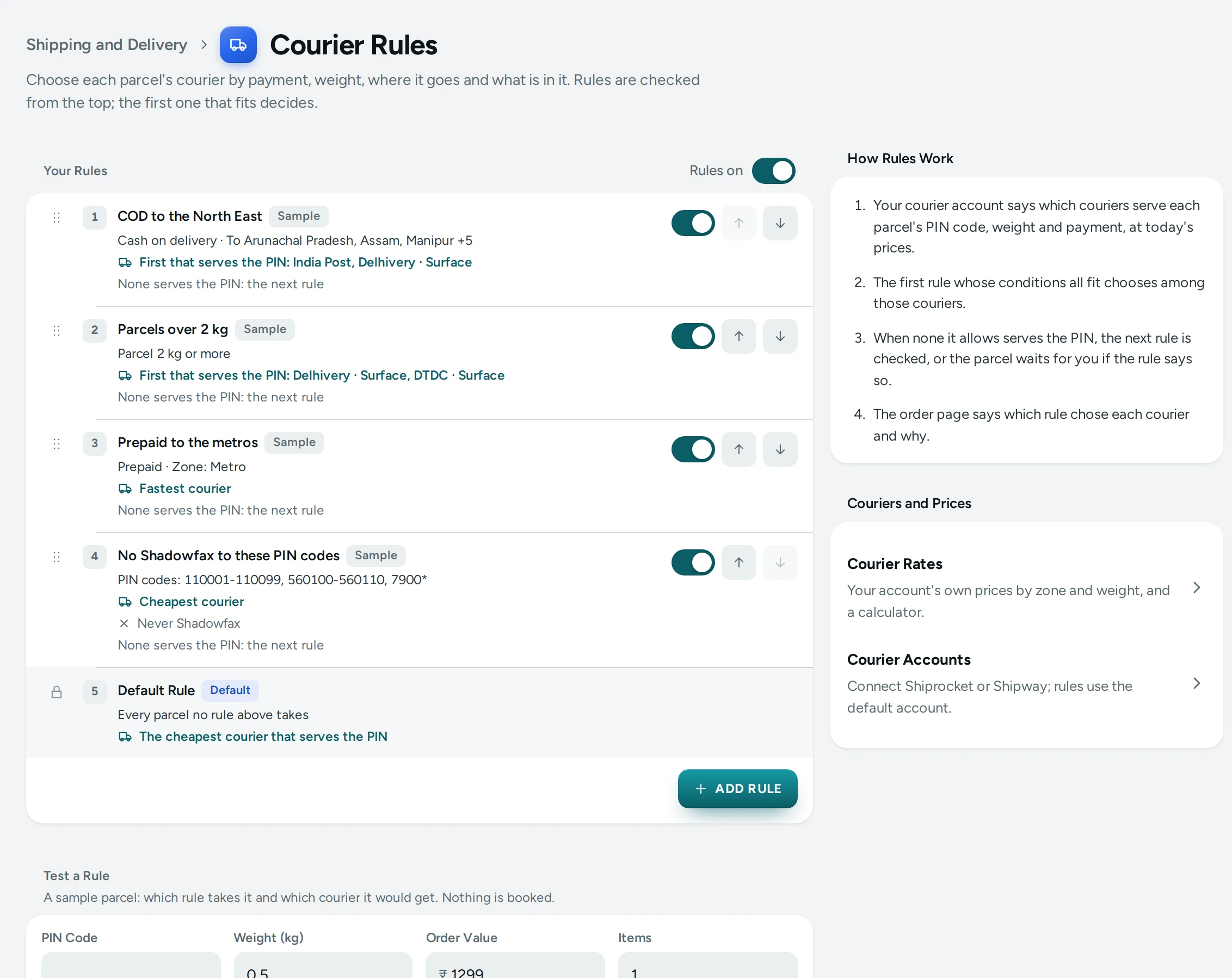
What You See
The title Courier Rules, with "Choose each parcel's courier by payment, weight, where it goes and what is in it. Rules are checked from the top; the first one that fits decides."
- Your Rules: the list, each rule with its number, name, its conditions in words ("Cash on delivery · To Arunachal Pradesh, Assam, Manipur +5"), what it chooses ("First that serves the PIN: India Post, Delhivery · Surface") and what happens when none serves the PIN. Each has an on/off switch and arrows to move it. Rules on, at the top, turns all your rules on or off at once.
- Default Rule, last, marked Default, with CHANGE.
- ADD RULE.
- Test a Rule, under the list.
- On the side, How Rules Work in four lines, and links to Courier Rates and Courier Accounts.
A demo store's sample rules carry a Sample tag.
Conditions
A rule fits a parcel when all of its conditions fit. A rule with no conditions takes every parcel that reaches it.
| Condition | What It Checks |
|---|---|
| Payment | Cash on delivery or Prepaid. A parcel with cash to collect counts as cash on delivery |
| Order value | The order's total, From and To (leave one side empty for no limit) |
| Parcel weight | The parcel's weight, From (kg) and To (kg) |
| Number of items | How many units are in the order |
| Zone | Local, Same State, Metro, Special or Rest of India, worked out from your pickup PIN code (below) |
| State | The states it goes to |
| City | Cities, separated by commas (the address's city, or the district in India Post's list) |
| PIN codes | Pasted many at once: 110001, a range like 110001-110099, or a start like 7900*. Up to 2,000 entries |
| Product category | Any product in the order is in the category (a product in a sub-category counts too) |
| Product tag | Any product in the order has the tag |
| Pickup address | The pickup address it leaves from, as named in your courier account |
Zones
| Zone | What It Means |
|---|---|
| Local | The pickup's own city (the same PIN code, or the same district in the same state) |
| Same State | The pickup's state, another city |
| Metro | Delhi, Mumbai, Kolkata, Chennai, Bengaluru, Hyderabad |
| Special | The North East, Jammu and Kashmir, Ladakh, Andaman and Nicobar, Lakshadweep |
| Rest of India | Everywhere else |
A parcel is in one zone only, checked in this order.
What a Rule Chooses
Under Then Choose, a rule does one of two things:
- Couriers in my order: a list, Couriers, First Choice on Top. The first courier on it that serves the PIN code gets the parcel (the cheapest of that courier's services when your account offers several, such as weight slabs).
- A way to choose: Cheapest (the lowest price today; ties go to the faster), Fastest (the fewest days; ties go to the cheaper) or Best performing (below), among Only These Couriers. With none chosen, every courier that serves the PIN code is in.
Either way, Never Use leaves couriers out even when they are the cheapest or the fastest.
If None of These Serves the PIN decides what happens when nothing the rule allows serves the parcel:
- Check the next rule (the start): the rules below it, then the default rule, try.
- Stop and let me choose: the label run leaves the parcel for you, with the reason; choose its courier on the phone app's ship sheet.
Courier Names
Couriers name their services differently in different accounts ("Delhivery Surface 5kg", "Delhivery Surface (0.5kg)"). Mercayo matches them by family: Delhivery matches Delhivery Surface and Delhivery Air but not an ONDC service; Delhivery · Surface matches only the surface service. The picker lists the couriers your connected accounts offer (kept for a day; REFRESH LIST reads them again), the couriers your own parcels used, and well-known ones. ONDC and quick (same-day) services show with Show all couriers, or when you type their name. You can also add a name by typing it.
Best Performing
Best performing ranks couriers by your own parcels from the last 90 days: the share delivered rather than returned to that state, once a courier has 20 finished parcels (delivered or returned) there; with fewer, its record for all of India; with fewer than that, it has no record and comes after the couriers that do. Ties go to fewer failed attempts, then the lower price.
The Default Rule
The Default Rule takes every parcel no rule above it takes, and every parcel while Rules on is off. Press CHANGE to choose:
| Choice | What It Picks |
|---|---|
| Cheapest | The cheapest courier that serves the PIN code (the start) |
| Fastest | The fastest courier that serves the PIN code |
| Best performing | The best performing courier that serves the PIN code |
| Preferred list | The first courier on your list that serves the PIN code; when none does, the cheapest |
A store that used Choosing the Courier and Preferred Couriers before has them here, unchanged.
How to Add a Rule
- Press ADD RULE.
- Type a Name, for example "COD to the North East".
- Under When All of These Fit, choose a condition in Add a condition, press ADD, and fill it in. Add as many as you need.
- Under Then Choose, pick Couriers in my order and add couriers to the list, or A way to choose and pick cheapest, fastest or best performing, with any Only These Couriers.
- Add couriers to Never Use if some must never take these parcels.
- Choose If None of These Serves the PIN.
- Press SAVE RULE. The toast says "Rule saved".
How to Order Your Rules
The first rule that fits decides, so put narrow rules (a few PIN codes, one category) above broad ones (all COD parcels). Drag a rule by its handle with a mouse or a finger, press its up and down arrows, or focus its handle and use the arrow keys. Each move is saved at once ("Order saved").
Test a Rule
"A sample parcel: which rule takes it and which courier it would get. Nothing is booked."
- Type a PIN Code, Weight (kg), Order Value and Items, and choose Cash on delivery or Prepaid. Optionally pick a Category and type a Tag.
- Press TEST.
- Read the answer: which rule takes it ("“Prepaid to the metros” takes it"), the place and zone, the courier with its price and days, the reason in words, and each rule's outcome: Fits, Not this: Payment (the condition that did not fit), Turned off, Fits, but none it allows serves the PIN, or Not reached.
- Couriers for This Parcel lists every courier that serves it, with its price, days and your Delivered share ("Too few parcels" without a record), and Chosen on the one picked.
With a courier account connected, the couriers and prices are your account's own answer for that parcel; without one, they are a sample list that says so.
The Reason on Each Order
Every parcel keeps why its courier was chosen. The order page's Parcel card says it in words, for example:
- "Courier chosen by rule: COD to the North East (number 1 on its list, the first that serves this PIN)"
- "Courier chosen by your default rule (the cheapest that serves this PIN, ₹54)"
- "Courier chosen by your default rule while rules are off (…)"
- "Courier chosen by your team on the ship sheet (your rules would have chosen India Post)"
When a Courier Refuses
If the courier your rules chose refuses the AWB, the label run asks your rules again without it: the next courier on the rule's list, or the next by its way of choosing, never one on Never Use. Up to three tries a parcel. Each refusal is written in the order's history as "Courier refused the parcel". A courier you picked yourself on the phone app's ship sheet is booked as picked, with no second try.
Mercayo Controls
Mercayo can turn your rules off (or keep them on) for your store, and set your default rule or preferred list, with a reason. When it does, the page says so: "Mercayo has turned courier rules off for this store: … Every parcel uses the default rule."
Good to Know
- Rules choose among the couriers of the courier account marked Default in Courier Accounts: that account makes the labels.
- A store keeps at most 30 rules.
- The rules are read when a label run starts, so a change applies to the next run.
- The phone app's ship sheet marks the courier your rules would pick as "Chosen by Your Rules".
- Testing a rule, the courier list and Courier Rates only read from your courier account: they never book, cancel or change anything there.
- Rule changes are recorded in the Activity Log.
Questions
What happens to a parcel no rule fits?
The Default Rule takes it. Only a rule you set to Stop and let me choose leaves a parcel without a courier.
Why did a rule not take a parcel I expected it to?
Run it through Test a Rule with the parcel's PIN code, weight, payment and value. Each rule's outcome says which condition did not fit, whether a rule above took it first, or whether none of the couriers it allows serves that PIN code.
Can a rule send COD parcels to one courier and prepaid to another?
Yes: make two rules, one with Payment set to Cash on delivery and one with Prepaid, each with its own couriers.
Do rules work with Shipway?
Yes. They choose among the couriers of your default account, whichever it is, and courier names are matched by family across both.
Will adding rules change how my parcels ship today?
Not until you add one. Your earlier courier choice is the default rule, unchanged.