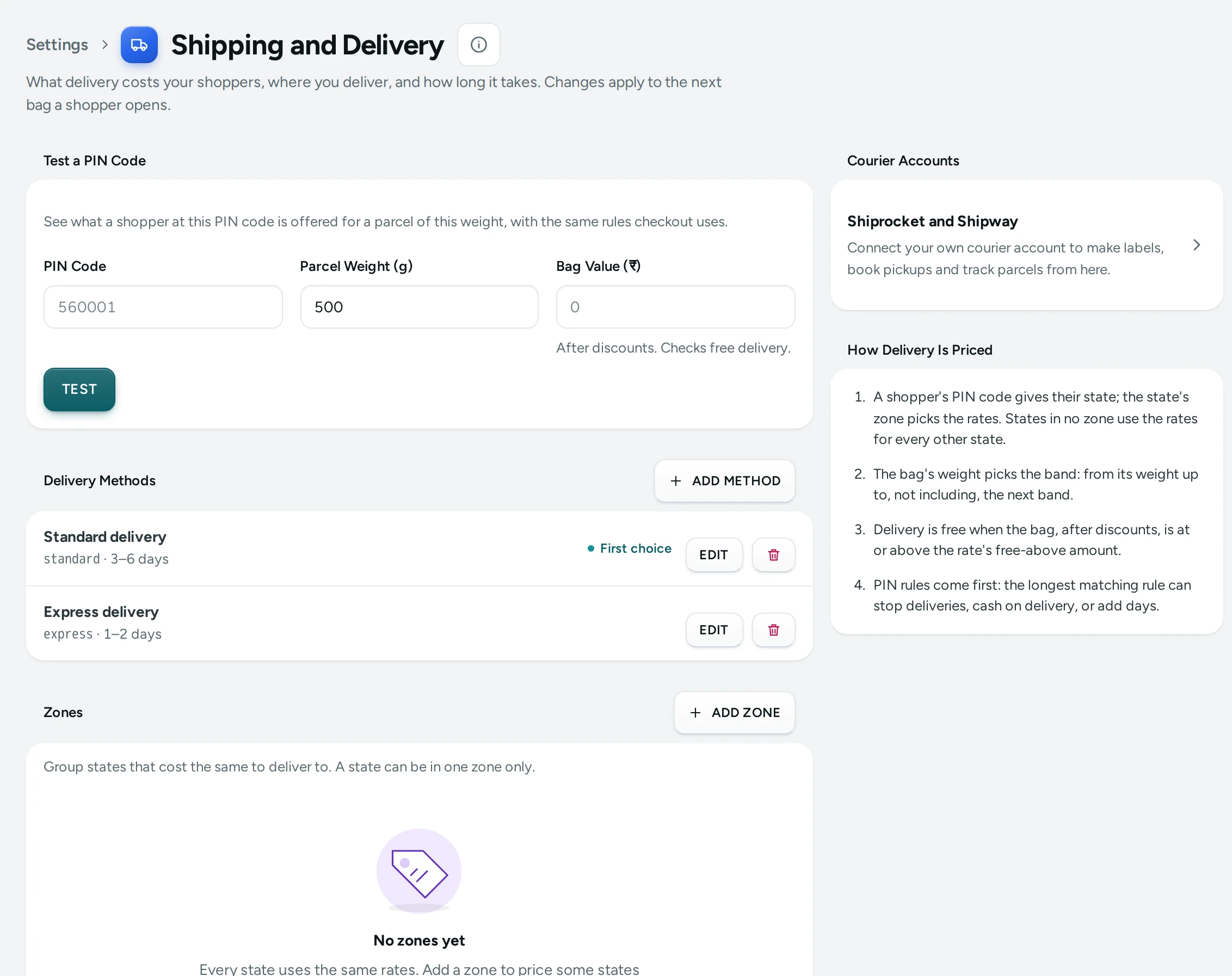
Shipping and Delivery is where you set what delivery costs your shoppers, where you deliver, and how long it takes. You make delivery methods (for example Standard and Express), group states into zones that cost the same, give each method a price by zone and parcel weight with an optional "free above" amount, and add PIN code rules that stop deliveries or cash on delivery for some areas. The Test a PIN Code card shows exactly what a shopper at any PIN code would be offered. Open it from Settings › Shipping and Delivery. Anyone who can see settings can open the page; changing it needs the right to change settings, which the store's owner and admins have.
What a New Store Starts With
Every new store gets one delivery method, Standard delivery (code standard), as the shoppers' first choice, with one rate: free, for any weight, to every state, with cash on delivery allowed. No zones, no PIN rules and no delivery days are set, so no delivery date is promised until you add days. Change this before you launch if you charge for delivery.
How Delivery Is Priced
The side card How Delivery Is Priced sums it up in four lines:
- A shopper's PIN code gives their state; the state's zone picks the rates. States in no zone use the rates for every other state.
- The bag's weight picks the band: from its weight up to, not including, the next band.
- Delivery is free when the bag, after discounts, is at or above the rate's free-above amount.
- PIN rules come first: the longest matching rule can stop deliveries, cash on delivery, or add days.
The PIN code must be in India Post's list (Mercayo's PIN directory); the state always comes from the PIN code, never from what the shopper types. A method is offered at a PIN code only where it has a rate for that zone and the bag's weight. Products without a weight count as 0 g.
Test a PIN Code
"See what a shopper at this PIN code is offered for a parcel of this weight, with the same rules checkout uses."
| Field | What It Does | Default |
|---|---|---|
| PIN Code | The 6-digit PIN code to test. | Empty |
| Parcel Weight (g) | The parcel's weight in whole grams, like 500. | Empty |
| Bag Value (₹) | After discounts. Checks free delivery. | Empty |
Press TEST. The answer shows the place, a Metro pill for metro PIN codes, the zone ("Zone: South India" or "In no zone"), the PIN rule that applies, and each method offered with its price, its days, COD or No COD, First choice on the default method, and "Free above ₹999" when free delivery applied. When nothing can be offered, it says why: the PIN code is not in India Post's list, a PIN rule stops deliveries there, or "No active delivery method has a rate for 500 g here, so shoppers cannot order. Add a rate below."
Delivery Methods
Each row shows the method's name, its code, its days (like "3–5 days"), and pills: First choice, Off when it is not offered, No COD when cash on delivery is not allowed with it. ADD METHOD makes a new one; EDIT and the bin button change or delete one.
| Field | What It Does | Default |
|---|---|---|
| Name Shoppers See | The name at checkout, for example "Standard delivery" or "Express". Up to 80 characters. | Empty |
| Code | Lowercase letters, digits, - and _. Used in reports; shoppers do not see it. Up to 40 characters, unique in your store. | Empty |
| Fastest (Days) and Slowest (Days) | The delivery time, in days from 0 to 60. Give both or neither; the slowest cannot be less than the fastest. Leave both empty to show no delivery estimate. | Empty |
| Metro Fastest (Days) and Metro Slowest (Days) | Faster days for metro PIN codes. Empty uses the days above. Set the usual days first. | Empty |
| Offer This Method | Turned off, shoppers do not see it. | On |
| Allow Cash on Delivery | With this method, when your COD setting allows it. | On |
| Shoppers' First Choice | Picked for them until they choose another. Only one method is the first choice, and it must be offered. | Off (on for Standard delivery) |
Deleting a method asks Delete This Method?: "Standard delivery and all its rates are deleted for good. Orders already placed keep their delivery charge."
Zones
"Group states that cost the same to deliver to. A state can be in one zone only." With no zones, every state uses the same rates.
| Field | What It Does | Default |
|---|---|---|
| Zone Name | For example "South India". Up to 80 characters, unique in your store. | Empty |
| States in This Zone | Tick the states. A state already in another zone shows "In North East" and cannot be in two zones. | None |
Each zone row shows how many states it has ("6 states"). Deleting a zone asks Delete This Zone?: its rates are deleted, and its states then use the rates for every other state.
Rates
"Each method's price by zone and parcel weight. A method is offered only where it has a rate for the parcel's weight."
Rates are grouped by method. Each rate reads as a sentence, for example "Standard delivery: ₹60.00 for 0–500 g in South India; free above ₹999.00". A method with no rates says "No rates: this method is not offered anywhere."
| Field | What It Does | Default |
|---|---|---|
| Method | The delivery method this price is for. | Empty |
| Where | A zone, or Every other state. | Empty |
| From (g) | The lightest parcel this price covers, in whole grams. | 0 |
| Up To (g) | Not including this weight. Empty: no limit. Must be more than From. | Empty (no limit) |
| Price (₹) | What the shopper pays for delivery. ₹0 for free. | Empty |
| Free Above (₹) | Optional. A bag at or above this ships free. Must be more than zero, or empty. | Empty |
As you type, Shoppers Get shows the sentence the rate makes. Bands of the same method and zone cannot overlap. Deleting a rate warns: "Without it, parcels of this weight may not be delivered there."
PIN Code Rules
"Stop deliveries, cash on delivery, or add days for PIN codes starting with some digits. The longest match wins." With no rules: "You deliver to every PIN code your rates cover."
| Field | What It Does | Default |
|---|---|---|
| PIN Codes Starting With | 1 to 6 digits, not starting with 0: 7930 covers 793001 to 793099; a full 6-digit code covers one PIN code. | Empty |
| Deliver Here | Turned off, shoppers here cannot order. | On |
| Allow Cash on Delivery | Turned off, shoppers at these PIN codes cannot choose cash on delivery. | On |
| Extra Days | Days added to the delivery estimate here, 0 to 30. | 0 |
| Note | For your team only, like the reason. Up to 200 characters. | Empty |
Each rule row shows what it does: Not delivered, No COD, "+2 days" or No change. The screen shows the first 200 rules. Deleting a rule puts those PIN codes back to your usual delivery and cash on delivery at once.
How to Charge for Delivery with Free Delivery Above an Amount
A jewellery brand in Mumbai wants ₹79 delivery anywhere, free on orders of ₹1,499 or more.
- Open Settings › Shipping and Delivery.
- In Rates, press EDIT on the Standard delivery rate for every other state (or ADD RATE).
- Set Price (₹) to
79and Free Above (₹) to1499. Leave From (g) at 0 and Up To (g) empty. - Check Shoppers Get: "Standard delivery: ₹79.00 for any weight in every other state; free above ₹1,499.00".
- Press SAVE.
- In Test a PIN Code, type a PIN code, a weight and
1600as the bag value, and press TEST: delivery should show as free.
A step-by-step guide is in Free Delivery Over an Amount.
How to Price Some States Differently
- In Zones, press ADD ZONE, name it (for example "North East"), tick the states and press SAVE.
- In Rates, press ADD RATE, choose the method, choose the zone under Where, and set the price.
- Make sure every method you offer has a rate for the zone, or it is not offered there.
How to Offer Express Delivery
- In Delivery Methods, press ADD METHOD.
- Name it "Express", code
express, days 1 to 2 (and metro days if faster in metros). - Leave Shoppers' First Choice off so Standard stays the default; turn Allow Cash on Delivery off if you want Express prepaid only.
- Press SAVE, then ADD RATE for Express with its price.
- With Choice of Delivery Speed on in Checkout and COD, shoppers choose between the two at checkout.
How to Stop Delivery or COD to Some PIN Codes
- In PIN Code Rules, press ADD RULE.
- Type the digits (for example
194for a group of PIN codes, or a full 6-digit code). - Turn off Deliver Here to stop orders, or turn off Allow Cash on Delivery to make them prepaid; or add Extra Days for slow areas.
- Add a Note for your team, then press SAVE.
- Test a PIN code under the rule to check it.
What Shoppers See
- On the product page, a shopper who types their PIN code sees whether you deliver there, the delivery price (or free above an amount), whether COD is available, and a delivery date range: your Days to Dispatch from Store Details, plus the method's days, plus any PIN rule's extra days. With no days set on the method, no date is promised.
- At checkout, the PIN code fills in the city and state; the shopper sees the delivery options for their PIN code with prices and dates, or "We don't deliver to this PIN code yet."
- Prices and rules are checked again when the order is placed.
Good to Know
- Changes apply to the next bag a shopper opens. Orders already placed keep their delivery charge.
- Delivery is charged GST at your GST on Delivery and Fees rate in Invoice Settings, when your store charges GST.
- Free above is checked on the bag after discounts, so a ₹1,050 bag with a 10% code (₹945) does not get free delivery above ₹999.
- Couriers and labels are set up separately in Courier Accounts and Labels and Pickups; the prices here are what shoppers pay, not what your courier charges you.
- Delivery is within India; zones are made of Indian states and union territories.
- Changes to zones and rates are recorded in the Activity Log.
Questions
Why does checkout say "We don't deliver to this PIN code yet"?
Either a PIN rule stops deliveries there, or no offered method has a rate for that state's zone and the bag's weight. Use Test a PIN Code to see which.
How do I charge by weight?
Add several rates for the same method and zone with weight bands, for example 0 to 500 g at ₹60, 500 to 1,000 g at ₹90, and 1,000 g with no limit at ₹120. Give your products weights in the product editor.
What if my products have no weights?
They count as 0 g, so the band starting at 0 g applies. For labels, couriers need a weight: set Package Weight (g) in Labels and Pickups.
Can I offer free delivery only in my own state?
Yes. Make a zone with your state, give its rate a price of ₹0 (or a free-above amount), and keep the paid rate for every other state.
Why is no delivery date shown on my product pages?
The delivery method has no days set. Edit the method and fill in Fastest (Days) and Slowest (Days).
Does a PIN rule override my COD setting?
A PIN rule can only take COD away for its PIN codes. COD must still be on in Checkout and COD and allowed by the delivery method.