"Which kinds of offers your store can run, and how they combine." Settings › Discounts holds store-wide switches for each kind of offer. You make the offers themselves in Discounts. Turning a kind off never deletes your offers: "Off: offers that use them stop applying; they stay saved."
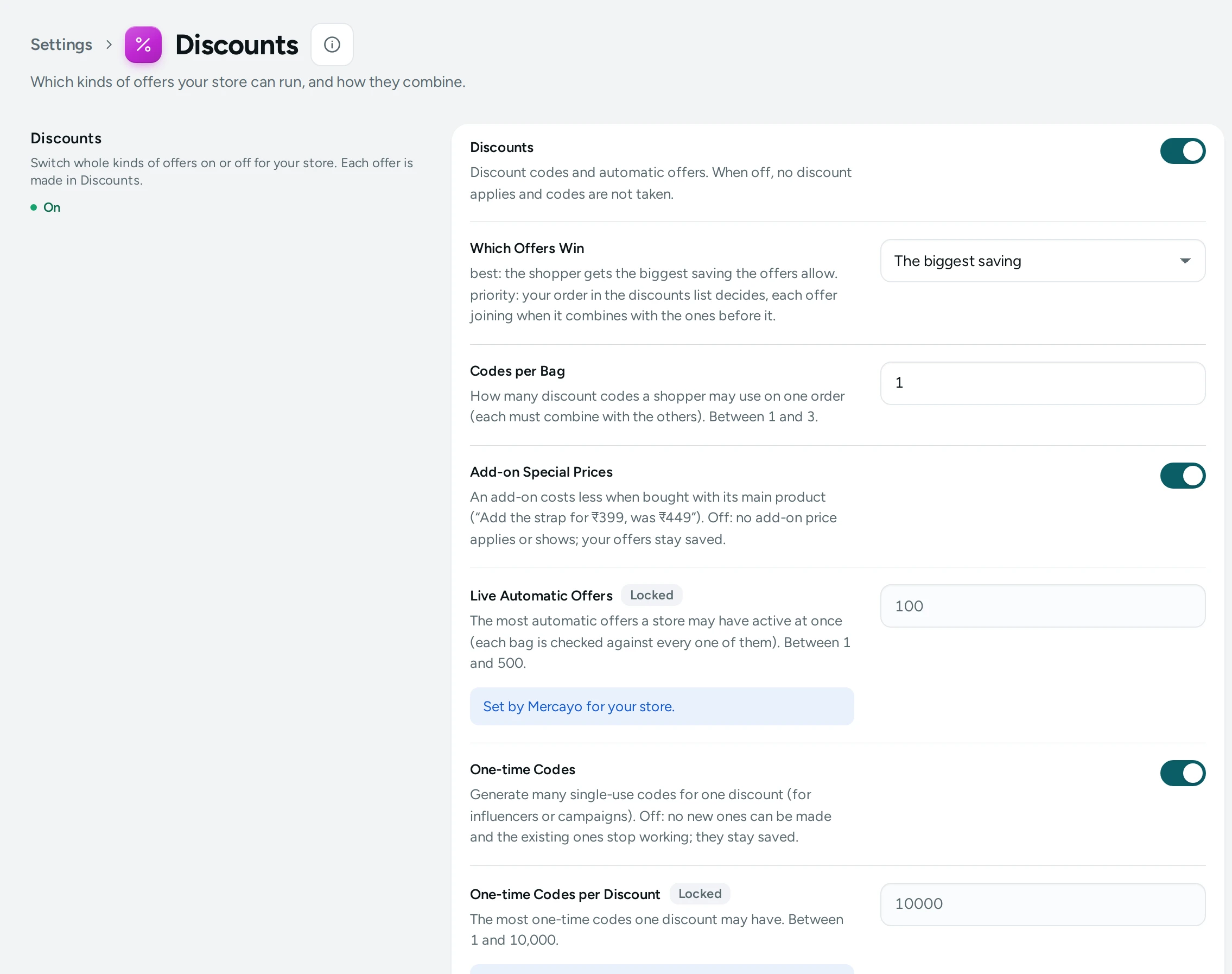
The Settings
Discounts
Switch whole kinds of offers on or off for your store. Each offer is made in Discounts.
| Setting | What It Does | Default |
|---|---|---|
| Discounts | Discount codes and automatic offers. When off, no discount applies and codes are not taken. | On |
| Which Offers Win | best: the shopper gets the biggest saving the offers allow. priority: your order in the discounts list decides, each offer joining when it combines with the ones before it. Choices: Best, Priority. | Best |
| Codes per Bag | How many discount codes a shopper may use on one order (each must combine with the others). (1 to 3) | 1 |
| Add-on Special Prices | An add-on costs less when bought with its main product (“Add the strap for ₹399, was ₹449”). Off: no add-on price applies or shows; your offers stay saved. | On |
| One-time Codes | Generate many single-use codes for one discount (for influencers or campaigns). Off: no new ones can be made and the existing ones stop working; they stay saved. | On |
| Buy X Get Y | Offers like “Buy 2, get 1 free”, “Buy 3, pay for 2” and “Buy a case, get a grip at 50% off”, applied in the bag. Off: they do not apply or show; your offers stay saved. | On |
| Buy X Get Y on the Invoice | all: the saving is shared by every item of the offer by value, so each keeps its GST (“two goods for the price of one”). get: the whole saving sits on the items given. Choices: All, Get. | All |
| Offer Labels on Product Cards | A short label on the cards of products in a live automatic offer for everyone (“Any 2 for ₹1,299”). Prices stay the product's own. Off: no labels. | On |
| Offer Label on the Product Page | The same label beside the price on the product page, with a countdown near the offer's end. Off: cards only. | On |
| Customer Conditions | Offers for a first order, signed-in shoppers, a reward tier or a list of phone numbers. Off: offers that use them stop applying; they stay saved. | On |
| Delivery Area Conditions | Offers only for deliveries to chosen states or PIN codes. Off: offers that use them stop applying; they stay saved. | On |
| Payment Conditions | Offers only for online payment (“Pay online and save ₹50”), or only for cash on delivery. Off: offers that use them stop applying; they stay saved. | On |
| Days and Hours | Offers only on chosen days of the week or hours of the day, in India time (weekend sales, happy hours). Off: offers that use them stop applying; they stay saved. | On |
| Offer Countdowns | A live countdown in an offer's last hours, only for offers with an end date. Off: the end date only. | On |
| Countdown Starts | How many hours before an offer ends its countdown appears. (1 to 168) | 48 |
| Delivery Discounts | An amount or a percentage off delivery, or a set delivery price, beside free delivery. Off: those offers do not apply; free delivery is not affected. | On |
| Exclusions and More Targets | Leave items out of an offer (“everything except…”, items already on sale) and aim offers at tags, brands or options. Off: offers that use them stop applying; they stay saved. | On |
| Fixed Prices | A sale price per item for chosen products (“all cases ₹499”), applied in the bag. Off: they do not apply; your offers stay saved. | On |
| “Add More” Lines in the Bag | A line in the bag and at checkout when a little more would unlock an automatic offer (“Add ₹300 more to get 10% off”). Off: none. | On |
| Percentage Bundles | Bundle sizes that give a percentage off (“3 or more: 15% off”). Off: they do not apply or show; bundles with a price are not affected. | On |
| Prices by Quantity | Bundles priced per item by range (“2–3 at ₹249 each, 4+ at ₹199 each”, or an amount off each). Off: they do not apply or show. | On |
| Spend Tiers | One offer with levels by spend (“₹200 off over ₹1,999, ₹500 off over ₹3,999”), with a “spend ₹X more” line in the bag. Off: they do not apply. | On |
| Combining Offers | Offers apply together when each one's "Combines with" ticks allow it (a sitewide sale on top of a bundle, free delivery on top of a code). Off: a bag gets the single best offer. | On |
| Tiered Pricing | Each range prices only its own items (items 1–4 at ₹200, 5–9 at ₹180). Off: tiered offers do not apply or show. | On |
The Two Most Important Choices
Which Offers Win
- Best (default): when several offers could apply, the shopper gets the biggest saving the offers allow. Shoppers never miss a better deal, and you never have to think about the order.
- Priority: your order in the discounts list decides; each offer joins when it combines with the ones before it. Use it when a particular offer must always come first. See Combining Discounts.
Combining Offers
On (default): offers apply together when each one's Combines with ticks allow it, for example a sitewide sale on top of a bundle, or free delivery on top of a code. Off: a bag gets the single best offer.
Offer Labels and Countdowns
- Offer Labels on Product Cards and Offer Label on the Product Page show a short label like "Any 2 for ₹1,299" for products in a live automatic offer for everyone. Prices stay the product's own; the bag applies the offer.
- Offer Countdowns show a live countdown in an offer's last hours (Countdown Starts 48 hours before the end by default), only for offers with an end date.
GST and Buy X Get Y
Buy X Get Y on the Invoice decides how a "free" item's saving sits on the GST invoice: All (default) shares it over every item of the offer by value, so each keeps its GST ("two goods for the price of one"); Get puts the whole saving on the items given. General guidance, not tax advice: ask your CA which suits you.
How This Page Works
Settings pages share one way of working (see Settings Home):
- Each card groups the settings of one feature, with a line saying what it is for. Its main switch turns the whole feature on or off.
- Change what you need; a save bar appears with SAVE. "Settings saved." Nothing changes on your store until you save.
- USE DEFAULT puts a setting you changed back to Mercayo's default.
- A setting Set by Mercayo for your store shows Locked (with Mercayo's reason when given) and cannot be changed here; "Mercayo allows … for your store." shows a range Mercayo has set.
- If a teammate saved the page after you opened it: "Someone else saved these settings after you opened the page, so yours were not saved. Reload to see theirs."
- Anyone who can see settings can look ("You can see these settings. Changing them needs the settings right."); saving needs the right to change settings.
Questions
Can I pause every discount at once?
Yes: turn off Discounts. No discount applies and codes are not taken, and every offer stays saved for when you turn it back on.
Why can a shopper only use one code?
Codes per Bag is 1 by default. Raise it (up to 3); each code must combine with the others.