Store Details is where you tell Mercayo who is selling: your legal name, the type of business, your registered address, how shoppers reach your customer care, who answers complaints, and how fast you dispatch and refund. Mercayo writes your six store policies from these details, the product page uses your dispatch days for delivery dates, and the fields marked Needed must be filled before you can launch your store. Open it from Settings › Store Details. Anyone who can see settings can open the page; changing it needs the right to change settings, which the store's owner and admins have.
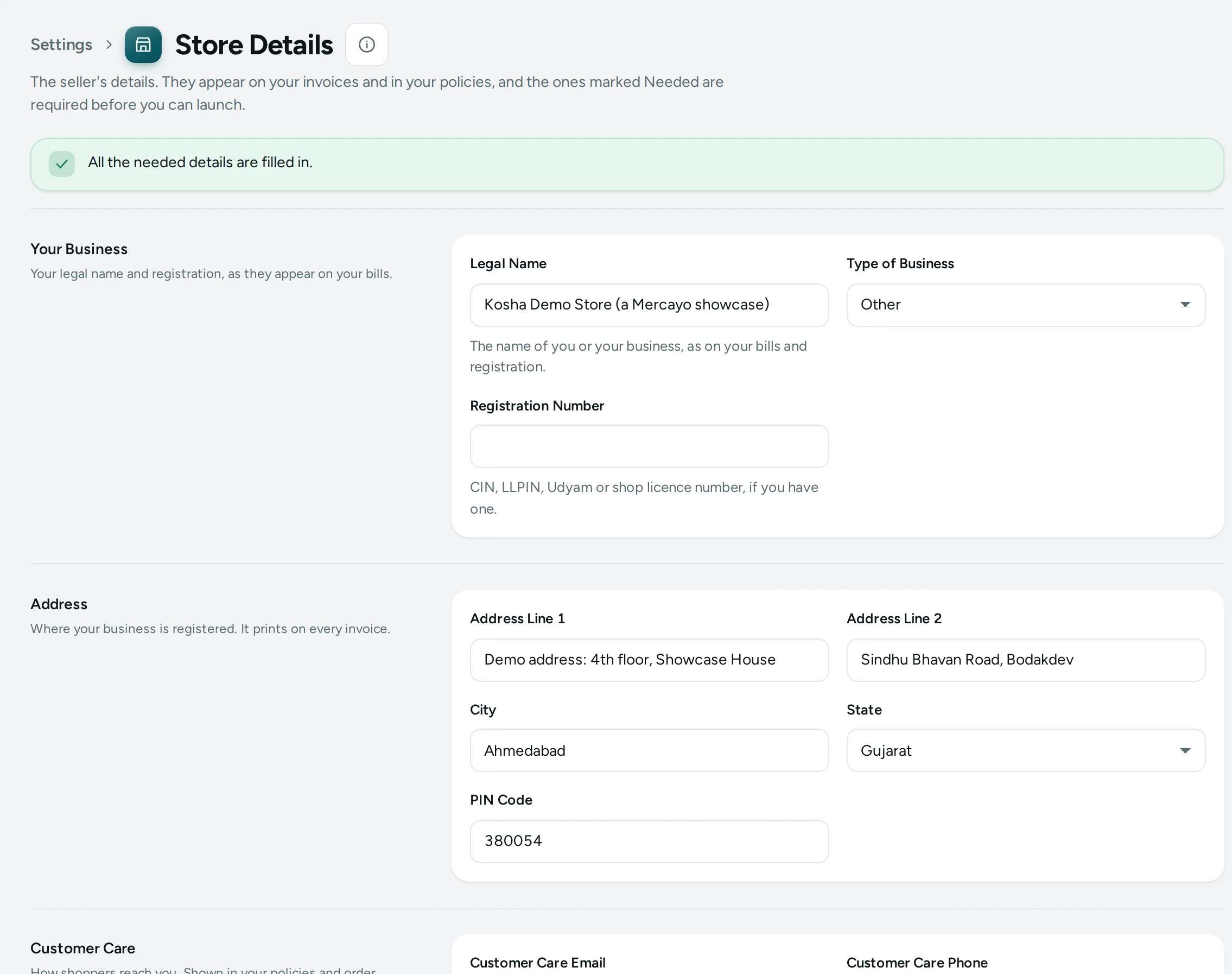
What You See
At the top, a banner tells you where you stand:
- Still needed before you can launch: followed by the list of missing details (for example "legal name, address, grievance officer"), or
- All the needed details are filled in. in green.
The form has six sections. Each section has its title and one line on the left, and its fields on the right. When a section still has needed fields, its title carries a pill such as 2 needed, and each of those fields shows a Needed tag next to its name.
If your role can see but not change settings, the page shows "You can see these details. Changing them needs the settings right." and every field is read-only.
Your Business
"Your legal name and registration, as they appear on your bills."
| Field | What It Does | Default |
|---|---|---|
| Legal Name (Needed) | The name of you or your business, as on your bills and registration. Used throughout your policies as the seller. 2 to 200 characters. | Empty |
| Type of Business (Needed) | Choose one: Sole proprietorship, Partnership, Limited liability partnership (LLP), Private limited company, Public limited company, One person company, Hindu undivided family, Individual (not a business), or Other. | Choose… (none) |
| Registration Number | CIN, LLPIN, Udyam or shop licence number, if you have one. Up to 60 characters. | Empty |
Address
"Where your business is registered. It prints on every invoice."
| Field | What It Does | Default |
|---|---|---|
| Address Line 1 (Needed) | The first line of your registered address. Up to 200 characters. | Empty |
| Address Line 2 | Optional second line. Up to 200 characters. | Empty |
| City (Needed) | Up to 80 characters. Also used as the city whose courts handle disputes when Courts Of is empty. | Empty |
| State (Needed) | Pick from the list of states and union territories. | Choose… (none) |
| PIN Code (Needed) | 6 digits, not starting with 0. | Empty |
All four of line 1, city, state and PIN code count as one needed item, "address".
Customer Care
"How shoppers reach you. Shown in your policies and order emails."
| Field | What It Does | Default |
|---|---|---|
| Customer Care Email (Needed) | Shoppers write to this address. It must look like name@example.com. | Empty |
| Customer Care Phone (Needed) | A landline or mobile number shoppers can call: 7 to 15 digits, for example +91 98765 43210. | Empty |
| Customer Care Hours (Needed) | For example: 10am to 6pm, Monday to Saturday. Up to 120 characters. | Empty |
Grievance Officer
"The person who answers complaints, as Indian e-commerce rules ask." It can be you.
| Field | What It Does | Default |
|---|---|---|
| Grievance Officer (Needed) | The person's name. Up to 120 characters. | Empty |
| Their Role (Needed) | For example: Owner. Up to 120 characters. | Empty |
| Their Email | Leave empty to use the customer care email. | Empty (uses the customer care email) |
| Their Phone | Leave empty to use the customer care phone. | Empty (uses the customer care phone) |
The grievance officer's email and phone are needed only when the customer care email or phone is missing too: with customer care filled in, leaving them empty is fine.
Delivery and Refunds
"How fast you ship and refund. Your policies quote these."
| Field | What It Does | Default |
|---|---|---|
| Days to Dispatch (Needed) | Working days from order to handing over to the courier, 1 to 30. The product page's delivery estimate adds these days to the delivery method's days. | Empty |
| Delivery Time (Needed) | Your promise in words, for example: 3 to 7 working days. Up to 80 characters. | Empty |
| Days to Refund | Working days to return money once a refund is approved, 1 to 60. | 7 |
| Cancel Until | Until when a shopper may cancel, in words. For example: before the order is shipped. Up to 120 characters. | Empty |
| Accept returns when a shopper changes their mind | Tick it if you take back items a shopper simply does not want. | Off |
| Return Window in Days | Shown once the box above is ticked: how long after delivery a shopper may return an item they changed their mind about, 1 to 90. | 7 when you tick the box |
| Items That Cannot Be Returned | For example: personalised items, innerwear. Up to 500 characters. | Empty |
Other Details
"Only if they apply to you: courts, branches, licences and age limits." None of these are needed.
| Field | What It Does | Default |
|---|---|---|
| Courts Of | The city whose courts handle disputes. Leave empty to use your own city. Up to 80 characters. | Empty |
| Other Branches | Addresses of other branches. Up to 1,000 characters. | Empty |
| Other Licences | For example: a food or drug licence number. Up to 300 characters. | Empty |
| FSSAI Number | For food sellers. Up to 30 characters. | Empty |
| Importer Details | If you sell imported goods: the importer's name and address. Up to 500 characters. | Empty |
| Age Limit | If your goods are for adults only. Up to 200 characters. | Empty |
How to Fill in Your Details
- Open Settings › Store Details.
- Read the banner at the top: it lists what is still needed.
- Fill in Your Business, Address, Customer Care, Grievance Officer and Delivery and Refunds. A section's needed pill disappears once its fields are filled.
- Add anything under Other Details that applies to you.
- Press SAVE DETAILS in the bar at the bottom. The page says Saved. and the banner updates.
- Open Store Policies and press REFRESH FROM MY DETAILS (or CREATE MY POLICIES the first time), so your policies carry the new details.
If a value is wrong, the field is marked in red with what to fix (for example "Enter a 6-digit PIN code that does not start with 0.") and the banner says "Some details need a look. They are marked below; nothing was saved yet." The first wrong field takes the focus.
What Shoppers See
Your details appear on your store through your policy pages (terms, privacy, shipping, returns, contact and grievance, cancellation), which quote your legal name, address, customer care, grievance officer, dispatch days, delivery time, refund days, return window and cancellation rule. The product page uses Days to Dispatch when it works out a delivery date for a PIN code, and shows a return window only when Accept returns when a shopper changes their mind is on.
Good to Know
- Launch is blocked while any needed detail is missing. The Launch screen and the setup guide both point back here.
- Your policies cannot be created or published while a needed detail is missing.
- Your GSTIN, GST state and the legal name on GST invoices are set in Taxes, not here.
- If someone else saved the page after you opened it, your save is refused: "Someone else changed these details since you opened the page, so your change was not saved. Reload to see theirs, then try again."
- Changes are recorded in the Activity Log as changes to the store's details.
Questions
Do I need a registered company to sell on Mercayo?
No. Choose Individual (not a business) or Sole proprietorship as the type of business and use your own name as the legal name. The registration number is optional.
Can the grievance officer be me?
Yes. You can name yourself, with "Owner" as the role. If you leave their email and phone empty, your customer care email and phone are used.
Why is my address still shown as needed?
The address counts as filled only when Address Line 1, City, State and PIN Code are all there. Check that the state is chosen and the PIN code has 6 digits.
I changed my customer care phone. Do my policies update?
Policies you have not edited yourself are updated when you press REFRESH FROM MY DETAILS on Store Policies. Ones you edited are kept as they are, so change the number in those by hand.
What is "Days to Dispatch" used for?
It is your promise of how many working days you need to hand an order to the courier. Policies quote it, and the product page adds it to the delivery method's days to estimate a delivery date for the shopper's PIN code.
Is this legal advice?
No. These fields follow what Indian e-commerce rules commonly ask a seller to show, but this is general guidance, not legal or tax advice. Ask your CA or lawyer about your business.