Courier Accounts is where you connect your own courier aggregator account to Mercayo. Once Shiprocket or Shipway is connected and the courier integration is switched on, you select orders in the admin and press GENERATE LABELS: each parcel gets a courier by your rule and an AWB, the labels are ready to print, and tracking updates come back on their own, with failed deliveries waiting for you under Shipments. Your courier rates stay your own and the money for COD parcels goes to your courier account as before. With both connected, MAKE DEFAULT chooses the one labels use. Open it from Settings › Couriers, or from Shiprocket and Shipway on the Shipping and Delivery page. Seeing it needs the right to see orders; connecting or disconnecting needs the right to change settings.
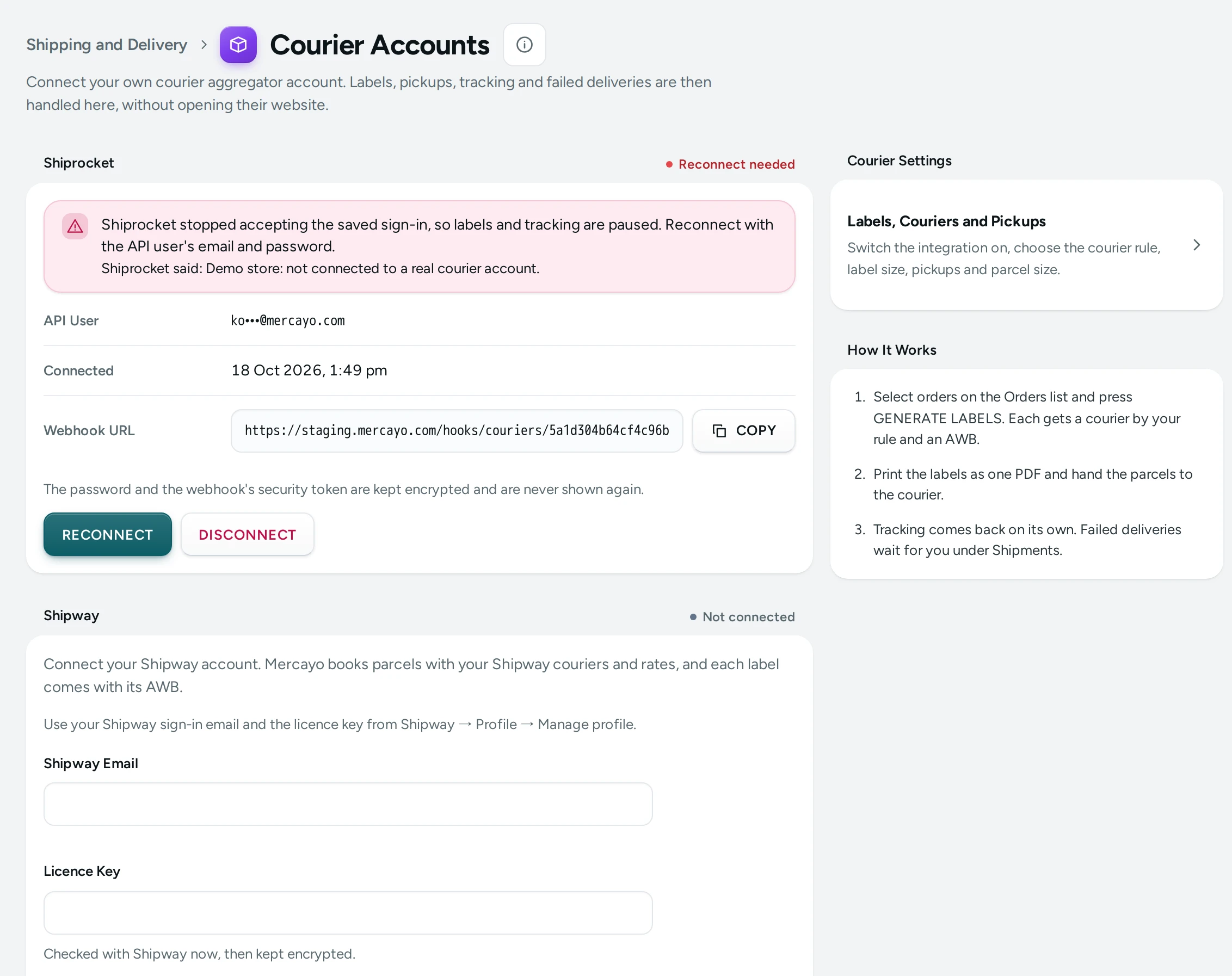
What You See
The page title reads Courier Accounts, with "Connect your own courier aggregator account. Labels, pickups, tracking and failed deliveries are then handled here, without opening their website." A Shipping and Delivery link at the top goes back.
Shiprocket
The card's corner shows Not connected, Connected or, in red, Reconnect needed.
Before you connect: "Connect your Shiprocket account. Mercayo makes labels with your rates and couriers, and the money for COD parcels goes to your Shiprocket account as before." Below it is the connect form.
Once connected, the card lists:
| Fact | What It Shows |
|---|---|
| API User | The API user's email, masked. |
| Connected | When the account was connected. |
| Sign-in Renews By | When Mercayo's sign-in to Shiprocket is next renewed, when known. |
| Webhook URL | The address Shiprocket sends tracking updates to, with COPY. |
Under the facts: "The password and the webhook's security token are kept encrypted and are never shown again." Then RECONNECT and DISCONNECT.
When Shiprocket stops accepting the saved sign-in (for example after the API user's password was changed), the card shows in red: "Shiprocket stopped accepting the saved sign-in, so labels and tracking are paused. Reconnect with the API user's email and password.", with what Shiprocket said, and RECONNECT becomes the main button.
Shipway
The Shipway card works like Shiprocket's, with Not connected, Connected or Reconnect needed in its corner. Before you connect: "Connect your Shipway account. Mercayo books parcels with your Shipway couriers and rates, and each label comes with its AWB." Below it is its connect form, with Shipway Email and Licence Key.
Once connected, it has RECONNECT and DISCONNECT, as Shiprocket's card does. If Shipway stops accepting the saved sign-in, the card says so in red: "Shipway stopped accepting the saved sign-in, so labels and tracking are paused. Reconnect with your email and licence key."
The account marked Default is the one label runs use; MAKE DEFAULT on the other card switches it.
Courier Settings and How It Works
On the side, Courier Settings links to Labels, Couriers and Pickups: "Switch the integration on, choose the courier rule, label size, pickups and parcel size." That is the Labels and Pickups page. How It Works has three steps:
- Select orders on the Orders list and press GENERATE LABELS. Each gets a courier by your rule and an AWB.
- Print the labels as one PDF and hand the parcels to the courier.
- Tracking comes back on its own. Failed deliveries wait for you under Shipments.
The Connect Form
"In Shiprocket, open Settings → API → Configure and create an API user. Use that user's email and password here, not your own sign-in."
| Field | What It Does | Default |
|---|---|---|
| API User's Email | The email of the API user you made in Shiprocket. | Empty |
| API User's Password | Its password. "Checked with Shiprocket now, then kept encrypted." | Empty |
The button reads CONNECT SHIPROCKET.
How to Connect Shiprocket
- In Shiprocket, open Settings → API → Configure and create an API user. Note its email and password.
- In Mercayo, open Settings › Couriers.
- Type the API User's Email and API User's Password, and press CONNECT SHIPROCKET. Mercayo signs in to Shiprocket with them straight away; if Shiprocket refuses, nothing is saved and you see why.
- A Finish in Shiprocket card appears: "Shiprocket is connected. One step is left: tell Shiprocket where to send tracking updates."
- In Shiprocket, open Settings → API → Webhooks.
- Copy the Webhook URL with COPY and paste it into Shiprocket.
- Copy the Security Token with COPY and paste it into the security token field. Shiprocket sends it with every update.
- Switch the webhook on and save.
- Press DONE, I HAVE ADDED IT.
- Open Labels, Couriers and Pickups (the side card) and switch on Courier Integration. Choose your courier rule and parcel size, then SAVE.
How to Connect Shipway
- In Shipway, open Profile → Manage profile and copy your licence key.
- In Mercayo, open Settings › Couriers and find the Shipway card.
- Type your Shipway Email (the email you sign in to Shipway with) and the Licence Key, and press CONNECT SHIPWAY. Mercayo checks them with Shipway straight away; if Shipway refuses, nothing is saved and you see why.
- A Finish in Shipway card appears: "Shipway is connected. One step is left: tell Shipway where to send tracking updates."
- In Shipway, open Settings → Webhooks (status updates).
- Paste the Webhook URL with COPY.
- Add a header named
x-api-keywith the token shown on the card. - Save the webhook.
- Open Labels, Couriers and Pickups and switch on Courier Integration, as for Shiprocket.
From then on, labels, pickup manifests, cancelled bookings and tracking work through Shipway as they do through Shiprocket. Each Shipway parcel has its own label PDF, with its AWB. A failed delivery on a Shipway parcel is answered in Shipway's own NDR screen; Mercayo shows the case and keeps it open for your team.
How to Reconnect
When the card says Reconnect needed, or you changed the API user's password:
- Press RECONNECT.
- Type the API user's email and its current password.
- Press CONNECT SHIPROCKET. "Reconnecting keeps your webhook address and token, so nothing changes in Shiprocket." The page says "Shiprocket reconnected. Your webhook in Shiprocket keeps working: its address and token are unchanged."
To keep the sign-in you have, press KEEP THIS SIGN-IN.
How to Disconnect
- Press DISCONNECT.
- Read Disconnect Shiprocket?: "Labels can no longer be made here and tracking updates stop. This is refused while any parcel is still on the way. Remove Mercayo's webhook in Shiprocket too."
- Press DISCONNECT to confirm.
- Remove the webhook in Shiprocket.
What Shoppers See
Nothing on this page shows on your store directly. Once parcels are shipped through Shiprocket or Shipway, shoppers see the courier's tracking events on their order page and get the shipped and delivered messages you have switched on in Notifications.
Good to Know
- Use a separate API user, never your own Shiprocket sign-in. You can change or remove the API user in Shiprocket without touching your own account.
- If Shiprocket cannot be reached, connecting says "Shiprocket could not be reached just now. Nothing was saved; try again in a minute."
- Labels need Courier Integration switched on in Labels and Pickups; without it, the label run says the integration is off.
- When a sign-in is refused in the middle of a label run, the run stops and the account is marked Reconnect needed, so no parcel is half-booked.
- Connecting and disconnecting are recorded in the Activity Log; the password and token never are.
Questions
Do I need Shiprocket to use Mercayo?
No. You can ship with any courier yourself and mark orders shipped by hand. Shiprocket or Shipway lets you make labels and track parcels from the admin.
Which couriers can I use?
Whichever couriers your Shiprocket or Shipway account offers. Mercayo books each parcel with a courier that serves its PIN code, picked by your rule in Labels and Pickups.
Who receives the COD cash?
Your courier aggregator collects it and remits it to you, as it does without Mercayo. Record each remittance with RECORD REMITTANCE in Analytics › Finance to see what is still owed.
Why are labels and tracking paused?
Your courier account stopped accepting the saved sign-in. Press RECONNECT and enter the current details: for Shiprocket the API user's password, for Shipway the email and licence key. See Courier Sync Problems.
Can I connect Shipway?
Yes. On the Shipway card, type your Shipway email and licence key and press CONNECT SHIPWAY, then add Mercayo's webhook in Shipway. The steps are under How to Connect Shipway, above.
Can I connect both?
Yes. Both cards can be connected at once; the one marked Default makes the labels.