"The bag drawer's style and aids, add-ons, and the shopper's wishlist." Settings › Bag and Wishlist switches on the helpers that turn a bag into a bigger, happier order. The bag drawer's look (Compact, Gallery and the others) is chosen in the Theme editor's Bag & Checkout section.
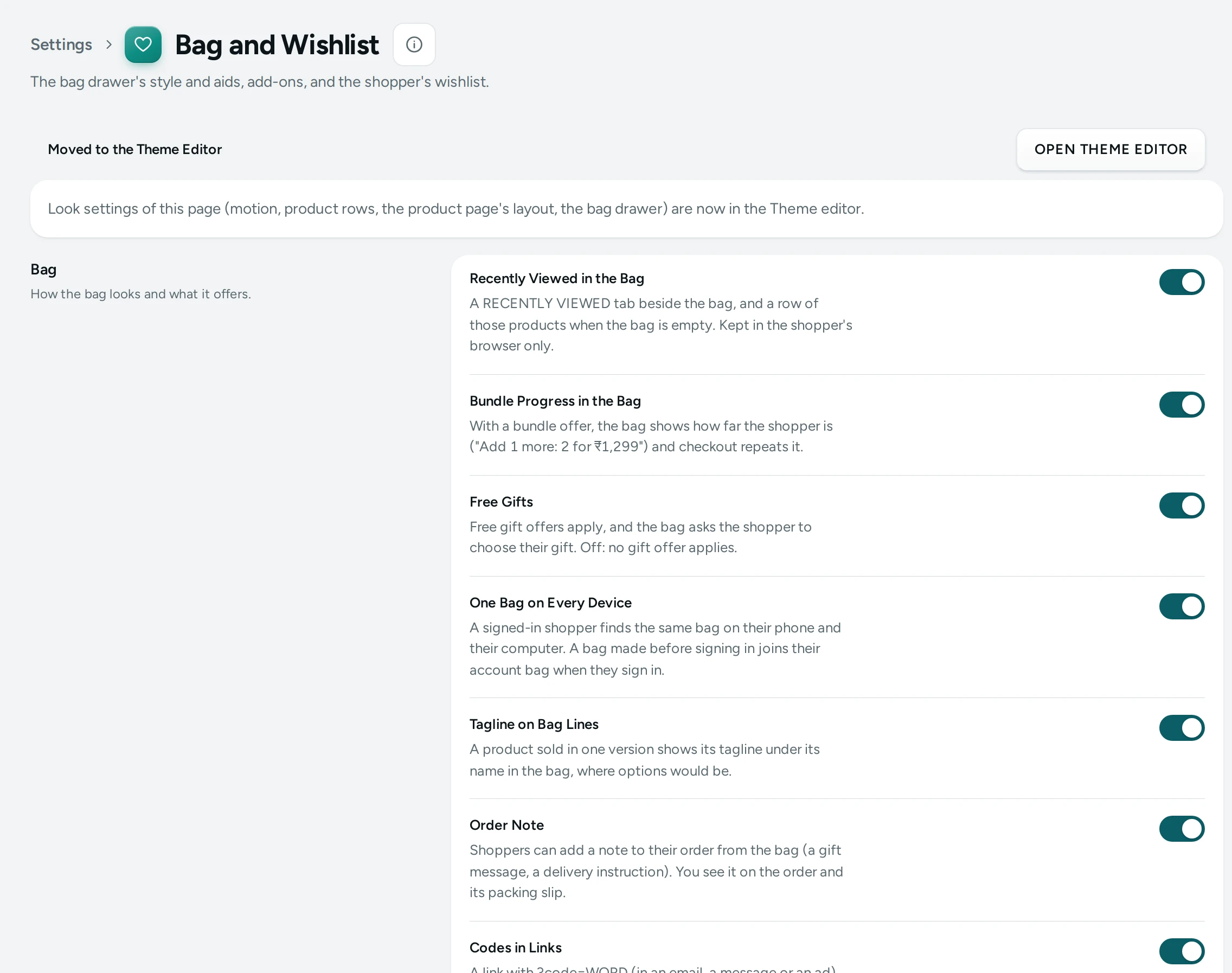
The Settings
Bag
How the bag looks and what it offers.
| Setting | What It Does | Default |
|---|---|---|
| Recently Viewed in the Bag | A RECENTLY VIEWED tab beside the bag, and a row of those products when the bag is empty. Kept in the shopper's browser only. | On |
| Bundle Progress in the Bag | With a bundle offer, the bag shows how far the shopper is ("Add 1 more: 2 for ₹1,299") and checkout repeats it. | On |
| Free Gifts | Free gift offers apply, and the bag asks the shopper to choose their gift. Off: no gift offer applies. | On |
| Order Note | Shoppers can add a note to their order from the bag (a gift message, a delivery instruction). You see it on the order and its packing slip. | On |
| Codes in Links | A link with ?code=WORD (in an email, a message or an ad) puts the code on the shopper's bag and says whether it works. | On |
Add-ons
Small add-ons offered in the bag and at checkout.
| Setting | What It Does | Default |
|---|---|---|
| Add-ons | Products you offer with another product (“Pairs well with”), shown on its page with a quick ADD. | On |
| Add-ons Shown at Most | How many add-ons one product page shows. (1 to 6) | 3 |
Wishlist
Shoppers save products to buy later.
| Setting | What It Does | Default |
|---|---|---|
| Wishlist | Shoppers save products with a heart and find them again in their wishlist: the heart in the header, a drawer and a page. | On |
| Wishlist Without Signing In | Shoppers who are not signed in keep their wishlist in their browser. It joins their account when they sign in. | On |
| Share a Wishlist | Signed-in shoppers can share a read-only link to their wishlist. Turning this off stops every shared link. | On |
What Each Aid Does in the Bag
- Recently Viewed in the Bag: a RECENTLY VIEWED tab beside the bag, and a row of those products when the bag is empty. Kept in the shopper's own browser, never sent to you.
- Bundle Progress in the Bag: with a bundle offer, the bag says how far the shopper is ("Add 1 more: 2 for ₹1,299"), and checkout repeats it. Make bundle offers in Discounts.
- Free Gifts: free gift offers apply and the bag asks the shopper to choose their gift. See Free Gift Offers.
- Order Note: a note to you from the bag (a gift message, a delivery instruction); you see it on the order and its packing slip.
- Codes in Links: a link with
?code=WORD(in an email, a message or an ad) puts the code on the shopper's bag and says whether it works. Example:https://yourbrand.in/collections/sale?code=DIWALI10.
Add-ons
Add-ons are small products you offer with a main product ("Pairs well with"), with a quick ADD on its page, in the bag and (with Add-ons at Checkout) at checkout. Add-ons Shown at Most caps how many one product page shows (3 by default). Choose each product's add-ons in the product editor.
Wishlist
The heart on products saves them to the shopper's wishlist: the heart in the header, a drawer and a page. Wishlist Without Signing In keeps it in the shopper's browser until they sign in, when it joins their account. Share a Wishlist lets signed-in shoppers share a read-only link (birthdays, weddings); turning it off stops every shared link.
How This Page Works
Settings pages share one way of working (see Settings Home):
- Each card groups the settings of one feature, with a line saying what it is for. Its main switch turns the whole feature on or off.
- Change what you need; a save bar appears with SAVE. "Settings saved." Nothing changes on your store until you save.
- USE DEFAULT puts a setting you changed back to Mercayo's default.
- A setting Set by Mercayo for your store shows Locked (with Mercayo's reason when given) and cannot be changed here; "Mercayo allows … for your store." shows a range Mercayo has set.
- If a teammate saved the page after you opened it: "Someone else saved these settings after you opened the page, so yours were not saved. Reload to see theirs."
- Anyone who can see settings can look ("You can see these settings. Changing them needs the settings right."); saving needs the right to change settings.
Questions
Can I see what shoppers have in their wishlists?
A product's editor shows how many shoppers have it in their wishlist; lists of who are not shown.
Do code links work with codes that need conditions?
Yes. The code goes on the bag, and the bag says whether it works for what is in it.