When a shopper asks for an exchange, they pick a reason. The reason decides who pays for the trip back and whether they may choose a different size. Exchange Reasons is where you set them: "Shoppers pick one of these when they ask for an exchange. For a reason that is the store's fault (wrong, damaged or faulty item) you arrange the pickup, and an unboxing video can be required. For the others the shopper sends the item back. A size change reason lets the shopper pick a different size, only in size categories." Open it from Settings › Returns and Exchanges (Exchange Reasons), or search "exchange settings" with Ctrl K. Seeing it needs the settings right ("Your role cannot see the exchange settings. Ask the store owner.").
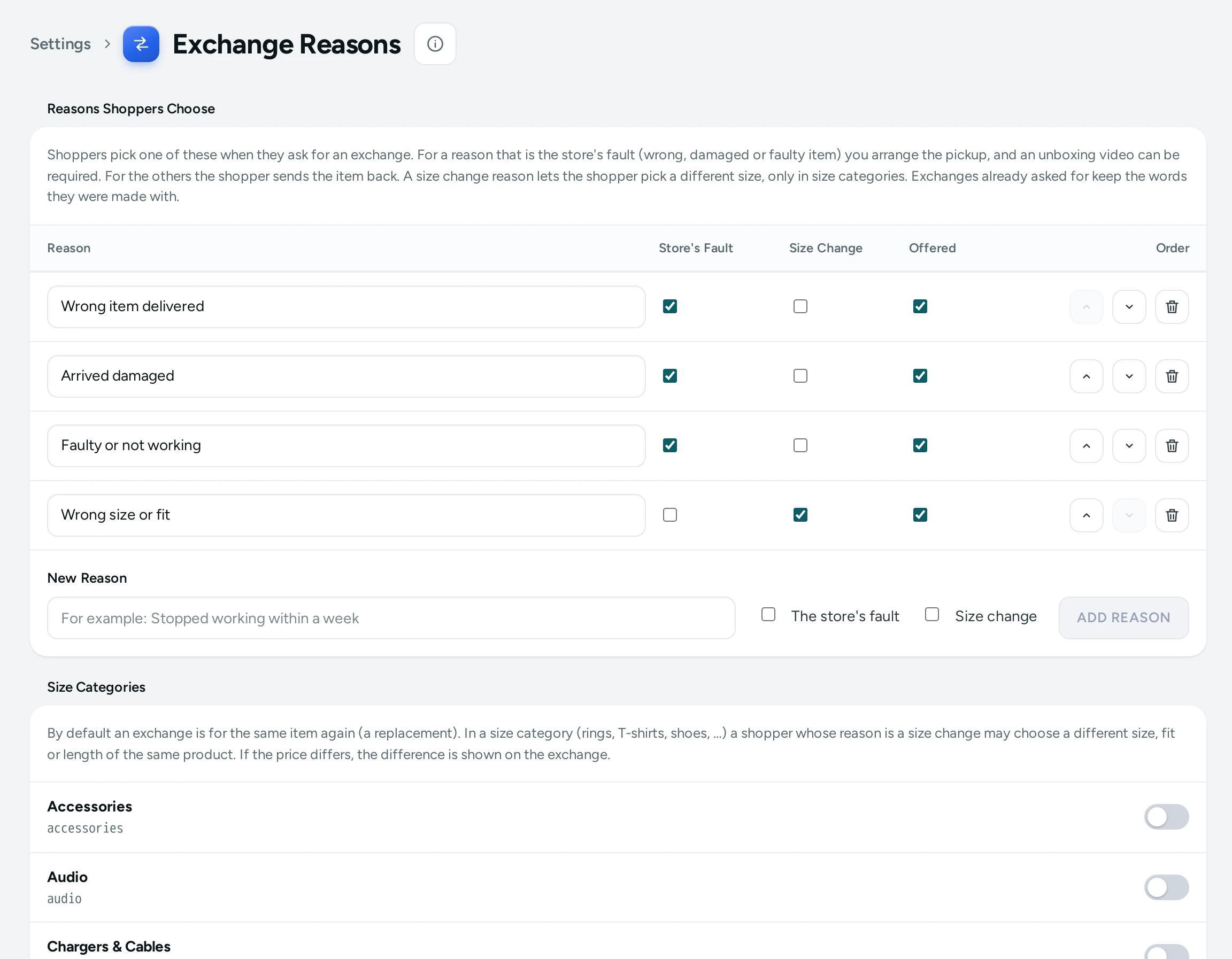
Reasons Shoppers Choose
A table of your reasons, in the order shoppers see them:
| Column | Meaning |
|---|---|
| Order | Move a reason up or down; "Order saved." |
| Reason | The words shoppers read, which you can edit in place |
| Store's Fault | Ticked for wrong, damaged or faulty items: you arrange the pickup, and with Unboxing Video for Claims on the shopper must add a video link |
| Size Change | Ticked for the reason that lets a shopper pick a different size (only in size categories, below) |
| Offered | Unticked hides a reason for a while without removing it ("Not offered") |
- ADD REASON: type the New Reason (for example "Stopped working within a week") and save: "… added."
- REMOVE: "Shoppers will no longer see "…". Exchanges already asked for with it keep it. To hide it for a while instead, untick Offered."
- "Exchanges already asked for keep the words they were made with."
With no reasons: No Reasons Yet: "Add at least one, or shoppers cannot ask for an exchange."
Size Categories
"By default an exchange is for the same item again (a replacement). In a size category (rings, T-shirts, shoes, …) a shopper whose reason is a size change may choose a different size, fit or length of the same product. If the price differs, the difference is shown on the exchange."
Each of your categories has a switch: "Rings allows a size change". Turning it on: "Rings: shoppers may now exchange for a different size." Draft categories are marked Draft. Changing size categories needs the right to edit products.
An Example
A T-shirt brand in Tiruppur keeps four reasons: "Wrong item sent" (store's fault), "Arrived damaged" (store's fault), "Size does not fit" (size change), "Changed my mind" (neither, hidden with Offered unticked during a sale). It marks the categories T-Shirts and Hoodies as size categories. A shopper whose medium tee is too small picks "Size does not fit" and chooses large; they send the medium back to the return address, and the store sends the large.
Questions
Who pays for the return trip?
For a reason marked Store's Fault, you arrange (and pay for) the pickup. For other reasons, the shopper sends the item back to your return address.
Can shoppers change to a different product?
No. An exchange is for the same product: the same item again, or a different size in size categories.