An exchange is a shopper asking to swap an item from a delivered order: the same item again when it arrived wrong, damaged or faulty, or a different size of it when the product's category allows a size change. Exchanges keep the sale and the shopper, which is why many Indian stores offer exchanges instead of refunds. Exchanges lists every request in tabs by where it stands; each opens its own page where you take it step by step. Open it from Orders › Exchanges in the side menu; on a phone, from the More sheet. Exchanges are off by default; switch them on in Settings › Returns and Exchanges. Anyone who can see orders can read the queue (the owner, admins, Order Manager and Customer Support); the step buttons need the right to process orders (the owner, admins and Order Manager).
What You See
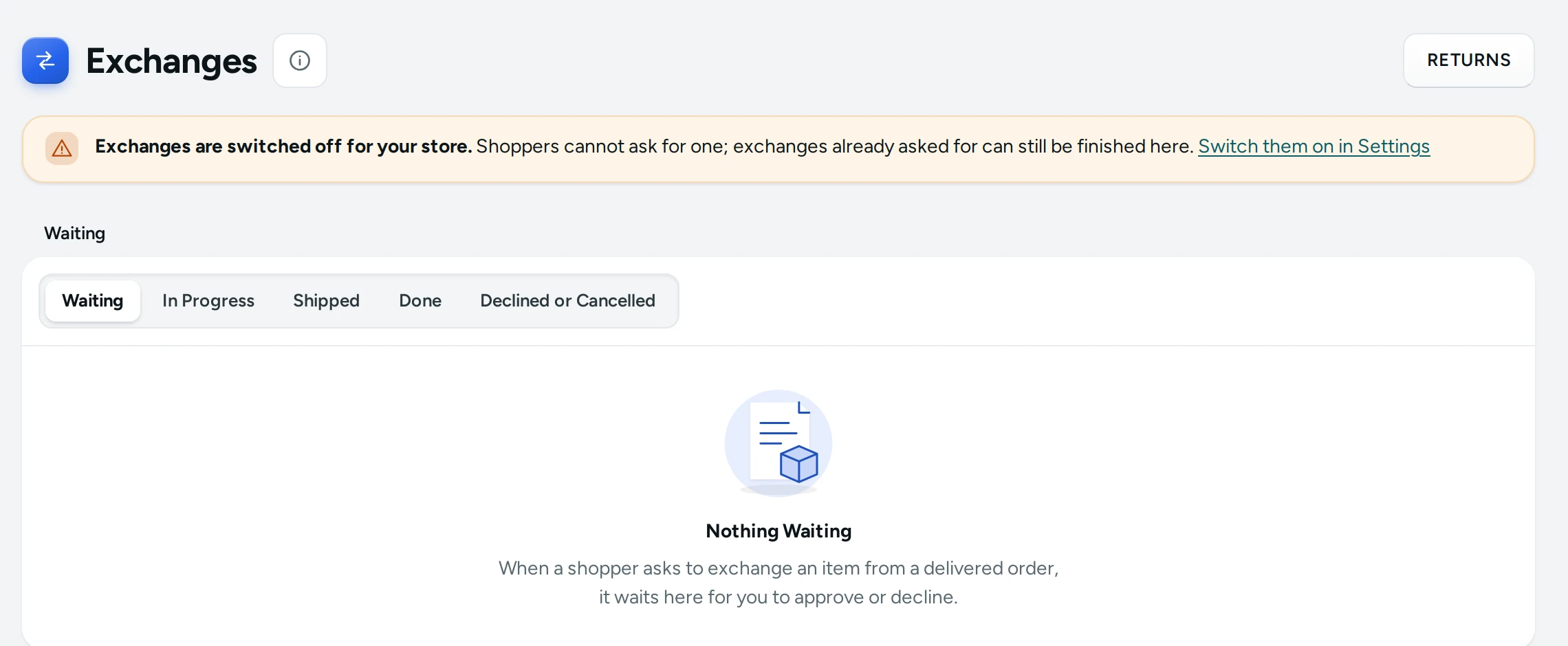
The title Exchanges with a Returns button that opens the Returns queue (returns for a refund).
When exchanges are switched off, a banner says "Exchanges are switched off for your store. Shoppers cannot ask for one; exchanges already asked for can still be finished here." with a link to switch them on, or Mercayo's note when Mercayo has fixed the setting for your store.
Tabs
| Tab | Statuses in It |
|---|---|
| Waiting | New requests to approve or decline (the queue opens here) |
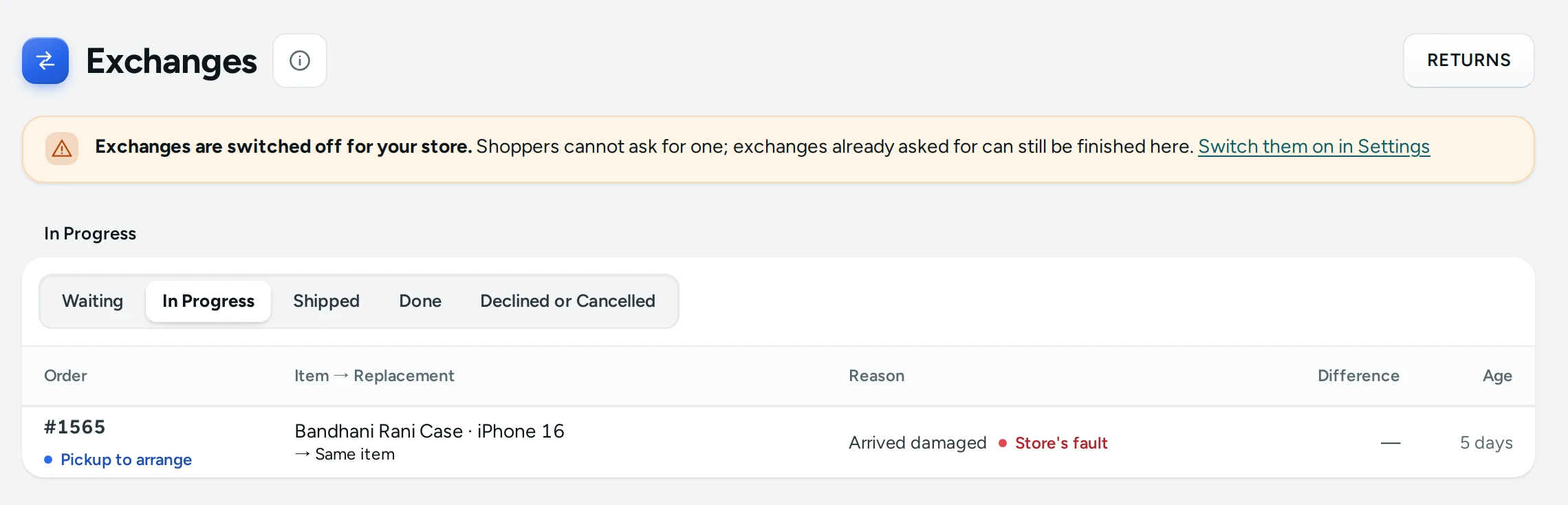
| In Progress | Pickup to arrange, Shopper to send back, On its way back, Item received |
| Shipped | Replacement shipped |
| Done | Completed |
| Declined or Cancelled | Declined and Cancelled |
The tab is kept in the page's address, so the back button and a shared link keep it.
Columns
| Column | What It Shows |
|---|---|
| Order | The order number, with the status pill on tabs other than Waiting |
| Item → Replacement | The delivered item and its variant, and what the shopper wants instead ("Same item", or the new variant such as "Large") |
| Reason | The shopper's reason, with a red Store's fault pill when it blames the store |
| Difference | The price difference: "+₹100.00" when the replacement costs more, "−₹50.00" when it costs less, "—" when there is none |
| Age | How long ago it was asked ("just now", "45 min", "3 h", "2 days") |
An Unboxing video link appears under a request that has one. Click a row to open the Exchange Page. LOAD MORE shows older requests.
When Waiting is empty: Nothing Waiting, "When a shopper asks to exchange an item from a delivered order, it waits here for you to approve or decline."
How an Exchange Moves
- Waiting: the shopper asked. You approve or decline. Approving holds the replacement in stock so it cannot be sold meanwhile.
- Pickup to arrange (the reason is the store's fault): you book a pickup from the shopper. Shopper to send back (any other reason): the shopper sends the item to your return address, at their cost, and adds the courier and tracking number.
- On its way back: the return parcel is on its way.
- Item received: you have the item and checked it.
- Replacement shipped: you sent the replacement; its held stock leaves stock for good.
- Completed: the shopper has the replacement.
A request can be declined (with a reason the shopper reads) while waiting, or cancelled at any point before the replacement ships. Each step is explained on the Exchange Page.
What Shoppers See
On a delivered order's page (from their account or the Track page) the shopper sees ASK FOR AN EXCHANGE and "You can ask until 26 Oct, once per order." They choose the item, a reason from your list, the size they want when the reason is a size change and the category allows it, a note, and an unboxing video link when the reason blames the store and you require one. On Track (found by the order number and phone) they first confirm it is their order with a 6-digit code sent to the order's own phone or email (how it works). Their order page then shows each step and its next instruction, including your return address when they are to send the item back, and fields for the courier and tracking number.
Settings
| Setting (Settings › Returns and Exchanges) | What It Does | Default |
|---|---|---|
| Exchanges | Shoppers can ask to exchange an item after delivery, once per order | Off |
| Days to Ask | How many days after delivery a shopper may ask (1 to 60) | 7 |
| Unboxing Video for Claims | When the reason blames the store (wrong, damaged, faulty), the shopper must add a link to an unboxing video. Shoppers are told before delivery | Off |
| Store Pays to Send the Replacement | The store pays for sending the replacement once | On |
| Return Address | Where shoppers send items back when the store was not at fault | Empty |
The reasons, their store's-fault flags and which categories allow a size change are set in Exchange Reasons. See Returns and Exchanges Settings and Exchange Reasons.
Mercayo Controls
Mercayo can switch exchanges on or off for your store, require the unboxing video, or hold the number of days in a range. A locked setting shows Mercayo's note, here in the banner and in Settings.
Good to Know
- One exchange per order, and never on an order that has a return for a refund.
- Only delivered orders can be exchanged, within Days to Ask of delivery.
- By default an exchange is for the same item and variant. A different variant is offered only for a size-change reason in a category marked as a size category.
- The unboxing video link is checked for its shape (an https link, such as YouTube or Google Drive) but never opened by Mercayo; you open it from the admin.
- Every step is recorded with who did it and when.
Questions
Can a shopper exchange for a completely different product?
No. An exchange is for the same product: the same variant, or a different size where the category allows it.
What happens to the price difference?
Mercayo shows it on the request and the exchange page ("+₹100.00 (the shopper pays)" or "₹50.00 (you refund)") but does not charge or refund it by itself. Settle it with the shopper; to give money back, use REFUND on the order with a custom amount (see Refunds).
Who pays for shipping?
When the reason is the store's fault you arrange the pickup. For other reasons the shopper sends the item back at their cost. With Store Pays to Send the Replacement on, you pay for sending the replacement once.
Why does a shopper not see the exchange button?
Exchanges may be off, the order may not be delivered yet, the days to ask may have passed, or the order already has an exchange or a return.