Categories are the kinds of things you sell: Sarees, Kurtas and Dupattas for an ethnic-wear store; Rings, Earrings and Necklaces for a jewellery brand; Phone Cases, Chargers and Screen Guards for an accessories shop. They form a tree: a category can sit inside another (Earrings inside Jewellery), and shoppers browse them from your menus. A product can be in several categories. Categories are Products › Categories in the side menu; on a phone, open More and choose Categories.
"The kinds of things you sell, like Shirts or Earrings. Shoppers browse by them; sub-categories sit inside."
Anyone who can see products can open Categories: the owner, admins and the Catalog Editor, Marketer and Order Manager roles. Changing them needs the right to edit products (the owner, admins and the Catalog Editor); others see "Your role can see categories but not change them."
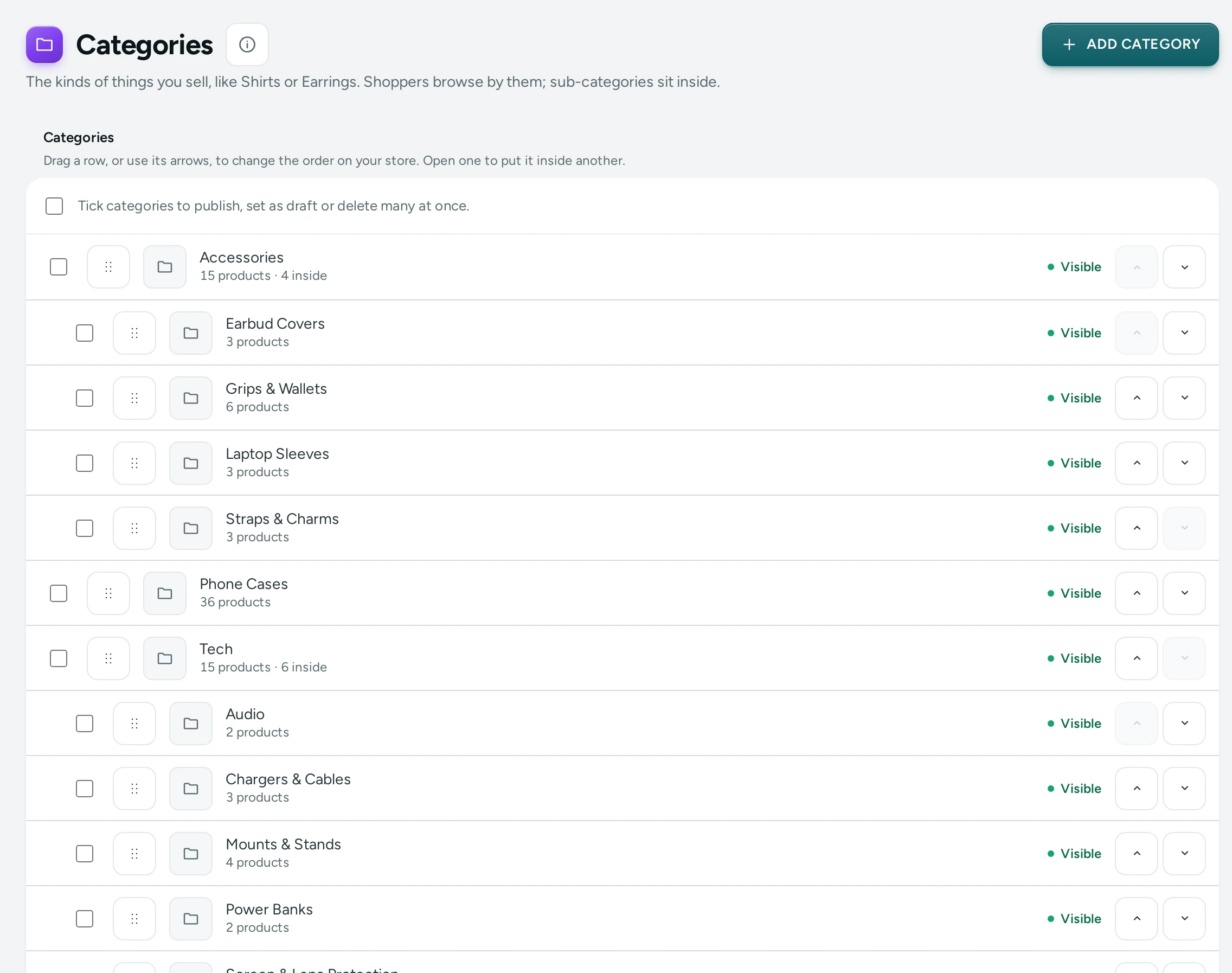
The Category Tree
The page shows Your categories as a tree: top-level categories first, each with its sub-categories indented under it. Each row has the category's name (a link to its editor), how many products it has ("12 products"), how many sub-categories sit inside ("3 inside"), and a Visible or Hidden pill.
"Drag a row, or use its arrows, to change the order on your store. Open one to put it inside another."
- Drag a row by its handle, or use its up and down arrows, to change the order among the categories at the same level. The new order is saved at once ("Order saved.") and is the order shoppers see.
- To move a category under another, open it and change Inside (see below).
- ADD CATEGORY makes a new one.
A store with no categories sees "Organise your catalogue": "Categories group products by kind. Shoppers browse them from your menu."
The Category Editor
Changes wait in a save bar with DISCARD and SAVE.
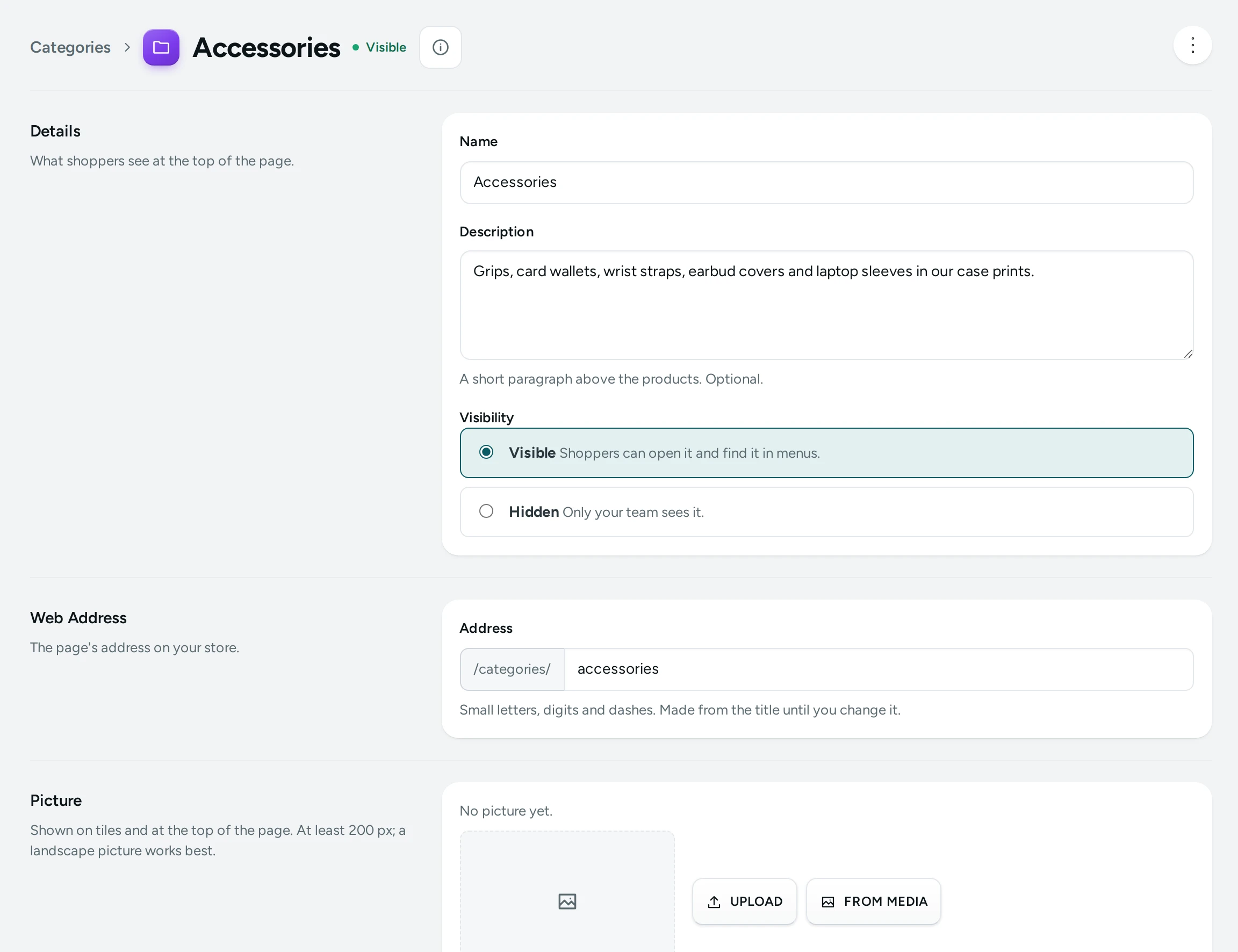
Details
| Field | What It Does | Default |
|---|---|---|
| Name | The category's name on its page, in menus and in the product's breadcrumb. Required, up to 120 characters. | Empty |
| Description | "A short paragraph above the products. Optional." Up to 5,000 characters. | Empty |
| Visibility | Visible: "Shoppers can open it and find it in menus." Hidden: "Only your team sees it." | Visible |
Web Address
| Field | What It Does | Default |
|---|---|---|
| Address | The page's address: /categories/address. Small letters, digits and dashes, up to 120 characters, unique among your categories. | Made from the name until you change it |
Changing the address of a saved category keeps the old one working: "The old address … will keep working and lead here."
Picture
"Shown on tiles and at the top of the page. At least 200 px; a landscape picture works best." JPEG, PNG, WebP or AVIF up to 20 MB, with UPLOAD, REPLACE and REMOVE.
Place
"A sub-category shows inside its parent on your store and in menus."
| Field | What It Does | Default |
|---|---|---|
| Inside | The parent category. Top level makes it a main category. | Top level |
A category cannot be placed inside itself or inside one of its own sub-categories: "A category cannot be placed inside itself."
Products
"Choose the products of this kind." Press ADD PRODUCTS, tick them and press DONE; remove one with its ×. A product that is not active shows Not on sale. A category holds up to 5,000 products. Products in a category are shown in your store's usual list order, set in Settings › Online Store › Product Lists › Default Order; only collections have their own hand-picked order.
You can also add a category from the product's side: the Categories field in the product editor's Organisation card.
Search Engines
| Field | What It Does | Default |
|---|---|---|
| Page Title | The title in search results (about 70 characters show). Up to 200. | Empty: the name |
| Meta Description | The text under it (about 160 show). Up to 320. | Empty: the description |
How to Build Your Category Tree
Example: a jewellery brand in Mumbai.
- Press ADD CATEGORY, type Jewellery, leave Inside at Top level and press SAVE.
- Press ADD CATEGORY again, type Earrings, set Inside to Jewellery, add the earring products with ADD PRODUCTS and press SAVE.
- Do the same for Rings and Necklaces.
- Back on Categories, drag the sub-categories into the order you want.
- Add the top category to your header menu in Menus so shoppers can browse it.
How to Delete a Category
- Open the category and choose DELETE in the header's ⋯ menu.
- The dialog says what still points at it. A category with sub-categories cannot be deleted: "It has 3 sub-categories. Move them elsewhere or delete them first." Menus that link to it are named and will leave it out. "Only this grouping goes. The products stay in your store."
- Press DELETE. The message says "Category deleted."
What Shoppers See
- A visible category has its page at
/categories/address, with its picture, name and description, its products and your store's filters and sorting. - Sub-categories show inside their parent on the store and in menus.
- On a product page, the breadcrumb shows the product's categories, and the "You may also like" row picks products from the same category by default (Settings › Product Page › You May Also Like).
- Hidden categories are not on the store.
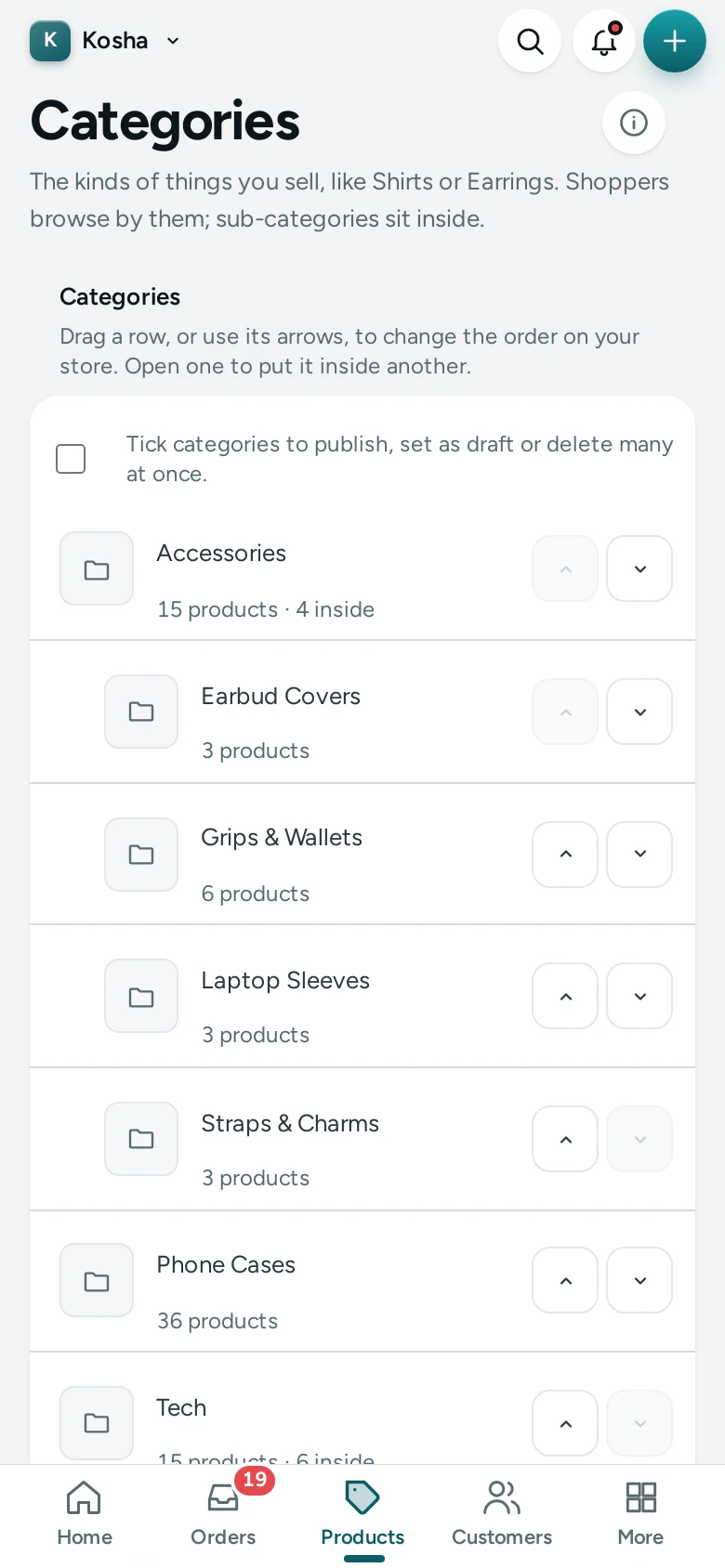
Good to Know
- Products in no category are counted under No Category on the Products List, because shoppers browsing your menu cannot find them.
- The products CSV names categories by name, separated by semicolons (
Jewellery; Earrings). A name your store does not have is refused: "No category has this name; add it on the Categories page first." See Products CSV. - A product can be in up to 100 categories.
- Changes are recorded in the Activity Log.
Questions
Should I use categories or collections?
Both. Categories describe what a product is and build the browsing tree; collections are hand-picked groups for a reason (a sale, a season). A kurta can be in the category Kurtas and the collections Festive Edit and New In.
How many levels can the tree have?
Mercayo does not set a small limit, but two or three levels are easiest for shoppers on a phone.
How do I move a category under another one?
Open it, change Inside to the new parent and press SAVE.
Can a product be in two categories?
Yes. Add both in the product's Categories field, or add the product in each category's editor.
Why can't I delete a category?
It has sub-categories. Move them to another parent (or delete them) first.