The exchange page shows one shopper's request to swap an item and the buttons for its next step. Every step says in plain words what it does, including what happens to your stock, so you never wonder whether a size is reserved or has left the shelf. Open it by clicking a row on Exchanges, or OPEN EXCHANGE on the order page. Anyone who can see orders can read it; the step buttons need the right to process orders (the owner, admins and Order Manager).
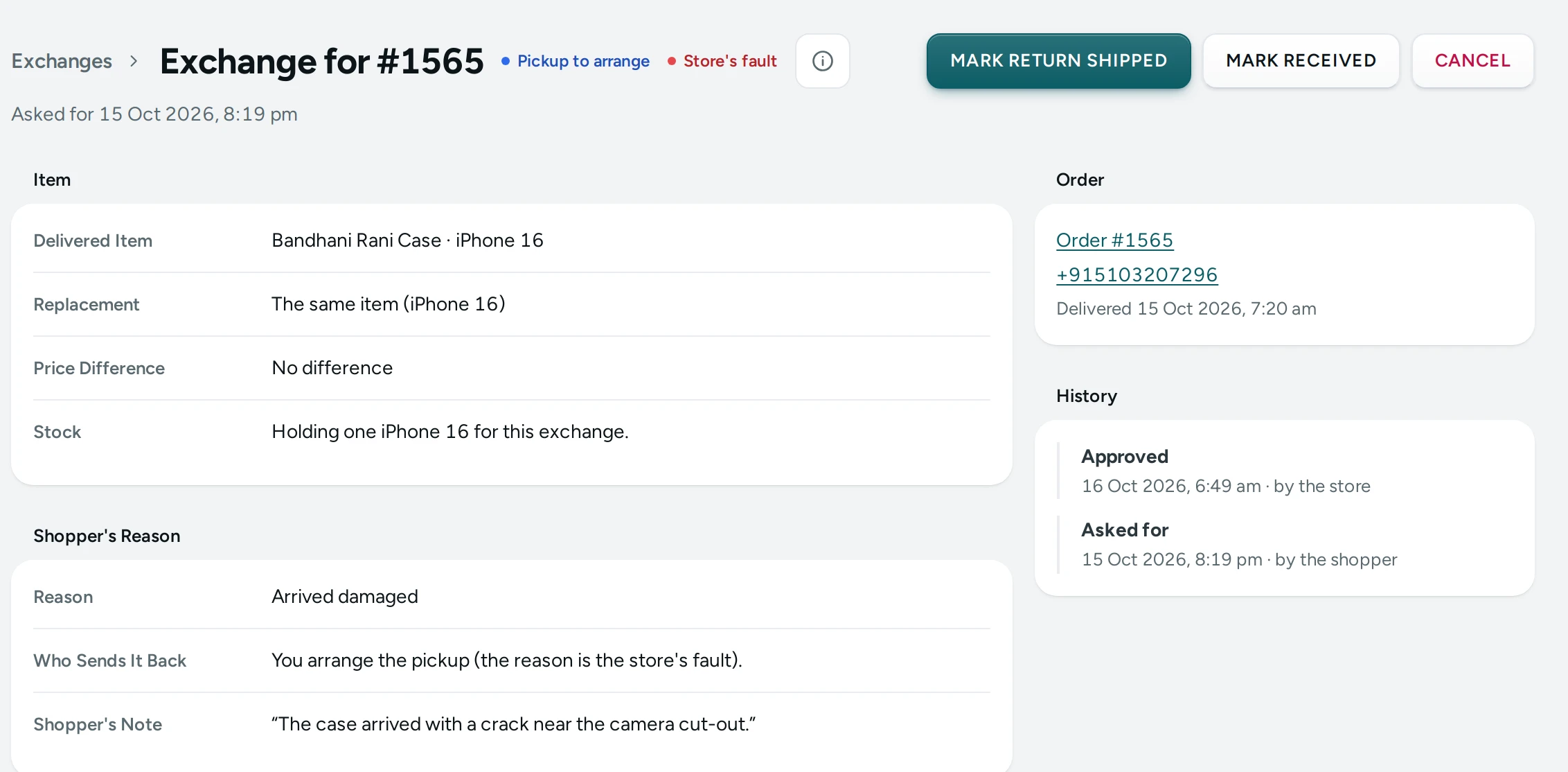
The Header
The title is Exchange for #1042, with a link back to Exchanges, and two pills: the status (Waiting, Pickup to arrange, Shopper to send back, On its way back, Item received, Replacement shipped, Completed, Declined, Cancelled) and either a red Store's fault or a plain Shopper's choice. Under the title: Asked for with the date and time.
The step buttons are on the right; the main next step is the dark button, DECLINE and CANCEL are in red.
Item
| Field | What It Shows |
|---|---|
| Delivered Item | The item and variant the shopper received, with the quantity |
| Replacement | What they want instead: "The same item (Large)" or the new variant. "A variant no longer on sale" if it was removed |
| Price Difference | "No difference", "+₹100.00 (the shopper pays)" or "₹50.00 (you refund)" |
| Stock | "Nothing held yet. Approving holds the replacement.", "Holding one Large for this exchange." or "The replacement has left stock." |
Shopper's Reason
| Field | What It Shows |
|---|---|
| Reason | The reason the shopper chose, as it read when they asked |
| Who Sends It Back | "You arrange the pickup (the reason is the store's fault)." or "The shopper sends it to your return address, at their cost." |
| Unboxing Video | Open the video, when the shopper gave a link |
| Shopper's Note | What they wrote |
| Why Declined | Your reason, once declined |
| Return Parcel | The courier and tracking number of the item coming back |
Order and History
The Order card links to Order #1042, shows the shopper's phone (tap to call) and when the order was delivered. The History card lists every step, oldest first, with "by the shopper" or "by the store" and any note: Asked for, Approved, Declined, Return shipped, Item received, Replacement shipped, Completed, Cancelled.
The Steps
| Button | Offered When | What It Does |
|---|---|---|
| APPROVE | Waiting | Holds the replacement in stock so it cannot be sold meanwhile. For a store's-fault reason the exchange moves to Pickup to arrange ("arrange a pickup from the shopper"); otherwise to Shopper to send back ("The shopper sends the item back to your return address, at their cost.") |
| DECLINE | Waiting | Tells the shopper the exchange is declined, with your reason. No stock is held |
| MARK RETURN SHIPPED | Pickup to arrange, Shopper to send back | Records that the item is on its way back, with Courier ("For example: Delhivery") and Tracking Number if you have them. Stock does not change |
| MARK RECEIVED | Any of the three return stages | You have the item back and checked it |
| SHIP REPLACEMENT | Item received | Ships the replacement. The stock held for it is taken out of stock for good |
| COMPLETE | Replacement shipped | The shopper has the replacement. Nothing more happens |
| CANCEL | Any stage before the replacement ships | Stops the exchange. Any stock held for it goes back into stock. An optional Note |
Each button opens a confirmation with its own title (Approve?, Decline?, Mark Return Shipped?, Mark Received?, Ship Replacement?, Complete?, Cancel This Exchange?) and the plain-words line above. Declining needs a Reason (the shopper sees it), up to 300 characters, for example "the video shows the item was fine when opened"; a cancel note is up to 500 characters.
After a step the page says "The exchange is now: item received." If someone else already took the step: "That step was already done. The exchange below is up to date."
How to Run a Size Exchange
A Mumbai jewellery brand gets a request: a ring delivered in size 12, the shopper wants size 14.
- Open the request. Check Replacement says size 14 and Price Difference.
- Press APPROVE. One size 14 ring is held for this exchange.
- The shopper sends the ring back and adds the tracking number (the status becomes On its way back). If they give you the details by phone instead, press MARK RETURN SHIPPED and type them.
- When it arrives, check it and press MARK RECEIVED.
- Pack the size 14 ring and press SHIP REPLACEMENT. Send it with your courier.
- Once it is delivered, press COMPLETE.
How to Handle a Damaged-Item Claim
- Open the request; it carries Store's fault.
- Press Open the video and check the unboxing.
- If the claim holds, press APPROVE and book a pickup with your courier. If not, press DECLINE and say why.
- Continue with MARK RECEIVED, SHIP REPLACEMENT and COMPLETE as above.
What Shoppers See
Each step changes the shopper's order page straight away with the next instruction: wait for a reply, send the item to your address with the courier and tracking number, a pickup is coming, the replacement is on its way, or your decline reason.
Good to Know
- Only the steps the exchange can take now are shown; the database refuses any other.
- The replacement leaves stock only when you press SHIP REPLACEMENT; until then it is only held.
- The price difference is shown, never charged or refunded by itself. To refund a difference, use REFUND on the order with a custom amount.
- Mercayo sends no email or message for each exchange step; the shopper follows them on their order page.
Questions
What if the size the shopper wants sells out before I approve?
Approving holds stock; if there is none left the step is refused with the reason. Decline with an explanation, or offer a return if your store allows them.
Can I undo an approval?
Not as such. Cancel the exchange instead: the held stock goes back and the shopper sees it is cancelled.
Does SHIP REPLACEMENT make a courier label?
No. It records that the replacement has gone and takes it out of stock. Send it with your courier as usual.
The shopper never sent the item back. What now?
Press CANCEL with a note. The held replacement goes back into stock.