Until you launch, your store is private: search engines never list it and, by default, visitors see an opening-soon page and need your password to look around. The Launch screen shows what is still needed, lets you set that password, and has the button that opens your store to everyone. Find it at Settings › Launch, or from the last step of the setup guide on Home (GO TO LAUNCH). Anyone who can see settings can open it; only the store's owner can launch.
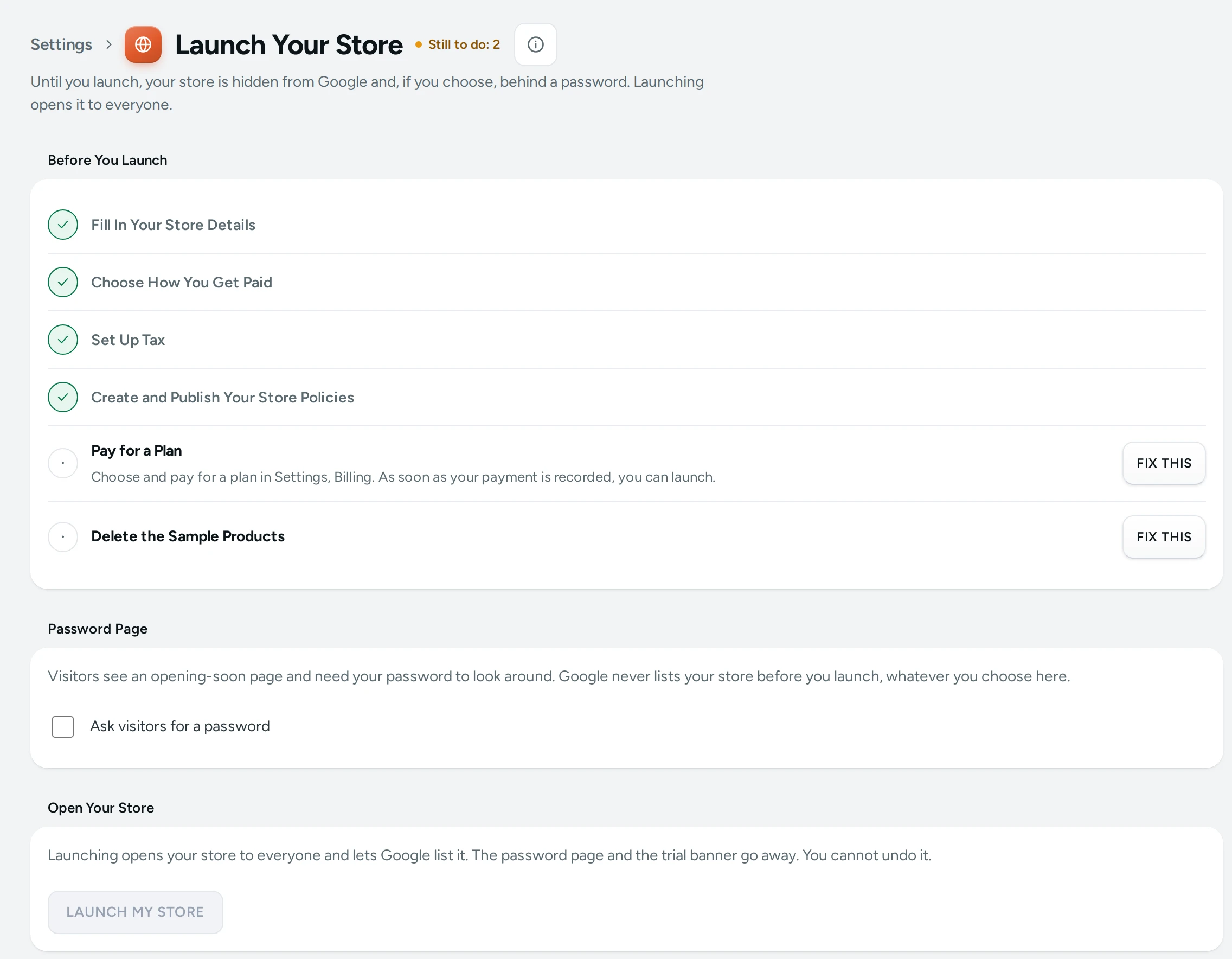
Before You Launch
The first card lists what is needed, each with Done or FIX THIS (which opens the right screen). The heading says "Still to do: 2", or "Everything needed is done. You can launch."
| Item | Done When | Where to Fix It |
|---|---|---|
| Fill In Your Store Details | Every detail marked Needed is filled in | Store Details |
| Choose How You Get Paid | Cash on delivery is on, or a payment gateway is connected | Payments |
| Set Up Tax | You told Mercayo whether you are registered for GST | Taxes |
| Create and Publish Your Store Policies | All six policies are published | Policies |
| Pay for a Plan | Your plan is paid up to a date in the future | Plans and Billing |
| Delete the Sample Products | Shown only while sample data is in the store | Home, setup guide, DELETE SAMPLE DATA |
Paying for a Plan
A plan counts as paid once Mercayo has recorded a payment that covers today. How you pay depends on what Mercayo has switched on for your store, and Settings › Billing always shows the way that applies:
- Online, by subscription: choose a plan on the Billing screen and authorise the payment on Razorpay's page (card, UPI autopay or bank mandate). During the trial you can start the plan at the trial's end, or start it today so you can launch now; the trial days left come back to you as credit.
- By bank transfer or UPI: the Billing screen says how. Once Mercayo records your payment, you can launch.
Password Page
While the store is not launched, visitors see an opening-soon page. Ask visitors for a password (on by default) means they need your Password to look around; share it only with people you want to show the store to.
- 6 to 72 characters. Press SAVE PASSWORD.
- Until a password is set, nobody can get past the opening-soon page: "No password is set yet, so nobody can get past the opening-soon page."
- Changing the password signs everyone out of the preview.
- Turn the switch off to let anyone browse the store before launch. Google still never lists it before you launch, whatever you choose here.
- If Mercayo has set the password page for your store, the card says "Mercayo has set the password page for your store." and the switch is locked.
Open Your Store
When every item is done, the owner presses LAUNCH MY STORE and confirms in the dialog ("Launch Your Store?", "Everyone will be able to see and order from your store, and Google can list it."), with LAUNCH.
What happens at once:
- The store opens to everyone. The password page goes away.
- Search engines may list the store.
- The trial banner disappears from the admin.
- The setup guide leaves Home, and the Launch screen shows "Your Store Is Live", with VISIT YOUR STORE.
If something is still missing when you press the button (for example a policy was unpublished in another tab), nothing changes and the screen says "There is still something to finish: …".
Who Can Do What
| Action | Who |
|---|---|
| See the Launch screen | Anyone who can see settings |
| Change the password page | Anyone who can change settings |
| Launch | The store's owner only ("Only the store owner can launch.") |
Questions
Can I launch during the free trial?
Yes, once the plan is paid. With an online subscription, choose to start the plan today: the trial days left come back as credit on your first charge.
Can I un-launch my store?
Not from the admin. If you need your store closed, write to Mercayo's support.
Will Google list my store before launch if I turn the password off?
No. Before launch, every page tells search engines not to list it, whatever the password setting.
Why is "Choose How You Get Paid" not done?
Cash on delivery is off and no gateway is connected. Turn cash on delivery on in Checkout and COD or connect Razorpay in Payments.
I paid by bank transfer. When can I launch?
As soon as Mercayo records your payment. The Pay for a Plan item then shows Done. See Launch Is Blocked if it does not.