Selling Abroad
Markets Abroad, With Their Own Prices, Content and Addresses
Shoppers in the US, the Gulf or Europe can buy in their own currency, pay by card and see what is made for them, while India keeps its own checkout with cash on delivery. Each market abroad has its prices, its delivery, its offers and its own address, and the GST export invoice is made for you.
- In every plan
- Free for 14 days


Kosha is a demo store on Mercayo. Its products, orders and customers are sample data.
In short
What It Does
Markets. With Sell Abroad on, Settings → Markets holds India (your home market: rupees, every state, cash on delivery) and up to 10 markets abroad. A market is a set of countries with one currency, a price adjustment and a price ending; Everywhere Else holds every country no other market names, so one market can cover the world. Prices are your rupee prices converted at Mercayo's daily rate or a rate you fix.
Prices per market. The most specific price wins: a fixed price for a variant in that market, then a rule for the product, a collection or a category (an adjustment from −50% to +200%), then the market's own adjustment. Set them in a market's Prices card, a product's Prices Abroad card, or a spreadsheet (DOWNLOAD SPREADSHEET, UPLOAD SPREADSHEET, checked whole before APPLY). The product page, the bag, the order and the card charge agree to the cent.
Content by country. Sections, announcement messages, offers, popups, menu links, pages and posts can carry Show In: India, abroad, chosen markets or countries, or everyone except some. ADD A VERSION FOR ANOTHER COUNTRY copies a section for the countries you pick, and Preview as shows the page as a visitor from any market would see it. A product's Sell In card leaves it out of chosen markets. India-only promises, such as cash on delivery, are never shown abroad.
The visitor's country. A visitor's own choice of country always wins. Otherwise the store can suggest their market's prices once, open in their market, or do nothing; sections and offers made for a country can follow where the visitor browses from. Only a country code is ever kept, and search engines always get your India pages.
Addresses and search. Each market has its own address, such as /en-us/, so its pages, in its currency, can be listed by search engines, with every page naming its other languages and markets. Each market with its own address gets its own Google and Meta product feeds.
Checkout and GST. Checkout abroad asks for an email, a phone with its country code and the address in that country's format, offers your delivery options abroad, and charges by card in the market's currency through your own Razorpay account. The order is an export: with a current LUT it is invoiced without IGST, otherwise with IGST, and it lands on your GSTR-1's export sheet.
For your store
Why It Matters
NRI families, gifting from the Gulf and shoppers who found you on Instagram from abroad are a real share of demand for many Indian brands, but a rupee price and an Indian checkout lose most of them. A price in dollars, an address form that fits their country and a card payment in their currency remove the doubt.
Selling abroad is also where India-only promises cause trouble: a "Cash on delivery" badge or a Diwali offer shown to a visitor in New Jersey sets an expectation checkout cannot meet. Show In and the per-market trust lines keep each visitor's page true for where they are.
And it stays one store: one catalogue, one admin, one set of reports, with GST export invoices made without a spreadsheet.
Step by step
How It Works
Turn On Sell Abroad
Open Settings → Markets and switch on Sell Abroad. Choose what The Visitor's Country does (suggest its prices, open in their market, or nothing) and whether Content Follows the Visitor's Country. Your LUT goes in Settings → Invoices.
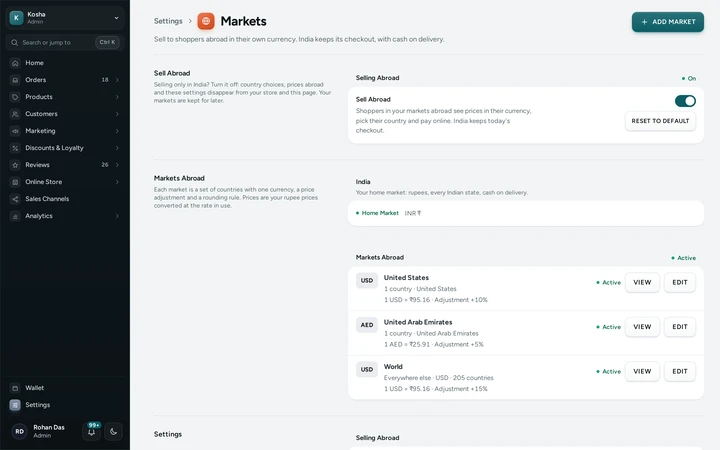
Settings → Markets with India as the home market and the United States, the UAE and Everywhere Else abroad, on Kosha, a demo store on Mercayo. Add Your Markets
Press ADD MARKET: a name, the currency, an adjustment and a price ending, and its countries (or Everywhere Else). The sheet shows what a ₹1,000 product would sell for there.
Set Delivery Abroad
In Settings → Shipping and Delivery, add zones of countries abroad (or everywhere else abroad) with their own rates by weight and "free above" amounts. A market's page lists any of its countries without a zone.
Fine-Tune Prices
In a market's Prices card, ADD RULE for products, collections or categories, or download the market's price spreadsheet, fill in fixed prices and upload it. A product's Prices Abroad card sets one product's prices market by market.
Show the Right Content in Each Country
In the page editor, open a section's Show In, or press ADD A VERSION FOR ANOTHER COUNTRY, and check the result with Preview as. Offers, announcement messages, popups, menu links, pages and posts have the same control. A market's page lists everything made for it.

Your shoppers
What Your Shoppers See
A visitor from abroad sees, at most once, "Shopping from United States? See prices in USD" with SHOP IN USD, or lands in their market directly if the store chose that, with a small note to change it. Prices, the bag and checkout are then in their currency, with their delivery options and dates, a card payment, and no promise of cash on delivery. Shared links and search results open the market's own address, already in its currency.

Settings
Settings You Control
Each one is in your admin. A new store starts with the value shown.
Mercayo
Mercayo's Controls
Mercayo keeps the list of countries, their currencies and address formats, and brings in the day's exchange rates; a market whose rate is too old is hidden rather than showing a wrong price. Mercayo can switch selling abroad off for a store, pause location by country, or change how many markets a store may have (10 to start with). The visitor's country is looked up from DB-IP's free country list in memory and dropped; only the country code is used.
Limits today
Good to Know Before You Start
- Orders abroad are paid online by card; cash on delivery, gift cards, store credit and gift wrap are India-only.
- The courier integration books parcels within India; exports are booked with your own courier.
- Bundle and quantity-price tiers on a product page abroad show converted from rupees; the bag prices them exactly.
- A store may have up to 10 markets abroad unless Mercayo changes the limit.
- Stores on GST's composition scheme cannot sell abroad.
Questions
About Selling Abroad
Do shoppers abroad pay in their own currency?
Yes, in a market's currency, by card through your own Razorpay account; what they can pay with depends on what your Razorpay account accepts. Your books, reports and GST stay in rupees at the rate of the order.
Is this the same as showing prices in other currencies?
No. Languages and Currencies can show a converted price as a guide while the shopper still pays in rupees. Markets are full selling abroad: their own prices, checkout, delivery, payment and export invoice.
Does the store guess where a visitor is?
Only when you let it: it can suggest the visitor's market once, or open in it. The visitor's own choice always wins, search engines always get India's pages, and only a country code is kept.
Can an offer be for India only?
Yes. Give the offer Show In: India only, and it is neither shown nor given to an order going abroad. A code typed from the wrong country says which country it is for.
How is GST handled on exports?
Each order abroad gets an export invoice: without IGST under a current LUT, or with IGST otherwise, and it goes on the export sheet of your GSTR-1.
Help Centre
In the Help Centre
Related
Related Features
- Languages and CurrenciesOffer your store in Hindi beside English, translate your products, pages and menus, and show prices in other currencies as a guide.
- Delivery ChargesSet delivery methods, group states into zones, price by weight, give free delivery above an amount, and add rules for PIN codes, then test any PIN code.
- Product FeedsFeeds for Google Merchant Center and the Meta catalogue at fixed addresses on your domain, rebuilt when products change, with a list of what to fix.
- Search EnginesClean addresses, your own titles and descriptions, product details Google can read, a sitemap and link previews for WhatsApp, on every store.
- RazorpayPaste your Razorpay keys, test with test keys first, and Mercayo sets up the webhook secret; the money goes straight to your account.
More in Online Store: Product Pages · Product Stories and Details · Collections and Filters · Store Search · Shop by Fit · Wishlist · Customer Accounts · After the Order · Content Pages and Blog · Personalisation · Shoppable Videos · Languages and Currencies · Installable Store · Page Speed · Search Engines · URL Redirects · Opening-Soon Page · Custom Domains · Change Domain · Sell to Businesses (B2B) · Marketplace · Digital Products · Dependent Dropdowns
Try It on Your Own Store
Every feature is in every plan, free for 14 days.