Wishlist
A Wishlist That Works Before Shoppers Sign In
Many shoppers browse today and buy on payday, or ask family first. The wishlist lets them save what they like with one tap, without an account, and come back to it later.
- In every plan
- Free for 14 days


Kosha is a demo store on Mercayo. Its products, orders and customers are sample data.
In short
What It Does
The wishlist is on for every store. Shoppers save a product with the heart: on its card in every list, beside ADD TO BAG on the product page, and among the round buttons over the photo on phones.
- No account needed. A shopper who is not signed in keeps their wishlist in their own browser. When they sign in (by phone, email or Google), it joins their account automatically.
- With an account, the wishlist follows them to every device, and holds up to 200 products.
- The saved option. Saved from the product page after choosing a size or colour, the wishlist remembers that choice.
- A drawer and a page. The heart in the header, with its count, opens the wishlist drawer (a side panel on computers, a sheet from the bottom on phones). Each product shows its picture, the saved option, price and MRP, and stock, with ADD (or CHOOSE when an option is needed) and REMOVE. VIEW WISHLIST opens the full page at /wishlist.
- Honest states. A sold-out product says so; a product you no longer sell says "No longer available" with REMOVE only.
- Share a link. A signed-in shopper can make one read-only link to their wishlist, copy it or send it with the phone's share menu, and STOP SHARING at any time. The shared page shows their first name ("Asha's Wishlist") and the products, and visitors can add them to their own bag or save them to their own list. Nothing else about the owner is shown.
In your admin, each product's editor shows how many shoppers' wishlists it is in (accounts only).
For your store
Why It Matters
Saving for later is how many people shop: they find something on their lunch break, show it to their sister in the evening and buy at the weekend. Without a wishlist, that product is lost in their browser tabs.
Asking for an account just to save a product turns most shoppers away. Mercayo lets them save first and sign in later, and nothing is lost when they do. The share link fits how families in India decide together: send the list on WhatsApp, and whoever is buying the birthday gift knows exactly what to pick.
For you, "In 14 shoppers' wishlists" on a product is a quiet signal of demand: a product people want but are not buying yet may need a better photo, a clearer size guide or an offer.
Step by step
How It Works
Check the Wishlist Settings
Open Settings → Bag and Wishlist. In the Wishlist card, the wishlist, Wishlist without signing in and Share a wishlist are all on to start with. Turn off guest lists if you want shoppers to sign in first, or sharing if you would rather not offer links.
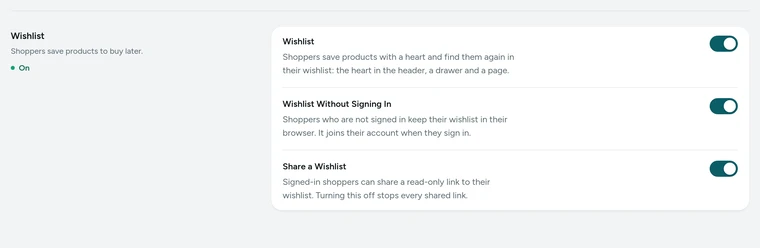
The Wishlist card in Settings → Bag and Wishlist, on Kosha, a demo store on Mercayo. Choose Where the Heart Shows
The heart is on product cards, on the product page and in the header. If you would rather keep product cards clean, switch off Wishlist Heart in Theme → Product Cards; the product page and the header keep theirs.
Shoppers Tap the Heart
A tap saves the product at once with a short note, "Saved to your wishlist", and VIEW. Another tap removes it. If your store has guest lists off, a shopper who is not signed in is asked to sign in first.
They Come Back to the Drawer or Page
The header's heart shows the count and opens the drawer. From there a shopper can ADD a product to the bag, REMOVE it, or open the full wishlist page, which shows the same products as your store's cards.
They Share It
On the wishlist page or drawer, a signed-in shopper presses SHARE, then COPY LINK or SEND through the phone's share menu. Anyone with the link sees the list but cannot change it. STOP SHARING ends the link; sharing again makes a new one.
See What Shoppers Want
Open any product in Products. Beside its status, the editor says "In 3 shoppers' wishlists" (or "Not in any shopper's wishlist yet"). Lists kept by guests in their browsers are never counted or seen.

Your shoppers
What Your Shoppers See
Shoppers see an empty heart on every product. One tap fills it and a short note says it is saved, with a link to view the list. The heart in the header shows how many they have saved and opens a drawer with each product, its price, the option they chose and whether it is in stock, ready to add to the bag. Without an account the list stays on their device, with a gentle line inviting them to sign in to keep it on every device. With an account they can share a link that shows their list to anyone they send it to.

Settings
Settings You Control
Each one is in your admin. A new store starts with the value shown.
Mercayo
Mercayo's Controls
The three wishlist settings follow Mercayo's rule: Mercayo's override for your store if there is one, then your choice, then the default; a locked setting shows its reason and each change is in Mercayo's audit log. When the wishlist is off, whether by you or by Mercayo, the hearts, the drawer and the pages disappear and links to them are dropped from your menus, but saved lists are kept for when it comes back. Neither your team nor Mercayo can read a shopper's wishlist: your admin sees only how many accounts saved each product.
Limits today
Good to Know Before You Start
- A shopper has one wishlist per store, of up to 200 products; there are no named lists or gift registries.
- Price-drop or back-in-stock messages to shoppers who saved a product are not sent.
- Your admin shows how many accounts saved a product, not who saved it.
- Signing out does not copy the account's list back to the browser, so a shared phone does not keep someone else's list.
Questions
About Wishlist
Do shoppers need an account to use the wishlist?
No, as long as Wishlist without signing in is on. The list is kept in their browser, and joins their account the moment they sign in by phone, email or Google.
What happens to a guest's list when they sign in?
It is added to their account's list. Products already in the account stay as they are, products you no longer sell are skipped, and the list is then kept with the account on every device.
Can I see who saved a product?
No. Shoppers' lists are private. Each product's editor shows how many shopper accounts have it in their wishlist, which is enough to see demand without seeing people.
What does a shared link show?
The shopper's first name if they gave one, and the products in their list that are still on sale. Visitors can add them to their own bag. The link shows nothing else about the shopper, and is hidden from search engines.
Does the heart slow down my pages?
No. Pages are the same for every shopper and are kept ready; each shopper's hearts fill in after the page loads, in place, without anything moving.
What happens to saved lists if I switch the wishlist off?
The hearts, the drawer and the wishlist pages disappear from your store, and menu links to the wishlist are dropped. Shoppers' saved lists are kept, so if you switch it back on, their lists are where they left them.
Can a shopper add everything in their wishlist to the bag?
One product at a time: each has its own ADD, which puts it straight in the bag when its option is saved and in stock, or CHOOSE to pick an option first.
Related
Related Features
- Customer AccountsShoppers sign in with a one-time code by email or phone, or with Google, and find their orders, invoices, addresses and credit in one place.
- Product PagesPhotos that zoom, options that never guess, delivery dates by PIN code, a buy bar that follows and rows of related products, on every product.
- Bag and Bag DrawerA bag drawer and bag page with a free-delivery bar, the order note, discount codes, bundle progress, add-ons, a free gift picker and recently viewed products.
- Google Sign-InShoppers sign in to your store with their Google account in one tap: no password, no code to wait for, and their own account in your store.
- ProductsA fast product list with a health strip, saved views and bulk changes you can undo, and an editor for options, variants, photos, descriptions and SEO.
More in Online Store: Product Pages · Product Stories and Details · Collections and Filters · Store Search · Shop by Fit · Customer Accounts · After the Order · Content Pages and Blog · Personalisation · Shoppable Videos · Languages and Currencies · Installable Store · Page Speed · Search Engines · URL Redirects · Opening-Soon Page · Custom Domains
Try It on Your Own Store
Every feature is in every plan, free for 14 days.