Marketplace
Run a Marketplace of Approved Sellers
A marketplace lets independent sellers sell in your store while you keep the store, the brand and the rules. Every seller and every product is approved by you, each seller works from a panel that shows only their own orders, and the money owed to them is worked out line by line, commission and TCS included.
- In every plan
- Free for 14 days


Kosha is a demo store on Mercayo. Its products, orders and customers are sample data.
In short
What It Does
Sellers join and are checked. A seller applies on your store's Sell With Us page (/sell) with their shop, contact and pickup address, their PAN, GSTIN and bank account with its IFSC, and their documents (PAN card, GST certificate, a cancelled cheque or bank statement). The PAN and GSTIN are checked as they type, including that the GSTIN carries the PAN and that its state is the pickup address's. Documents are kept private: only your team and the seller can download them. You APPROVE SELLER, DECLINE with a note, PAUSE SELLER (their products leave the store at once) or REINSTATE.
Products are approved. A seller's new product waits in Products → Product Approvals until you APPROVE it or SEND BACK with a note. An approved product stays live while the seller edits it.
Each seller has a panel. Sellers sign in to their own panel and see only their own: products and stock, the order lines they sell with the address to ship to, labels and packing slips, returns, payouts, reports and their shop profile. They never see your customers, your other sellers or your settings, and the database itself keeps them to their own rows.
Orders are split by seller. An order with items from several sellers has one part per seller (and one for your own items). A seller packs and ships their part (MARK SHIPPED with the courier and AWB, or a printable label), or you ship it for them. The order is shipped when every part is, and the shopper sees each parcel with its seller and tracking. A return is split per seller too.
The money. Every item carries your commission from the moment it is sold: your default share and a fixed amount per item, or a rule for a category, a seller, a seller in a category or a product (the most exact wins). When a seller's part is delivered, their ledger gets the sale less your commission, your fee per order and 1% TCS; it becomes payable after the wait you set. MAKE STATEMENT puts what is payable on a numbered statement, paid by bank transfer (MARK PAID with the UTR) or by PAY BY ROUTE from your Razorpay balance into the seller's linked account.
GST. Each seller's items are invoiced in the seller's own name, GSTIN and numbering, with credit notes on cancellations and returns. The TCS (GSTR-8) view gives each seller's monthly net taxable value and TCS, with a CSV for your accountant.
For your store
Why It Matters
A marketplace lets a store grow its range without buying stock: a curated lifestyle store adds makers, a city store adds local brands, a category store adds the sellers its shoppers already ask about. What usually stops it in India is the paperwork: checking sellers' PAN and GST, paying each one the right amount after returns, invoicing in each seller's name and filing TCS as an e-commerce operator.
Mercayo does that work in the store you already run. Seller checks happen at sign-up, commission is fixed at the moment of sale so a later rule never changes a past order, returns come off before a sale becomes payable, and the TCS figures for GSTR-8 are counted as you go rather than rebuilt at month end.
Shoppers get a normal store: one bag, one checkout, a "Sold by" line on each product, and a page per seller with their products and the rating your store's reviews gave them.
Step by step
How It Works
Turn On the Marketplace
The marketplace comes with the Marketplace plan, which Mercayo sets up with you (see Pricing). Once it is on your store, open Products → Sellers and press TURN ON MARKETPLACE. Decide whether sellers can sign up themselves, whether they need a GSTIN, and whether their products need your approval.
Check and Approve Sellers
Applications arrive under To Review with an email to your team. Open one to see the business, the KYC details and the documents; MARK KYC CHECKED or ASK FOR NEW DOCUMENTS with a note. APPROVE SELLER invites the seller's first person to their panel. ADD SELLER adds one yourself with the same checks.
Approve Their Products
Products → Product Approvals lists products under Waiting, Sent Back and Approved. APPROVE one or many (they are live at once), or SEND BACK with a note the seller reads on the product.
Set Your Commission
Set your default Commission, Fixed Commission per Item, Fee per Order and Pay Sellers After (Days) in the marketplace settings, then add rules in Products → Seller Payouts → Commission by seller, by category or both. A rule counts for orders placed after you save it.
Pay Sellers by Statement
Products → Seller Payouts → Balances shows each seller's payable, waiting and paid amounts with their bank account. MAKE STATEMENT, pay it, and MARK PAID with the bank's reference, or PAY BY ROUTE when Razorpay Route is on. ADJUST BALANCE adds or takes an amount with a note the seller sees.
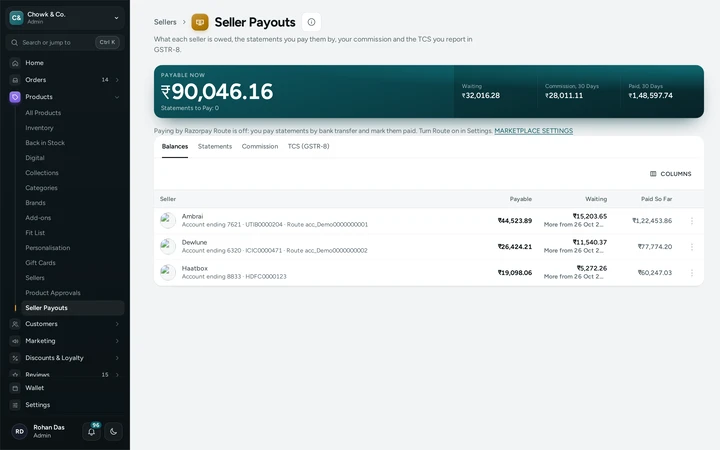
Products → Seller Payouts with each seller's payable and waiting amounts, on Chowk & Co., a demo store on Mercayo. File TCS From the Month's Figures
Products → Seller Payouts → TCS (GSTR-8) lists each seller with a GSTIN: gross sales, returns, net taxable value and the TCS by tax for the month. DOWNLOAD CSV gives the file for your accountant.

Your shoppers
What Your Shoppers See
Shoppers buy as in any store: one bag and one checkout for items from several sellers. Each product card and product page says Sold by with the seller's name and rating, linking to the seller's page with their products and reviews, and /sellers lists every approved seller. After ordering, the order page and tracking show each seller's parcel with its own courier and status, and every seller's tax invoice can be downloaded.
Settings
Settings You Control
Each one is in your admin. A new store starts with the value shown.
Mercayo
Mercayo's Controls
The marketplace is switched on for a store by Mercayo with the Marketplace plan, and Mercayo can set, limit or lock each marketplace setting for your store. Mercayo's database keeps every seller to their own products, orders, returns and payouts, and never gives a seller's full bank account number to the screens (they show its last four digits). Mercayo never holds sellers' money: shoppers pay you through your own Razorpay account, and you pay sellers by bank transfer or through your own Razorpay Route.
Limits today
Good to Know Before You Start
- Sellers do not have two-step sign-in yet; your own team keeps it.
- A seller cannot invite their own staff; your team invites them from the seller's sheet.
- Paying by Razorpay Route needs Route enabled on your Razorpay account; otherwise statements are paid by bank transfer and marked paid.
- The marketplace is not a self-service choice in Billing: Mercayo sets up the Marketplace plan with you.
Questions
About Marketplace
Who collects the shopper's money?
You do, through your own Razorpay account (or cash on delivery through your courier). Each seller's share builds up in their ledger as their parts are delivered and is paid by statement.
How is my commission worked out?
From the rule that fits each item best: the product's own, a seller in a category, the seller, the category, then your default share plus any fixed amount per item. It is fixed when the order is placed, so a later rule never changes a past order.
What happens when a shopper returns a seller's item?
The return is split per seller, the seller marks it received in their panel, and your refund takes the sale back from their ledger while giving your commission and the TCS back. A sale becomes payable only after the wait you set, so most returns arrive before payout.
Whose invoice does the shopper get?
Each seller's items are invoiced in the seller's name and GSTIN, in the seller's own numbering; your own items and the delivery charge stay on your store's invoice. The shopper can download every one from their order.
Can sellers see my other sellers or customers?
No. A seller's panel shows only their own products, order lines, returns and payouts, and the database refuses anything else even if asked directly.
Related
Related Features
- GST InvoicesEvery order gets the right GST document, a tax invoice or a bill of supply, numbered without gaps per financial year, as a PDF for you and your shopper.
- RazorpayPaste your Razorpay keys, test with test keys first, and Mercayo sets up the webhook secret; the money goes straight to your account.
- ProductsA fast product list with a health strip, saved views and bulk changes you can undo, and an editor for options, variants, photos, descriptions and SEO.
- Sell to Businesses (B2B)Approve businesses by GSTIN, give them their own price lists, minimums and quick ordering, send quotes and let them pay later on terms.
More in Online Store: Product Pages · Product Stories and Details · Collections and Filters · Store Search · Shop by Fit · Wishlist · Customer Accounts · After the Order · Content Pages and Blog · Personalisation · Shoppable Videos · Languages and Currencies · Installable Store · Page Speed · Search Engines · URL Redirects · Opening-Soon Page · Custom Domains · Change Domain · Sell to Businesses (B2B) · Digital Products · Selling Abroad · Dependent Dropdowns
Try It on Your Own Store
Every feature is in every plan, free for 14 days.