Installable Store
Your Store on the Shopper's Home Screen, No App Store Needed
A store app usually means months of work and an app store listing. Every Mercayo store can be added to a phone's home screen today, opens full screen like an app, and greets a shopper who loses signal with a calm page instead of an error.
- In every plan
- Free for 14 days

Kosha is a demo store on Mercayo. Its products, orders and customers are sample data.
In short
What It Does
Your store is an installable web app from the first day, with nothing to build or submit.
What makes it installable:
- A home screen icon with your store's name (shortened to fit under the icon), your square icon from Brand, or your initials drawn in your colours when you have not added one yet. The icon is also used in the browser tab.
- Your colours: the app opens with your page colour, full screen, without the browser's address bar.
- An offline page. If the shopper's connection drops while they browse, they see "You Are Offline" with TRY AGAIN and a line saying their bag is safe, instead of the browser's error.
What it never does: show an old page. Pages always come fresh from the network; the offline page is used only when the network fails. Only the store's own program files are kept on the phone once fetched, so the next visit starts quicker. The bag, checkout and anything personal are never stored by it. When you change your store, the saved offline page is refreshed too.
A quiet invitation. After a shopper has looked at 3 pages, where their browser allows installing, a small card at the foot of the screen offers Add Kosha to Your Home Screen (with your store's name) and ADD or NOT NOW. It never appears on the bag, checkout, account, thank-you or tracking pages, never while the cookie banner is up, at most once a visit, and NOT NOW keeps it away for a month.
For your store
Why It Matters
Most of your shoppers are on Android phones, and few of them will download a shop's app for one or two orders. A home screen icon costs them nothing: no download from an app store, no storage, no sign-up. It just puts your store one tap away, next to the apps they use every day, which matters for the shoppers who come back every festive season.
For you, there is no second product to maintain. The icon opens the same store, the same pages, prices and offers, with every change you make live at once.
And connections drop: in a lift, on a train, in a town where 4G comes and goes. A shopper who sees a friendly "You Are Offline" with their bag kept is far more likely to try again than one who sees an error.
Step by step
How It Works
Add Your Square Icon
In Settings → Brand, add a Square Icon: a square picture of at least 180 × 180 px. It is used in the browser tab and on phones' home screens. Without one, your store's initials are drawn as the icon in your colours, so you can launch first and add the icon later.
Check the Home Screen App Settings
Open Settings → Pixels, Cookies and App. In Home Screen App, Add to home screen is on to start with: phones can add your store with its own name, colours and icon, and shoppers who lose their connection see the offline page. Suggest adding to the home screen is on as well: after a few pages, the small note offers it. Switch either off if you prefer.
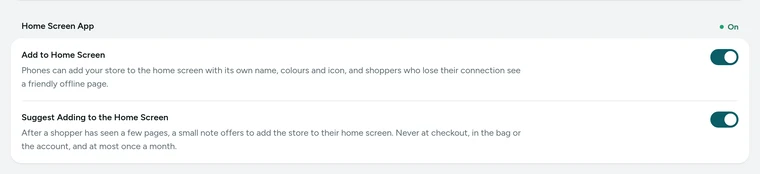
The Home Screen App card in Settings → Pixels, Cookies and App, on Kosha, a demo store on Mercayo. A Shopper Adds Your Store
On an Android phone with Chrome, after three pages, the shopper sees the note with your icon, "Add Kosha to Your Home Screen" (your store's name), and "Open the store in one tap, full screen, like an app. No download from an app store." ADD opens the phone's own install question. Shoppers can also add it at any time from the browser's menu. On an iPhone, they use Safari's Share button and Add to Home Screen; the note does not show there, because Safari does not offer it.
It Opens Like an App
The icon opens your home page full screen in your colours. Everything else is your store as it is: the same pages, prices, bag and checkout, with every change you make live at once. There is nothing to update: when you change a price, a photo or your theme, the next visit from the icon shows it, because every page comes from your store.
When the Connection Drops
If a page cannot load, the shopper sees You Are Offline: "Check your connection and try again. Your bag is safe: it is kept with the store." TRY AGAIN loads the page once the connection is back. The bag lives with your store, not on the phone, so nothing is lost.

Your shoppers
What Your Shoppers See
Shoppers who come back now and then see, after a few pages, a small card with your icon offering to add your store to their home screen, with ADD and NOT NOW. Once added, your icon sits among their apps and opens your store full screen in your colours. If they lose signal while browsing, they see a calm page saying they are offline, with their bag kept and TRY AGAIN. They never see an old price or page from it.
Settings
Settings You Control
Each one is in your admin. A new store starts with the value shown.
Mercayo
Mercayo's Controls
Both switches follow Mercayo's rule: Mercayo's override for your store if there is one, then your choice, then the default. Mercayo's team can switch the home screen app or the invitation off or on for one store, with a reason your admin shows beside the locked switch and a record in Mercayo's audit log. Turning the app off removes it cleanly: the install information disappears and the helper already on shoppers' phones removes itself. Mercayo does not send notifications to shoppers who added your store.
Limits today
Good to Know Before You Start
- The install note shows only in browsers that offer installing (Chrome and other Chromium browsers); on iPhones shoppers add the store from Safari's Share menu.
- There are no push notifications to shoppers who added the store.
- The store is not listed in Google Play or the App Store; it is added from the browser.
- Without a connection, only the offline page works: shoppers cannot browse or order offline.
Questions
About Installable Store
Is this the same as a native app?
It opens from the home screen, full screen, with your icon and colours, like an app. It is your store's website underneath, so it needs no download from an app store and no updates, and every change you make shows at once. It is not listed in Google Play or the App Store.
Will shoppers see old prices if they open it later?
No. Pages always come from the network; nothing about your products is kept on the phone. Only the store's program files are kept, so it starts quickly. Prices, stock and offers are as live as on the website. Opening the icon is the same as opening your store's address in the browser.
Does the invitation annoy shoppers?
It is designed not to. It appears only after three pages, only where the browser can install, never in the bag, checkout, account, thank-you or tracking pages, never with the cookie banner, once a visit at most, and NOT NOW keeps it away for a month. You can switch it off and keep the app.
What icon is used if I have none?
Your store's initials, drawn in your colours. Add a square icon in Settings → Brand whenever you are ready; the home screen icon and the browser tab use it from then on. The browser tab uses the same icon.
Can I tell how many shoppers added my store?
No. Phones do not report installs to the store, and Mercayo's analytics do not separate visits that start from the home screen icon from other visits. What you can see is how shoppers browse and buy, in Analytics, whichever way they opened the store.
Related
Related Features
- Page SpeedPages are kept ready and refreshed the moment you change something, photos are sized for each screen at full quality, and nothing on the page jumps.
- Privacy and ConsentA cookie banner written for India's DPDP Act, marketing tags only after consent, double opt-in for subscribers, and a Delete My Account that really deletes.
- Ads Pixels and Analytics TagsAdd your Meta pixel, Google Analytics 4, Google Ads, Pinterest and Clarity tags by their ids; they load only after shoppers agree.
- Theme EditorColours, fonts, shapes, header, cards, product page, motion, logo and sharing picture, in one editor with a live preview, readability checks and undo.
- Store LooksPick a layout for the header, menus, search, product cards, lists, footer, product page, bag, checkout and order page, and mix them freely.
More in Online Store: Product Pages · Product Stories and Details · Collections and Filters · Store Search · Shop by Fit · Wishlist · Customer Accounts · After the Order · Content Pages and Blog · Personalisation · Shoppable Videos · Languages and Currencies · Page Speed · Search Engines · URL Redirects · Opening-Soon Page · Custom Domains
Try It on Your Own Store
Every feature is in every plan, free for 14 days.
