Delivery Charges
Delivery Charges by Zone, Weight and Speed
What delivery costs your shoppers is yours to decide, as simply or as finely as you like: one flat rate for the whole country, or zones, weights, speeds and free delivery above an amount, with a tester that shows exactly what a shopper would see.
- In every plan
- Free for 14 days


Kosha is a demo store on Mercayo. Its products, orders and customers are sample data.
In short
What It Does
Settings → Shipping and Delivery is built from four simple parts:
- Delivery methods: the options shoppers see, such as Standard and Express. Each has the name shoppers see, its fastest and slowest days (and shorter metro days if you like), whether it is offered, whether it allows cash on delivery, and which one is the shoppers' first choice.
- Zones: groups of states that cost the same to deliver to, such as "South India". A state can be in one zone only; states in no zone use your rates for everywhere else.
- Rates: for each method and zone, a price by weight band (from and up to grams), with free delivery above an amount of the bag after offers.
- PIN code rules: for PIN codes starting with some digits, stop deliveries, stop cash on delivery, or add days. The longest match wins.
The bag's weight comes from your products' weights. Whether a PIN code is served, what each option costs and when it arrives are worked out on Mercayo's server by one set of rules, used by the product page's delivery line, the bag, checkout and the order, so the price a shopper is shown is the price they pay.
How a Price Is Worked Out
The screen explains it in four lines, and this is the whole of it:
- The shopper's PIN code gives their state, from Mercayo's PIN directory (the India Post list). A PIN code that is not in the list cannot be delivered to.
- Your PIN code rule with the longest matching start applies first: it can stop deliveries there, stop cash on delivery there, or add days.
- The state's zone picks the rates. A state in no zone uses your rates for every other state.
- The bag's weight picks the band, from its weight up to, but not including, the next band. Delivery is free when the bag, after discounts, is at or above the rate's free above amount.
A method is offered only where it has a rate for the parcel's weight. If no method has one, checkout says you do not deliver there, so a gap in your table never turns into a wrong price.
Starting Simple
A new store starts with one method, Standard delivery: free, for any weight, everywhere you deliver, with cash on delivery allowed. Change its price and you have one flat rate for India. Add zones, bands and an Express method only when you need them.
Test a PIN Code shows what a shopper at any PIN code would be offered for a parcel weight and bag value: the zone, metro or not, each option with its price and days, "Free above" where it applies, the PIN rule that matched, and COD or no COD.
For your store
Why It Matters
Delivery is a big part of the price a shopper compares. Charging the same everywhere either loses money on far-away orders or overcharges nearby shoppers. Zones and weight bands let you price fairly without a spreadsheet of every PIN code.
Free delivery above an amount is the simplest way to raise your average order, and the bag's free-delivery bar shows shoppers exactly how far they are from it ("Add ₹180 more for free delivery").
PIN code rules matter in India more than almost anywhere. Some districts are far from any courier hub, and some areas send back more cash parcels than others. A rule for a few digits lets you keep selling there, prepaid only or with a few more days promised, instead of refusing the whole state.
And the tester means you never find out about a pricing mistake from an angry shopper: you can check any PIN code before you launch, and again after every change.
Step by step
How It Works
Create Your Delivery Methods
A new store starts with one free standard method. Open it to set its price, or press ADD METHOD for another, such as Express. Give each method its Name Shoppers See, a short Code for your reports, and its Fastest (Days) and Slowest (Days) (0 to 60; leave both empty to show no estimate). Add Metro Fastest and Metro Slowest days if metro PIN codes are quicker. Tick Allow Cash on Delivery for the methods that take cash, and choose one as the Shoppers' First Choice; it must also be offered.
Group States Into Zones
Press ADD ZONE, name it ("North East"), and tick its states. A state already in another zone shows which one, because a state can be in one zone only. Without zones, every state uses the same rates. Deleting a zone deletes its rates; its states then use your rates for every other state.
Add Rates by Weight
Press ADD RATE, choose the Method and Where (a zone, or every other state), then the weight band in grams: From (g) and Up To (g), not including that weight (empty for no limit). Set the Price (₹) and, if you like, Free Above (₹). The Shoppers Get line previews the rate in words, for example "Standard delivery: ₹49 for 0–500 g in every other state; free above ₹999". Bands of one method and zone cannot overlap.
Add PIN Code Rules Where You Need Them
Press ADD RULE and type the first 1 to 6 digits (7930 covers 793001 to 793099). Untick Deliver Here to stop orders there, untick Allow Cash on Delivery to take only prepaid orders there, or set Extra Days (0 to 30) for a slower area. A Note is for your team only, like the reason. The longest match wins, so a rule for 7930 can relax a rule for 793.
Test a PIN Code
Type a PIN Code, a Parcel Weight (g) and a Bag Value (₹) after discounts, and press TEST. The answer is exactly what checkout would offer that shopper: the zone, whether it is a metro, each method with its price and days, which is the first choice, and COD or no COD. It also tells you plainly when a PIN code is not in India Post's list, when your rule stops deliveries, or when no method has a rate for that weight.
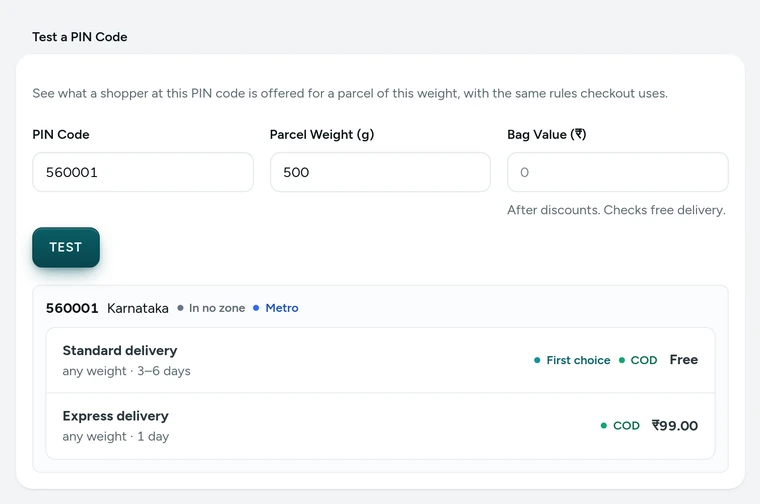
Test a PIN Code in Settings → Shipping and Delivery, on Kosha, a demo store on Mercayo. Give Your Products Their Weights
In the product editor, give each variant its weight. The bag's weight is the sum of its items, and it picks the rate band. A variant with no weight counts as 0 grams for the rate, so a store that prices by weight should fill weights in. The same weights go on the courier booking when you make shipping labels.

Your shoppers
What Your Shoppers See
Shoppers see delivery as one clear line: "Free", or its price, from the product page's delivery line to checkout. In the bag, a bar tells them how much more for free delivery, then "Your order gets free delivery" once they are there. At checkout, with more than one option, they choose by price and date; a method that does not take cash on delivery says so.
A shopper whose PIN code you do not serve is told "We don't deliver to this PIN code yet" before they type anything else, and one whose PIN code takes only prepaid orders sees that cash on delivery is not available there.
Settings
Settings You Control
Each one is in your admin. A new store starts with the value shown.
Mercayo
Mercayo's Controls
Your methods, zones, rates and rules are yours; Mercayo does not edit them. Mercayo maintains the PIN directory every store uses (the India Post list of PIN codes with their states, cities and metro flags), so a new PIN code reaches every store at once. The GST rate on delivery and fees can be fixed or limited by Mercayo for a store, with a reason your admin shows; every such change is kept in Mercayo's audit log. Prices are always checked again on Mercayo's server when the order is placed, so nobody can change a delivery charge from the browser.
Limits today
Good to Know Before You Start
- Rates are by weight band and zone; there are no rates by volume (dimensional weight), by product or by order value bands.
- Delivery is within India only.
- Rates are your own table, not live rates from a courier.
- A gift from a free gift offer adds no weight to the rate.
- Zones are made of whole states; a part of a state is handled with PIN code rules.
Questions
About Delivery Charges
Can I charge one flat rate everywhere?
Yes. Keep one method with one rate and no zones: every PIN code you serve pays that rate. A new store starts that way, with the rate at ₹0, so set the price you want and you are done.
How do I offer free delivery above ₹999?
Set "Free Above (₹)" to 999 on the method's rates. Bags at or above it, after offers, pay nothing for delivery, and the bag shows a bar until they get there. Each rate has its own amount, so Express can stay paid while Standard is free.
What weight does Mercayo use?
The weights of the products in the bag, added up. Give each variant its weight in the product editor. A variant without a weight counts as 0 grams for the delivery rate; for courier labels, the package weight in Settings → Labels and Pickups is used when an order's products have none.
Can I stop deliveries to some PIN codes?
Yes. A PIN code rule with "Deliver Here" unticked stops deliveries there; checkout tells the shopper you do not deliver to that PIN code yet. A rule can also keep deliveries but stop cash on delivery, or add days.
Does a discount change the free-delivery amount?
Free delivery looks at the bag after offers, so a shopper who reaches the amount really gets free delivery. A free-delivery code from discount codes works on top of your rates.
Is GST charged on delivery?
Yes, for a store on regular GST: delivery and the COD fee are taxed at one flat rate, 18% to start with, whatever the goods in the bag. Change it in Settings → Invoices → GST on Delivery if your accountant advises another rate. A store that charges no GST charges none on delivery.
Do my changes reach orders already placed?
No. Changes apply to the next bag a shopper opens. Orders already placed keep the delivery charge they were placed with, and deleting a method never changes them.
Related
Related Features
- Delivery Dates by PIN CodeShoppers type their PIN code on the product page and see the delivery dates and whether cash on delivery is available, from your own delivery rules.
- Delivery Options at CheckoutWhen a PIN code has more than one delivery option, shoppers choose one at checkout, each with its price and the dates it should arrive.
- Cash on DeliveryOffer cash on delivery with your own fee, a limit on the cash a courier collects, and the PIN codes and delivery options where it is not offered.
- Bag and Bag DrawerA bag drawer and bag page with a free-delivery bar, the order note, discount codes, bundle progress, add-ons, a free gift picker and recently viewed products.
- Discount CodesMake codes for a percentage or an amount off, free delivery and more, with minimums, dates, limits and rules for who may use them.
More in Shipping: Delivery Dates by PIN Code · Shipping Labels · Failed Deliveries · Order Tracking · Exchanges · Returns and Refunds · Packing Slips
Try It on Your Own Store
Every feature is in every plan, free for 14 days.