Dependent Dropdowns
Linked Dropdowns for Brand, Model and Size, Without Variants
A printed case comes in five hundred designs that all fit the same four hundred phones. Making each phone a variant multiplies your catalogue; a dependent dropdown does not. The shopper picks a brand, then a model (or a metal, a purity and a size), and the pick travels with the order line wherever the variant's name goes.
- In every plan
- Free for 14 days

Kosha is a demo store on Mercayo. Its products, orders and customers are sample data.
In short
What It Does
A dependent dropdown is a kind of personalisation field with two or three linked levels. Its choices come from your own list or from your store's Fit list of phone brands and models.
- Your own list: type the levels' names ("Metal", "Purity", "Ring size"), then add entries, PASTE A LIST ("Group: a, b" or "A > B > C") or IMPORT CSV with one column per level plus price, code and hidden, previewed as added, changed and removed before anything is saved. EXPORT CSV and DOWNLOAD SAMPLE CSV are there too.
- Your Fit list: the brands and models you already keep, with a price, a code and Shown per brand or model.
- Prices per entry, as an amount or a whole percent of the variant's price; the nearest priced entry on the path wins.
- Hidden entries (and everything under them) are not offered, and old orders keep their words.
- Codes in the SKU, optional per field: "CASE-001-IP16P" for couriers and your warehouse.
- Each level's prompt, such as "Choose phone brand".
Use it on one product, on a collection, or in a field set for every product, chosen categories with their subcategories, or chosen products.
On a phone the dropdown is a row that opens a sheet: the first level, then the chosen group's entries, with a search once a level has more than 12 entries and BACK to the level above. On a computer it is linked dropdowns side by side. A Fit-list dropdown picks the shopper's remembered phone for them.
On the order, the pick becomes part of the line's variant text ("Matte · Apple · iPhone 16 Pro"), so it shows in the bag, checkout, the order, the GST invoice, exports, messages and the courier's item name, and two different picks are two lines.
For your store
Why It Matters
Variants are for things you stock: sizes and colours with their own counts. A choice like "which phone is this case for" or "which ring size" usually is not stocked separately, and turning it into variants makes a catalogue of thousands of rows that is slow to edit and slow to load.
A dependent dropdown keeps the product light: one variant per design, and one list shared by every product that needs it. Shoppers on a phone find their model in two taps with a search, instead of scrolling a list of four hundred names. Your team and your courier still see exactly what was ordered, because the pick is written into the order line itself.
Step by step
How It Works
Add the Field
In Products → Personalisation, open or make a field set (or a product's own personalisation card) and add a field of kind Dependent dropdown. Choose Choices From: your own list or your Fit list, and name the levels; ADD A THIRD LEVEL for three.
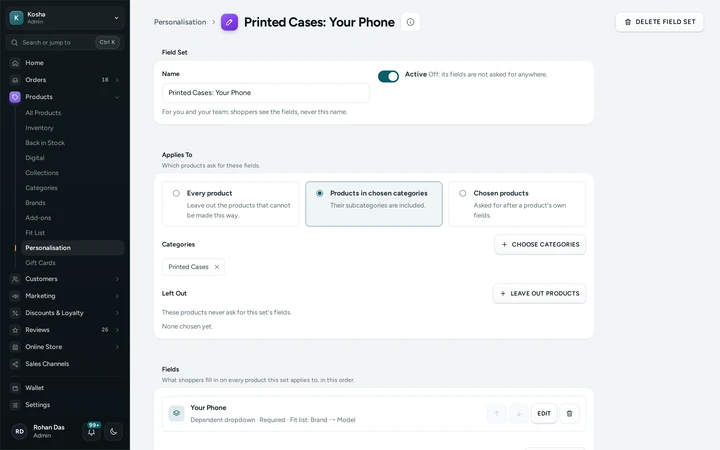
A field set for printed cases with its Your Phone dropdown, from the Fit list, on Kosha, a demo store on Mercayo. Fill the List
Add entries one by one, PASTE A LIST, or IMPORT CSV and check the preview of what is added, changed and removed. Give entries a price, a code or hide them. Save with the card's one SAVE.
Choose Where It Applies
A field set applies to every product, to products in chosen categories (with their subcategories), or to chosen products, and can leave products out. Mark the field Required if ADD TO BAG should ask for it.
Shoppers Pick
On a phone the shopper opens the row and picks level by level; on a computer they use linked dropdowns. The price changes with the pick, CHANGE and CLEAR let them change their mind, and the bag shows the pick in the item's name.

The same dropdown on a computer: the brand chosen, the model next, on Kosha, a demo store on Mercayo.


Your shoppers
What Your Shoppers See
On a phone, shoppers see a row such as "Choose phone brand" that opens a sheet with brands, then models, with prices beside them and a search for long lists. On a computer, linked dropdowns sit side by side. After picking, the field reads "Apple · iPhone 16 Pro" with CHANGE, and the bag, checkout and order show the same words.
Settings
Settings You Control
Each one is in your admin. A new store starts with the value shown.
Mercayo
Mercayo's Controls
The dropdown is part of personalisation, which Mercayo can switch off or lock for a store like any setting. Mercayo keeps the list light: the product page carries only the field's description, and the entries come from one cached address that changes only when you save, fetched once when the shopper reaches the field. The limits are Mercayo's: 100 entries at the first level and 2,000 below it.
Limits today
Good to Know Before You Start
- Stock is not kept per pick; use variants for choices you stock separately.
- Up to 100 entries at the first level and 2,000 below it.
- Entries keep the order of your list or CSV; there is no drag to reorder them.
- Only the dropdown's pick goes into the courier's item name; other personalisation answers stay as details on the line.
Questions
About Dependent Dropdowns
Why not just use variants?
Variants are for things you stock separately. When every design fits the same list of phones, sizes or metals, a dropdown keeps one variant per design and one shared list, so the catalogue stays small and fast.
Will my courier know which phone the case is for?
Yes. The pick is written into the order line's variant text, which goes into the courier's item name, the invoice, exports and messages; with codes on, into the SKU too.
Can a choice cost more?
Yes: an amount or a whole percent of the variant's price on any entry, such as +₹50 for Samsung or +8% for 18K gold. The nearest priced entry on the path counts.
Can I update a long list from a spreadsheet?
Yes. EXPORT CSV, change it, and IMPORT CSV: the preview shows what is added, changed and removed and names any wrong line before you choose Add and update or Replace the whole list.
Related
Related Features
- PersonalisationAsk shoppers for a name to engrave, a photo, a choice, a date or a tick box, each with its own price, carried through to the order, slip and invoice.
- Shop by FitFor products made for a model (a phone, a car, a printer): shoppers pick theirs once and every list, card and product page shows what fits it.
- Product PagesPhotos that zoom, options that never guess, delivery dates by PIN code, a buy bar that follows and rows of related products, on every product.
- ProductsA fast product list with a health strip, saved views and bulk changes you can undo, and an editor for options, variants, photos, descriptions and SEO.
More in Online Store: Product Pages · Product Stories and Details · Collections and Filters · Store Search · Shop by Fit · Wishlist · Customer Accounts · After the Order · Content Pages and Blog · Personalisation · Shoppable Videos · Languages and Currencies · Installable Store · Page Speed · Search Engines · URL Redirects · Opening-Soon Page · Custom Domains · Change Domain · Sell to Businesses (B2B) · Marketplace · Digital Products · Selling Abroad
Try It on Your Own Store
Every feature is in every plan, free for 14 days.
