Languages and Currencies
Your Store in Hindi, Prices in Other Currencies
Many of your shoppers would rather read in Hindi, and some live abroad and think in dollars or dirhams. Mercayo serves your store in more than one language, each at its own address, and shows prices in other currencies as a guide while every order is paid in rupees.
- In every plan
- Free for 14 days


Kosha is a demo store on Mercayo. Its products, orders and customers are sample data.
In short
What It Does
Languages
Your store has a main language, at its own address (/products/…), and can offer others, each under its code: Hindi pages are at /hi/products/…, /hi/collections/… and so on. Every page has exactly one address per language, so search engines and shared links never mix them up.
Two kinds of words are translated:
- Mercayo's words: every button, label and message of the store (ADD TO BAG, the bag, checkout, the account pages). Mercayo translates these. Today Hindi is ready: Mercayo's Hindi for the store's words is reviewed and ships with the product. You can change any of them in Localization, per language.
- Your content: product names, taglines, descriptions, highlights, what's in the box and care, options and their values, collections, categories, content pages, the home page, header, footer, announcement bar and page-not-found page, and menu labels. You translate these in the Translate screen, beside the original. When you change the original later, its translation is marked out of date.
Pages in Hindi use a font made for Devanagari next to your theme's own, so prices, numbers and Latin words keep your look. Shoppers switch language from a globe in the header (on computers), the footer, or the phone menu, and land on the same page in the other language.
Prices in Other Currencies
You can let shoppers see prices in other currencies: US dollars, euros, pounds and dirhams to start with, from the currencies Mercayo offers. Browsing pages and the bag show the converted price, with a line saying it is a guide and that they pay in rupees (₹) at checkout. Checkout and everything after it are always in rupees. Rates are Mercayo's, updated every day, or fixed rates you set yourself.
For your store
Why It Matters
India reads in many languages, and a shopper who is comfortable in Hindi will trust a store that speaks it, especially in Tier 2 and Tier 3 towns and among older buyers who shop on a family member's phone. A Hindi store is not just a translated home page: the buttons, the delivery check, the bag and the checkout all need to say the same thing in the same language, or the shopper is lost at the moment they pay.
For shoppers abroad (NRIs buying gifts for family, or customers in the Gulf), a price in their own currency answers "how much is that really?" without a currency app, while you keep collecting rupees through your own Razorpay account and filing GST in rupees as before.
Each language having its own address matters for search too. Google can list your Hindi pages for Hindi searches and your English pages for English ones, and the page tells it which is which.
Step by step
How It Works
Add a Language
Open Settings → Languages and Currencies. Under Languages, your main language is marked Main. Choose a language in Add a Language and press ADD. Each language shows its address (such as /hi/) and how many items are translated. MAKE MAIN moves your store's own address to another language; REMOVE stops offering one (its translations are kept, and come back if you add it again). A store may offer up to 5 languages, the main one included.
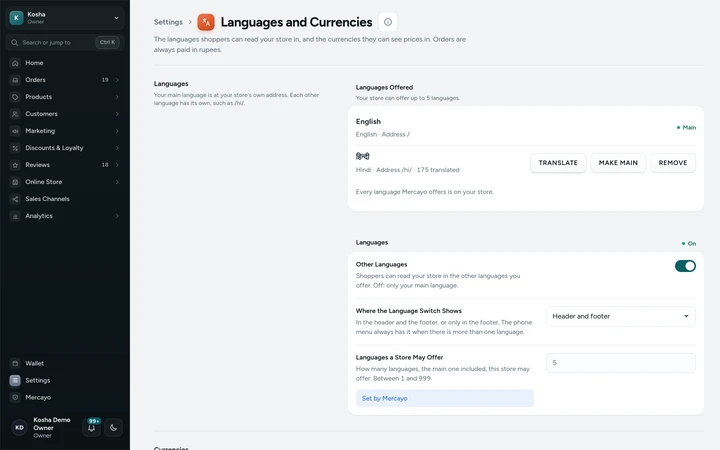
Settings → Languages and Currencies, with English as the main language and Hindi offered, on Kosha, a demo store on Mercayo. Translate Your Content
Press TRANSLATE, choose the language, then a kind: Products, Collections, Categories, Pages, Home, Header and Footer, or Menus. Each item shows Translated, a count such as "3 of 7", Not Translated or Out of Date. Open one to see the original beside a box for each field (Title, Tagline, Description, Highlights, In the Box, Care, Search Engine Title and Description; options and their values) and save. VIEW ON STORE opens the translated page.
Check Mercayo's Words
Buttons and Messages links to Localization, where every word of the store is listed by page, with a language filter. Mercayo's Hindi is already there. Change any text for your store, and RESET takes it back to Mercayo's. Words about money, security and codes are Mercayo's only, so the guide note and checkout lines always say exactly what is true.
Turn On Other Currencies
Under Currencies, switch on Prices in Other Currencies. The currencies shown start as USD, EUR, GBP and AED; add others from Mercayo's list with Add a Currency, reorder them, or hide one. Each shows its rate ("1 USD = ₹…") and when Mercayo last updated it. To use your own rate instead, type the Rupees for 1 of that currency and SAVE RATE. A currency with no recent rate is not offered, so a shopper never sees an old price.
Shoppers Switch
On computers, the globe in the header opens a small menu with the languages (links to the same page in each) and the currencies, with the guide note and the rate. The footer has both too, and on phones they sit at the foot of the phone menu. With Where the Language Switch Shows set to the footer only, the header stays as it is. A price in another currency says "Prices in USD are a guide. You pay in rupees (₹) at checkout."; under the bag's CHECKOUT it says "You pay ₹… at checkout."
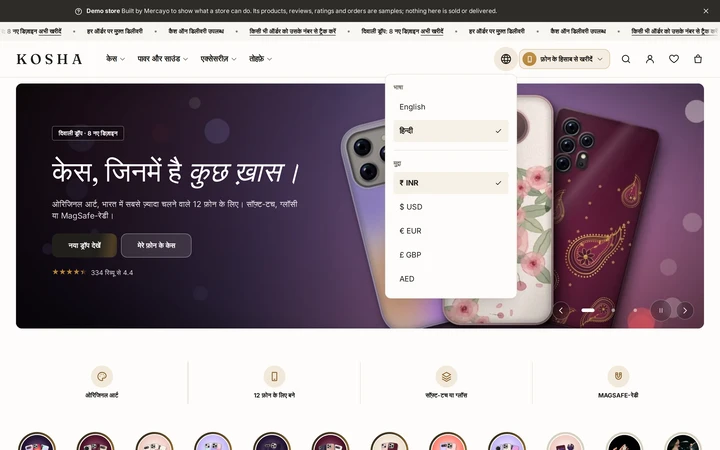
The language and currency menu open from the header's globe, on Kosha, a demo store on Mercayo.


Your shoppers
What Your Shoppers See
Shoppers choose हिन्दी from the globe, the footer or the phone menu and stay on the same product, now with its name, description, the buttons and the delivery check in Hindi, in a font made for Devanagari. Links they share open in that language. A shopper abroad can pick dollars, euros, pounds or dirhams and see every price on browsing pages and in the bag converted, with a plain note that it is a guide; at checkout they see rupees, and the note says so.

Settings
Settings You Control
Each one is in your admin. A new store starts with the value shown.
Mercayo
Mercayo's Controls
Mercayo decides which languages and currencies are offered on the platform and keeps their rates; a rate Mercayo sets by hand is recorded with a reason. For your store, Mercayo's team can lock any of the settings above, with a reason your admin shows. Two limits are Mercayo's alone: how many languages a store may offer (5 to start with, the main one included) and how old a rate may be before its currency is hidden (72 hours). Mercayo's machine translations never replace a text that a person wrote, yours or Mercayo's reviewers'. Mercayo does not translate your products or pages for you.
Limits today
Good to Know Before You Start
- Hindi is the only language with Mercayo's own translated store words; for another language your team translates the store's words in Localization.
- Order emails follow the language the shopper ordered in; words not translated into it show in English.
- Addresses stay in Latin letters.
- Blog posts and the policy pages are not translated.
- Prices in other currencies are a guide only: orders, refunds and invoices are always in rupees.
Questions
About Languages and Currencies
Does Mercayo translate my products for me?
No. Mercayo translates its own words (buttons, labels and messages) and you translate your content in the Translate screen. That keeps product names, sizes and claims exactly as you mean them. Anything you leave untranslated shows in your main language.
Will a Hindi page slow my store down?
No. A page in Hindi is kept ready in the page cache like any other page. Its words travel as one small file that the browser keeps, and an English page carries nothing extra. The Devanagari font is loaded only on pages in Hindi.
How do search engines see the languages?
Each page names its language, points to its own address as the main one, and lists the same page in every language you offer, with your main language as the default. Google can then show the right version to each searcher.
Can shoppers pay in dollars?
No. Every order is paid in rupees through your own Razorpay account, and checkout always shows rupees. Other currencies are shown on browsing pages and in the bag as a guide, so shoppers abroad know roughly what they spend. Card payments from abroad depend on what your own Razorpay account accepts.
Where do the exchange rates come from?
Mercayo brings the day's rates from a public rupee rate feed and refuses a sudden jump of more than 20 percent. You can set your own fixed rate for any currency instead. A currency whose rate is older than 72 hours is not offered.
Can I change a Hindi word Mercayo chose?
Yes, in Localization, with the language set to Hindi: type your own word and save, or RESET to go back to Mercayo's. Your text always wins over Mercayo's, except for the few texts about money, security and codes, which are Mercayo's only.
Help Centre
In the Help Centre
Related
Related Features
- Search EnginesClean addresses, your own titles and descriptions, product details Google can read, a sitemap and link previews for WhatsApp, on every store.
- Content Pages and BlogWrite your About page, FAQ, contact page, guides and blog posts in the admin, from ready sections that match your store's look.
- Menus and Mega MenuBuild header, phone and footer menus up to three levels deep, with pictures, tags and icons, and a mega menu panel on computers.
- Phone-First CheckoutOne page that starts with the mobile number and the PIN code, fills in the city and state, shows clear errors and a price breakdown that adds up.
- RazorpayPaste your Razorpay keys, test with test keys first, and Mercayo sets up the webhook secret; the money goes straight to your account.
More in Online Store: Product Pages · Product Stories and Details · Collections and Filters · Store Search · Shop by Fit · Wishlist · Customer Accounts · After the Order · Content Pages and Blog · Personalisation · Shoppable Videos · Installable Store · Page Speed · Search Engines · URL Redirects · Opening-Soon Page · Custom Domains
Try It on Your Own Store
Every feature is in every plan, free for 14 days.