Shop by Fit
Shoppers Pick Their Model Once and See Only What Fits
When what you sell is made for a model, the first question is always "does it fit mine?". Shop by fit asks once, remembers the answer, and quietly narrows the whole store to products that fit.
- In every plan
- Free for 14 days


Kosha is a demo store on Mercayo. Its products, orders and customers are sample data.
In short
What It Does
Shop by fit is for stores whose products are made for something the shopper owns: phone cases and screen guards, car mats and covers, printer ink, laptop sleeves, watch straps, bike parts. You name what shoppers pick (a "phone", a "car", a "printer"), and every sentence on the store uses your word: "Which car do you have?", "Shop by printer".
What you set up:
- A fit list of brands and their models, in your order, each model with a picture, a short name, other names shoppers may type (model numbers, nicknames, up to 12) and a "popular" mark.
- What fits what. A product fits a model through its option (a case with an option per phone model), or as a whole (one car mat that fits five cars). A product with no fit set, like a charger or a gift card, fits every model.
What shoppers get:
- A picker sheet that opens from anywhere: search by name or other name, brands as one swipe row, model cards with the exact number of products for each.
- A remembered pick. Every product list (all products, collections, categories, sale, search) then shows what is made for their model plus what fits everything, with a line such as "38 products fit iPhone 16" and SHOW ALL.
- Marks: cards made for their model say "Fits iPhone 16"; the product page says "Fits your iPhone 16".
- The product page opens on their model when the product has it, and long model lists are grouped by brand with a search, their own marked "Yours".
- A fit page at /fits with every brand and model, and a page per model with what is made for it and what works with any model.
- A fit panel in the menu: a menu item linking to the fit page opens brands and models with counts, on computers.
For your store
Why It Matters
For model-specific products, a wrong fit is the most common reason for a return, and the most avoidable. A shopper who picks their phone or car once and then only sees what fits is far less likely to order the wrong one.
It also makes a big catalogue feel small. A store with cases for 60 phone models shows a shopper only theirs, everywhere, without them having to filter every list.
The counts are exact. A model with 12 products made for it says 12, not the whole catalogue, and products that fit everything are counted separately. And the pick is the shopper's own: it is kept on their device (for a year, or until they close the browser if you prefer) and they can change it or forget it at any time.
Step by step
How It Works
Switch On Shop by Fit and Name It
Open Settings → Online Store → Shop by Fit, switch on Shop by fit, and type What shoppers pick in lower case ("phone", "car", "printer") and More than one ("phones", "cars"). Choose an Icon for the header pill (fit, phone, car, bike, printer, laptop or watch).
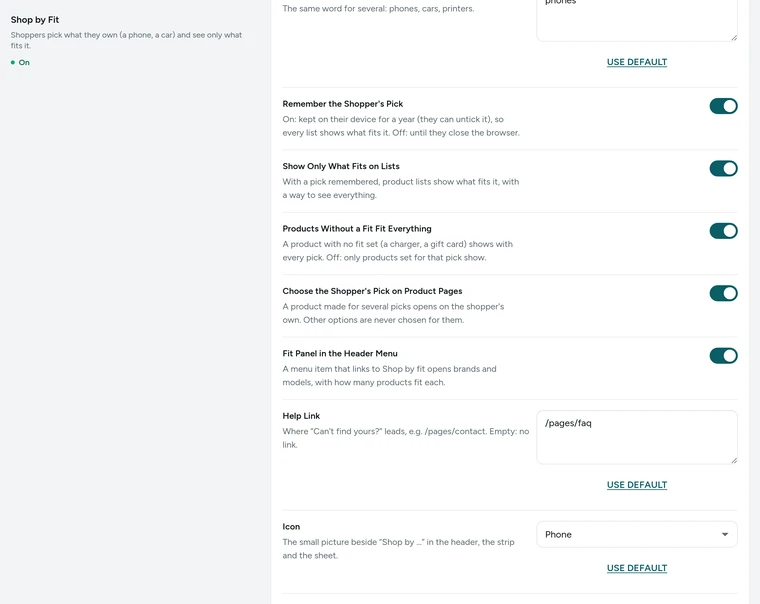
The Shop by Fit card in Settings → Online Store, on Kosha, a demo store on Mercayo. Build Your Fit List
In Products → Fit List, press ADD BRAND, then ADD MODEL for each model: its name as shoppers know it, a short name for tight spaces, Other Names (model numbers, short names, with commas), Show it among the popular ones, and a small upright picture. Reorder brands and models as you like. Every change is saved at once.
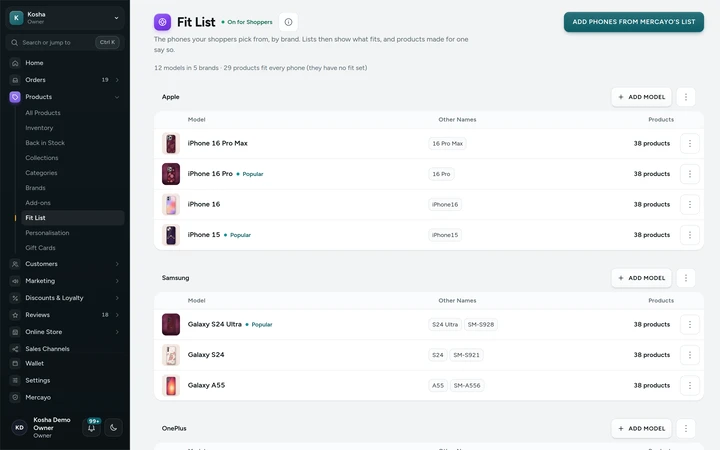
The Fit List with brands, models and their product counts, on Kosha, a demo store on Mercayo. Say What Fits Each Model
A product whose option values name models (an option "Phone model" with a value per model) fits them through that option. For a product that fits several models as a whole, open its Fits card in the product editor and CHOOSE the models, or open a model in the Fit List and ADD PRODUCTS to it in bulk. The Fit List shows each model's exact count and how many fit it as a whole.
Add the Fit Panel and Picker
In Menus, add the store page "Shop by fit" under a top-level item (for example under Cases), and that item opens the fit panel with brands and models on computers. On the home page, add the model picker section in the page editor. Set a Help link (for example your contact page) for "Can't find yours?".
Decide How the Pick Behaves
Keep Remember the shopper's pick on to keep it for a year (shoppers can untick it), or off to keep it until the browser closes. Show only what fits on lists narrows lists to the pick. Products without a fit fit everything keeps universal products in every list. Choose the shopper's pick on product pages opens a product on their model; other options are never chosen for them.


Your shoppers
What Your Shoppers See
On the home page a strip asks "Which phone do you have?" (in your word). The shopper taps PICK, searches or swipes to their brand, taps their model and presses SHOP FOR their model. From then on, every list says how many products fit it, cards made for it carry a "Fits" mark, and product pages open on their model. A pill in the header on computers shows their pick, and CHANGE or "Forget my phone" is always one tap away.

Settings
Settings You Control
All are under Settings → Online Store → Shop by Fit.
Mercayo
Mercayo's Controls
Every Shop by Fit setting follows Mercayo's rule: Mercayo's override for your store if there is one, then your choice, then the default; a locked setting shows its reason in your admin and each change is in Mercayo's audit log. Mercayo sets how many models a store's fit list may hold (500 to start with; brands up to 100). Mercayo never edits your fit list or decides what fits what: that is your store's own data, and the counts come straight from your products.
Limits today
Good to Know Before You Start
- The pick is kept on the shopper's device, not in their account, so it does not follow them to another device.
- Home page product rows are not narrowed to the pick; product lists, search and product pages are.
- Each store builds its own fit list; Mercayo does not provide a ready-made list of models.
- A shopper picks one model at a time.
Questions
About Shop by Fit
Is this only for phone cases?
No. Name what shoppers pick in your own word (car, printer, laptop, bike, watch) and every sentence uses it: "Which car do you have?", "Fits your Creta". Kosha, a demo store of phone cases, is only one example.
What about products that fit every model?
Products with no fit set fit every model and show with every pick, like a charger or a gift card. They are counted separately, so a model's count is only what is made for it. Switch Products without a fit fit everything off if you want strict lists.
Can one product fit several models?
Yes, two ways: an option with a value per model (each value a variant), or as a whole, for one item that fits several models, set in the product's Fits card or in bulk from the Fit List.
Can shoppers still see everything?
Yes. Every narrowed list has SHOW ALL, which still marks what fits their model. They can also change or forget their pick at any time.
Will shoppers find their model if they type a model number?
Yes, if you add it under Other Names. Up to 12 other names per model are searched in the picker, such as model numbers and short names.
Does it slow down my store?
No. Pages that depend on the pick are kept ready for each model, so a shopper with a pick gets the right page straight away, without a flash of the wrong products.
Related
Related Features
- Collections and FiltersEvery list of products gets filters with exact counts, quick chips, sorts, badges and LOAD MORE, the same on collections, categories, sale and search.
- Product PagesPhotos that zoom, options that never guess, delivery dates by PIN code, a buy bar that follows and rows of related products, on every product.
- Menus and Mega MenuBuild header, phone and footer menus up to three levels deep, with pictures, tags and icons, and a mega menu panel on computers.
- ProductsA fast product list with a health strip, saved views and bulk changes you can undo, and an editor for options, variants, photos, descriptions and SEO.
- Store SearchInstant, typo-tolerant search with pictures and prices, your own synonyms, pinned and hidden results, and searches that open a page directly.
More in Online Store: Product Pages · Product Stories and Details · Collections and Filters · Store Search · Wishlist · Customer Accounts · After the Order · Content Pages and Blog · Personalisation · Shoppable Videos · Languages and Currencies · Installable Store · Page Speed · Search Engines · URL Redirects · Opening-Soon Page · Custom Domains
Try It on Your Own Store
Every feature is in every plan, free for 14 days.