Sell to Businesses (B2B)
Trade Prices, Quotes and Credit for Business Buyers
Shops, offices and kitchens buy differently from shoppers: in cases, at agreed prices, often on credit. Mercayo lets the same store sell to both. Businesses apply with their GSTIN, you approve each one, and its people buy at their own prices, ask you for quotes and pay within their terms.
- In every plan
- Free for 14 days


Kosha is a demo store on Mercayo. Its products, orders and customers are sample data.
In short
What It Does
B2B selling is a set of tools that switch on together for the businesses you approve. Your shoppers keep the store exactly as it is.
- Business accounts. A signed-in shopper applies from My Account → Business or your store's trade accounts page at /business, with the business's legal name, trade name, GSTIN and address. The GSTIN is checked by its check character and its state, and one GSTIN has one account in your store. You APPROVE (with payment terms, a credit limit and a customer group), REJECT with a reason the business sees, SUSPEND or REINSTATE. Several people can buy for one business, each with their own sign-in: approvers run the account, buyers order.
- Price lists and groups. A price list takes a percentage off everything, plus fixed prices or percentages for chosen variants, products or categories; the most specific row wins and a list never raises a price. A customer group points at one list. Buyers see their prices on cards, product pages and in the bag, with your price struck through and a Trade tag.
- Who sees your catalogue. Everyone (a normal store), prices for approved buyers only, or the products themselves for approved buyers only.
- Minimum quantities and case packs, per product or variant, for business buyers (or for everyone).
- Quick Order and reorder. Buyers find items by SKU or name, paste or upload a list of SKUs and quantities, ADD ALL TO BAG, or REORDER a past order at today's prices. A business buyer's bag takes up to 9,999 of an item.
- Quotes. A buyer presses REQUEST A QUOTE in the bag; you set a price per item, the terms and a validity date, then SEND QUOTE (by email and WhatsApp). They order it at exactly those prices with ORDER AT THESE PRICES.
- Credit terms. An approved business on net 7, 15 or 30 days sees Pay Later at checkout, up to its credit limit. Each order becomes a due; you RECORD PAYMENT (bank transfer, UPI, cheque, cash) against the oldest dues first, reminders go out before and after the due date, and both sides get a statement of account with its ageing.
- PO numbers at checkout and on quotes, printed on the GST invoice, its credit notes and the packing slip.
The business's GSTIN, legal name and address go on its GST invoices, so its orders land on the B2B sheet of your GSTR-1 without any typing.
For your store
Why It Matters
Wholesale in India usually runs on WhatsApp messages, price lists in PDFs and a notebook of who owes what. That works for ten buyers and breaks at fifty: a retailer sees last month's prices, a hotel orders on the phone and nobody writes the PO number down, and chasing payments is a weekly round of calls.
Selling to businesses from your own store keeps one catalogue, one stock count and one set of GST invoices for both kinds of customer. Each business sees only its own prices (never shared with other visitors or cached for anyone else), orders when it suits them, and pays within the terms you agreed.
The money side matters most. A credit limit checked at the moment of ordering, dues that start from the invoice date, reminders that go out on their own and a statement both of you read the same way take the awkwardness out of asking to be paid.
Step by step
How It Works
Switch On Business Buyers
B2B is part of the Growth, Scale and Marketplace plans and an add-on on Starter (see Pricing). With it on your plan, open Customers → Businesses and switch on Business Buyers in the settings at the foot of the page. Choose Who Sees Your Catalogue, whether to Ask for a GSTIN, and the Payment Terms for New Businesses.
Make Your Price Lists
In Customers → Price Lists, press NEW PRICE LIST: a percentage Off Everything Else, then rows with a fixed price or a percentage off for a variant, a product or a category. Press NEW GROUP to make a customer group on that list. Each row shows your price beside what the buyer pays.
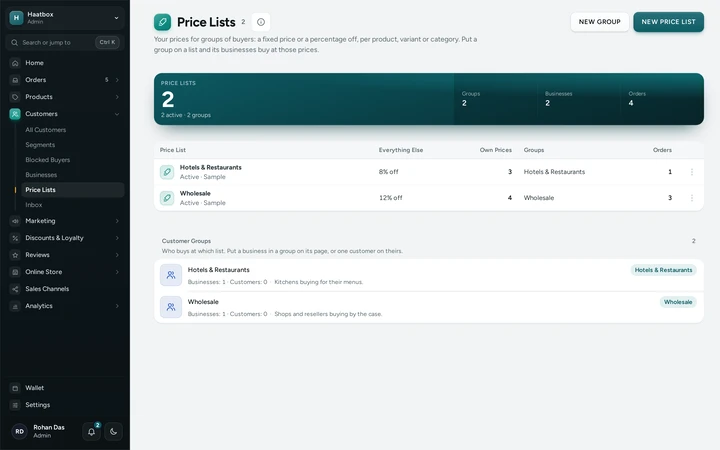
Customers → Price Lists with a Wholesale and a Hotels & Restaurants list and their groups, on Haatbox, a demo store on Mercayo. Approve Businesses
Applications arrive under Pending with an email to your team. Open one to see the details and the GSTIN check, then APPROVE with its terms, credit limit and group, or REJECT with a reason. ADD BUSINESS adds one you already know, approved at once, with its first person invited.
Set Minimums and Packs
On a product's page in the admin, the Minimum Quantities card sets a minimum order and a pack size for the product or each variant. The bag names any line that breaks a rule and offers to fix it, and checkout refuses an order that still does.
Price and Send Quotes
Quotes asked from a bag arrive in Orders → Quotes as Q-1001, Q-1002 and so on. Type a Quoted Price per item, choose the terms and Valid Until date, add conditions, and SEND QUOTE. If items are short of stock the quote says so before you send it.
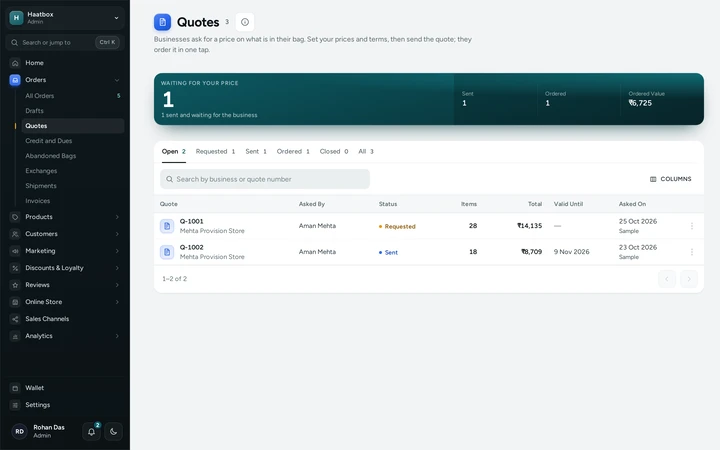
Orders → Quotes with one quote waiting for prices and one sent, on Haatbox, a demo store on Mercayo. Follow Dues and Payments
Orders → Credit and Dues shows what you are owed, what is overdue, what falls due this week and what was paid this month, by business and by order. RECORD PAYMENT on a business with the amount, the day, how they paid and the reference (a UTR or cheque number).
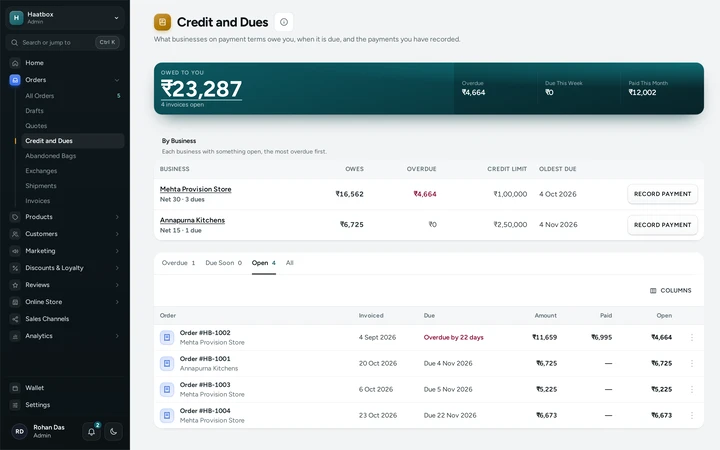
Orders → Credit and Dues with each business's open and overdue amounts, on Haatbox, a demo store on Mercayo.


Your shoppers
What Your Shoppers See
A business buyer signs in and sees your store at their prices, with your price struck through and a Trade tag, minimums and packs on the product page, and My Account → Business with Overview, Quick Order, Quotes and Statement. At checkout they see Pay Later with the credit left, and a box for their PO number. Everyone else sees your store as before, or, if you choose, a "Sign in to see trade prices" note in place of prices.

Settings
Settings You Control
All are under Customers → Businesses → settings.
Mercayo
Mercayo's Controls
Mercayo can set, limit or lock any of the settings above for your store, with a reason your admin shows, and grants the B2B add-on where a plan does not include it. Every price a buyer sees is worked out again in Mercayo's database when they order: the trade price is recorded as one offer on the order ("Trade price · Wholesale"), so the bag, the order, the GST invoice and any credit note match to the paisa. Pages showing a buyer's prices are never kept in the shared page cache. Mercayo never sees or moves the money a business owes you: payments are recorded by your team.
Limits today
Good to Know Before You Start
- One business buys at one price list; a business cannot have different lists for different products.
- Store offers do not stack on trade or quoted prices unless you switch that on.
- Payments against dues are recorded by your team; Mercayo does not collect them online.
- Credit terms are 7, 15 or 30 days; other terms are not offered.
- A quote's order and an order made by your team are not held to the minimum quantities.
Questions
About Sell to Businesses (B2B)
Which plans include B2B?
Growth, Scale and Marketplace include it; on Starter it is an add-on. The prices are on the Pricing page. Business GST invoices and reorders are on every plan.
Can other visitors see my trade prices?
No. A buyer's prices are worked out for that signed-in buyer only and are never stored in the shared page cache. With Who Sees Your Catalogue set to prices for approved buyers, nobody else sees a price at all, and your product feeds are switched off.
What stops a business going over its credit limit?
The limit is checked as the order is placed, counting every open due, while the business's account is locked for that one order. An order that would go over is refused and nothing is charged or held.
Do my discount codes work on trade prices?
Not by default: a code counts only the items in the bag at your own prices, and a bag of trade items is told the code does not apply to trade or quoted prices. Switch on Store Offers Also Apply to Quotes and Trade Prices to let them stack.
Does a business get a proper GST invoice?
Yes. An approved business's GSTIN, legal name and billing address go on its invoices, with its PO number, and the orders appear on your GSTR-1's B2B sheet.
Can I see what a business buyer sees?
Haatbox, a demo wholesale store, has a SEE IT AS A TRADE BUYER button on its trade accounts page that signs you in as a sample buyer for a day. Your own store never has that button.
Help Centre
In the Help Centre
Related
Related Features
- Business (B2B) InvoicesBusiness buyers add their GSTIN and legal name at checkout; the GSTIN is checked and the GST invoice names the business, ready for input tax credit.
- Quantity PricesSet a price per item by quantity, a sale price for chosen products, or more off as the bag grows, all shown on the product page and applied in the bag.
- Draft OrdersTurn a phone or WhatsApp order into a real order with an invoice, take cash on delivery or send a Razorpay link, and edit an order before it ships.
- CustomersEvery customer with their orders, spending and returned parcels, guests included, ready-made segments like VIP and RTO-Prone, tags, notes, credit and export.
- MarketplaceSellers apply with PAN, GSTIN and bank details, sell from their own panel after your approval, and are paid by statement with commission and TCS worked out.
More in Online Store: Product Pages · Product Stories and Details · Collections and Filters · Store Search · Shop by Fit · Wishlist · Customer Accounts · After the Order · Content Pages and Blog · Personalisation · Shoppable Videos · Languages and Currencies · Installable Store · Page Speed · Search Engines · URL Redirects · Opening-Soon Page · Custom Domains · Change Domain · Marketplace · Digital Products · Selling Abroad · Dependent Dropdowns
Try It on Your Own Store
Every feature is in every plan, free for 14 days.