Customer Accounts
Shopper Accounts With No Password to Forget
Passwords are the reason many shoppers never make an account. On Mercayo they type a 6-digit code sent to their email or phone, or tap Google, and their orders, invoices and saved addresses are there.
- In every plan
- Free for 14 days

Kosha is a demo store on Mercayo. Its products, orders and customers are sample data.
In short
What It Does
Every Mercayo store has shopper accounts, switched on from the first day. There is no password anywhere: a shopper proves who they are with a one-time code, or with their Google account.
The ways in, in the order the sign-in page offers them:
- Continue with Google, once Mercayo has Google sign-in set up and your store allows it.
- An email code: a 6-digit code sent to their email.
- Their mobile number (+91): the code goes on WhatsApp first, and by SMS when WhatsApp cannot deliver it.
A code lives 10 minutes, allows 5 wrong tries and works once. It is never stored: only a salted fingerprint is kept.
What the account holds, as tabs at the top of the page (one row that swipes on a phone):
- Overview: a greeting, the latest orders and a link to all of them.
- Orders: every order with its status, total and date, each opening the order's own page with its tracking, GST invoice and credit notes, cancel, BUY AGAIN and returns or exchanges.
- Credit, Rewards and Gift Cards, when your store offers store credit, rewards or gift cards.
- Addresses: up to 10 saved addresses (Home, Work or Other), one of them the default, ready at checkout.
- Profile: name, email, the choice to get offers and news, the ways to sign in, SIGN OUT, SIGN OUT ON ALL DEVICES and DELETE MY ACCOUNT.
Guest checkout stays open. When a shopper later signs in with the phone number or email they used as a guest, their earlier orders join the account by themselves.
For your store
Why It Matters
Most shoppers in India buy on a phone, and many of them have never set a password for a shop and never will. A one-time code is a habit they already have from banking and UPI apps; asking for a password at the end of a purchase loses people.
An account still matters, for them and for you:
- "Where is my order?" gets answered by the shopper, on their own phone, instead of by your team on WhatsApp.
- GST invoices and credit notes are a tap away when a business buyer or a shopper claiming a warranty needs them.
- Saved addresses make the next checkout quicker.
- Store credit, rewards and gift cards need somewhere to live, and a shopper who can see their balance comes back to spend it.
Because accounts are per store, a shopper who buys from two Mercayo stores has two separate accounts. Nothing about their purchases with you is visible to another store, and nothing from another store reaches yours.
Step by step
How It Works
Choose the Ways to Sign In
Open Settings → Shopper Accounts. In the Shopper Accounts card, Shopper accounts is on, and so are Sign in with an email code, Sign in with Google and Sign in with a phone code. Switch off any way you do not want. If you switch off both email and phone, email stays on, so a shopper without a Google account is never locked out. Send phone codes on WhatsApp first is on; switch it off to send phone codes by SMS only.
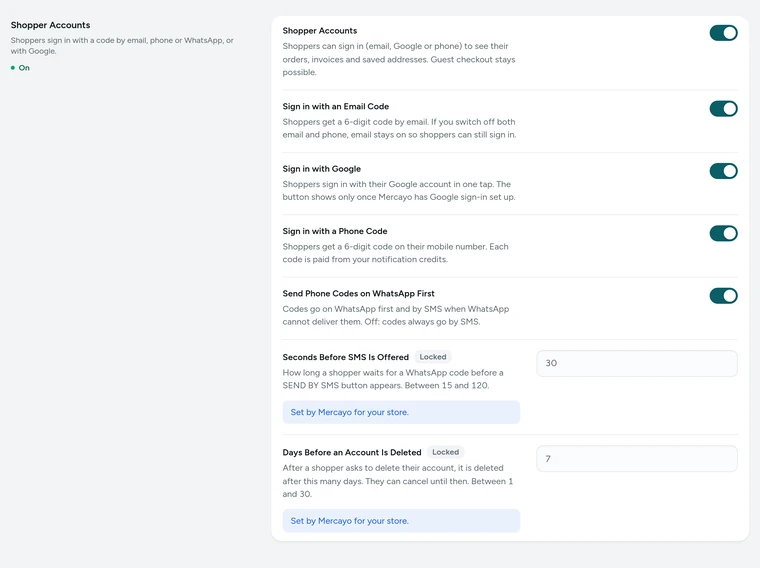
The Shopper Accounts card in Settings → Shopper Accounts, on Kosha, a demo store on Mercayo. A Shopper Signs In
The account icon in your header (or the phone menu) opens Sign In. The shopper types their email and presses SEND CODE, or chooses USE MY MOBILE NUMBER, or CONTINUE WITH GOOGLE. A code by email says to look in spam if it is not there. A code on WhatsApp says to open the message and tap Copy code; if it has not arrived after 30 seconds, SEND BY SMS appears. They type the code and press SIGN IN. A first-time shopper can add their name.
Earlier Orders Join the Account
If the shopper bought from you as a guest with the same phone or email, those orders are added at sign-in, and the page says so ("We added 2 of your earlier orders to your account"). There is no separate step to turn a guest into a customer. The account stays signed in on that device for 30 days after its last use, and never longer than 180 days without a fresh sign-in.
Orders, Invoices and Addresses
Orders lists every order with its first pictures and a BUY AGAIN button. Each order opens its own page: the status and courier timeline, the items and the money, DOWNLOAD INVOICE and every credit note as a PDF, and the actions the order allows. Addresses keeps up to 10 addresses with a label, a landmark and a default. At checkout, a signed-in shopper picks one instead of typing it again.
More Ways to Sign In, Inside Your Store
In Profile → Ways to Sign In, a shopper who joined with an email can add their mobile number (and the other way round), each confirmed with a code. Google shows as linked once used. An email or phone already confirmed by another account in your store is refused: accounts are never merged by guesswork, so a mistyped email can never open someone else's account.
Deleting an Account
Profile → Delete My Account lists, before anything happens, what is deleted (name, mobile number, email, addresses, ways to sign in, the name on reviews they wrote) and what the store must keep and why: orders, GST invoices and payment records, for 8 years under India's tax law, without the shopper's name, number, email or street address. It also shows any store credit that will be lost. The shopper confirms with a code; the account is deleted 7 days later and can be kept with CANCEL DELETION until then. An order still on its way must be delivered or cancelled first.

Your shoppers
What Your Shoppers See
Shoppers see an account icon in your header. Sign In asks for one thing at a time: their email, or their mobile number, then the 6-digit code. There is no password to make and none to forget. Once signed in, the page greets them by name and shows their latest orders, with tabs for orders, addresses, profile and, where your store offers them, credit, rewards and gift cards. Every order opens with its tracking and documents. Their profile lets them change their details, choose whether to get offers, sign out on every device, or delete their account after reading exactly what is deleted and what the store keeps.

Settings
Settings You Control
All are under Settings → Shopper Accounts → Shopper Accounts.
Mercayo
Mercayo's Controls
The sign-in settings follow Mercayo's one rule for settings: Mercayo's override for your store if there is one, then your choice, then the default. Mercayo's team can switch shopper accounts or any way of signing in on or off for your store, with a written reason your admin shows beside the locked setting; each change is kept in Mercayo's audit log. Two values are Mercayo's alone: how long a shopper waits before SEND BY SMS appears (30 seconds to start with, 15 to 120) and the days before a deleted account goes (7, from 1 to 30). Neither Mercayo nor your team can sign in as a shopper, and nobody can read a code: only its fingerprint is kept, for the minutes it lives.
Limits today
Good to Know Before You Start
- Phone codes are for Indian (+91) numbers: on WhatsApp first, then by SMS on Mercayo's registered template.
- The Google button appears only after Mercayo has finished setting up Google sign-in.
- There is no sign-in with a password or with Apple, and two accounts in one store cannot be merged.
- An account belongs to one store: a shopper of two Mercayo stores signs in to each separately.
- When an account is deleted, the store credit left on it is lost; the page says so before the shopper confirms.
Questions
About Customer Accounts
Do shoppers have to make an account to buy?
No. Guest checkout is always open. An account is there for shoppers who want their orders, invoices and addresses in one place, and when they sign in later with the same phone or email, the orders they placed as a guest join the account by themselves.
Why no passwords?
A one-time code is safer and easier: there is no password to be guessed, reused from another site or forgotten. Each code lives 10 minutes, allows 5 wrong tries, works once and is never stored, only a fingerprint of it. A phone or email can ask for 3 codes in 15 minutes, which stops floods of messages.
Does each sign-in cost me anything?
A code by email, SMS or WhatsApp is a message from your store, so it counts like your order messages: first against the messages your plan includes, then your notification credits. Google sign-in sends no message. You can switch any way off in Settings → Shopper Accounts.
Can I see my shoppers' accounts?
Your team sees customers in Customers, with their orders and the details they gave, as your staff roles allow. Nobody, on your team or at Mercayo, can sign in as a shopper or see their codes. A shopper adds or changes their own email or phone in their profile, and each is confirmed with a code before it can be used to sign in.
What happens when a shopper deletes their account?
After a code and a 7-day wait they can cancel, their name, number, email, addresses and sign-ins are removed from your store. Orders, GST invoices and money records stay for 8 years, as India's tax law requires, without their personal details, and your admin shows "Deleted customer" where the name was. Their accounts in other stores are not touched.
Is a shopper's account shared between Mercayo stores?
No. Each store's accounts are separate and kept apart by the database itself. The same person with the same phone has a separate account in each store, and no store can see what they bought elsewhere. If they delete their account in your store, their accounts in other stores stay exactly as they are.
Are account pages slower than the rest of the store?
Account pages are personal, so they are never kept in the shared page cache; they load the shopper's own data after the page opens. Your product and list pages stay cached and fast for everyone, signed in or not. The account pages' own code loads only when a shopper opens them.
Related
Related Features
- After the OrderOne page per order with its status, items, money and GST documents, plus cancel, BUY AGAIN, reviews, returns and exchanges for the shopper.
- WishlistShoppers save products with a heart, signed in or not, find them in a drawer and a page, and share a read-only link with family and friends.
- Google Sign-InShoppers sign in to your store with their Google account in one tap: no password, no code to wait for, and their own account in your store.
- Store CreditGive shoppers a balance with your store: instant refunds without bank details, goodwill credit, cashback and referral rewards, spent at checkout.
- CustomersEvery customer with their orders, spending and returned parcels, guests included, ready-made segments like VIP and RTO-Prone, tags, notes, credit and export.
- Privacy and ConsentA cookie banner written for India's DPDP Act, marketing tags only after consent, double opt-in for subscribers, and a Delete My Account that really deletes.
More in Online Store: Product Pages · Product Stories and Details · Collections and Filters · Store Search · Shop by Fit · Wishlist · After the Order · Content Pages and Blog · Personalisation · Shoppable Videos · Languages and Currencies · Installable Store · Page Speed · Search Engines · URL Redirects · Opening-Soon Page · Custom Domains
Try It on Your Own Store
Every feature is in every plan, free for 14 days.
