URL Redirects
Old Links Keep Working When Addresses Change
Every link to your store, in a Google result, an old WhatsApp message or an Instagram bio, should land somewhere useful. Mercayo sends old addresses to their new pages, and makes the redirect for you when you rename a product or page.
- In every plan
- Free for 14 days


Kosha is a demo store on Mercayo. Its products, orders and customers are sample data.
In short
What It Does
A redirect sends a visitor who opens an old address on your store to a new one. Mercayo's redirects are permanent (301), the kind search engines follow and pass a page's standing on through.
Three ways a redirect is made:
- By you, one at a time: an old address on your store (such as /shop/summer) and where it goes, a page on your store (/collections/summer) or a full address starting with https:// on another site.
- From a file: a CSV with two columns, the old address and the new one, the way Shopify and most shops export them ("Redirect from,Redirect to"). Up to 2,000 rows and 1 MB a file. The file is checked first, with a report by row (New, Replaced, Already There, Need a Fix), and only then imported.
- Automatically: when you change the address of a product or a content page, its old address points at the new one. Collections and categories keep their old addresses the same way, and those show in the list too.
Rules that keep it safe:
- A redirect is used only where no page lives. A live page at an address is never hidden by a redirect, and live pages never pay the time of looking one up.
- No loops: a redirect that would send visitors round in a circle is refused.
- No chains: when a page moves twice, older redirects are moved to its newest address, so a visitor makes one jump, not three.
- An old address is a path on your store (lower case, without a query); the home page can never be redirected.
Changes work at once.
For your store
Why It Matters
When you move to Mercayo from another platform, every address changes: Shopify's /blogs/news, WooCommerce's /shop and /my-account/orders, an old /pages/about-us. Those old addresses live in Google's results, in posts you shared years ago and in shoppers' bookmarks. Without redirects, each becomes a page-not-found, and the visitor, and often the search ranking, is lost.
Redirects also protect the everyday work of running a store. Renaming a product to match what shoppers search for, or tidying a page's address, should not break the link a customer sent their friend on WhatsApp last month. Mercayo makes those redirects as you work, so you do not have to remember.
For a small team that just moved platforms, importing the old shop's redirect file in one go saves hours of copying addresses by hand.
Step by step
How It Works
Open URL Redirects
URL Redirects sits under Online Store → Menus; the Menus screen has a URL REDIRECTS button. The list shows each redirect's Old Address, where it Sends To, who Made it (You, A File, or an address change of a page, product, collection or category) and when it was last changed. Tabs: All, Made by You and Automatic, with a search over old and new addresses.
Add a Redirect
Press ADD REDIRECT. Type the Old Address (a full address is cut to its path) and the New Address: a path on your store or a full https:// address. Press SAVE: "Redirect added. It works at once." The same old address cannot have two redirects; edit the one already there. Try the Old Address opens it, so you can see the redirect work.
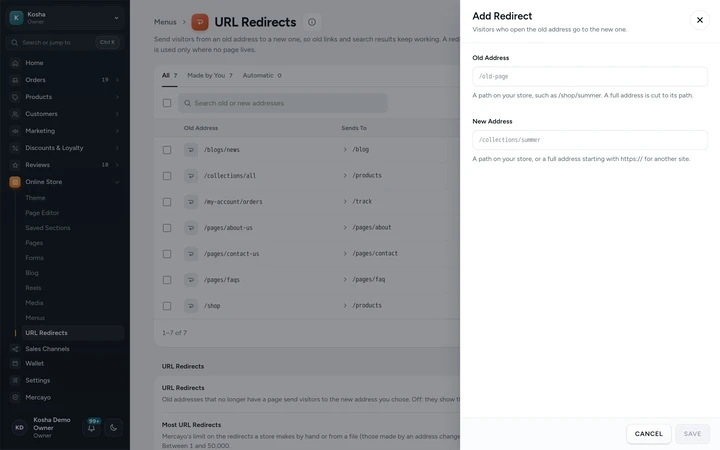
Adding a redirect in a side sheet, with the old and new address, on Kosha, a demo store on Mercayo. Import Your Old Shop's Redirects
Press IMPORT. Choose a CSV file or paste the rows, and tick Replace a redirect that already exists for the same old address if you want the file to win. Press CHECK FILE: every row is checked and the report says which are new, which would replace one, which are already there and which need a fix, with the row number. Press IMPORT with the count to bring in the good rows. EXPORT downloads all your redirects in the same format.
Rename Without Worry
Change a product's address in its editor, or a content page's in Pages → Title, Address and Search. Its old address now sends visitors to the new one, and any redirect that pointed to the old address is moved to the new one. These appear under Automatic. A redirect kept for a collection or category stays while it has that address; change the address itself to change it.
Delete What You No Longer Need
Select redirects for bulk delete, or delete one from its row. Visitors to that old address then see your page-not-found page, unless a page lives there. If you switch URL redirects off in the settings card on this screen, every old address shows the page-not-found page until you switch them back on; your redirects are kept.

Your shoppers
What Your Shoppers See
Shoppers never see a redirect at work. They open an old link from a Google result, a bookmark, an old Instagram post or a WhatsApp message, and land on the right page a moment later, as if the address had never changed. There is no page-not-found, no search for the product, no wondering whether the shop has closed. Their browser remembers the jump for an hour, so a second visit goes straight to the new page, and any part of the old link after a question mark is carried along when the new address has none.
Settings
Settings You Control
All are under Online Store → Menus → URL Redirects (settings card).
Mercayo
Mercayo's Controls
The switch follows Mercayo's rule: Mercayo's override for your store if there is one, then your choice, then the default; a locked switch shows its reason and the change is in Mercayo's audit log. One limit is Mercayo's alone: the redirects a store may make by hand or from files (5,000 to start with). Redirects made automatically by an address change are never counted against it.
Limits today
Good to Know Before You Start
- There are no wildcard redirects: each old address is redirected one by one.
- Mercayo does not count how often a redirect is used.
- A redirect works only on your store's own addresses, not for another domain you own that is not connected to the store.
- An old address cannot carry a query (the part after ?); visitors' query is passed on when the new address has none.
Questions
About URL Redirects
I am moving from Shopify. What do I do with my old links?
Export your old shop's redirects as a CSV file (Shopify's export has the same two columns, Redirect from and Redirect to) and import it here with IMPORT. Then add redirects for your old product and collection addresses that differ from the new ones, one by one or as rows in a file.
What happens if a page exists at the old address?
The page wins. A redirect is only used when the address has no live page, so you can never hide a live page by mistake. If you later unpublish or delete that page, the redirect starts working. Try the Old Address, on the redirect's row, shows you where a visitor ends up.
Can I redirect to another website?
Yes, to any address that starts with https://, such as your marketplace listing or a booking page. Addresses starting with http:// (without the s) are refused, to keep visitors on secure pages. A redirect to another site keeps the shopper's browser on a secure connection from start to finish.
Do I need to make a redirect when I change a product's address?
No. Changing a product's or a content page's address makes the redirect for you, and redirects that pointed to the old address are moved to the new one, so there are never chains of jumps. You can see these automatic redirects under the Automatic tab, and the old address keeps working until you delete its redirect.
Does a redirect hurt my Google ranking?
Mercayo's redirects are permanent (301), which is how search engines are told a page has moved for good. They then list the new address in place of the old one. Browsers remember the jump for an hour, so a change you make later still reaches shoppers soon.
How many redirects can I have?
Up to 5,000 made by you or from files, to start with. Redirects made by an address change do not count. If you are close to the limit, the screen says so before you add more. A redirect over the limit is refused with a message that says so.
Related
Related Features
- Search EnginesClean addresses, your own titles and descriptions, product details Google can read, a sitemap and link previews for WhatsApp, on every store.
- Content Pages and BlogWrite your About page, FAQ, contact page, guides and blog posts in the admin, from ready sections that match your store's look.
- Import and ExportImport products and customers from Shopify, WooCommerce or Dukaan with a preview first, copy their pictures, and export your store's data as one ZIP.
- Menus and Mega MenuBuild header, phone and footer menus up to three levels deep, with pictures, tags and icons, and a mega menu panel on computers.
- Custom DomainsConnect a domain you own, like yourbrand.in, with a guided DNS check and an automatic secure certificate; your free Mercayo address always keeps working.
More in Online Store: Product Pages · Product Stories and Details · Collections and Filters · Store Search · Shop by Fit · Wishlist · Customer Accounts · After the Order · Content Pages and Blog · Personalisation · Shoppable Videos · Languages and Currencies · Installable Store · Page Speed · Search Engines · Opening-Soon Page · Custom Domains
Try It on Your Own Store
Every feature is in every plan, free for 14 days.