Commissions lists every affiliate's commissions in one place, so you can approve or pay many at once instead of opening each affiliate. Open Marketing › Affiliates and press COMMISSIONS. Seeing it needs the affiliates right; approving and marking paid need the right to manage affiliates (the owner and admins).
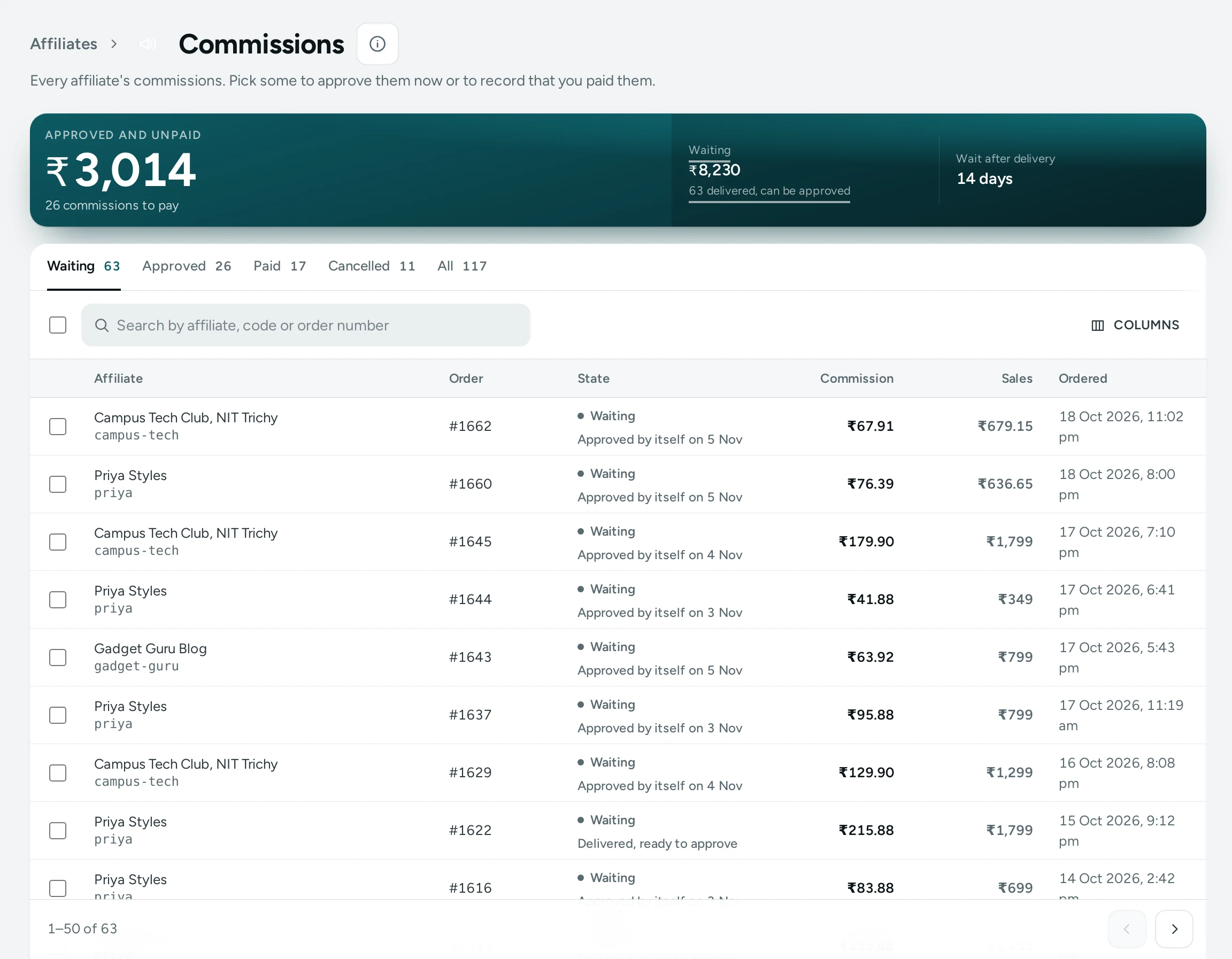
The List
- Tabs: Waiting, Approved, Paid, Cancelled and All, each with its count.
- The top strip: what is approved and still unpaid, what is waiting, how many waiting ones are already delivered, and your waiting days after delivery.
- Each row: the affiliate and their code, the order, the state ("Delivered", "Approved by itself on 14 Nov", "Not delivered yet"), the commission, the sales it is on and when it was ordered.
- Search by the affiliate's name, their code or an order number.
Approve Many at Once
- Open Waiting and tick the commissions you want, or tick the box at the top and select all that match (up to 500).
- Press APPROVE.
Commissions whose order is delivered are approved now, before their waiting days end, on what is left after any refunds: use this when you judge a return unlikely. Orders not delivered yet stay waiting, and the notice says how many: "6 commissions approved. 2 were left waiting: their orders are not delivered yet."
Mark Many Paid
- Pay your affiliates outside Mercayo, by UPI or bank transfer.
- Open Approved, tick the commissions you paid (or select all that match) and press MARK PAID.
- Choose the Method, type the Payment Reference, the Paid On date (not in the future) and a note if you like, and press MARK … PAID.
Each affiliate gets one payout record with the commissions you picked, so their sheet and the payout report show exactly what was paid. The total must still be what the screen showed: if a commission changed meanwhile, nothing is paid and you are told the new amount. Pressing twice never pays twice.
Undo
The notice after a bulk change has UNDO, and Recent Changes lists the changes of the last hour, each with UNDO:
- an approval goes back to waiting (only the commissions still approved and unpaid);
- a payment removes the payout records it made, and its commissions are approved again, as long as nobody changed those payouts since.
After an hour a change cannot be undone here. Every bulk change and undo is in your activity log.
Questions
Does Mercayo send the money?
No. Mercayo records that you paid; you pay affiliates yourself.
Why were some commissions left waiting?
Their orders are not delivered yet, or were refunded in full. A commission is only approved for a delivered order.
Can I approve a commission and still let a return cancel it?
An approved commission is frozen on what was left after refunds at that moment. Wait for the waiting days to pass (they approve by themselves) if returns are common for you.