Popup and Forms sets up the ways shoppers join your list, and the small floating buttons on your store: "The sign-up popup, the footer's sign-up band and the floating chat buttons on your store." Open it from Marketing › Subscribers › Popup and Forms, or POPUP AND FORMS on the Subscribers screen. Anyone who can see settings can look; changing it needs the settings right ("You can see the popup but not change it.").
Popup Content
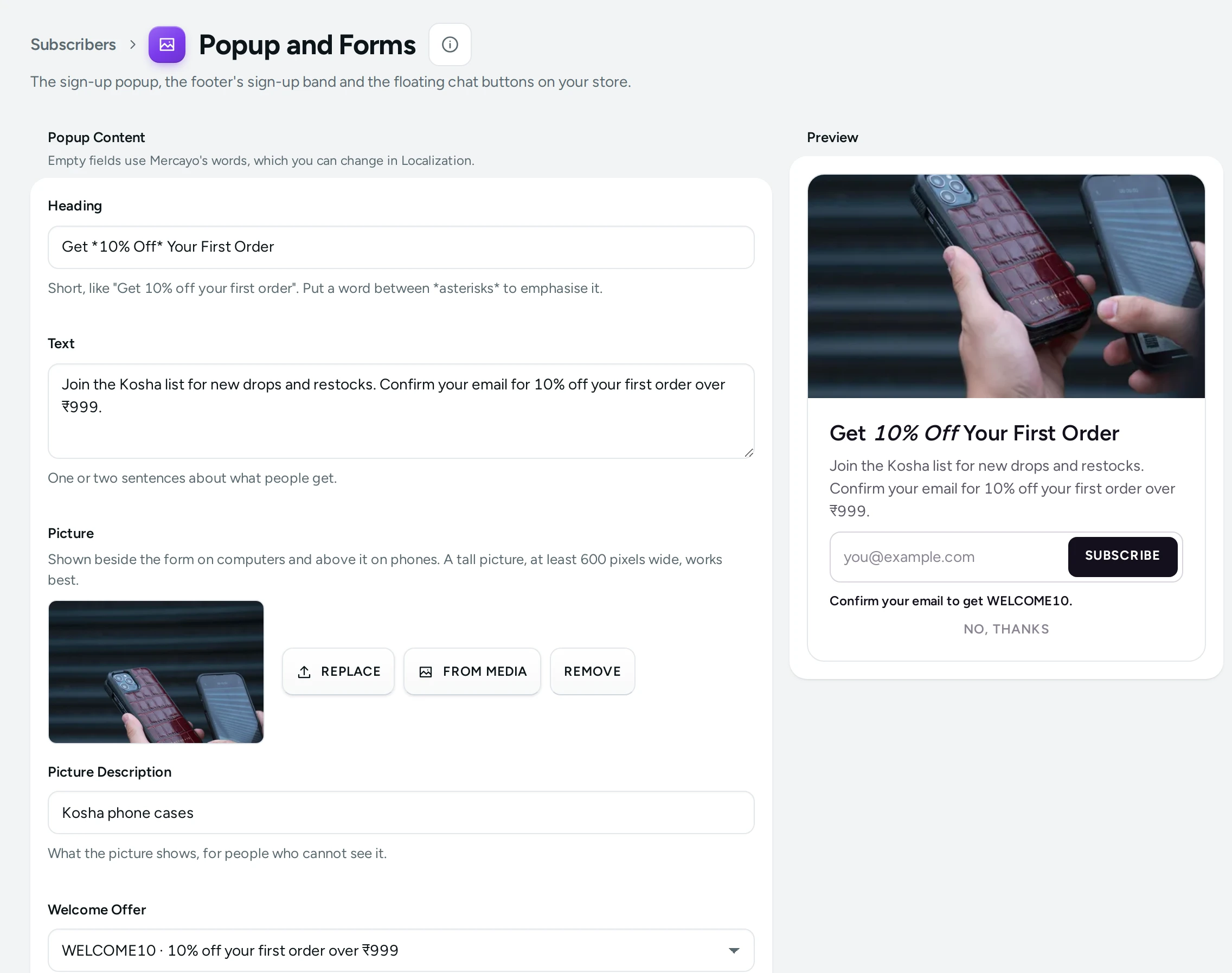
The left side holds the words and picture; the Preview on the right shows the popup as shoppers will see it, as you type. "Empty fields use Mercayo's words, which you can change in Localization."
| Field | What It Does | When Empty |
|---|---|---|
| Heading | Short, like "Get 10% off your first order". Put a word between *asterisks* to emphasise it | "Be the First to Know" |
| Text | One or two sentences about what people get | "Join the list for new products, restocks and offers before anyone else." |
| Picture | Shown beside the form on computers and above it on phones. A tall picture, at least 600 pixels wide, works best (UPLOAD, REPLACE, REMOVE) | No picture |
| Picture Description | What the picture shows, for people who cannot see it | |
| Welcome Offer | A discount code shown to people once they have confirmed. Only codes of live discounts are listed ("… (not live now)" otherwise) | No offer |
The popup's buttons are SUBSCRIBE and NO, THANKS. With a welcome offer, the preview says "Confirm your email to get WELCOME10."
Save with the save bar: "Popup saved. Your store shows it at once." If a teammate saved in between: "Someone saved the popup after you opened it. Reload to see their changes."
When and Where It Opens (Sign-up Popup)
The popup is off for a new store. While off, the preview says "The popup is off. Turn on Sign-up Popup below to show it on your store."
| Setting | What It Does | Default |
|---|---|---|
| Sign-up Popup | A window asking shoppers to join, shown at most once a visit and never on the bag, checkout, account or policy pages | Off |
| Popup Asks For | Email or WhatsApp number | |
| Show After Seconds | Seconds on a page before it opens; 0: not by time (0 to 300) | 12 |
| Or After Scrolling (%) | Opens once a shopper has scrolled this far, if that comes first; 0: not by scrolling | 0 |
| When Leaving the Page (computers) | Also opens when the pointer heads for the browser's tabs or address bar | On |
| Show On | All shopping pages, Home page only, Home page and product lists, Product pages only | All shopping pages |
| From Page Number | Opens only once the shopper has seen this many pages in the visit (1 to 10) | 1 |
| Days Before It Shows Again | After a shopper closes it; 0: on their next visit. Never again once they have signed up | 7 |
| On Phones | On phones it rises from the bottom as a sheet that closes with one tap. Off: computers and tablets only | On |
A good start for most stores: after 12 seconds or 50% scroll, from the second page, every 7 days.
Sign-up Forms
| Setting | What It Does | Default |
|---|---|---|
| Sign-up Forms | The footer band, the popup and sign-up sections. Off: none is shown | On |
| Confirm Emails by a Link | An email joins only after its owner taps the confirmation link | On |
| Sign-up Band in the Footer | A band at the top of every page's footer asks shoppers to join | On |
| Footer Band Asks For | Email or WhatsApp number |
Floating Buttons
Small round buttons fixed in a corner of your store. They always rise above the page's own sticky bars (such as the product page's ADD TO BAG bar).
| Setting | What It Does | Default |
|---|---|---|
| WhatsApp Chat Number | With the country code, like +91 98765 43210. A round WhatsApp button opens a chat with it. Empty: no button | Empty |
| First Message | What the chat starts with, like "Hi, I have a question". The shopper can change it | Empty |
| Back to Top Button | Appears after scrolling down two screens and takes the shopper back to the top | On |
| Side for the Buttons | Right or Left | Right |
| Floating Link Label | A pill in the other corner on computers, like "Shop bestsellers". Empty: no pill | Empty |
| Floating Link Goes To | A page of the store, like /collections/bestsellers. Hidden on that page and on product pages | Empty |
What Shoppers See
The popup opens once, by your rules, with your heading, text and picture; on phones as a bottom sheet. After signing up by email they get a confirmation email; after confirming, they see your welcome code. The popup never opens on the bag, checkout, account or policy pages, and never again for someone who signed up.
Questions
Why does the popup not show on my store?
Check that Sign-up Popup and Sign-up Forms are on, that you are on a page it is set to show on, and that you have not closed it in the last Days Before It Shows Again: try a private browser window.
Can the popup ask for a WhatsApp number instead?
Yes: set Popup Asks For to WhatsApp number.
Where do sign-ups go?
To Subscribers, with the record of their consent.