Store credit is money a customer holds with your store and spends at checkout. It comes from refunds you give as credit, cashback, referral and rewards perks, and credit you give yourself (for a late parcel, say). Credit keeps the money in your store instead of going back to a bank account, and shoppers like it because it needs no bank details. Open Customers › Store Credit: "What customers hold to spend at checkout, and every credit added or used."
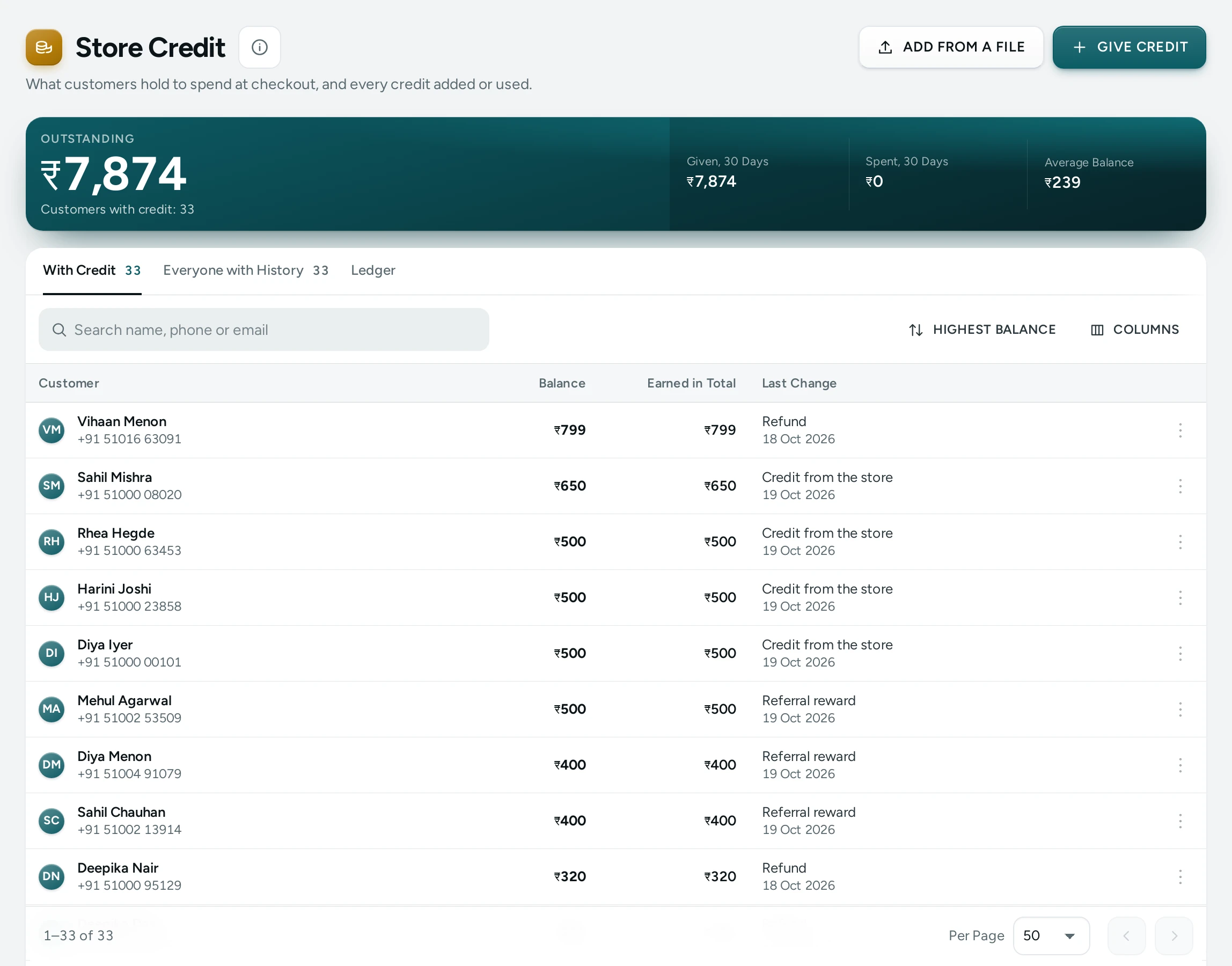
The Totals
| Number | Meaning |
|---|---|
| Outstanding | What customers hold now and can spend at checkout, with how many customers have credit. Store credit never expires. |
| Average Balance | What a customer with credit holds, on average |
| Given, 30 Days | Credit added in the last 30 days: refunds, cashback, rewards and credit from the store. Spends put back by a cancelled order are not counted. |
| Spent, 30 Days | Credit used at checkout in the last 30 days, less what came back from cancelled orders |
The Tabs
- With Credit: customers holding a balance, with Balance, Earned in Total and Last Change. Sort by Highest balance, Recent change or Name A–Z; Search name, phone or email.
- Everyone with History: everyone whose credit ever moved, including those now at zero.
- Ledger: every movement, newest first: Date, Customer, What (the reason), Amount (Added or Taken off), Balance after it, By (Store team or Automatic) and the order when there is one. Filter by Direction and Reason, or Search name, phone, email or note.
Reasons you will see: Refund, Credit from the store, Cashback, Referral reward, Rewards perk, Gift card, Spent on order #…, Returned from order #…, Taken back.
Give or Take Back Credit
- Press Give or take back credit.
- Type the Customer's Mobile Number (10 digits) and press FIND. "Find the customer by mobile number. Credit given to a new number waits for them."
- Choose What to Do: Give credit or Take credit back.
- Type the Amount (₹) and a Reason (at least 3 letters).
- Confirm: "Give ₹250 to Priya? Their balance becomes ₹400." with the reason.
"Done. ₹250 credit given. The balance is now ₹400." Taking back cannot go below zero ("Only … is there to take back."), and the movement stays in the history.
If the number has no account yet: "This customer has no account or credit yet. If you give credit, it waits for them and shows when they sign in with this number."
One movement can be at most Most One Staff Credit Can Be (₹10,000 by default): "One go can be up to …". Pressing save twice never gives twice ("That was already saved.").
You can also give or take back credit from a customer's page. Giving credit needs the right to give or take back store credit (the owner and admins, or a role you give it to).
Give Credit from a File
ADD FROM A FILE opens Store Credit from a File: "Check first: nothing is given until every row is right. Then all of it is given at once."
- The File: "A CSV with a phone number and an amount in rupees on each row, and a note if you want one. Up to 1,000 rows." (DOWNLOAD TEMPLATE gives one to fill in; at most 512 KB.) Or select customers on the Customers list and press GIVE STORE CREDIT, then choose How Much: The same amount to each or A share of what each spent (in whole rupees, rounded down).
- A Reason ("Diwali thank you") for rows without a note of their own.
- CHECK shows What Will Be Given: customers, the total, how many have no account yet, and Rows to Fix (for example "Not a phone number", "Use whole rupees", "This phone is on an earlier row").
- If any row is wrong: "Nothing Is Given Yet". Fix the file and choose it again.
- GIVE … gives it all at once: "… of store credit was given. Customers: …". Customers without an account get their credit when they first sign in with that phone.
Each row is held to Most One Staff Credit Can Be, and one file to Most Credit in One File (₹5,00,000 by default). Recent Files lists what was given.
What Shoppers See
A signed-in shopper sees their balance in their account and can use it at checkout to pay part or all of an order, within your limit on how much of an order credit may pay.
Settings
In Settings › Rewards and Credit:
| Setting | What It Does | Default |
|---|---|---|
| Store Credit | Shoppers can hold a balance with this store and see it in their account | On |
| Spend Credit at Checkout | A signed-in shopper can pay part or all of an order with credit | On |
| Most of an Order Credit Can Pay | The largest share of one order credit may pay; 100% means all of it | 100% |
| Most One Staff Credit Can Be | The largest amount staff can give or take back in one go | ₹10,000 |
| Most Credit in One File | A file of credits that adds up to more than this is refused; each row is also held to the limit for one credit | ₹5,00,000 |
| Refund to Store Credit | The refund screen offers to give the money back as store credit | On |
With store credit off, the screen says Store Credit Is Switched Off: "Customers cannot spend credit at checkout and none can be given. Balances stay as they are." See Rewards and Credit Settings.
Questions
Does store credit expire?
No. Store credit never expires.
Is store credit the same as a gift card?
No. Credit belongs to one customer's account; a gift card is a code anyone holding it can use. See Gift Cards.
What happens to credit spent on an order that is cancelled?
It goes back to the customer's balance, shown as Returned from order #….
Can I give credit to someone who has never shopped with me?
Yes, by mobile number. It waits for them and shows when they sign in with that number.