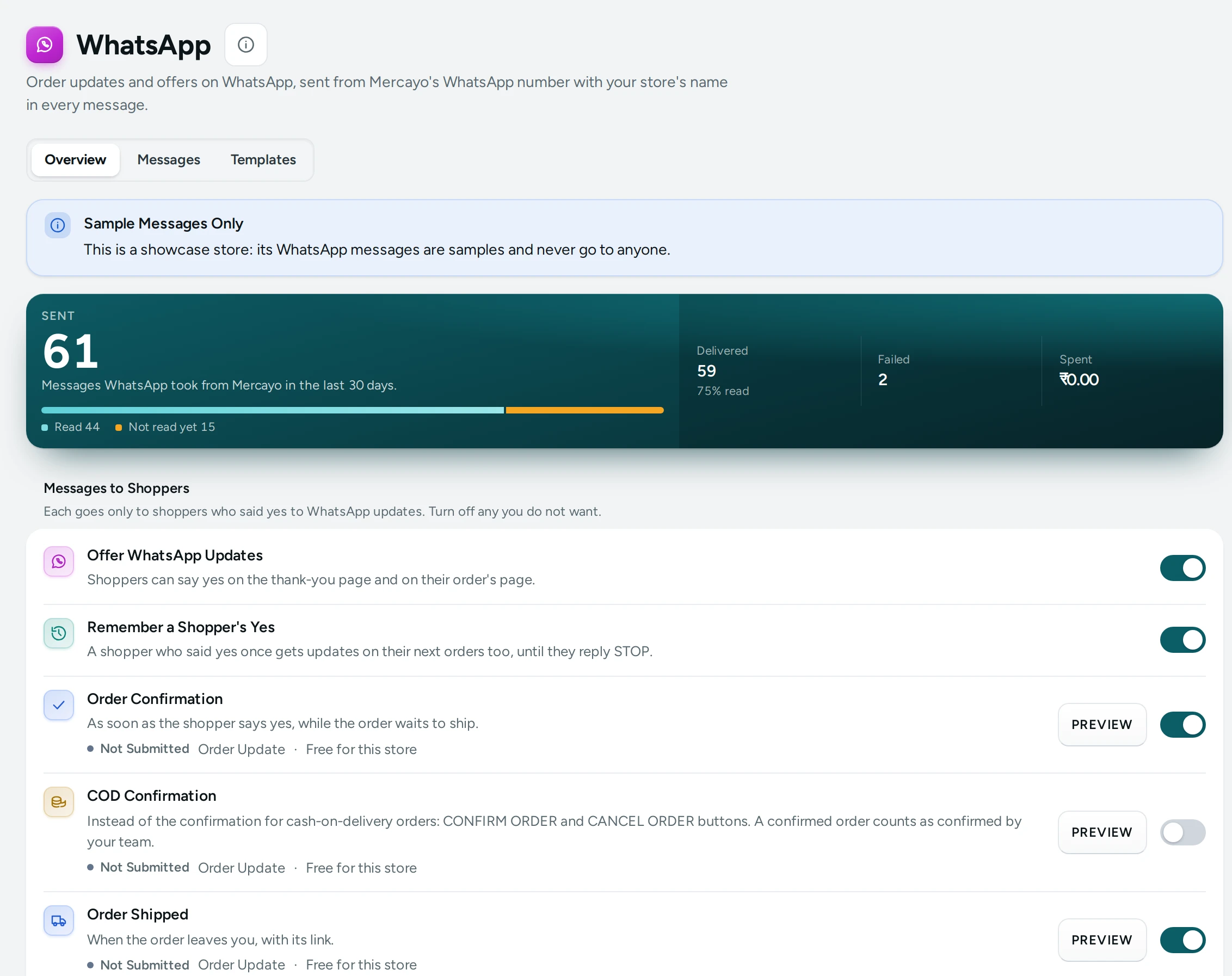
Indian shoppers read WhatsApp first. This screen controls every WhatsApp message your store sends: the order confirmation, the COD question with CONFIRM ORDER and CANCEL ORDER buttons, shipped, out for delivery and delivered updates, bag reminders, sign-in and COD codes, back-in-stock alerts, and offers to your WhatsApp subscribers. Messages go from Mercayo's WhatsApp number with your store's name, picture and buttons in every message, or from your own number once you connect it. Open it from Marketing › WhatsApp; on a phone it is under More.
The screen opens for anyone who can see settings, orders or discounts: the owner, admins and the Marketer, Order Manager and Customer Support roles. Turning messages on or off needs the right to change settings, which the owner and admins have. MESSAGES (the log) needs the right to see orders.
What Decides Whether a Message Goes
- The message's template is approved by WhatsApp. WhatsApp only lets businesses send words it approved. Each message shows its template's state: Approved, Waiting for Approval, Not Submitted, Rejected, Paused by WhatsApp or Turned Off by WhatsApp. Mercayo's order updates, COD buttons, bag reminders, back-in-stock alerts and sign-in codes are approved in English and Hindi; Mercayo submits and looks after them, so you never need a WhatsApp Business account of your own.
- The shopper said yes. Order messages go only to shoppers who said yes to WhatsApp updates; marketing messages only to people who said yes or joined your list on WhatsApp. Codes a shopper asks for always go.
- Your plan includes WhatsApp Marketing, for marketing messages only (bag reminders, back-in-stock alerts and offers): included on Growth and Scale, an add-on on Starter. Order updates and codes go on every plan.
A shopper gets the message in the language they ordered in, Hindi or English.
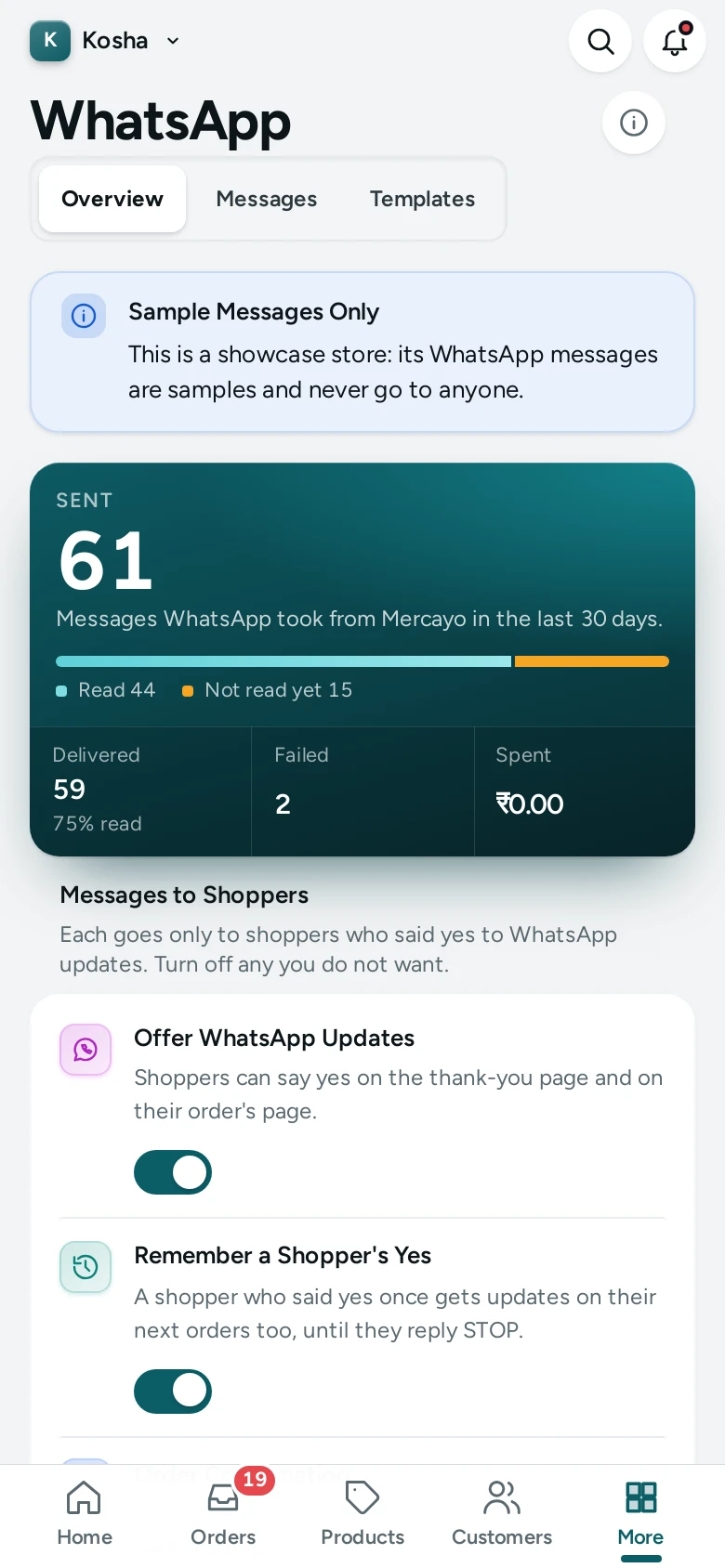
On a showcase (demo) store, the screen says Sample Messages Only: "This is a showcase store: its WhatsApp messages are samples and never go to anyone."
The Last 30 Days
| Figure | What It Counts |
|---|---|
| Sent | "Messages WhatsApp took from Mercayo in the last 30 days." The note counts those held back. |
| Delivered | "Messages that reached the shopper's phone." The note says how many were read, with the share. |
| Failed | "Messages WhatsApp could not deliver, for example to a number not on WhatsApp. Their charge is given back." The note shows the amount given back. |
| Spent | "What WhatsApp messages took from your notification credits in the last 30 days, after anything given back." |
Messages to Shoppers
"Each goes only to shoppers who said yes to WhatsApp updates. Turn off any you do not want." Each row says when the message goes, its template's state, its kind (Order Update, Marketing or Code) and its price ("₹… a message", or Free for this store). PREVIEW opens the message as the shopper sees it, with sample values: "With sample values: each message carries the shopper's own order." "WhatsApp approved these words, so they cannot be changed here."
| Row | When It Goes | Default |
|---|---|---|
| Offer WhatsApp Updates | "Shoppers can say yes on the thank-you page and on their order's page." | On |
| Remember a Shopper's Yes | "A shopper who said yes once gets updates on their next orders too, until they reply STOP." | On |
| Order Confirmation | "As soon as the shopper says yes, while the order waits to ship." | On |
| COD Confirmation | "Instead of the confirmation for cash-on-delivery orders: CONFIRM ORDER and CANCEL ORDER buttons. A confirmed order counts as confirmed by your team." | Off |
| Order Shipped | "When the order leaves you, with its link." | On |
| Out for Delivery | "When the courier sets out, with the cash to keep ready." | On |
| Order Delivered | "When the courier delivers it." | On |
| Bag Reminder | "To a shopper who left items in the bag, only after they said yes to WhatsApp." Switched in Set in Abandoned Bags. | |
| Sign-In and COD Codes | "A one-time code the shopper asked for." "Sent when a shopper asks for a code, before a text message." |
Each switch saves the moment you flip it: "Order Shipped is on." If someone else changed it since you opened the page: "Someone changed this since you opened the page. Reload to see their choice." with RELOAD.
With Offer WhatsApp Updates off: "Updates are not offered, so only shoppers who said yes before still get them."
How the COD Confirmation Works
With COD Confirmation on, a cash-on-delivery order whose shopper said yes, and that nobody has confirmed yet, gets the COD question instead of the plain confirmation.
- CONFIRM ORDER marks the order confirmed, as if your team had called; it leaves the Unconfirmed tab. See Unconfirmed COD Orders.
- CANCEL ORDER cancels it while the shopper may still cancel; after that, it asks your team instead: "The shopper asked to cancel. The order is still open: please call them."
Every answer shows under Replies in WhatsApp Messages.
This Month's Cost
"Taken from your plan's messages first, then from your notification credits." The card shows this month's count and charge for Order Update, Code, Marketing and Answer (answers to a shopper's STOP, START or COD button are Free), how many came from your plan, and the Total. A line says how many order updates your plan includes and how many are left: "Your plan includes 750 order updates a month: 512 left." WALLET · ₹… opens your balance (for people who can see it).
- Order updates and codes come from your plan's WhatsApp messages first, then from your credits.
- Marketing messages (bag reminders and offers) always come from your credits.
- A message WhatsApp could not deliver is given back.
Prices and plan bundles are in Notification Wallet. When Mercayo does not charge your store: "Messages from this store are not charged."
Shoppers
"Who may get WhatsApp messages from your store."
| Count | Meaning |
|---|---|
| Said Yes to Updates | "Order updates go to them." |
| WhatsApp Subscribers | "Offers may go to them." See your WhatsApp subscribers opens Subscribers on its WhatsApp list. |
| Replied STOP | "Nothing goes to them but a code they ask for." |
How Shoppers Say Yes and Stop
- Order updates: on the thank-you page and the order page, a shopper can ask for updates on WhatsApp (while Offer WhatsApp Updates is on). The confirmation goes straight away. With Remember a Shopper's Yes on, their next orders from the same number get updates too.
- Your WhatsApp list: shoppers join from the footer band or the sign-up popup when they ask for a WhatsApp number (see Sign-Up Popup).
- STOP: a shopper who replies STOP (or STOP ALL, UNSUBSCRIBE, OPT OUT) to one of your messages stops your store's messages: they leave your WhatsApp list, anything waiting for them is cancelled, and the answer tells them how to start again. START starts them again. Only the shopper can start again; your team can stop a number on request from WhatsApp Messages.
Branding
The Branding tab shows every message as a WhatsApp chat, in English and Hindi, exactly as your shoppers get it: a picture at the top, your store's name in bold, the facts of the order, a line in your own words, and real buttons such as View order, Track order, Complete my order and Shop now.
- The picture is the first of these that exists: your own picture for that message (UPLOAD PICTURE), the product's photo (a bag reminder, a back-in-stock alert, an order of one item), your store's WhatsApp banner (UPLOAD BANNER), or a banner Mercayo makes from your logo and brand colour. RESET goes back a step.
- Your words: EDIT WORDS changes the line above the closing line of each message, in each language.
- The switch: branded messages are on by default. Turn them off for plain messages.
Each branded design goes once WhatsApp approves it; until then the plain approved message goes, so nothing waits. The row says whether WhatsApp has approved it.
Your Own WhatsApp Number
Under Your Own WhatsApp Number, CONNECT YOUR OWN NUMBER opens Meta's own sign-up window: choose or create your WhatsApp Business account and the number to use. Mercayo then submits its message templates to your account, and each one starts going from your number once WhatsApp approves it there.
- Your number, its display name, Meta's review and its quality rating show on the card, with how many templates are approved.
- Shoppers see your name at the top of the chat, and their replies reach your number.
- One-time codes (sign-in and COD) always go from Mercayo's number.
- DISCONNECT goes back to Mercayo's number.
Mercayo Controls
Every switch here is a store setting Mercayo can force or lock for your store; a locked row says "Set by Mercayo for your store: …" with Mercayo's reason. Some rules are Mercayo's only:
| Rule | Default |
|---|---|
| Marketing Only After a Yes: a marketing message goes only to a number that joined the list or said yes | On |
| Offers per Day: offers a store may send to its subscribers in one day, India time | 2 |
| Most People per Offer | 5,000 |
| Own Message Templates: templates of its own a store may have | 10 |
Good to Know
- From Mercayo's number, the name at the top of the chat is Mercayo's; your store's name, picture and words are inside each message. Your own number changes that.
- Shoppers who write back to Mercayo's number show in the log; you answer them by calling or messaging from your own phone.
- A message from a showcase store, about a sample (demo) order or to a stopped number is held back and logged with the reason.
- Mercayo's templates are in English and Hindi; each language has its own approval from WhatsApp.
- The screen's data is kept for 15 seconds while you move around the admin.
Questions
Do I need my own WhatsApp Business account?
No. Messages go from Mercayo's WhatsApp number with your store's name inside each one. If you want them to come from your own number, connect it under Your Own WhatsApp Number.
Why is nothing being sent?
Check the message's template is Approved, its switch is on, and the shopper said yes. For a bag reminder, back-in-stock alert or offer, check your plan includes WhatsApp Marketing. WhatsApp Messages shows each message held back with its reason.
Can I change the words of the order messages?
No. WhatsApp approved those words for every store. Your store's name and the order's details go into them. For offers, write your own in WhatsApp Templates.
What does a WhatsApp message cost?
The screen shows each message's price. Order updates use your plan's included messages first. See Notification Wallet.
Will a shopper who replied STOP still get COD codes?
Yes, if they ask for one: codes the shopper asks for always go. Nothing else does.
How do I send bag reminders on WhatsApp?
Choose WhatsApp (or both) under Send Reminders By in Bag Reminders Settings; Set in Abandoned Bags on this screen takes you to the reminders. They go only to shoppers who said yes to WhatsApp, and count as marketing messages (WhatsApp Marketing: included on Growth and Scale, an add-on on Starter). See Abandoned Bags.