WhatsApp Messages is the log behind the WhatsApp screen: "Every WhatsApp message your store sent or held back, and what shoppers wrote back." Use it to answer "did the customer get the shipped message?", to see who confirmed or cancelled a COD order by WhatsApp, and to stop messages to a number when someone asks. Open it from Marketing › WhatsApp and press MESSAGES (on a phone, under More Actions), or Marketing › WhatsApp › Messages in the side menu. Back to WhatsApp returns.
The log needs the right to see orders: the owner, admins and the Order Manager and Customer Support roles. Stopping messages to a number needs the right to edit customers, which the owner and admins have. Others read "Your role cannot see who the store wrote to."
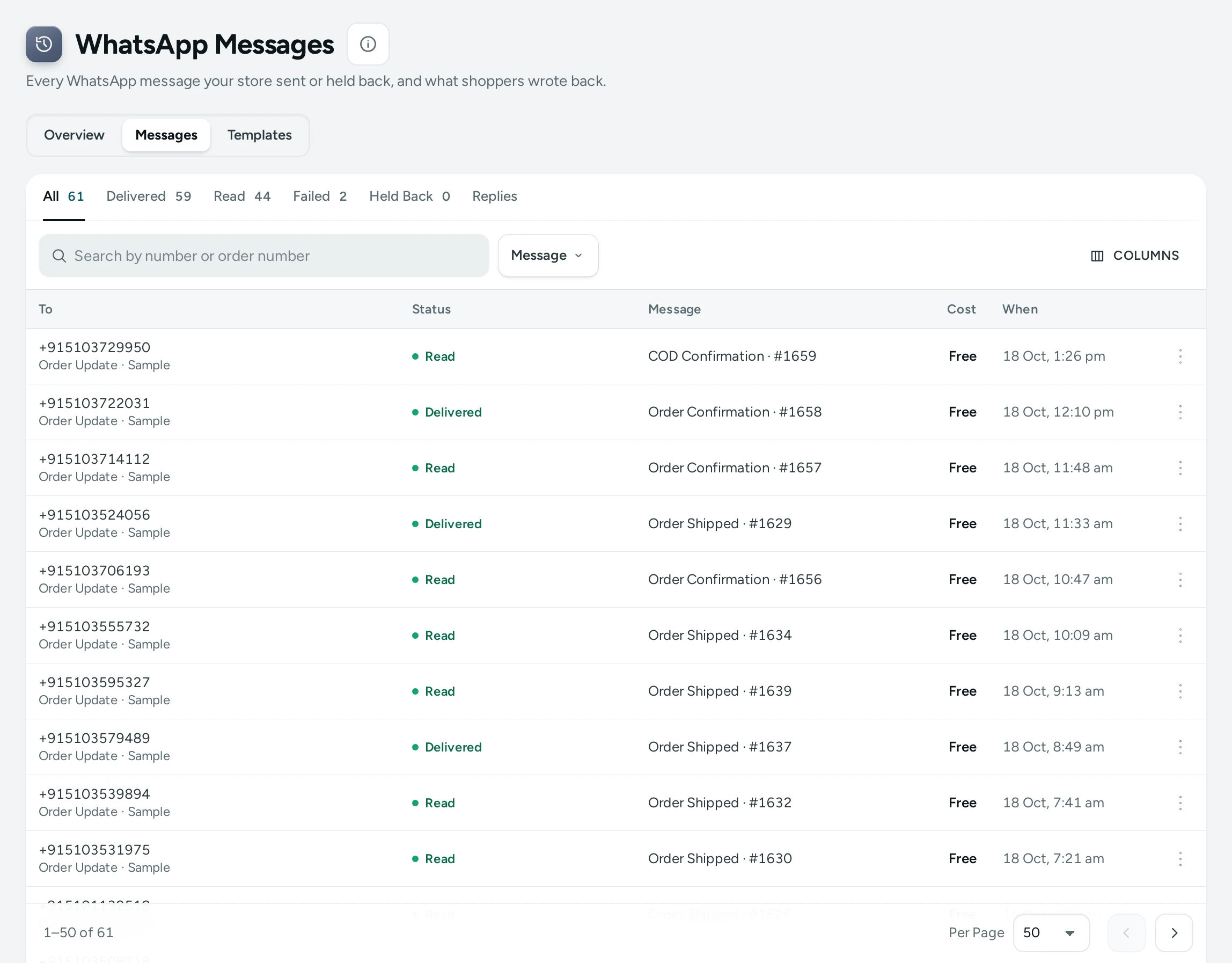
The Tabs
| Tab | Messages In It |
|---|---|
| All | Every message, newest first |
| Delivered | Reached the shopper's phone |
| Read | Opened by the shopper |
| Failed | WhatsApp could not deliver them |
| Held Back | Never sent, with the reason |
| Replies | What shoppers wrote back |
Search by number or order number finds messages to one shopper or about one order. When the log holds more than one kind of message, a Message filter narrows it to one kind (Order Shipped, COD Confirmation and so on). Show 25, 50 or 100 rows a page.
The Messages Table
| Column | What It Shows |
|---|---|
| To | The shopper's number and the message's kind (Order Update, Marketing, Code or Answer); Sample for demo rows |
| Status | Sent, Delivered, Read, Failed or Held Back, with the reason for a failed or held-back message |
| Message | Which message it was, such as Order Shipped, with the order number |
| Cost | What it cost, In plan for one of your plan's included messages, Given back for a failed one, or Free |
| When | When it was sent |
Each row's menu has Details, OPEN ORDER #1042 for a message about an order, and (with the right) STOP MESSAGES TO THIS NUMBER.
A Message's Details
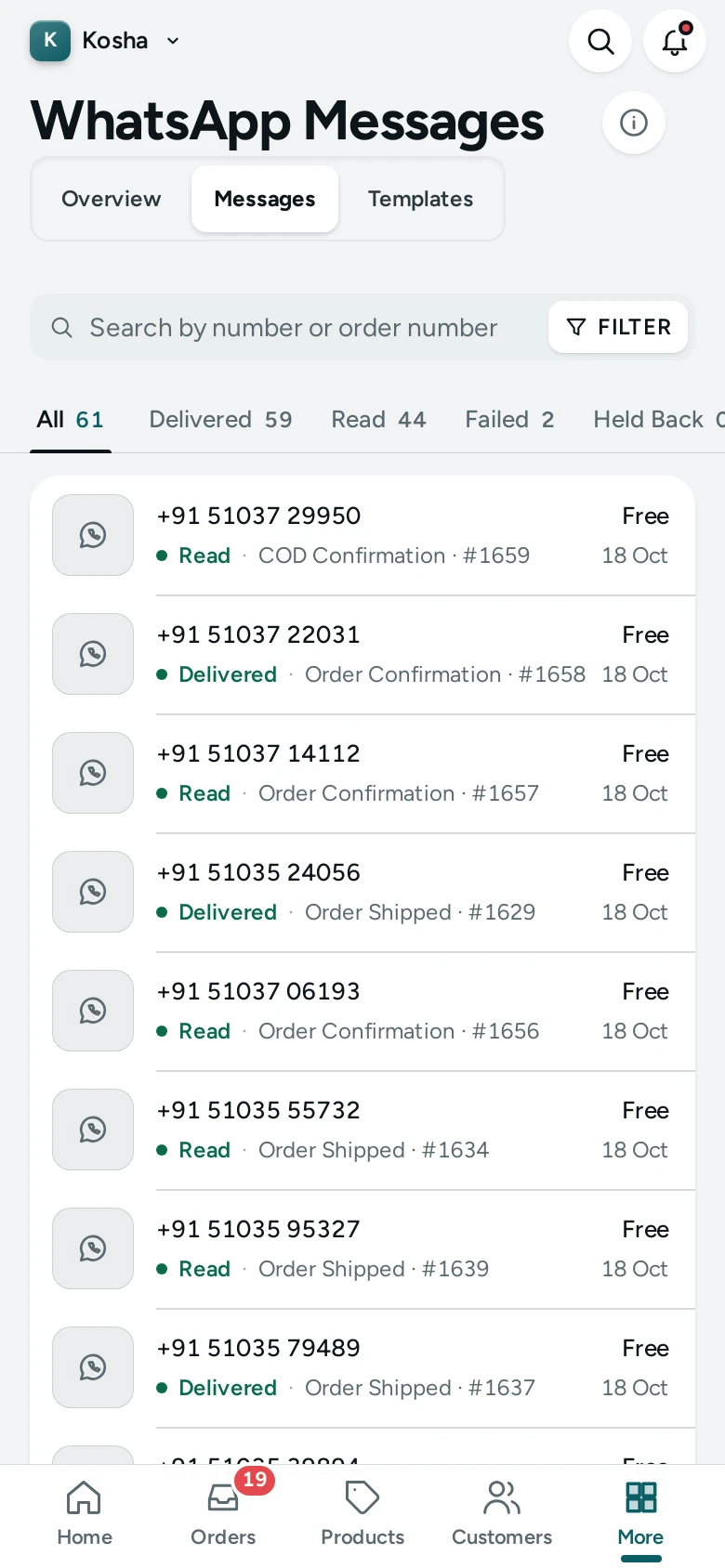
Tap a row to open its details on the side:
- How It Went: the timeline, Ready to send, Taken by WhatsApp, Delivered to the phone, Read, or "Not delivered: …" or "Held back: …" with the reason.
- Cost: "₹… from your notification credits.", "One of your plan's included messages.", "₹… was taken and given back: it was not delivered.", "Free." or "Nothing was charged."
Why a Message Is Held Back
A message is held back, never sent and never charged, when for example:
- the store is a showcase (demo) store, or the order is sample data;
- the number replied STOP;
- just before sending, the shopper's yes is no longer there, the message's template is not approved, or your store is not open.
The reason is written on the row. Held-back messages show in the Held Back tab and in the Sent figure's note on the WhatsApp screen.
Why a Message Fails
WhatsApp could not deliver it: most often the number is not on WhatsApp. The reason WhatsApp gives is written on the row, and the charge is given back.
The Replies Tab
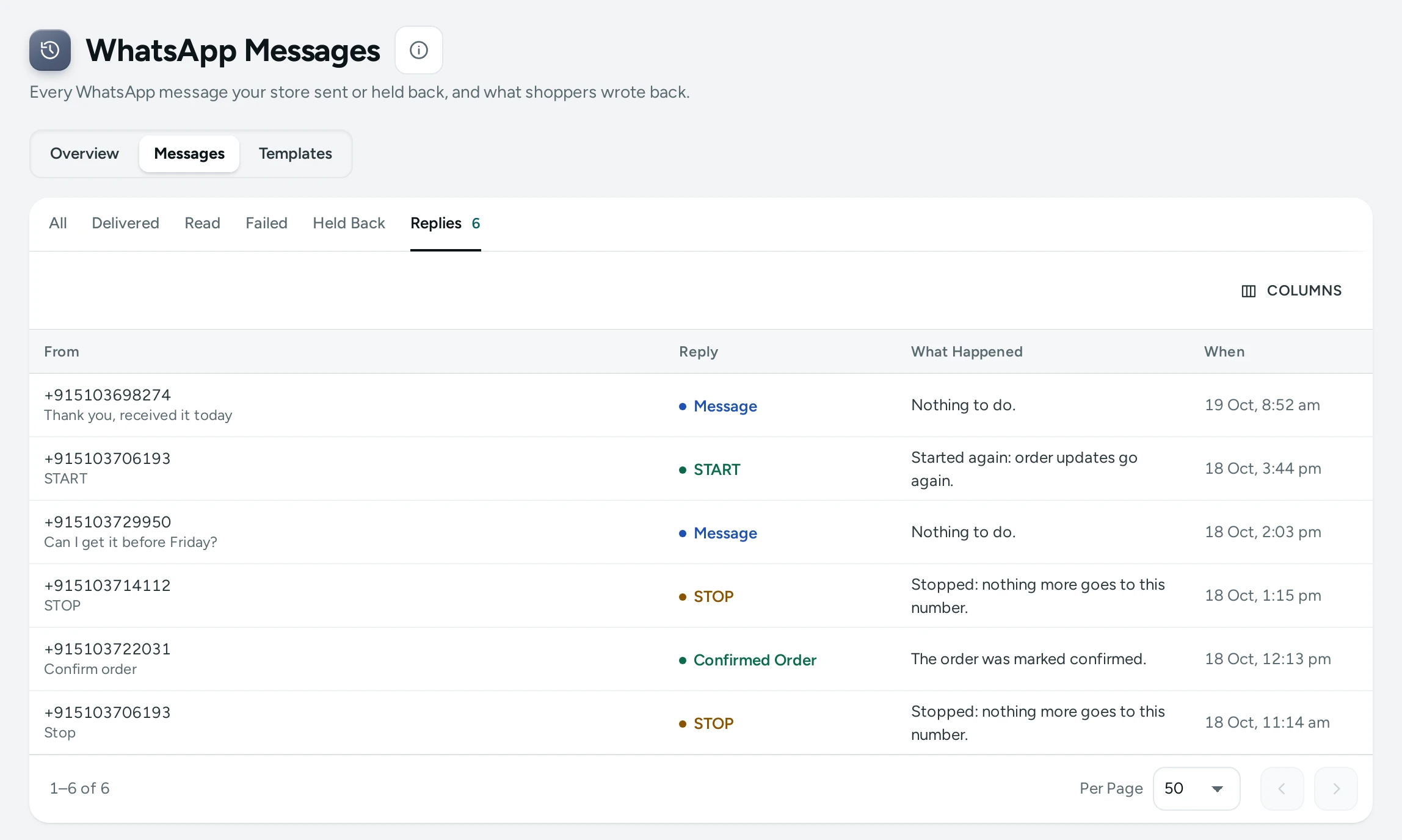
"What shoppers write back to your messages shows here."
| Column | What It Shows |
|---|---|
| From | The shopper's number |
| Reply | STOP, START, Confirmed Order, Cancel Order, Message (free text) or Picture or File |
| What Happened | The result |
| When | When they wrote |
What each result means:
| What Happened | Meaning |
|---|---|
| "Stopped: nothing more goes to this number." | They replied STOP; they left your WhatsApp list and anything waiting was cancelled |
| "Started again: order updates go again." | They replied START |
| "The order was marked confirmed." | They pressed CONFIRM ORDER on the COD question |
| "The order was cancelled." | They pressed CANCEL ORDER in time |
| "The shopper asked to cancel. The order is still open: please call them." | They pressed CANCEL ORDER after the time a shopper may cancel by themselves |
| "The order had already moved on, so nothing changed." | Their button came after the order was shipped or changed |
| "Nothing to do." | A message that needs no action |
Open a reply to read They Wrote. "Shoppers write to Mercayo's WhatsApp number. To answer a question, call or message them from your own phone."
How to Stop Messages to a Number
Use this when a person asks you to stop messaging them.
- Find a message to them (search their number).
- In the row's menu, choose STOP MESSAGES TO THIS NUMBER.
- Read the dialog: "Use this when the person asked you to stop. Nothing more goes to this number from your store on WhatsApp, and it leaves your WhatsApp list. Only they can start them again, by replying START."
- Press STOP MESSAGES. "Messages to … are stopped." with their number.
Codes the person asks for (to sign in, or to confirm a COD order) still go.
How to Check Whether a Shopper Got Their Update
- Search their phone number or the order number.
- Look at Status: Delivered or Read means it reached them. Failed shows WhatsApp's reason.
- Tap the row to see the timeline.
If no message appears, the shopper may not have said yes to WhatsApp updates; check the order's page.
Good to Know
- Delivery and read receipts come from WhatsApp, as each message moves from sent to delivered to read.
- A failed message's charge is given back once.
- Answers to a STOP, START or COD button are free.
- A STOP that answers no message of yours stops every store that wrote to that number in the last 90 days, to be safe.
- Kosha is a demo store: its log shows sample messages, marked Sample, that were never sent.
Questions
Can I reply to a shopper from here?
No. Shoppers write to Mercayo's number; call or message them from your own phone. Their words show under They Wrote.
Why does a message show Delivered but not Read?
WhatsApp has not reported it as read yet. The shopper may not have opened it, or WhatsApp may not report reads for that phone.
A shopper says they never got the shipped message. Why?
Search their number. A Held Back or Failed row gives the reason. With no row at all, they did not say yes to WhatsApp updates on that order.
Can I start messages again for someone who replied STOP?
No. Only the shopper can, by replying START.
Do held-back messages cost anything?
No. Nothing is charged for a message that was never sent.