Quantity Prices
Prices That Drop as Shoppers Buy More
"1 for ₹299, 2 to 3 at ₹249 each, 4 or more at ₹199 each." Quantity prices tell shoppers on the product page exactly what buying more saves them, and the bag charges it without a code.
- In every plan
- Free for 14 days

Kosha is a demo store on Mercayo. Its products, orders and customers are sample data.
In short
What It Does
Quantity prices are offers in the one discount engine, so they have dates, limits, conditions, combining and a report like every other offer. There are three kinds.
1. Prices by quantity. Ranges such as 1, 2–3 and 4+, each with a price per item, an amount off each, or a percentage off. Ranges follow each other with no gaps; leave the last one open for "or more". Two ways to count:
| Pricing | What Happens with 5 Items in "1–4 at ₹200, 5–9 at ₹180" |
|---|---|
| Bulk | every item gets the range the quantity reaches: 5 × ₹180 |
| Tiered | each range prices only its own items: 4 × ₹200 and 1 × ₹180 |
You also choose how items are counted: across the chosen products (mix and match), per product, or per option (exactly the same colour or size). Short of the first range, items keep their own price.
2. A fixed price. "All kurtas ₹499": each chosen item costs that price in the bag. An item already at or below it keeps its own price; a price is never raised.
3. Spend tiers. One offer with up to 5 levels by spend: "₹200 off over ₹1,999, ₹500 off over ₹3,999", as an amount or a percentage. The level is read on the bag before any discount, and the bag says how much more reaches the next one.
The product's own price never changes on its page or its cards. The product page shows a quantity price table with each range's total worked out by the engine itself, and the bag applies it.
For your store
Why It Matters
Buying in threes and fours is normal for many Indian shoppers: screen guards for the family, socks by the pack, return gifts for a function. A price table answers "how much if I take four?" before they ask, and the answer is on the page they are already reading.
Tiered pricing lets you reward volume without giving the deepest price on the first items, which is how wholesale price lists already work. Per-option counting lets you price "3 of the same size" differently from a mixed bag.
Spend tiers are the easiest way to lift your average order in a sale: the bag line "Spend ₹1,401 more and get ₹200 off" is a reason to add one more item, and the number is exact, because it is worked out by the same engine that prices the bag.
And because these are offers, not a second price list, you can schedule them for a festive week, limit them, and see in the offer report what they sold.
Step by step
How It Works
Start From the Product
In a product's editor, the Quantity Prices card lists the live, scheduled and draft quantity offers that cover it. Press SET QUANTITY PRICES: a new offer opens for that product, with ranges 2–3 and 4+ ready to fill in, counted per product and shown on the product page. Or start from Discounts → CREATE DISCOUNT.
Choose How Each Range Prices
Under Value, choose Bundle price, then under Each Size Gives choose A price per item, An amount off each or A percentage off. Fill in each range's From, To and its price; leave To empty on the last range for "or more". Each range is written out in words beside it.
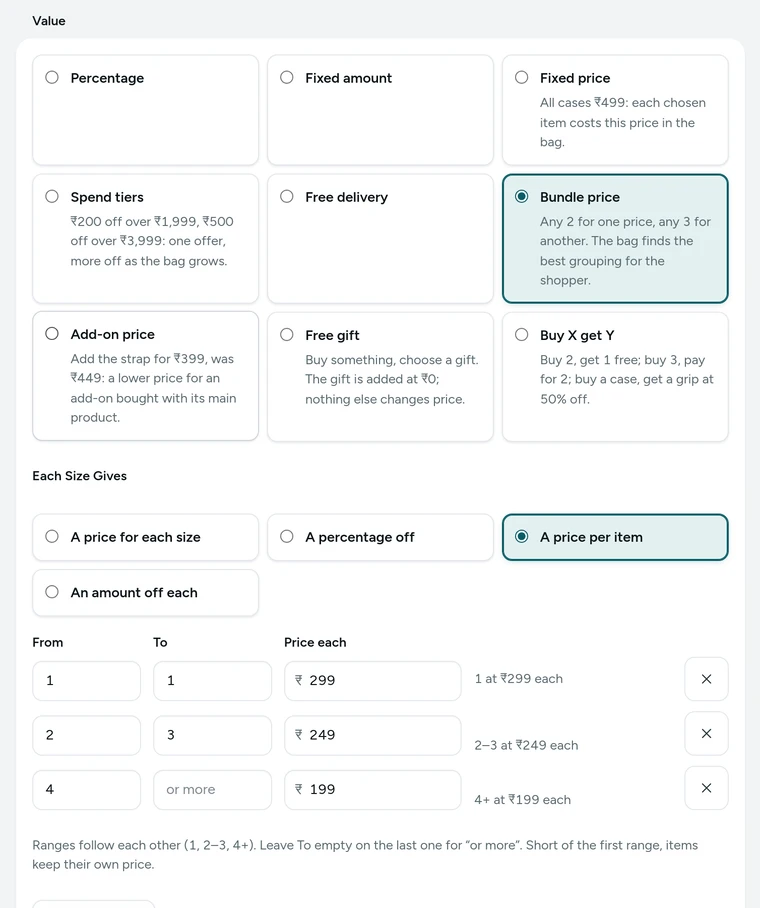
The ranges of Screen guards: buy more, pay less in the discount editor, on Kosha, a demo store on Mercayo. Pick Bulk or Tiered, and How to Count
Pricing: Bulk (every item gets the range the quantity reaches) or Tiered (each range prices only its own items). Count items: across the chosen products (mix and match), per product, or per option (colour, size…).
Or Set a Fixed Price or Spend Tiers
For one sale price, choose Fixed price under Value and type the Price per Item. For more off as the bag grows, choose Spend tiers, then Each Level Gives an amount or a percentage, and add up to 5 levels with ADD LEVEL: Spend at Least and its saving. A bigger spend must give more off.
Show It and Save
Make it an automatic offer and tick it for product pages: the product page shows the table. Save it with its dates. The bag applies the right price by itself, and the bag's tray tells the shopper how close the next range is.

Your shoppers
What Your Shoppers See
On the product page, shoppers see Buy More, Pay Less: a tile for each range ("1", "2–3", "4+") with its total, its price each, "Save ₹100" and BEST VALUE on the best one, and a hint such as "The more screen guards you add, the less each one costs." On phones the tiles are one row that swipes. In the bag, the tray says how close the next range is ("Add 2 more guards: 4+ at ₹199 each"), and a spend line reads "Spend ₹1,401 more and get ₹200 off." The product's price on its page and cards stays its own.
Settings
Settings You Control
Each one is in your admin. A new store starts with the value shown.
Mercayo
Mercayo's Controls
Each of these switches can be forced or locked by Mercayo's team for your store, with a reason your admin shows beside it and a record in Mercayo's audit log. "Off" is always safe: an offer that uses a switched-off kind simply does not apply, and it stays saved for when the kind is back on. Mercayo never sets your prices or edits your offers.
Limits today
Good to Know Before You Start
- One offer uses one way of pricing: a price per item, an amount off each, a percentage, or group prices; never a mix.
- Group prices ("any 2 for ₹1,299") cannot be tiered or counted per product; use a price per item for that.
- A quantity price never shows as the price on product cards; it shows as a label and in the table.
- Offers for some shoppers only (such as a reward tier) never show on the product page, so wholesale prices for chosen buyers appear only in their bag.
Questions
About Quantity Prices
What is the difference between bulk and tiered?
Bulk prices every item at the range the quantity reaches: 5 items in "5–9 at ₹180" are all ₹180. Tiered prices each range's own items: the first 4 at the first range's price, the fifth at ₹180. Tiered takes the cheapest items into the first range, so the deepest price lands on the dearest items.
Can shoppers mix colours and sizes?
Yes, with Count items: across the chosen products. Choose per product or per option when only the same product, or exactly the same item, should count together.
How are percentages rounded?
A percentage range is worked out once on the group's total and rounded to a whole rupee, then shared over the lines to the paisa. The table, the tray and the bag all show the same rounded figure.
Can I give "full price for the first two, then cheaper"?
Yes. Use tiered pricing with a first range that starts at 3: items below the first range stay at full price.
Do spend tiers count items already discounted?
The level is read on the eligible items before any discount, so stacking never changes which level a bag reaches. A spend tier is an order offer: it works on what product offers have left.
Will the product page be right for everyone?
Yes. The table is part of the page every shopper gets, and it only shows ranges the engine would really apply; a range that another offer beats is left out.
Related
Related Features
- Bundles and Add-OnsAny 2 for ₹1,299, 3 or more for 15% off, and add-ons at a special price with the main product, chosen on the product page and applied in the bag.
- Buy X Get YBuy 2 get 1 free, buy 3 pay for 2, or buy one item and get another at a lower price, with the bag telling shoppers what to add.
- Automatic OffersOffers that need no code: the bag finds them, applies the best for the shopper and says what a little more would unlock.
- Product PagesPhotos that zoom, options that never guess, delivery dates by PIN code, a buy bar that follows and rows of related products, on every product.
- Offer Labels and Sale PageShow live offers as short labels on product cards, list every product on offer at /sale, and count down only when an offer really ends.
More in Discounts and Offers: Discount Codes · Automatic Offers · Buy X Get Y · Bundles and Add-Ons · Free Gifts · One-Time Codes · Combining Offers · Offer Labels and Sale Page · Offer Reports · Gift Cards · Store Credit · Rewards Tiers · Refer and Earn · Affiliates
Try It on Your Own Store
Every feature is in every plan, free for 14 days.
