When a variant sells out, the product page asks shoppers to leave their email or mobile number to hear when it is back. Back-in-Stock Requests shows who is waiting for what, and Mercayo tells each shopper once, by itself, as soon as stock returns. Open Products › Back in Stock (or BACK IN STOCK on Inventory). Seeing contacts in full needs the customers right; others see them masked.
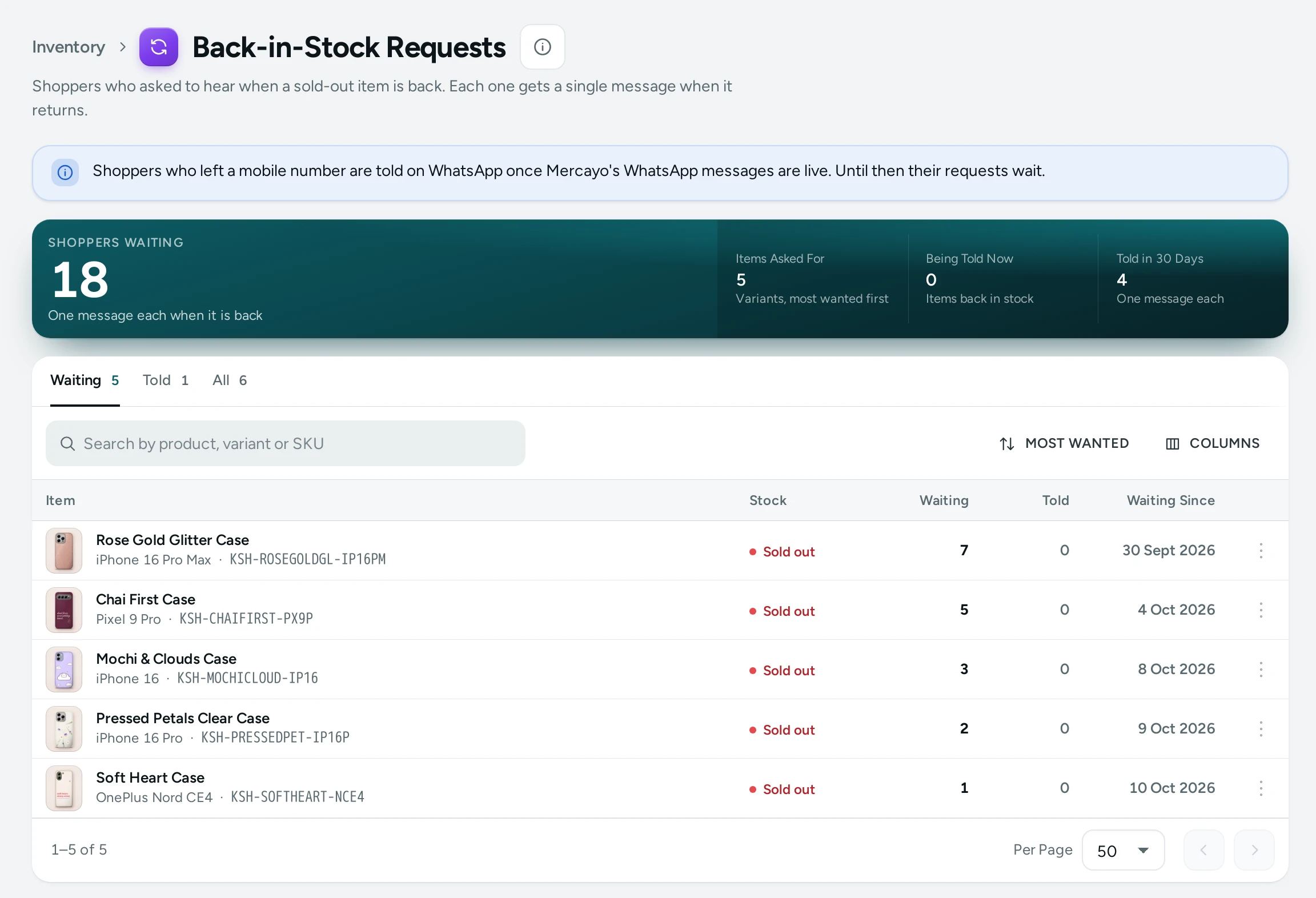
The Totals
| Number | Meaning |
|---|---|
| Shoppers Waiting | One message each when it is back |
| Items Asked For | Variants with at least one shopper waiting, most wanted first |
| Being Told Now | Items back in stock whose shoppers are being told |
| Told in 30 Days | Shoppers who got their back-in-stock message in the last 30 days |
The List
Tabs Waiting, Told and All; Search by product, variant or SKU; sort by Most wanted, Waiting longest or Newest request. Each row shows the Item, its Stock (Sold out, In stock, Pre-order, Sells when out, Not counted), Waiting, Told and Waiting Since.
See Requests opens Requests for This Item: each request with its contact, Email or WhatsApp, and when it was Asked, Told or Closed. REMOVE deletes a request when a shopper asks to be forgotten.
How Shoppers Are Told
- Stock comes back for a variant (you add stock, or a return puts it back).
- Within a few minutes, Mercayo sends one message per waiting request: an email ("It's Back in Stock") with the item, its price and a SHOP NOW button, or a WhatsApp message for a mobile number.
- The request is marked Told and its contact removed. If the item sells out again, the shopper can ask again.
The WhatsApp message carries the item's photo and a Shop now button. Back-in-stock alerts on WhatsApp are WhatsApp Marketing: included on Growth and Scale, an add-on on Starter; without it, a request left with a mobile number is held back and the log says why. A request waiting longer than Keep Back-in-Stock Requests (180 days by default) is closed and its contact removed.
The Low-Stock Email for Your Team
When a counted variant falls to your Running Low At mark (Settings › Admin and Reports, 5 by default) or sells out, your team gets an email listing what is low or out, with OPEN INVENTORY, at most once every 24 hours by default. It goes to the people who get the new-order emails.
Settings
| Setting | What It Does | Default |
|---|---|---|
| Back in Stock Requests (Settings › Product Page) | Sold-out items ask shoppers for an email or mobile number | On |
| Keep Back-in-Stock Requests (Settings › Product Page) | Days a request waits for the item to come back; then it is closed and the contact removed (7 to 365) | 180 |
| Back in Stock Message (Settings › Notifications) | Tells each shopper who asked, once, by email or WhatsApp | On |
| Email When Stock Runs Low (Settings › Notifications) | The team's low-stock email | On |
| Low-stock Email at Most Every | Hours between two low-stock emails (1 to 168) | 24 hours |
Questions
Does a shopper get more than one message?
No. One message per request; they can ask again if the item sells out again.
Can I tell shoppers by hand?
The message goes by itself when stock returns. Add stock in Inventory.