Menus are the links shoppers use to find their way round your store: the row at the top of every page, the menu that opens on a phone, and the columns of links in the footer. "Menus are the links in your store's header, phone menu and footer. Each place shows one menu." A saree seller in Surat might have Sarees, Lehengas, Dupattas and Sale in the header, each opening a panel of fabrics and occasions with pictures, and a footer with About, Shipping and Returns. Open it from Online Store › Menus (on a phone: More, then Menus). URL Redirects sits under it.
Seeing menus needs the theme right (themes.edit). Saving a menu makes it live at once, so it needs the right to publish layout changes (themes.publish). The owner and admins have both; the Marketer preset role can see menus but not save them. Someone who can only see them is told: "You can look at the menus. Saving them makes them live, which needs the right to publish layout changes."
What You See
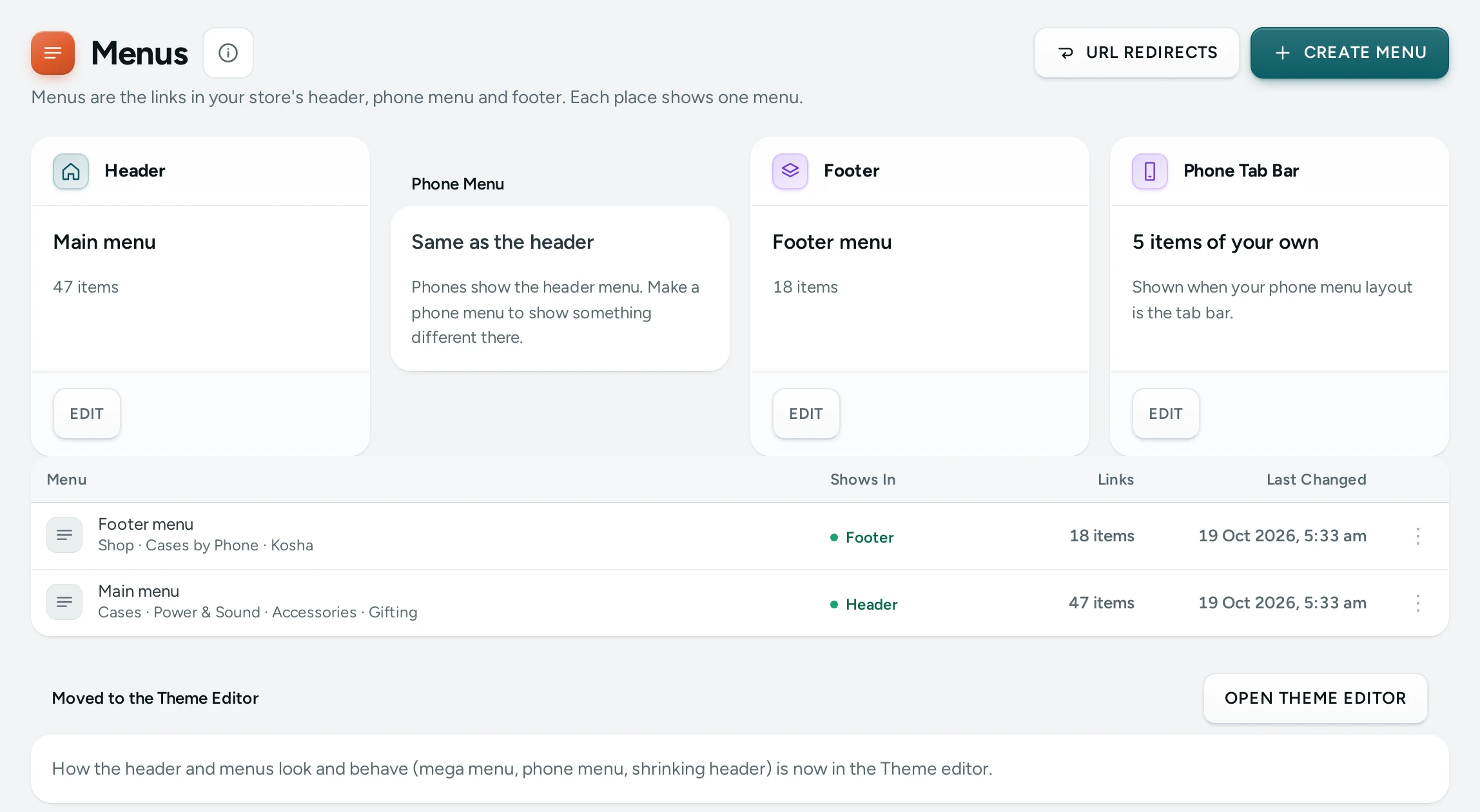
Three places. A card for each place a menu can show:
| Place | What It Is | Without a Menu |
|---|---|---|
| Header | "The links at the top of every page. On a computer, an item with links under it opens a panel." | Automatic: your categories: "Your top categories and their sub-categories, in your order." |
| Phone Menu | "The menu on phones, instead of the header menu." | Same as the header: "Phones show the header menu. Make a phone menu to show something different there." |
| Footer | "The bottom of every page: one column per top-level item, its links under it." | Automatic: Shop and Help: "A Shop column with your categories, and a Help column. A footer menu replaces the Shop column." |
A card with a menu shows its name and EDIT (or VIEW).
All Menus lists every menu with Menu, Shows In (Header, Phone Menu, Footer or Not shown), Links (how many items) and Last Changed. CREATE MENU starts a new one. With no menus yet: "Your header shows your categories until you make a menu. Start from them, or from an empty menu." with START FROM MY CATEGORIES and START EMPTY.
At the foot, a Moved to the Theme Editor card: "How the header and menus look and behave (mega menu, phone menu, shrinking header) is now in the Theme editor."
The Menu Editor
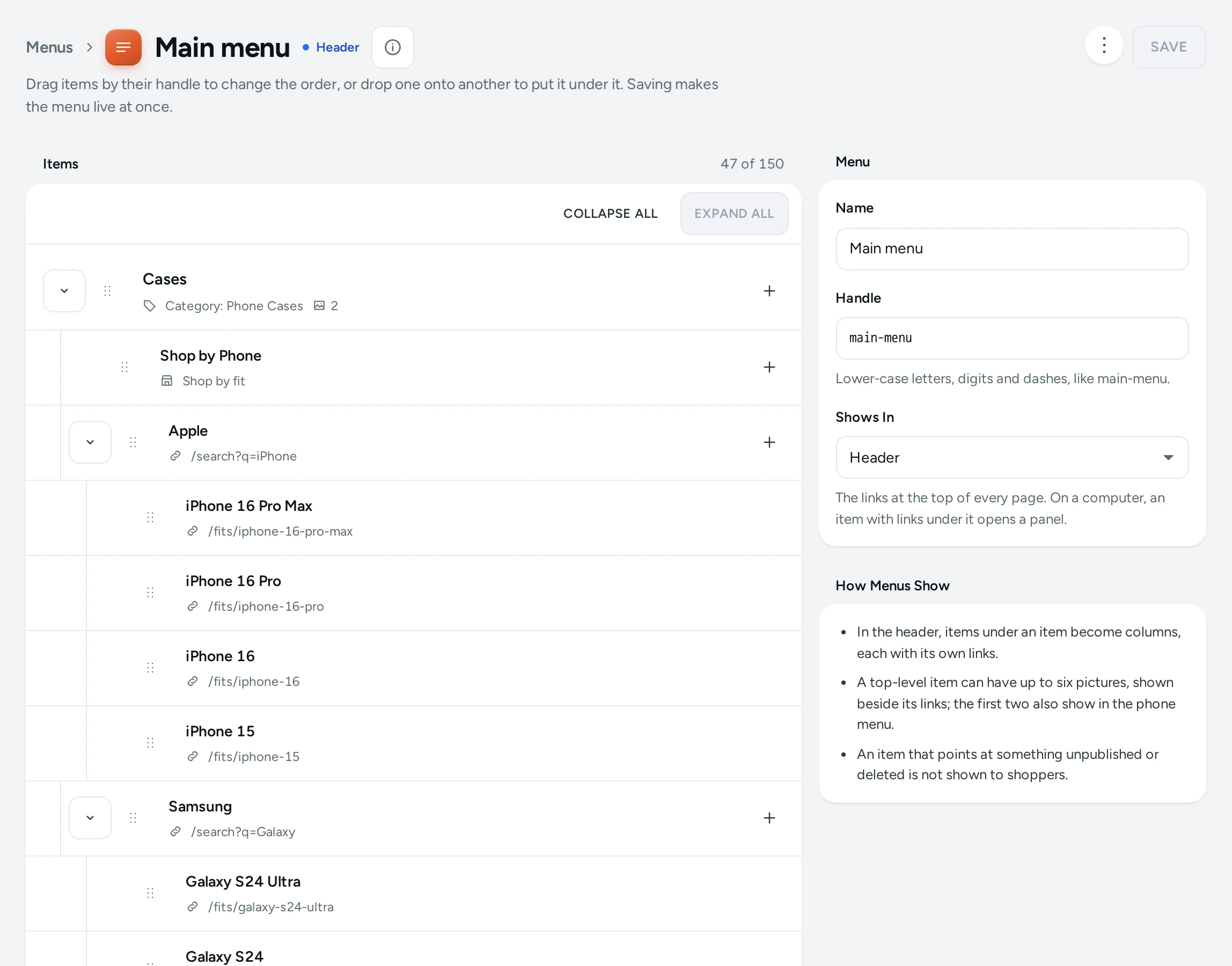
Opening a menu (or CREATE MENU) shows the editor: "Drag items by their handle to change the order, or drop one onto another to put it under it. Saving makes the menu live at once."
Menu card:
| Field | What It Does |
|---|---|
| Name | The menu's name, for you (up to 80 characters) |
| Handle | "Lower-case letters, digits and dashes, like main-menu." |
| Shows In | Header, Phone Menu, Footer or Not shown ("Kept for later. Choose a place to show it."). If another menu holds that place: "Saving moves "Main menu" out of this place (it is kept, not shown)." |
How Menus Show explains the rules: "In the header, items under an item become columns, each with its own links." "A top-level item can have up to six pictures, shown beside its links; the first two also show in the phone menu." "An item that points at something unpublished or deleted is not shown to shoppers."
Items lists the tree with a count ("12 of 150"). Each item has a drag handle, its name, where it leads, and tags such as HIGHLIGHT, HIDDEN FROM SHOPPERS or DELETED. COLLAPSE ALL and EXPAND ALL fold the tree. ADD MENU ITEM adds an item at the top level; an item's own add button (Add a link under Sarees) adds one under it.
"With the keyboard: Alt and the arrow keys move the chosen item; Alt and Right puts it under the one above."
An Item's Settings
Click an item to edit it.
| Field | What It Does | Limit |
|---|---|---|
| Name | "What shoppers see in the menu." | 80 characters |
| Links To | Collection, Category, Product, Page, Store page, Web address or Nothing (a heading) ("The item opens the links under it and goes nowhere itself."). Collections, categories, products and pages are found with Search by name. | |
| Store Page | With Store page: Home, All products, Search, Bag, My account, Track your order, Gift cards or Shop by fit | |
| Address | With Web address: "A page of your store like /pages/about, an https:// address, mailto: or tel:." | |
| Description (under More Options) | "A short line under the item in a panel's list (optional)." | 120 characters |
| Tag | "A short tag such as New (optional)." | 16 characters |
| Highlight | "Shows the item in your sale colour, for a Sale link." | |
| Pictures (top-level items only) | "Up to six, shown beside the links on a computer; the first two also show under the first list in the phone menu." Each has a Picture Name, a Line Under The Name and where it leads. ADD PICTURE, REMOVE PICTURE. | 6 pictures |
| Icon | "Shown beside the item in the phone menu. Automatic picks one that fits the name." Choose Automatic, No icon or one of 35 icons (Clothing, Jewellery, Shoes, Sale, Gift, Delivery…). |
REMOVE ITEM takes it off ("“Sarees” and the 6 items under it will be removed from the menu when you save."). DONE closes the item.
How to Make Your First Header Menu
- Open Online Store › Menus.
- Press START FROM MY CATEGORIES. Mercayo makes "Main menu" from your categories, in the header, and opens it.
- Drag items into the order you want; drop one onto another to put it under it.
- Add a Sale item: ADD MENU ITEM, name it "Sale", Links To Collection, pick your sale collection, and tick Highlight.
- Press SAVE. "Saved. The menu is live on your store now."
How to Build a Mega Menu Panel
- Make a top-level item, for example "Sarees", with Links To Nothing (a heading) or a category.
- Under it, add column headings ("By Fabric", "By Occasion").
- Under each heading, add links (Banarasi, Chanderi, Wedding, Festive). Menus go three levels deep at most.
- Open "Sarees" and ADD PICTURE up to six pictures, each with a name and a link.
- SAVE. On a computer, pointing at Sarees opens a panel with the columns and pictures (with Mega Menu on in Theme).
How to Make a Footer Menu
- Press CREATE MENU, name it "Footer", and set Shows In to Footer.
- Add a top-level item per column, such as "Help" and "About".
- Under each, add links: your Pages, policies or store pages like Track your order.
- SAVE. Each top-level item becomes a footer column.
How to Delete a Menu
Open it and press DELETE, then DELETE MENU. "“Main menu” and its 24 items will be deleted. This cannot be undone." If it held a place, that place goes back to its automatic menu ("Your header will show your categories again.").
What Shoppers See
- Header on a computer: the top-level items in a row; an item with links under it opens a panel (with Mega Menu on) or a short list. The panel's layout is a Section Style.
- Phone menu: the phone menu, or the header menu when you have none, opened as your chosen phone menu style, with icons as Icons in the Phone Menu says.
- Footer: one column per top-level item.
- An item pointing at a draft product, a hidden page or something deleted is left out, so shoppers never land on a missing page.
Mercayo Controls
Mercayo sets the most menus a store may keep (20 unless Mercayo changes it).
Good to Know
- A menu holds up to 24 top-level items and 150 items in all, three levels deep. Pictures go on top-level items only.
- Leaving with unsaved changes asks first: "Leave without saving? Your changes to this menu will be lost." DISCARD CHANGES throws your edits away.
- If someone else saved the menu after you opened it: "Someone else saved this menu after you opened it, so your changes were not saved. Reload to see theirs, then make yours again." with RELOAD.
- The announcement bar's messages are not set here: they are in the page editor under Announcement Bar.
- Menu changes are recorded in the Activity Log. Menu labels can be translated on Translate.
Questions
Why does my header show my categories although I made no menu?
Until a menu holds the Header place, the header shows your top categories and their sub-categories automatically.
Can phones show a different menu?
Yes. Make a menu and set Shows In to Phone Menu. Without one, phones show the header menu.
Why is a menu item missing on my store?
It points at something shoppers cannot see: a draft or archived product, a hidden page, or something deleted. The editor marks it HIDDEN FROM SHOPPERS or DELETED.
How do I make a heading that does not link anywhere?
Set Links To to Nothing (a heading) and put links under it.
Can I link to WhatsApp or a phone number?
Yes. Use Web address with a tel: number, or an https link such as your WhatsApp chat link.