Product Designer
A Product Designer Your Shoppers Use on Their Phones
Shoppers design the product themselves on a live picture of it: their photos and words in your fonts, your art and Mercayo's starter art, shapes and QR codes, on every side you set up, or they start from a design you made. They check each side, save it or share it, and once the order is paid you download a print-ready PDF and PNG for each print area. It is a paid add-on on every plan, ₹799 a month or ₹7,670 a year plus GST, and your first 14 days are free.
- No fee on your orders, on every plan
- Free for 14 days

Kosha is a demo store on Mercayo. Its products, orders and customers are sample data.
In short
What It Does
For your shoppers, a DESIGN YOURS card on the product page opens the designer on its own page, built for the phone first. Under the card, Start From a Design shows up to four of your templates.
- Text in the fonts you choose (Mercayo's free library, with Hindi faces, or your own), any colour or your palette, size, alignment, letter spacing, a curve both ways, an outline and a shadow.
- Photos from the phone or computer: crop, five filters, and a print quality meter that shows the photo's DPI at the size it will print, against the lowest you allow.
- Art from your own art sets and Mercayo's starter set, searchable and by set, recoloured colour by colour where you allow it.
- Shapes (rectangle, circle, line, star, heart, badge) with a fill, an outline and rounded corners, and QR codes from a link or text.
- Layers (order, hide, lock), undo and redo, snapping to the middle and edges, a ruler in real centimetres, pinch to size and turn, zoom, and the keyboard on a computer.
- Every side (front, back, sleeve, lid) on its own photo, and a photo for each value of any option (a colour, a phone model), or a tint of another.
- Check Your Design: each side's picture, the checks ("sharp enough to print", "inside the print areas"), the price lines and, unless you turn it off, the shopper's tick "I have checked the spelling, colours and placement".
- SAVE DESIGN and SHARE, and EDIT DESIGN from the bag.
- CUT OUT BACKGROUND on a photo, with UNDO, and names and numbers for a team.
- A size of their own for a poster or a banner, priced by its area.
- A 3D view of a mug, a tumbler or a bottle that they turn with a finger.
For you, each product gets a Designer screen: its sides, the photos, and the print areas you draw on the photo with their real size, print quality (DPI), bleed, safe margin, what shoppers may add, colours, fonts, letter limits and a price when used. The Designer Library holds your fonts, art, palettes, templates and price rules. On each order, Print Files gives a PDF (the area plus its bleed, text as real fonts) and a PNG at the area's DPI for every print area, with the checks made before printing.
Art and Shapes
Upload your own art in art sets (the chips shoppers filter by: Festive, Sports, Your Logos): SVG files, made safe as they are added, or PNG and WebP pictures. An SVG with up to 12 colours can be colourable: the shopper changes each of its colours. Give any piece a price (a line "Art: Diya" on the shopper's price) and a licence note for your own records.
Next to yours, Mercayo's starter set: 24 pieces drawn for Mercayo and free to print (CC0), in Festive (diya, marigold, rangoli, lantern, sparkle, paisley), Love, Nature, Celebration and Frames. Switch it off and shoppers see only your own.
Shapes are drawn as outlines, not pictures, so they stay sharp at any size.
QR Codes
A shopper types a link or up to 300 letters of text and gets a QR code drawn square by square (never a blurred picture), in the colour and background they choose, with its quiet border kept inside the element so it scans once printed. A wedding card's map, a shop's payment page, a song for a gift.
Templates Shoppers Start From
Make a template in your store's own designer: NEW TEMPLATE in the Designer Library opens the product in template mode, you design it like a shopper and press SAVE TEMPLATE. For each part you choose:
| Lock | What the shopper can do |
|---|---|
| Free | Move, change or remove it |
| Replace Only | Put in new words or a new photo; it stays where you placed it |
| Locked | Nothing: it prints as you made it |
Give texts a Linked Field name and one typed name fills every layer that shares it (the front and the back). A template is offered on this product or on every product in the same category (matched side by side), under a chip you name (Festive, Names, Photos). The product page shows up to four as Start From a Design; the designer's Templates sheet shows them all, with search.
Saved Designs and Share Links
SAVE DESIGN keeps the design with a name. A signed-in shopper finds it in My Account → Saved Designs (open, rename, delete); every shopper gets a link to open it again on any device, and saving from that link updates the same design. SHARE makes a read-only link for a friend or a family group: it opens a copy, never the shopper's own, shows no name, phone or email, can be stopped at any time, and is never shown to search engines. The shopper's photos go with it only if they choose Include my photos, and then only through addresses that work for 10 minutes.
EDIT DESIGN under a bag line reopens that design; UPDATE BAG replaces the line with the new design and its price.
Price Rules
Beyond a price per print area, rules in the Designer Library add to the design's price, each with an optional cap:
| Rule | Example |
|---|---|
| Per side used | ₹49 for each printed side, or only when the back is used |
| Per kind of element | ₹20 for each photo, or ₹40 once for any QR code |
| Per letter over N | ₹2 a letter after the first 10 |
| Per colour over N on a side | ₹30 a colour after 2 (screen printing) |
| Per element over N on a side | ₹15 for each element after 5 |
An amount is in rupees or a percentage of the variant's price (10% of a ₹599 tee is ₹59.90). A rule applies to one product or to every product with the designer. The shopper sees the price change as they design, and Mercayo works it out again on its server when the design goes in the bag.
Own-Shape Print Areas and Colour Limits
Print areas can be rectangles, ovals, a preset (rounded rectangle, circle, heart, star, hexagon, arch, a phone's back with its camera cut-out) or your own outline of straight lines and curves. Keep Inside checks against the real outline, so nothing is placed over the camera hole.
Palettes are named colour lists you make once and choose for any area. A colour limit (1 to 12 colours on a side) keeps out a design a screen printer cannot print: it cannot go in the bag until it fits.
Change a palette later and your templates keep working: the parts a template locks keep their own colours for every shopper. Before you save, Mercayo names the templates that use a colour you took out, so you can keep them as they are or UPDATE TEMPLATES to the nearest colours you still offer.
Names and Numbers for Teams
Switch on Names and Numbers on a product and a team orders one design with a row for each player: a name, a number and a size. The shopper places a name and a number on the design (or starts from your template that has them), then types the rows, pastes a list copied from a spreadsheet, or imports a CSV. Tapping a row shows it on the design. ADD 12 TO BAG puts each row in the bag as its own item, at its own size, each priced as the design plus your price per name and price per number.
Each row gets its own print file with its own name and number, and the order, the invoice, the emails and the packing list say whose it is ("Name: Rahul | Number: 7").
The list goes with the design: SAVE DESIGN keeps it, so the captain can finish it on another phone from the saved design's link or My Account. EDIT DESIGN on one of the team's items in the bag brings the whole list back, and UPDATE 12 IN BAG replaces them together. A share link never carries the names.
Posters and Banners in the Shopper's Size
Let one print area take the shopper's size: the sizes you offer (A4, A3, a 12 × 18 inch), each either way round, and, if you allow it, any size between your smallest and largest in steps you choose (a centimetre, or 10). The price comes from the size:
| Price by | Example |
|---|---|
| Area | ₹0.05 a cm²: a 60 × 90 cm poster (5,400 cm²) is ₹270 |
| Size bands | Up to 1,250 cm² ₹299, up to 2,500 cm² ₹499, more ₹999 |
with a lowest price for the smallest. The design grows or shrinks with the size, the line says "Size: 60 × 90 cm", and the print file is made at that size.
Templates in Every Language
A template can have a version for each of your store's languages: the Hindi version's own words and layout. A shopper reading your store in Hindi starts from the Hindi version; everyone else from the template. While you edit a version, the designer says which language it is, with EDIT MAIN TEMPLATE one tap away.
Urdu, Arabic and Hebrew
Shoppers type Urdu and Arabic right to left, straight or curved, in Noto Naskh Arabic, and Urdu in the calligraphic Noto Nastaliq Urdu, set straight. Hebrew comes in Frank Ruhl Libre (regular and bold), straight or curved. All are free to print and in the font library. Joined letters stay joined on a curve, numbers and English words inside the line keep their own order, and a text typed in a font without its letters moves to one that has them.
Cut Out the Background
CUT OUT BACKGROUND on a shopper's photo takes the background away on Mercayo's own servers (the photo never goes to another company) in a few seconds, with UNDO if the edges are not right; it works best on a clear subject against a plain background. It works on a photo the shopper just added and on one that came back with their saved design on another phone. Your store gets 300 cut-outs a month; the count is on your Product Designer settings.
Sellers in a Marketplace
In a marketplace store, switch on Sellers' Designer Products: your sellers set up the designer on their own products in their seller panel, with your fonts, art and palettes, and no more than the price you allow for a print. They download the print files of their own orders.
Turn a Mug in 3D
Mark a side as Wraps Around, with its diameter, height and whether it has a handle, and shoppers get a 3D button in the designer and on Check Your Design: their design on a lit, glazed cylinder that they turn by dragging, swiping or with the arrow keys. It loads only when they open it, and a phone that cannot draw 3D shows the design laid flat.
CMYK Files for Your Printer
Switch on CMYK PDF for Printing and every print file also comes as a PDF in CMYK, converted through Coated FOGRA39 or your print shop's own profile (upload their .icc file), which the file names inside it. Text and shapes are pixels at the print DPI in that file; the sRGB PDF keeps them as vectors.
For your store
Why It Matters
Photo gifts, names on tees, couple cases, festival prints and wedding favours are some of the most asked-for products in India, and nearly all of them are ordered on a phone. Older designers load hundreds of kilobytes on every product page, squeeze a computer's layout onto a phone, and charge a monthly fee in dollars with a cap on orders.
Here the product page carries a small card and nothing else; the designer's code loads only when a shopper opens it. Templates let a shopper who does not want to design finish in a minute (type the name, add the photo), and locked parts keep your brand where you put it. The price includes what the design adds, GST is worked on the whole line, and offers never discount the print. Print files are made on Mercayo's own servers after payment, with no outside service to pay and no cap on designed orders, and the shopper's tick and the frozen design are on the order if anyone asks "that's not what I designed".
Step by step
How It Works
Start Your Free Trial
In Settings → Billing → Add-ons → Product Designer, press START 14-DAY FREE TRIAL. Nothing is charged for the trial; press ADD PRODUCT DESIGNER when you want to keep it.
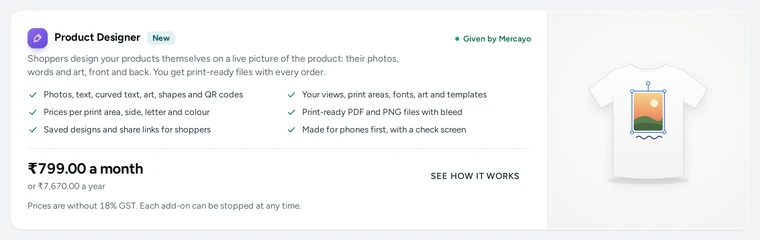
The Product Designer card in Billing, with its price and what it includes. Fill the Designer Library
In Products → Product Options → Designer Library, add the fonts shoppers may use, your art sets, palettes and price rules.
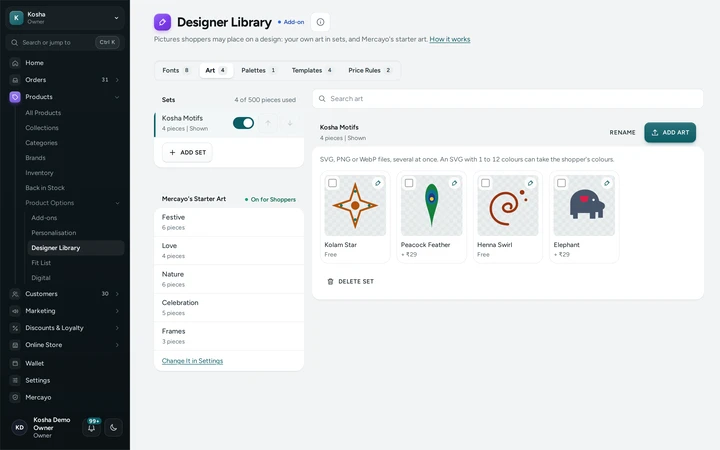
The Designer Library's art sets with their pieces, on Kosha, a demo store on Mercayo. Set Up the Product's Sides
On the product's page, the Product Designer card opens its Designer screen (Products → a product → Product Designer → OPEN DESIGNER). ADD SIDE takes the product's first photo; choose another, an overlay (a camera ring, a fold) and a photo or a tint for each colour or model. Switch on Names and Numbers for a team kit, or Shopper Picks the Size on a poster's print area.
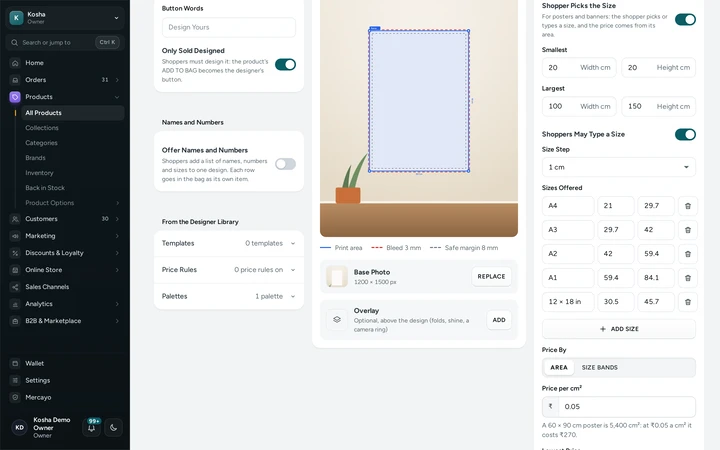
A poster's print area that takes the shopper's size, with its sizes and its price by area. Draw Where Printing Can Go
Choose a rectangle, an oval, a preset or your own outline and drag on the photo. Give the area its real size, print quality, bleed and safe margin, Cut at the Edge or Keep Inside, what shoppers may add, a palette and colour limit, and the price when used. SAVE.
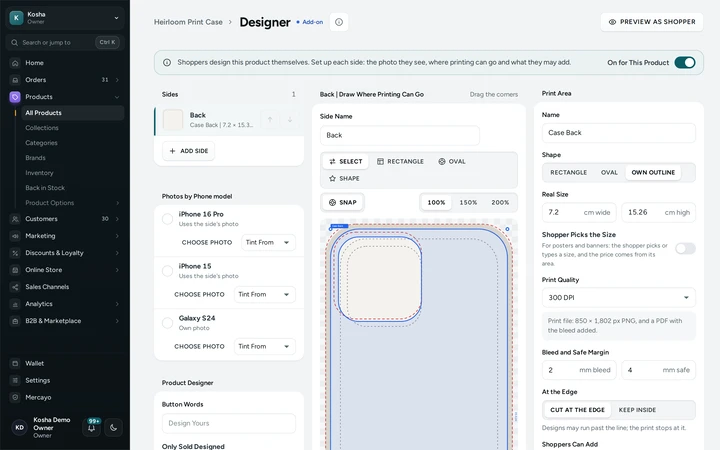
A phone case's print area with its camera cut-out, drawn on the case's photo. Make a Template or Two
In the Designer Library's Templates, press NEW TEMPLATE: your store's designer opens in template mode. Place the words, photo and art, set each part to Free, Replace Only or Locked, and SAVE TEMPLATE.
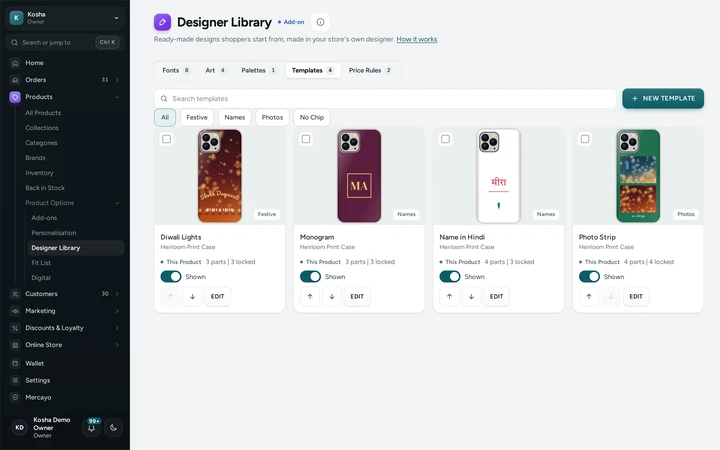
Templates in the Designer Library, each with its picture, chip and switch. Price It Your Way
Each print area has its price when used, and each art piece may have one. In the Designer Library's Price Rules, add more: per side, per photo or QR code, per letter, colour or element over a number, in rupees or a percentage, with a cap.
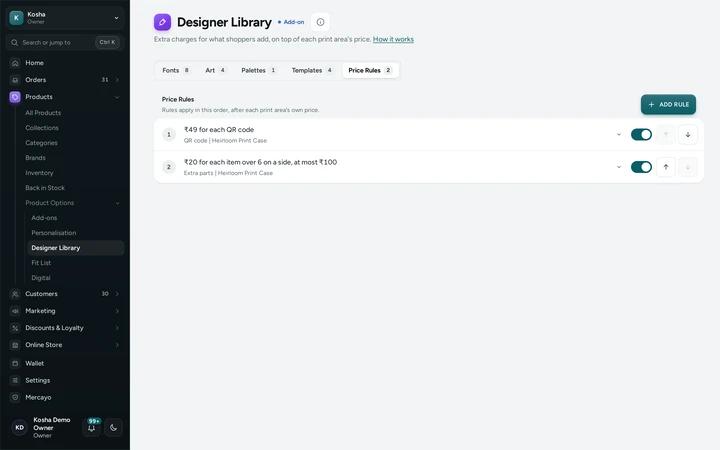
Price rules in the Designer Library: per side, per photo and per letter, with their caps. Shoppers Design It
The product page shows DESIGN YOURS and Start From a Design. The shopper designs, saves or shares it, checks, ticks and adds it to the bag; the line shows each side's picture and the design's price.
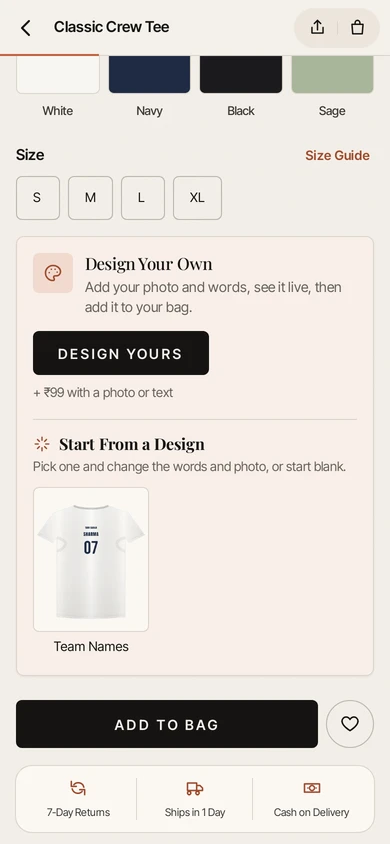
Start From a Design on a T-shirt's product page, with its templates. Download the Print Files
Once the order is paid (or its cash on delivery is taken), the order's Print Files card has DOWNLOAD PRINT FILE (PDF) and the PNG for every print area, with the checks. The order emails and the packing list show each designed side.


Your shoppers
What Your Shoppers See
A DESIGN YOURS card on the product page, with Start From a Design under it, then the designer on its own page: on a phone, the sides at the top, the product in the middle, the tools under the thumb (Text, Photo, Art, Shapes, QR Code, Templates, Layers) and the price with CHECK AND ADD at the bottom; on a computer, the tools on the left, the product with its sides as pictures, and the selected item's settings and the price on the right. SAVE DESIGN keeps it (in My Account → Saved Designs when signed in) and gives a link to open it again; SHARE makes a read-only link. Back closes any open panel first.

Settings
Settings You Control
Each one is in your admin. A new store starts with the value shown.
Mercayo
Mercayo's Controls
Mercayo sells the add-on (₹799 a month or ₹7,670 a year plus 18% GST, the same on every plan) with one 14-day free trial per store, and can turn it on or off for a store whatever its billing (Force On, Force Off, Follow Billing), end a trial or give it more days (each written in Mercayo's audit log). Mercayo also sets how many elements a side may hold (30), how many art pieces a store may upload (500), how many saved designs a shopper may keep in a store (50), how long print files are kept after delivery (180 days; the small pictures are kept for good) and how long a design that was never ordered, or a guest's saved design, is kept (90 days). Mercayo also sets how many background cut-outs a store makes a month (300) and how many names and numbers rows a shopper adds at once (50), and can turn any of your switches on or off for your store.
Limits today
Good to Know Before You Start
- The background cut-out is made by a model on Mercayo's servers: dark hair against a dark background, or something touching the subject, may need UNDO.
- Files are sRGB PDF and PNG, with an SVG of the layers, crop marks and a CMYK PDF when you turn them on. In the CMYK PDF, text is pixels at the print DPI. Text in your own uploaded fonts prints as outlines in the PDF; the library's fonts are embedded as fonts.
- The 3D view is for sides that wrap a cylinder (mugs, tumblers, bottles); other products are designed on a flat photo of each side.
- An SVG with pictures, text, styles or animations inside it, a script, or a link outside itself is refused; save it as plain shapes first, or upload a PNG.
- Noto Nastaliq Urdu is set straight: its sloping, stacked letters cannot follow a curve or take letter spacing, so curved or spaced-out Urdu uses Noto Naskh Arabic.
- A template offered on other products of its category keeps its locked parts as made only on its own product; on the others, its colours must be ones the area offers.
- When a trial ends or the add-on stops, the designer is hidden from shoppers; your setups, art and templates are kept, and orders keep their print files.
Questions
About Product Designer
How much does it cost?
₹799 a month or ₹7,670 a year, plus 18% GST, on every plan. There is no cap on designed orders and no charge per print file.
How does the free trial work?
Press START 14-DAY FREE TRIAL on the Product Designer card in Billing. Everything works for 14 days and nothing is charged for them. Add it during the trial and it is charged from the day the trial ends; Mercayo reminds you before the end. Each store has one trial.
What happens when the trial ends and I have not added it?
The designer is hidden from shoppers (a product sold only designed shows as not available). Your sides, print areas, art, palettes, templates and price rules are kept, and orders already placed keep their print files. Add it at any time and the designer is back.
Does it slow down my product page?
No. The product page carries a small card and no new script; the designer's code loads only on its own page when a shopper taps DESIGN YOURS or a template.
What do I send to my printer?
For each print area, a PDF whose page is the area plus its bleed (the trim marked in the file) with text as real fonts, and a PNG at the area's DPI with a transparent background. Both are sRGB. Your shopper's photos are placed at their original pixels. You can also have an SVG with one layer for each text or photo and crop marks on the PDF. The Print Queue downloads a batch as one ZIP, or sends the files to your print partner by email or webhook once an order is paid.
Can I use my own clipart?
Yes. Upload SVG files (made safe as they are added, at most 512 KB each) or PNG and WebP pictures into art sets, with a price per piece if you like. Mercayo's 24-piece starter set is free to print and can be switched off.
What does a shopper see when a friend shares a design?
A read-only copy of the design on the product, with no name, phone number or email. Photos show only if the person who shared it chose Include my photos.
Can it do Hindi?
Yes. The font library has Hindi faces, and Hindi words are shaped correctly, curved too. Templates can have a Hindi version, and Urdu (Naskh or Nastaliq), Arabic and Hebrew can be typed right to left.
What happens to my templates if I change a palette?
They keep working. The parts a template locks keep their own colours for shoppers. Before you save, Mercayo lists the templates that use a colour you took out; UPDATE TEMPLATES moves those colours to the nearest ones you still offer, or keep them as they are.
Can shoppers see a mug in 3D?
Yes. Mark the mug's side as Wraps Around with its diameter and height: shoppers get a 3D button and turn their design on the mug before they order. The print file is still the flat print area.
Can a team order one design with everyone's name and number?
Yes. Switch on Names and Numbers for the product. The shopper adds a row per player (a name, a number and a size), typed, pasted from a spreadsheet or from a CSV, and each row goes in the bag as its own item with its own print file. SAVE DESIGN keeps the list with the design, so it can be finished on another phone.
How is a poster in the shopper's own size priced?
By its area (a rate per cm²) or by size bands you set, never under your lowest price. The shopper sees the price of each size before choosing it.
Related
Related Features
- Print QueueEvery print file of your paid designed items in one queue: batch them, download one ZIP, send them to your print partner, mark them printed.
- PersonalisationAsk shoppers for a name to engrave, a photo, a choice, a date or a tick box, each with its own price, carried through to the order, slip and invoice.
- MarketplaceSellers apply with PAN, GSTIN and bank details, sell from their own panel after your approval, and are paid by statement with commission and TCS worked out.
- Plans and BillingA free trial, then a monthly or yearly plan: your use against its limits, every payment with its GST invoice, and nothing deleted if a payment is late.
- Customer AccountsShoppers sign in with a one-time code by email or phone, or with Google, and find their orders, invoices, addresses and credit in one place.
- Packing ListsA packing list for any order at any stage: every item in full with tick boxes, notes and gifts, the money if you show it, Packed by and Checked by lines.
More in Design and Page Editor: Page Editor | Home Page Sections | Theme Editor | Store Looks | Menus and Mega Menu | Announcement Bar | Product Templates | Loading and Motion | Royal Depth | Graphite | Sideways Scrolling | Section Builder Assistant | Print Queue
