Graphite
Graphite: Photos Edge to Edge, Three Font Sets, Dark or Light
Graphite is a finished look for a store whose products are best seen big: photos run edge to edge on a near-black ground, offers stand out in copper, cash on delivery and delivery in green, and the main button in ink. It comes in Graphite Dark and Graphite Light, with three font sets you can switch in one tap, and a set of home sections made for it, every one of them yours to use with any preset.
- No fee on your orders, on every plan
- Free for 14 days

Kosha is a demo store on Mercayo. Its products, orders and customers are sample data.
In short
What It Does
Choose Graphite in Online Store → Theme → Presets. It sets the colours, the fonts, 12 px corners (never pills) and the Graphite Finish:
- Photos edge to edge: product cards show the photo square and full, on a near-black ground, with the saving as a copper tag, a glass heart and a white + on the photo.
- The header: frosted glass, your name as the wordmark (its last part in copper), and a bar under it on phones, "Which phone is yours?", that tucks away while shoppers scroll down and comes back when they scroll up.
- The offer line: your announcement messages moving slowly in small capitals.
- The footer: near-black on both grounds; on phones the link groups fold, with your promise chips and a WhatsApp row under them.
In Colours, Graphite offers two colourways, Graphite Dark and Graphite Light. In Typography → Font Pair, three font sets change the headings, the words and the small labels together: 1 | Engineered (Archivo expanded, Geist, Geist Mono), 2 | Couture (Bodoni Moda, Hanken Grotesk, IBM Plex Mono) and 3 | Future (Unbounded, Plus Jakarta Sans, DM Mono). Every store can pick these font sets, with any preset.
Its sections, in the Editor: the Colour Story hero (a photo per colour, cycling like stories, with the real price, the colours as dots and a bag button), Offer Tickets (a ticket naming an offer shows only while that offer is on), the Word Band (very large words moving slowly), Bento Six (category tiles), the Photo Band (one photo edge to edge, several lines become ticked points), the Blueprint (a technical drawing with its parts named, drawn as it scrolls into view), the Finder Card (search and eight brands), Tall Cards (a row of tall product photos), Four Across and Two By Two (promises).
For your store
Why It Matters
A phone case, a watch strap or a charger is bought on how it looks in the hand. Graphite gives the photos the whole width of the phone, keeps two product cards side by side with 8 px between them, and keeps the words short and in a clear order: what it is, what it costs, what you save, what to tap.
It is quick as well as rich: the finish is drawn in CSS, only the chosen font set's fonts are loaded, each section loads only on a store that uses it, the phone bar tucks away by sliding (nothing under it moves) and motion uses only transform and opacity. Shoppers who ask for less motion get none.
Step by step
How It Works
Apply the Preset
Open Online Store → Theme → Presets and press APPLY on Graphite. The preview shows it at once; UNDO takes it back. Press SAVE to put it on your store.
Pick Dark or Light
In Colours, choose Graphite Dark or Graphite Light. Only the colours change.
Pick a Font Set
In Typography → Font Pair, choose 1 | Engineered, 2 | Couture or 3 | Future. The headings, the words and the small labels change together. To keep a combination ready, save it with SAVE THIS LOOK in Presets and APPLY it whenever you like.
Build the Home Page
In Online Store → Editor, add a Hero with the look Colour Story (one photo per colour), Offer Tickets (link each ticket to its offer), a Word Band, Category Tiles as Bento Six, a Banner as Photo Band, a Blueprint, Shop by Device as Finder Card, a Product Rail as Tall Cards, and Promises as Four Across or Two By Two.
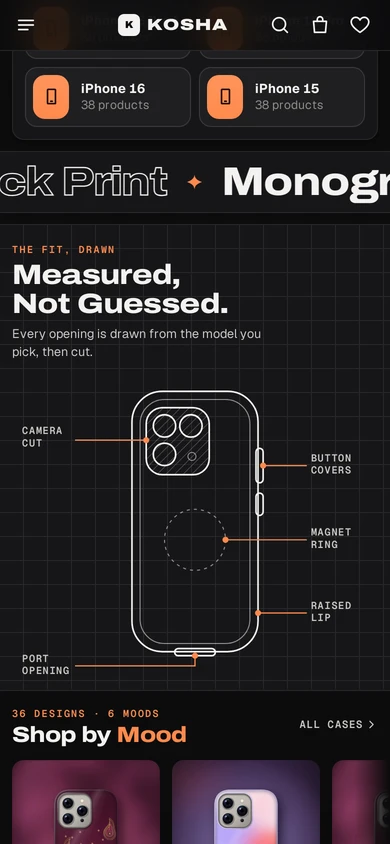
The Blueprint on a phone: a case drawn on a grid with its camera cut, button covers, port, lip and magnet ring named. Check the Moving Parts
On a phone, scroll down: the phone bar tucks away and the header stays. The Word Band moves slowly; with "reduce motion" on a phone, nothing moves.
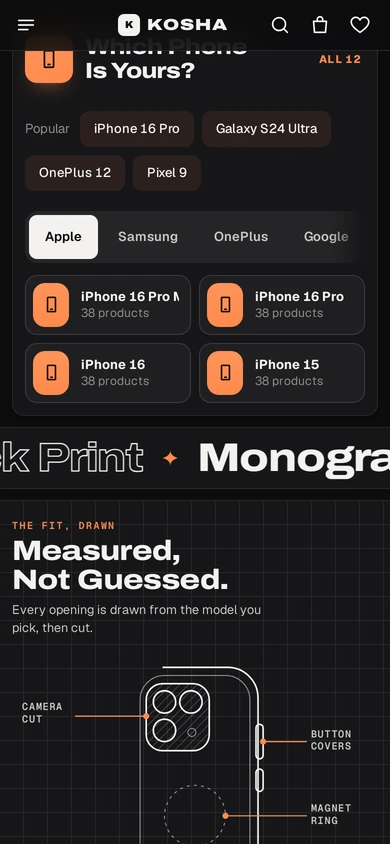
The Word Band and the start of the Blueprint on Kosha, a demo store on Mercayo.


Your shoppers
What Your Shoppers See
Shoppers see big photos edge to edge, offers they can trust (a ticket for an offer that has ended disappears by itself), a bar asking for their phone that gets out of the way while they scroll, and a footer that folds neatly on a phone. With "reduce motion" on their phone, nothing moves.

Settings
Settings You Control
Each one is in your admin. A new store starts with the value shown.
Mercayo
Mercayo's Controls
Mercayo's team can set any of these looks for a store, or keep one from being changed, as with every look setting. Mercayo never changes a store's look on its own.
Limits today
Good to Know Before You Start
- Two colourways today: Graphite Dark and Graphite Light.
- The Blueprint draws a phone case today; other drawings can follow.
- The footer's WhatsApp row shows only once you set your WhatsApp number (Settings, Floating Buttons).
Questions
About Graphite
Can I use the three font sets without the Graphite preset?
Yes. They are in Typography → Font Pair for every store, with any preset.
Will the moving parts slow my store down?
No. They move with transform and opacity only, are drawn in CSS, and each section's code loads only where it is placed.
What happens to an offer ticket when the offer ends?
A ticket linked to an offer is shown only while that offer is on, so it disappears by itself when the offer ends.
How do I switch between Graphite Dark and Graphite Light later?
Pick the colourway in Colours, or save each combination with SAVE THIS LOOK in Presets and APPLY the one you want, then press SAVE.
Related
Related Features
- Theme EditorColours, fonts, shapes, header, cards, product page, motion, logo and sharing picture, in one editor with a live preview, readability checks and undo.
- Store LooksPick a layout for the header, menus, search, product cards, lists, footer, product page, bag, checkout and order page, and mix them freely.
- Royal DepthA premium preset in Temple Green or Ivory: gold gradients, glass controls, paper grain, arched photos, and its own hero, card, dock and sections.
More in Design and Page Editor: Page Editor | Home Page Sections | Theme Editor | Store Looks | Menus and Mega Menu | Announcement Bar | Product Templates | Loading and Motion | Royal Depth | Sideways Scrolling | Section Builder Assistant | Product Designer | Print Queue
