Menus and Mega Menu
Menus That Lead Shoppers Straight to What They Want
Shoppers decide in seconds whether they can find what they came for. Mercayo's menus let you lay out your range as you think about it, up to three levels deep, with pictures beside the links on computers and a menu built for thumbs on phones.
- In every plan
- Free for 14 days


Kosha is a demo store on Mercayo. Its products, orders and customers are sample data.
In short
What It Does
Online Store → Menus holds your store's menus and where each one shows. There are three places:
- Header: the links at the top of every page. On a computer, an item with links under it opens a wide panel.
- Phone Menu: the menu on phones. Without one, phones show the header menu.
- Footer: the bottom of every page, one column per top-level item with its links under it.
Each place shows one menu. Until you make a header menu, the header shows your top categories and their sub-categories, and the footer shows a Shop column with your categories and a Help column, so a store that never opens Menus still has working navigation.
A menu item has a name and leads to a collection, a category, a product, one of your content pages, a store page (Home, All products, Search, Track your order, My account, Bag, Gift cards, Shop by fit), a web address, or nothing (a heading over the links under it). Collections, categories, products and pages are linked by what they are, not by their address, so renaming one never breaks the menu. Under More Options an item can take a short description, a tag such as New, a highlight in your sale colour, an icon for the phone menu and, on top-level items, up to six pictures.
An item that leads to something unpublished, deleted or switched off is left out for shoppers automatically, and comes back when the page does.
For your store
Why It Matters
In a store with phone cases for 200 models, or sarees by fabric, region and occasion, the menu is the catalogue's table of contents. When it is a flat list of categories, shoppers scroll, give up, or search for something you do not call by that name.
A mega menu with pictures lets a computer shopper see your range at a glance and jump straight to "Silk sarees" or "Gifts under ₹999". On phones, where most Indian shoppers browse, the menu needs to be large enough to tap, quick to go back from, and clear about where each row leads.
Menus here are also safe to change on a busy day: saving shows the change on every page at once, links never point at a page you unpublished, and the database checks every link before it is stored.
Step by step
How It Works
Create a Menu
Open Online Store → Menus and press CREATE MENU. With no menus yet, START FROM MY CATEGORIES builds a first header menu from your categories, or START EMPTY gives you a blank one. Give it a Name and choose where it Shows In: Header, Phone Menu, Footer or Not shown. Giving a menu a place another menu has moves that one out (it is kept, not shown).
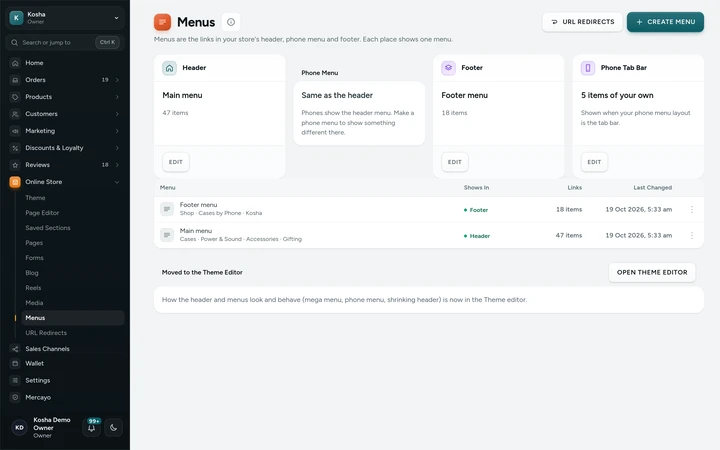
Menus with the three places and the store's menus, on Kosha, a demo store on Mercayo. Add Items and Links
Press ADD MENU ITEM, type the name shoppers see and choose what it Links To. For a collection, category, product or page, search by name. For a web address, use a page of your store like /pages/about, an https:// address, mailto: or tel:. Choose "Nothing (a heading)" for an item that only opens the links under it.
Arrange the Tree
Drag an item by its handle to move it, or drop it onto another to put it under that one; it works with a finger too. With the keyboard, Alt and the arrow keys move the chosen item, and Alt and Right puts it under the one above. Menus go three levels deep: a top item, its columns and their links. Long menus fold: COLLAPSE ALL and EXPAND ALL, and a folded item says how many links it hides.
Add Pictures for the Mega Menu
Open a top-level item, then More Options and Pictures: up to six, each with a name, a link and an optional one-line description. On a computer they sit beside the item's links in its panel; the first two also show in the phone menu. Use Highlight for a Sale link and Tag for a short word like New.
Save to Make It Live
Press SAVE. "Saved. The menu is live on your store now." Every cached page shows it at once. Anything that needs fixing is marked in red first, and if someone else saved the same menu after you opened it, your save is stopped so you can reload and see their changes.
Set How Menus Behave
In Online Store → Theme → Header & Announcement, choose whether the mega menu opens on computers (off gives a short list), whether its pictures zoom a little under the pointer, and the icons in the phone menu. In Section Styles, choose the panel's layout (Columns, Picture Tiles, Tabs or Flyout) and the phone menu's (Full Panel, Accordion, Bottom Sheet, Picture Cards or Tab Bar).

Your shoppers
What Your Shoppers See
On a computer, pointing at a menu item, or tabbing to it with the keyboard, opens its panel: columns of links and pictures that fade up into place. On a phone, the menu rows are large enough for a thumb, each with an icon when you use them, and rise in one after another; inside a group, a round Back button and the group's name as the title show where they are. Shoppers never see a link to a page that is hidden or gone.

Settings
Settings You Control
Each one is in your admin. A new store starts with the value shown.
Mercayo
Mercayo's Controls
Mercayo's team can force or limit each menu setting for a store (the mega menu, picture zoom, phone menu icons, the panel and phone menu layouts), always with a written reason that is logged. Mercayo also sets how many menus a store may keep (20 to start with). Mercayo never edits your menus or their links.
Limits today
Good to Know Before You Start
- A menu goes at most three levels deep, with up to 24 top-level items and 150 items in all.
- Each place (header, phone, footer) shows one menu; there is no menu for a single page or collection.
- Menus are built by hand: there are no rules that fill a menu by themselves, apart from the automatic menus a store shows before it makes its own.
Questions
About Menus and Mega Menu
Do I need to make a menu before I launch?
No. Without a header menu, the header shows your top categories and their sub-categories, and the footer shows Shop and Help columns. Make a menu when you want a different order, collections, pictures or your own wording.
What happens to a menu link when I unpublish a collection?
Shoppers stop seeing that item at once, and it comes back when you publish the collection again. In the menu editor it is marked HIDDEN FROM SHOPPERS (or DELETED), so you can see why.
Can phones show a different menu from computers?
Yes. Give a menu the Phone Menu place and phones show it instead of the header menu. A shorter phone menu with your top categories first often works better than the full header menu.
How many pictures can a mega menu panel have?
Up to six for each top-level item. With three to six they sit as a grid of pictures beside the links on a computer, four in a row on wide screens. The first two also show in the phone menu.
Can a menu link to WhatsApp or a phone number?
A menu item can be any https:// address, so a wa.me link works, as do mailto: and tel: links. Addresses that start with javascript: or http: are refused.
Can my menus show in another language?
Yes. When your store offers more than one language, menu names are translated on the Translate screen with the rest of your store's own words, and each language's pages show their own. See languages and currencies.
Who can change the menus?
Saving a menu makes it live, so it needs the right to publish layout changes. A person with only the right to edit layouts can look at the menus but not save them.
Related
Related Features
- Store LooksPick a layout for the header, menus, search, product cards, lists, footer, product page, bag, checkout and order page, and mix them freely.
- Announcement BarUp to six short messages over your header, each with an optional link and its own start and end time, as a rotating line, a ticker or a closable bar.
- Theme EditorColours, fonts, shapes, header, cards, product page, motion, logo and sharing picture, in one editor with a live preview, readability checks and undo.
- Shop by FitFor products made for a model (a phone, a car, a printer): shoppers pick theirs once and every list, card and product page shows what fits it.
- URL RedirectsSend old addresses to new ones by hand or from a Shopify-style CSV, and get automatic redirects whenever a product or page changes its address.
More in Design and Page Editor: Page Editor · Home Page Sections · Theme Editor · Store Looks · Announcement Bar · Product Templates · Loading and Motion
Try It on Your Own Store
Every feature is in every plan, free for 14 days.