Royal Depth
Royal Depth: Gold That Catches Light, Glass and Arches
Royal Depth is a finished look for a store that should feel like a gift: a deep temple green (or warm ivory) with gold that catches the light, frosted glass for the controls that float, a faint paper grain and soft arches on the photos. It comes with layouts for the header, the product card, the phone's menu and footer, and sections for the home page, all of them yours to use with any preset.
- In every plan
- Free for 14 days

Kosha is a demo store on Mercayo. Its products, orders and customers are sample data.
In short
What It Does
Choose Royal Depth in Online Store → Theme → Presets. It sets the colours, fonts (Fraunces for headings, Mukta for words, with Devanagari in the same face), shapes and the premium finish:
- Gold that catches light: small headings, the words you mark in a heading, the main button, badges and card edges in a gradient from light to deep gold.
- Glass controls: the header's icons in small frosted circles.
- Paper and glow: a faint grain over the page and a warm glow behind its top.
- Arched photos: a soft arch on the top of product, category and story photos.
Each is a switch in Layout → Premium Finish, so any preset can borrow one. In Colours, Royal Depth offers two colourways, Temple Green (dark) and Ivory (light): one tap changes the colours and nothing else. Save either as a saved look to switch later.
Its layouts, in Section Styles: the Crest header (a round logo in a gold ring, search, bag and menu as glass circles), the Royal product card (an arched photo, a gold mark, the weights as a switch that changes the price, a round gold add), the Glass Dock for phones (a frosted dock at the foot of the screen, the menu opening as a full panel from its button) and the Phone Fold footer (one group open at a time, your contact lines always shown).
Its sections, in the Editor: Arch Cinema (a hero with the words set into an arched picture), Arch Thumbnails and the Occasion Grid (category tiles), Story With a Seal (picture and words, your logo as a seal), Feature and Pair (a large gift tile with its price and two smaller cards) and the WhatsApp Order Card.
For your store
Why It Matters
Sweets, dry fruit, tea and gifts sell on how they feel before a shopper tastes them. A store that looks like a printed menu loses to one that looks like a gift box. Royal Depth was made for a sweets maker's festive season and every part of it is built for phones first: the weights switch on the card itself (250 g, 500 g, 1 kg), the price follows, and one tap puts that pack in the bag.
It is fast as well as rich: the finish is drawn in CSS (no heavy pictures for the grain or the gold), each section and layout loads only on a store that uses it, motion uses only transform and opacity (no layout shift), and shoppers who ask for less motion get none.
Step by step
How It Works
Apply the Preset
Open Online Store → Theme → Presets and press APPLY on Royal Depth. The preview shows it at once; UNDO takes it back. Press SAVE to put it on your store.
Pick a Colourway
In Colours, choose Temple Green or Ivory. Only the colours change. To keep both ready, save each with SAVE THIS LOOK in Presets and APPLY the other one whenever you like.
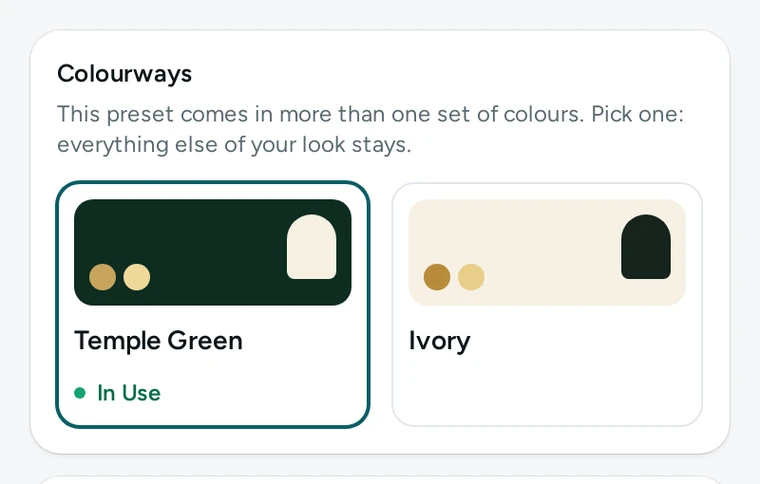
The Colourways card in the Theme editor: Temple Green in use, Ivory beside it. Choose the Layouts
In Section Styles, pick Crest for the header, Royal for product cards, Glass Dock for the phone's menu and Phone Fold for the footer. Each is a choice like any other: mix them with any preset.
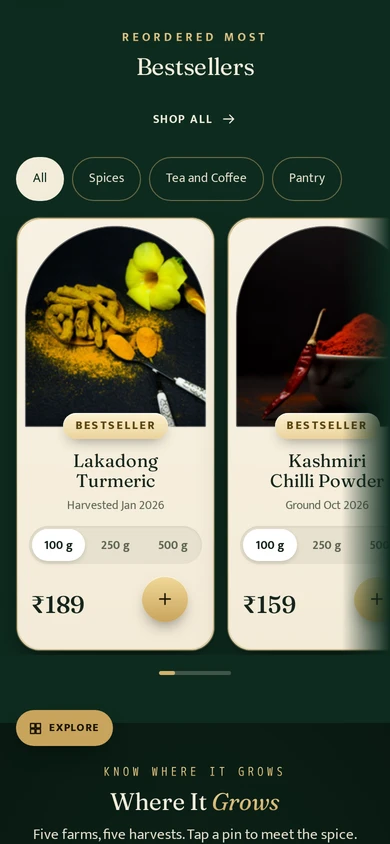
The Royal card on a phone: an arched photo, a gold mark, the weights' switch and the gold add. Build the Home Page
In Online Store → Editor, add a Hero and set its look to Arch Cinema, Category Tiles with Arch Thumbnails or Occasion Grid, Picture and Words with Story With a Seal, a Product Rail with Feature and Pair, and the WhatsApp Order Card (it uses the WhatsApp number in your settings).
Check the Phone Menu
With the Glass Dock, the menu opens as a full panel growing from the menu button: your categories with small arched pictures, a featured picture tile from your menu and your contact lines. Set the dock's tabs in Online Store → Menus → Phone Tab Bar.
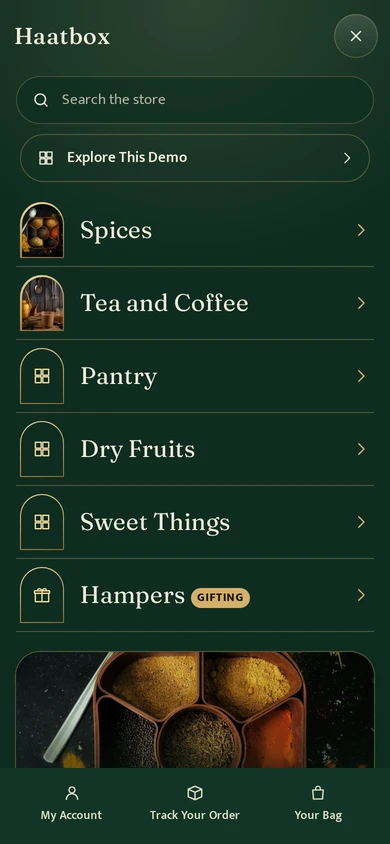
The Royal panel open on a phone, on Haatbox, a demo store on Mercayo.


Your shoppers
What Your Shoppers See
Shoppers see a store that feels like a gift box: an arched hero with your words in it, gold buttons with one sweep of light, weights to choose right on each card, a dock at the foot of the phone that tucks away while they scroll down, and a menu that opens like a door. With "reduce motion" on their phone, nothing moves.

Settings
Settings You Control
Each one is in your admin. A new store starts with the value shown.
Mercayo
Mercayo's Controls
Mercayo's team can set any of these layouts for a store, or keep one from being changed, as with every look setting. Mercayo never changes a store's look on its own.
Limits today
Good to Know Before You Start
- Two colourways today: Temple Green and Ivory.
- The weights' switch on the Royal card shows a product's two or three packs; a product with more choices opens its options instead.
- A product without a photo shows the preset's drawn arch until you add one.
Questions
About Royal Depth
Can I use the Royal card or the Glass Dock without the Royal Depth preset?
Yes. Every layout and section is a choice for any store; with another preset they take its colours.
Will the gold and the grain slow my store down?
No. They are drawn in CSS with no pictures, and each layout's code loads only on a store that uses it.
How do I switch between Temple Green and Ivory later?
Save each as a saved look in Presets (SAVE THIS LOOK), then APPLY the one you want and press SAVE.
Does the WhatsApp Order Card need anything set up?
Only your WhatsApp number, set in Settings on the Floating Buttons card. Without a number the card is not shown.
Related
Related Features
- Theme EditorColours, fonts, shapes, header, cards, product page, motion, logo and sharing picture, in one editor with a live preview, readability checks and undo.
- Store LooksPick a layout for the header, menus, search, product cards, lists, footer, product page, bag, checkout and order page, and mix them freely.
- Page EditorArrange the sections of every page in a visual editor with a live preview, private drafts, share links and 30 published versions to go back to.
More in Design and Page Editor: Page Editor · Home Page Sections · Theme Editor · Store Looks · Menus and Mega Menu · Announcement Bar · Product Templates · Loading and Motion · Sideways Scrolling
Try It on Your Own Store
Every feature is in every plan, free for 14 days.
