Announcement Bar
An Announcement Bar With Messages That Start and Stop on Time
The thin bar above your header is the first thing every shopper reads. Use it for free delivery, a festive sale or cash on delivery, and give each message its own start and end time, so the bar changes with your calendar without anyone remembering to edit it.
- In every plan
- Free for 14 days


Kosha is a demo store on Mercayo. Its products, orders and customers are sample data.
In short
What It Does
The announcement bar sits above the header on every page of your store. You edit it in the page editor, under On Every Page → Announcement Bar.
The bar holds up to six messages. Each message has:
- Text, up to 200 characters.
- An optional link: a label after the text ("Shop now") and where it leads; with no label, the whole message is the link.
- An optional Starts and Ends time, in India time. Outside its window, a message simply is not shown.
The bar takes one of four layouts, chosen in Online Store → Theme → Section Styles:
- Rotating (to start with): one line; your messages take turns. On a computer, up to four messages show side by side.
- Ticker: your messages move across in a continuous line, and stop when touched or pointed at.
- Message and Links: your message on the left; Track Order, Gift Cards (when you sell them) and a WhatsApp chat (when your store shows its WhatsApp button) on the right, on wide screens.
- Closable: a slim bar shoppers can close; it stays closed on their next visits until your messages change.
Its colours come from your theme. To start with, the bar picks a tone that stands apart from your header, so it never reads as another menu row; you can choose a scheme of your own.
For your store
Why It Matters
Free delivery above an amount, cash on delivery, a Diwali or end-of-season sale, a new drop: these are what move a shopper from browsing to buying, and the announcement bar is where they are seen on every page.
The hard part is timing. A sale that ended last night but still shows in the bar costs you trust, and a small team rarely has someone awake at midnight to change it. Here you set the window once: the message starts and stops by itself, and even a page served from the cache never shows a message past its end.
The bar also behaves well on phones. It has a fixed height, so the page never jumps when messages turn, and it holds still for shoppers who ask their phone for less motion.
Step by step
How It Works
Open the Announcement Bar
Open Online Store → Editor, then choose Announcement Bar under On Every Page in the page picker. A new store has no announcement bar; press ADD SECTION to add one.
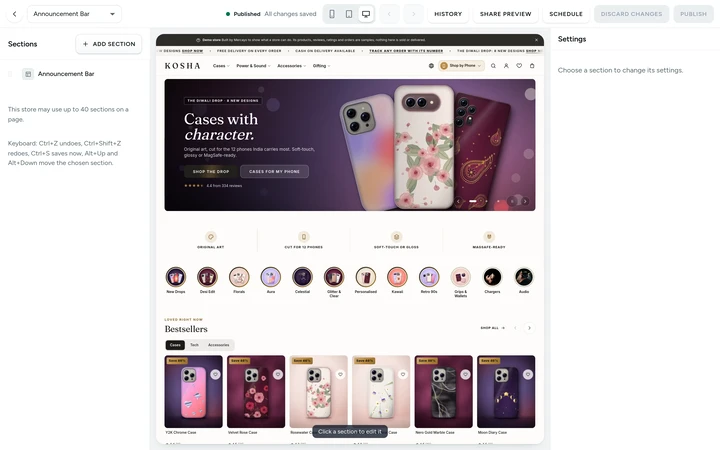
The announcement bar in the Editor, with its messages and their settings, on Kosha, a demo store on Mercayo. Write Your Messages
Under Messages, press ADD for each message, up to six. Keep them short: a phone shows one at a time. Add a link where a message leads somewhere, such as a sale collection or your delivery policy; leave the label empty to make the whole message the link.
Give a Message Its Own Window
Set Starts and Ends for a message that belongs to a date: "Diwali sale: 20% off till Sunday" from Friday 6 pm to Sunday midnight, India time. Leave both empty for a message that always shows. Messages outside their window are left out by themselves, so you can write next week's in advance.
Choose Its Colours, Then Publish
Colour Scheme is "Store default" to start with: a tone that stands apart from your header. You can choose Base, Alternate, Night or Brand (your theme's second brand colour) instead. Preview it at phone and computer size, then press PUBLISH. The bar changes on every page at once.
Choose How It Behaves
In Online Store → Theme → Header & Announcement, set Seconds per Announcement (5 to start with, 3 to 15), whether messages are written in capitals, and the small accent dot before each message. In Section Styles, choose Rotating, Ticker, Message and Links, or Closable.

Your shoppers
What Your Shoppers See
Shoppers see your messages above the header on every page. On a phone, one message shows at a time and the next takes its place every few seconds; the turning pauses while they touch or point at the bar, while the tab is in the background, and always for shoppers who ask their phone for less motion. A link in a message is a real tap target. With the Closable layout, one tap hides the bar, and it stays hidden on their next visits until your messages change.

Settings
Settings You Control
Each one is in your admin. A new store starts with the value shown.
Mercayo
Mercayo's Controls
Mercayo's team can force or limit how long each message shows and the bar's layout for a store, with a written reason that is logged, and can switch off the announcement bar section type for a store like any other section. Mercayo never writes or edits your messages: they are your store's own words.
Limits today
Good to Know Before You Start
- One bar shows above the header on every page; a message cannot be limited to some pages or collections.
- Each message is plain text up to 200 characters with one optional link; no pictures or icons inside messages.
- Times are set in India time.
- Every shopper sees the same bar: a message cannot be shown only to some shoppers, such as first-time visitors.
Questions
About Announcement Bar
Where do I edit the announcement bar?
In Online Store → Editor: choose Announcement Bar under On Every Page in the page picker. Its timing and lettering are in Online Store → Theme → Header & Announcement, and its layout in Section Styles.
Will a sale message disappear on time even on a cached page?
Yes. When the page is built, only the messages inside their window are included, and the shopper's browser checks the windows again every minute, so a message never shows past its end time.
How many messages can I show?
Up to six. On a computer, up to four show side by side in the Rotating layout; with more, and always on phones, they take turns. The Ticker runs them all in one moving line.
Does the bar move the page when it changes?
No. The bar has a fixed height, so turning messages never moves the page under it. A Closable bar that a shopper closed is hidden before the page is drawn, so it never flashes in and pushes the page down.
Can the messages show in Hindi or another language?
Yes. When your store offers more than one language, the bar's messages are translated on the Translate screen like the rest of your page layouts, and shoppers on the other language's pages see them in that language.
Can I put a WhatsApp chat link in the bar?
Yes, in two ways: a message's link can be any https:// address such as a wa.me link, or the Message and Links layout adds a WhatsApp chat link on wide screens when your store shows its WhatsApp button.
Related
Related Features
- Page EditorArrange the sections of every page in a visual editor with a live preview, private drafts, share links and 30 published versions to go back to.
- Store LooksPick a layout for the header, menus, search, product cards, lists, footer, product page, bag, checkout and order page, and mix them freely.
- Menus and Mega MenuBuild header, phone and footer menus up to three levels deep, with pictures, tags and icons, and a mega menu panel on computers.
- Automatic OffersOffers that need no code: the bag finds them, applies the best for the shopper and says what a little more would unlock.
- Delivery ChargesSet delivery methods, group states into zones, price by weight, give free delivery above an amount, and add rules for PIN codes, then test any PIN code.
More in Design and Page Editor: Page Editor · Home Page Sections · Theme Editor · Store Looks · Menus and Mega Menu · Product Templates · Loading and Motion
Try It on Your Own Store
Every feature is in every plan, free for 14 days.
