Your store sends messages to shoppers: order confirmations and shipping updates by email, SMS and WhatsApp, COD confirmation codes, and marketing messages when you send them. Most cost a little to deliver. Wallet (the Notification Credits screen) is the prepaid balance that pays for them: "Credits for the order and marketing messages your store sends: what is left, what each channel costs, every change." Open Wallet at the foot of the side menu. Seeing it needs the right to see notification credits; only the store's owner can add money.
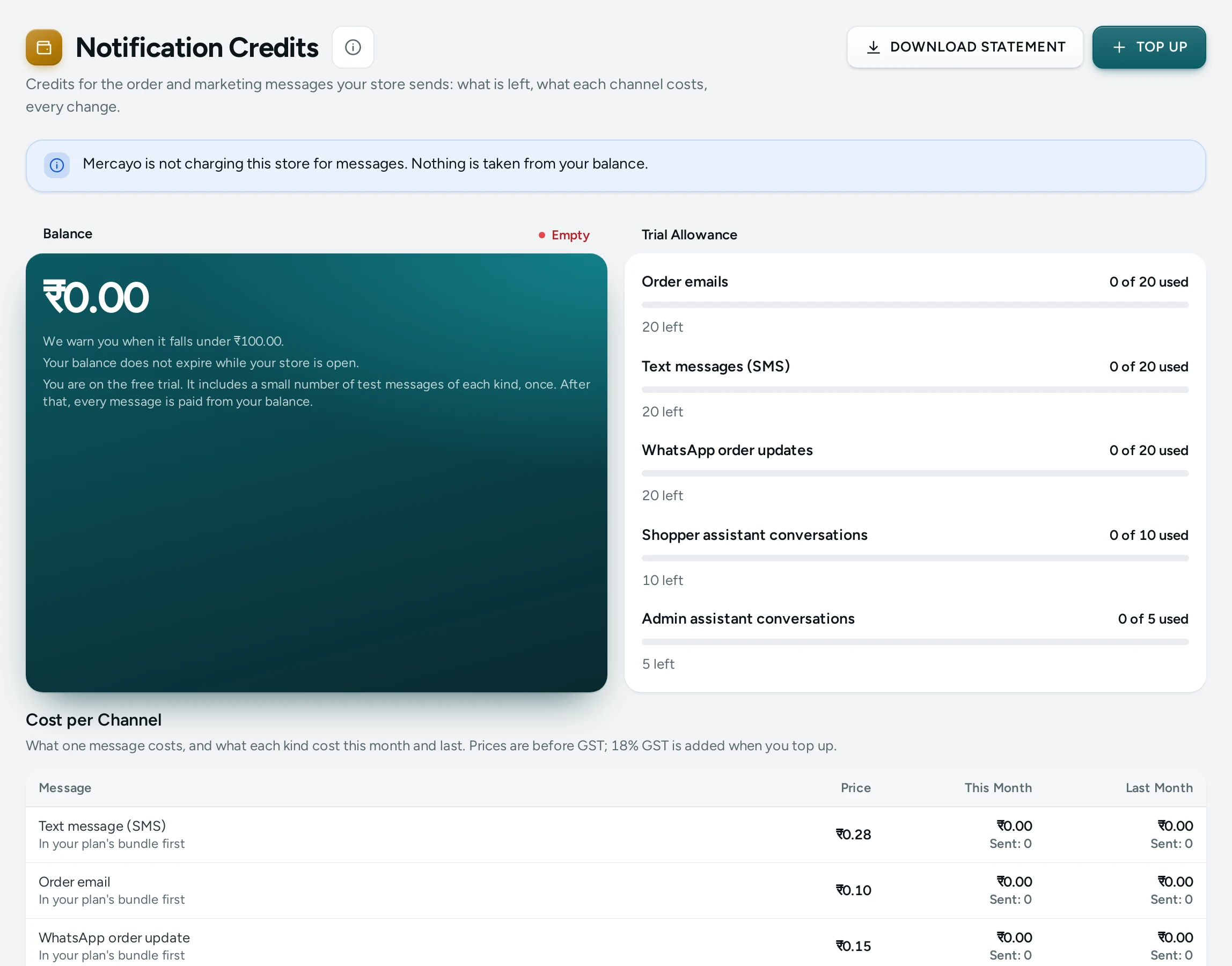
Balance
The top shows your Balance and its state: Healthy, Low or Empty. "We warn you when it falls under …" "Your balance does not expire while your store is open."
- Low: "Your balance is running low. … is left. When it reaches zero, messages that are not in your plan's bundle stop." The Home screen and the bell warn you too, and a banner appears across the admin.
- Empty: "Messages that are not in your plan's bundle are not being sent. Order emails keep going, free, up to … a month." The screen counts what was not sent ("12 messages were not sent this month because the balance was empty.").
Your Plan's Bundle
How messages are paid depends on your store's stage, and the screen says which applies:
| Stage | How Messages Are Paid |
|---|---|
| Free trial | "It includes a small number of test messages of each kind, once. After that, every message is paid from your balance." (20 emails, 20 SMS and 20 WhatsApp messages) |
| A paid plan | "Your plan includes a bundle of messages every month. It is used first, and your balance pays for anything beyond it." The bundle starts again each month |
| No plan | Every message is paid from your balance |
The monthly bundles today: Starter 1,000 emails, 150 SMS, 100 WhatsApp; Growth 3,000 emails, 750 SMS, 750 WhatsApp; Scale 8,000 emails, 2,000 SMS, 2,000 WhatsApp.
This Month's Use shows each kind: "120 of 750 used", "630 left", or "All used. Further messages are paid from your balance."
Cost per Channel
"What one message costs, and what each kind cost this month and last. Prices include GST." Each row is a kind of message (order email, SMS, order WhatsApp, marketing WhatsApp, marketing email…), with its Price, whether it comes In your plan's bundle first or is Always from your balance, and This Month and Last Month. Mercayo may set a price for your store (Your price). When Mercayo is not charging your store: "Mercayo is not charging this store for messages. Nothing is taken from your balance."
Top Up
- Press TOP UP: Top Up Your Balance.
- Choose an amount, or type Another amount in rupees (from ₹200 to ₹1,00,000).
- The quote shows Added to your balance, GST at 18% and You pay.
- Press PAY and the amount: Razorpay's page opens to pay.
"You get a GST tax invoice for every top-up." Where online paying is not switched on for your store, the dialog asks you to contact Mercayo support with the amount you want to add, and pay by bank transfer or UPI; the credit appears once the payment arrives.
Statement and Invoices
- Statement: every change, newest first: When, What (money added, messages sent, gifts), Amount and Balance, with filters for Type, Message and Dates, Hide plan messages, and Download statement as a file.
- Top-ups and Invoices: each top-up with its Date, Added, GST, Paid and Status (Paid, Waiting for payment, Not completed, Expired), and INVOICE to download Mercayo's GST tax invoice.
Questions
Do order emails stop when my balance is empty?
Order emails keep going, free, up to a monthly allowance. SMS and WhatsApp messages beyond your plan's bundle stop until you top up.
Does my balance expire?
No, not while your store is open.
Why did a COD code not reach a shopper?
One cause is an empty balance once the bundle is used. See COD Codes Not Arriving.