Cash on delivery is how many Indian shoppers like to pay, and it is also where fake orders and refused parcels come from. Every refused parcel costs you the courier's charge both ways. Mercayo gives you checks you can use alone or together: a confirmation code the shopper types at checkout before a COD order is placed, a staff call your team makes before shipping, WhatsApp buttons the shopper can press to confirm, and RTO Shield, which uses them only on risky orders. This article explains what each does to your orders and how to work through the Unconfirmed tab on the Orders List every day. The settings themselves are in Settings › Checkout and COD; marking orders confirmed needs the right to process orders (the owner, admins and the Order Manager role).
The Checks at a Glance
| Check | Where You Switch It On | Default | When It Happens | What It Changes on the Order |
|---|---|---|---|---|
| COD confirmation code | Settings › Checkout and COD › COD Confirmation Code › Confirm COD Orders by Code | Off | At checkout, before the order exists | Nothing visible: a COD order is placed only once the shopper has typed the right code |
| Staff call | Settings › Checkout and COD › Order Clean-up › Staff Call to Confirm COD Orders | Off | After the order is placed, before you ship | New COD orders are marked Unconfirmed until someone presses MARK CONFIRMED |
| RTO Shield | Settings › Checkout and COD › RTO Shield (Hold for a Call, Ask for the Code, Ask for Part Payment) | Off | At checkout and when the order is placed, only for risky COD orders | A held order is marked Unconfirmed ("Held for a call (RTO risk)"), like the staff call |
| WhatsApp confirmation | WhatsApp settings, Ask COD Shoppers to Confirm | Off | After the order, for shoppers who said yes to WhatsApp updates | The shopper presses CONFIRM or CANCEL; a confirm counts as confirmed by your team |
Confirmation Codes at Checkout
With Confirm COD Orders by Code on, a shopper who chooses cash on delivery must confirm their mobile number with a one-time code before the order is placed. With Mobile Code First on (the default), checkout asks for the code right under the mobile number, before the address; with it off, at the payment step. With Codes by WhatsApp Too on, the shopper may choose to get the code on WhatsApp instead of SMS.
On the order side this means:
- Every COD order placed while codes are on was placed from a phone number that received and returned the code. A typo in the number, or a made-up number, cannot place a COD order.
- The order goes straight to To ship, exactly like any COD order. There is no separate "verified" badge, because a COD order cannot exist without the code while the setting is on.
- Codes do not apply to prepaid orders.
The rules behind the code: it is 6 digits, lasts 10 minutes and allows 5 tries; a phone can ask for at most 3 codes in 15 minutes in your store. Mercayo never stores the code itself. Each code sent is paid like any other text message: from your plan's monthly message bundle first, then your notification credits (see Notification Wallet).
The Staff Call
Some stores also want a person to phone the shopper before a COD parcel goes out, to check the address, the size or simply that they still want it. Switch on Staff Call to Confirm COD Orders. From then on:
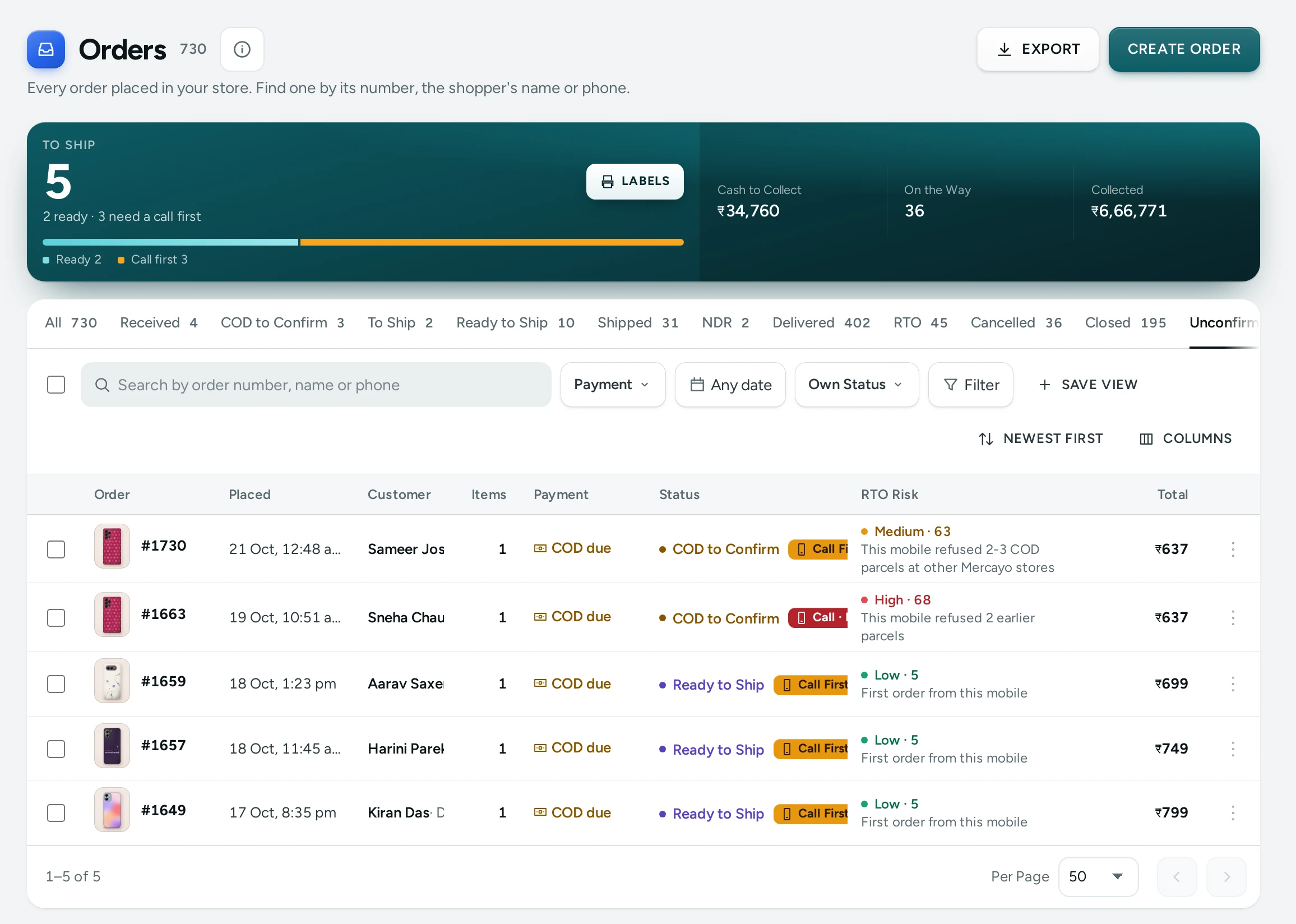
- Each new COD order is marked Unconfirmed (a yellow pill beside its status) until someone on your team marks it confirmed. Hover over the pill: "Staff have not phoned this shopper yet."
- The order's status stays To ship. The call is an extra marker, not a different status, so nothing stops you shipping an unconfirmed order if you choose to.
- On the Order Page a Confirmed by Call step appears between Placed and Shipped, and MARK CONFIRMED is the main button.
- The Unconfirmed tab appears on the Orders list, and the To Ship number in the summary strip says how many orders are "waiting for a call".
- Once marked, the pill turns green: Confirmed ("Staff phoned this shopper and confirmed the order.").
The setting is read when each order is placed. Switching it on does not mark orders already placed, and switching it off does not clear the marker from orders already waiting; prepaid orders are never marked.
With the staff call off, RTO Shield can still mark only the risky COD orders Unconfirmed (its Hold for a Call action), and they are confirmed the same way.
WhatsApp Confirmation
When your store sends WhatsApp updates and Ask COD Shoppers to Confirm is on, a COD shopper who said yes to WhatsApp updates gets a message with CONFIRM ORDER and CANCEL ORDER buttons instead of the plain order confirmation.
- CONFIRM ORDER on an order still to ship: the order's history gets Confirmed on WhatsApp, and if it was waiting for a staff call it is marked confirmed, exactly as if your team had called.
- CANCEL ORDER: if the shopper may still cancel (within your cancel window and before a courier label), the order is cancelled with "Cancelled by the shopper on WhatsApp". If not, the history gets Asked on WhatsApp to Cancel so your team can follow up.
See WhatsApp for setting up WhatsApp messages.
The Daily Routine for the Unconfirmed Tab
- Open Orders and click the Unconfirmed tab. Choose Oldest first so the orders that have waited longest come first.
- Open the first order. Look at the Customer card: a red Returned count means this shopper has refused COD parcels before, and the card says "Consider a call before shipping."
- Phone the shopper on the number shown (tap it on a phone to call). Check the name, address, landmark, PIN code and the items.
- If they confirm, press MARK CONFIRMED. In the dialog ("Mark order #1042 as confirmed with the shopper? Do this after you have phoned them.") add a Call note (optional), for example "wants delivery after 6 pm", and press MARK CONFIRMED.
- If they no longer want the order, press Cancel order, give the reason ("Shopper declined on call") and confirm. The items go back into stock.
- If they do not answer, add an internal note in the Timeline ("No answer 11 am, try again 5 pm") and move to the next order.
- Repeat until the tab is empty, then ship the confirmed orders from the To ship tab.
Undo
Pressed MARK CONFIRMED on the wrong order? On the order page, the message that appears offers Undo for about 10 seconds. A confirmation can be taken back within 10 minutes of making it, by the person who made it, the owner or an admin. The history then shows Confirmation taken back.
Orders Nobody Confirms
COD orders that sit unconfirmed hold stock that other shoppers could buy. You can have Mercayo cancel them:
| Setting (Settings › Checkout and COD › Order Clean-up) | What It Does | Default |
|---|---|---|
| Cancel COD Orders Nobody Ships | Cancels a COD order not shipped or paid for the number of days below, unless staff marked it confirmed. With the staff call on, only orders still waiting for the call are cancelled. Stock and coupon uses go back | Off |
| Days Before They Are Cancelled | Counted from when the order was placed (1 to 30) | 7 |
| Tell the Shopper When an Order Expires | Sends the shopper an order-cancelled message when this happens | Off |
An order cancelled this way shows Expired in its timeline, and a GST credit note is issued for it if it had an invoice.
Email When an Order Is Confirmed
In Settings › Notifications › Order Alerts, Email When a COD Order Is Confirmed (on by default) sends your team an email when an order is marked confirmed, for stores that phone shoppers. Who receives it follows the other order alert settings.
Mercayo Controls
Each of these settings can be set or held by Mercayo for your store; a setting Mercayo has fixed shows as locked in your settings, with Mercayo's note.
Good to Know
- MARK CONFIRMED works only on COD orders that are still To ship. A cancelled, shipped or prepaid order cannot be marked.
- Marking an order confirmed twice changes nothing and writes nothing new in the history.
- The call note is up to 500 characters and is kept in the order's timeline under Confirmed by staff.
- Confirmation codes, the staff call and part payment for COD work well together: codes stop wrong numbers, the call catches changed minds, and an advance paid online makes a refusal less likely. See Partial COD.
Questions
Do I need both codes and the staff call?
No. Codes alone stop orders from wrong or made-up numbers at no cost in staff time. Add the call if you sell high-value items (a jewellery brand in Mumbai, say) or see many refusals even with codes.
Can I ship an order that is still Unconfirmed?
Yes. Unconfirmed is a reminder for your team, not a lock. GENERATE LABELS and Ship work on any order that is To ship.
I switched the staff call on, but my old orders are not in the Unconfirmed tab. Why?
The marker is decided when each order is placed. Only COD orders placed after you switched it on are marked.
A shopper confirmed on WhatsApp. Do I still need to call?
No. A confirm on WhatsApp counts as confirmed by your team: the order leaves the Unconfirmed tab.
Does the confirmation code cost money?
Yes, a little: each code is a message, paid from your plan's monthly message bundle first and then your notification credits. Watch your balance in the Notification Wallet.