Move to Mercayo
Move Your Store From Shopify, WooCommerce or Dukaan, History and All
Your store has years in it: products, customers who know you, orders, reviews, gift cards people still hold, and links on Google. Mercayo brings all of it. Import it yourself with a preview before anything changes, or ask our team to move it for you.
- No fee on your orders, on every plan
- Free for 14 days


Kosha is a demo store on Mercayo. Its products, orders and customers are sample data.
In short
What It Does
What Moves
| What | From Shopify | From WooCommerce | From Dukaan |
|---|---|---|---|
| Products, variants, pictures | yes | yes | yes |
| Customers and their consent | yes | ||
| Past orders, as history | yes | yes (an order export's CSV) | yes |
| Reviews, stars, dates, replies | yes (Product Reviews, Judge.me) | yes | |
| Gift-card balances | yes | ||
| Discount codes | yes | yes | |
| Pages and blog posts | yes | yes (the WordPress export file) | |
| Old addresses | redirected | redirected | redirected |
Past orders come in as history. They sit apart from your store's own orders: they are never invoiced again, never sent a message, never take stock, never booked with a courier and never counted in today's sales or a report's period. Each customer's page shows their Orders From the Old Store, and their lifetime orders and spend count them, so your best customers are still your best customers. Orders → Imported lists them all.
Reviews keep their stars, date, name and reply, and stay on the right product (matched by handle, SKU or name). Published ones show at once; no thank-you codes go out for them.
Gift cards keep their balance and expiry so shoppers can spend them. Shopify's export shows only the last characters of each code: such a card comes in with a new code nobody has yet, and REISSUE sends it to the customer the old store had.
Discount codes come in switched off for you to check (or kept on, if you choose). Buy X Get Y, automatic offers and codes for some products only are listed as not imported, with why.
Pages and blog posts come in as drafts (or published as they were), and each old address, like /pages/about-us or /blogs/news/hello, becomes a URL redirect to its new page.
Every file is checked first: you see what will be made, updated and left out, row by row, before you press IMPORT. A second run of the same file never makes anything twice.
Two Ways to Move
| Do It Yourself | Move My Store | |
|---|---|---|
| Who | you, in Settings → Import and Export | Mercayo's team, through Support Sign-in |
| Plans | every plan | every plan |
| Price | included | ₹3,999 + GST once; included on Scale |
| Domain | Change of Domain, when you choose | moved for you, on the day you choose |
Move My Store is a request on Mercayo's support desk with its steps: export from the old store, products and customers, the history, the old addresses, a catalogue check against the old store, and the domain when you choose. Its status shows on the card and the request, and you can see what our team did in your activity log.
For your store
Why It Matters
Most merchants who come to Mercayo already sell somewhere, and a move that loses order history, reviews or links costs real sales: repeat buyers look like strangers, products look unreviewed, and Google's old links end on an error page.
Keeping the history apart is what makes it safe. An imported order never sends a confirmation email to a shopper who ordered last year, never uses an invoice number, and never inflates today's sales.
Step by step
How It Works
Export From Your Old Store
Download the exports: products, customers, orders, reviews, gift cards and discounts from Shopify; products, an order export and the WordPress export file from WooCommerce; products and orders from Dukaan.
Import Products and Customers First
In Settings → Import and Export → Import, bring the catalogue and customers in with their preview. Past orders and reviews then match them.
Bring the History
Choose Past Orders, Reviews, Gift Cards, Discount Codes or Pages and Posts under Your History, check each file and IMPORT. See them in Orders → Imported and on each customer.
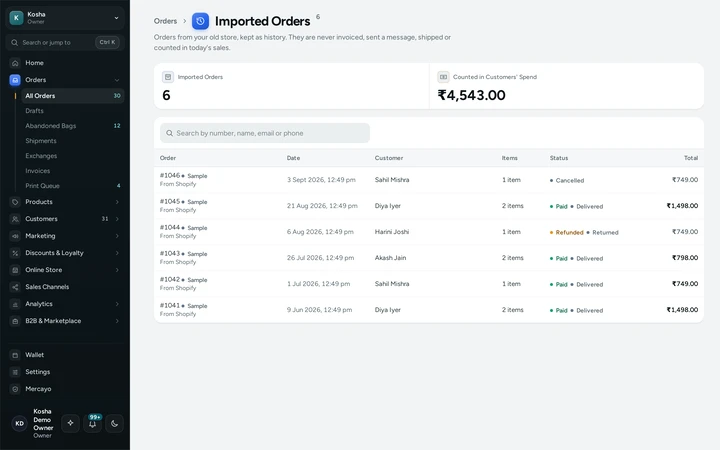
Orders → Imported: the old store's orders, kept as history. Or Ask Our Team
On the Move My Store card, press ASK MERCAYO TO MOVE MY STORE, say where your store is and what to move, and order (₹3,999 + GST, or included on Scale). The request and its steps show on the card.
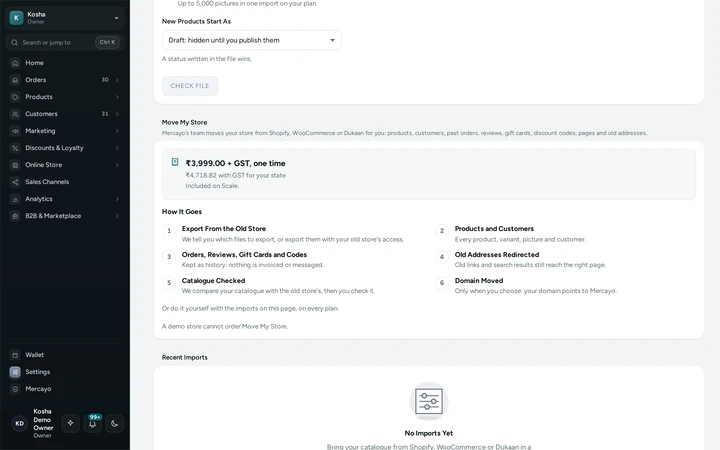
The Move My Store card, with its price and how it goes. Move Your Domain When Ready
When the store looks right, connect your domain, or change it from the old store's, on the day you choose.


Your shoppers
What Your Shoppers See
Shoppers keep what they had: their reviews on the products, their gift-card balances (with the old code when the file has it), and old links that land on the right page. Nobody is sent a message because of an import.
Settings
Settings You Control
Each one is in your admin. A new store starts with the value shown.
Mercayo
Mercayo's Controls
Move My Store's price, whether it is included and whether it is offered are Mercayo's settings, by plan and per store. Each kind of import needs its own right (past orders need orders and customers, reviews the reviews right, gift cards the gift cards right, codes the discounts right, pages the content right), checked by the database on every batch. One store never sees another's imports or imported orders.
Limits today
Good to Know Before You Start
- Past orders are history only: they cannot be shipped, refunded or invoiced from Mercayo.
- Shopify's own gift card export has only the last characters of each code; those cards get a new code to send.
- Buy X Get Y, automatic discounts and codes for some products only are not imported.
- Pictures inside pages and posts are not copied.
- Customers come from Shopify's or Mercayo's customers file, or from the past orders themselves.
Questions
About Move to Mercayo
Will my customers get emails about their old orders?
No. Imported orders never send a message, use an invoice number, take stock or book a courier.
Do imported orders count in my sales?
Not in today's or any period's sales and reports. They count in each customer's lifetime orders and spend.
What does Move My Store cost?
₹3,999 + GST once on Starter and Growth, paid online or by bank transfer or UPI, with Mercayo's GST invoice. It is included on Scale.
Can I import the same file twice?
Yes. Orders match by their old number, reviews by the old store's id, gift cards by their id or code, pages by their old address: a second run updates and never doubles.
Will my Google rankings move?
Your old addresses send visitors and search engines to the new pages with a permanent redirect, which is how search engines expect a move.
Related
Related Features
- Import and ExportImport products, customers and your old store's history from Shopify, WooCommerce or Dukaan with a preview first, and export your store's data as one ZIP.
- URL RedirectsSend old addresses to new ones by hand or from a Shopify-style CSV, and get automatic redirects whenever a product or page changes its address.
- Change DomainSwitch from one domain of yours to another: every link in your store changes, the old domain redirects with shoppers' bags, then is removed and checked.
- CustomersEvery customer with their orders, spending and returned parcels, guests included, ready-made segments like VIP and RTO-Prone, tags, notes, credit and export.
More in Admin on Your Phone: Orders | Products | Inventory | Import and Export | Collections and Categories | Order Alerts | Customers | Admin on Your Phone | Search and Command Palette | Setup Guide and Launch | Sample Data | Contact Inbox | Notification Credits | Plans and Billing | Draft Orders | Catalogue Tools | Media Library | Locations, Barcodes and Stock Counts | Installable Admin | Order Number Prefix | Mercayo Admin App | Alert Sounds | Assistants