Alert Sounds
Know It Is an Order Before You Pick Up the Phone
When every alert sounds the same, every alert gets checked. Give new orders a till's cha-ching, COD calls a coin chime and failed deliveries a doorbell, and you know what needs you before the phone is out of your pocket.
- In every plan
- Free for 14 days

Kosha is a demo store on Mercayo. Its products, orders and customers are sample data.
In short
What It Does
Five kinds of alert each have a sound: New Orders, COD to Confirm, Failed Deliveries, Low Stock and Messages (a shopper's WhatsApp message or the contact form).
Mercayo's Sounds
Seven short original sounds, made for Mercayo and evened out to the same loudness: Cash Register (a till's "cha" then a bright two-bell "ching", for new orders to start with), Coin Chime (coin clinks and a two-note bell, for COD to confirm), Doorbell (failed deliveries), Soft Ping (low stock), Bell (messages), Marimba and Drum Roll, plus Vibrate Only and Silent. PLAY lets you hear each before choosing it.
Your Own Sounds
Your Sounds adds sounds of your store's own: an MP3, OGG or WAV file of up to 10 seconds and 1 MB, with a name, and a tick to confirm your store has the right to use it (you made it, bought it, or it is free to use). Each one is checked by what the file really is, not its name, and evened out to the loudness of Mercayo's sounds, so no sound is louder than the rest. A store keeps up to 5 to start with. A sound the store plays for an alert cannot be deleted until another is chosen there.
Who Chooses
Alert Sounds in Settings sets the store's sound for each alert. Each person can choose their own in the app's Alerts and Sounds, and their choice follows them on every phone they sign in on. The sound played is the person's choice, else the store's, else Mercayo's starting one; a sound Mercayo fixed for a store shows as locked.
Where They Play
- The Mercayo Admin Android app plays each alert's sound on a locked phone with the app closed: each alert goes to an Android notification channel with its sound, which you can still change or mute in Android's own settings.
- The app open on the screen plays the sound with a note to open the alert.
- The full admin, open in a browser, plays your sound for new orders when one reaches the bell. SEND TEST in the app sends a test of an alert's kind, so you can hear it on a locked phone.
For your store
Why It Matters
A busy owner gets dozens of notifications an hour from family groups, banks and suppliers. An order alert that sounds like all of them gets checked late. A sound that means "money" or "call the customer now" is acted on at once, and a team on the shop floor can tell which phone needs attention.
Sounds of your own matter for teams that share a space: two stores run from one office, or a packing area where several phones sit together, each store with its own chime.
Step by step
How It Works
Set the Store's Sounds
In Settings → Admin App and Alerts, the Alert Sounds card has a sound for each alert. Press PLAY to hear one, and choose. The choice is saved at once.
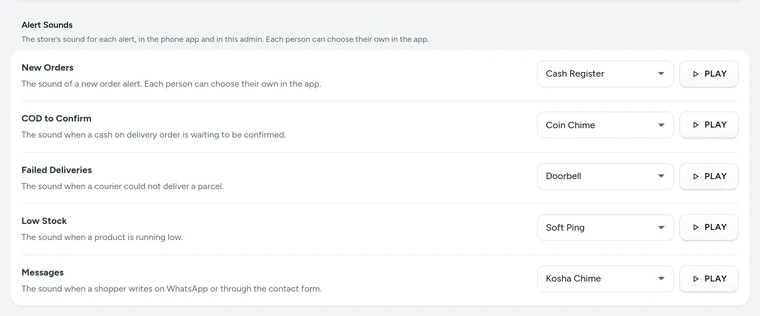
Alert Sounds in Settings → Admin App and Alerts, on Kosha, a demo store on Mercayo. Add a Sound of Your Own
In Your Sounds, choose a file, give it a name, tick that your store has the right to use it, and press ADD SOUND. It appears in every sound list under your store's own sounds.
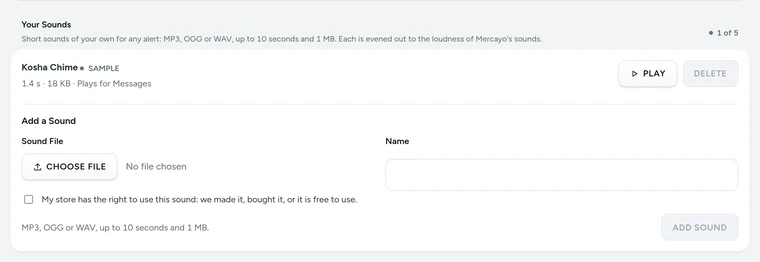
Your Sounds with a store's own sound and the form to add one, on Kosha, a demo store on Mercayo. Choose Your Own in the App
In the app, open More → Alerts and Sounds and pick a sound for each alert for yourself. It follows you on every phone.
Hear It on a Locked Phone
Turn on Alerts on This Phone, then SEND TEST, and lock the phone: the test arrives with the sound you chose.


Settings
Settings You Control
All are under Settings → Admin App and Alerts → Alert Sounds.
Mercayo
Mercayo's Controls
Mercayo can fix a store's sound for any alert (only from Mercayo's own sounds or the store's own), switch a store's own sounds off, and set how many it keeps (5 to start with, up to 20). When own sounds are switched off, alerts that named one play their kind's starting sound. Mercayo's own sounds were made from code for Mercayo and imitate no known product's recording. A store's own sounds are stored with its files and count toward its storage; Mercayo's demo stores never send alerts.
Limits today
Good to Know Before You Start
- Sounds on a locked phone with the app closed are for the Mercayo Admin Android app; in a phone's browser, alerts use the phone's usual notification sound.
- An own sound is at most 10 seconds and 1 MB, as MP3, OGG or WAV.
- Android fixes a sound for each notification channel when it is first used; a changed sound arrives as a new channel, and older channels can be removed in Android's settings.
Questions
About Alert Sounds
Can every person on my team have a different sound?
Yes. The store sets a sound for each alert, and each person can choose their own in the app's Alerts and Sounds; their choice follows them on every phone.
Why is my own sound quieter or louder than the file I uploaded?
Every sound is evened out to the same loudness as Mercayo's, so no alert is startling and none is too quiet to hear.
Can I use a song as my sound?
Only one your store has the right to use, which you confirm when you add it. A sound is at most 10 seconds.
Why can I not delete a sound?
It is the store's sound for an alert. Choose another sound for that alert first; the screen says which alerts use it.
Will the sound play if my phone is on silent?
Android decides that: on silent or Do Not Disturb, a notification's sound follows your phone's settings. Each alert's channel can also be changed in Android's notification settings.
Related
Related Features
- Mercayo Admin AppA light phone app for today's sales, orders, COD calls, shipping, stock and messages, with alerts that sound like a till and edits that wait for the network.
- Installable AdminInstall the admin like an app and get push alerts on each device for new orders, failed deliveries and returns, with your chosen sound for new orders.
- Order AlertsAn email for each new order to the owner and up to 5 more addresses, an optional SMS, and the admin's bell listing new orders, failed deliveries and exchanges.
More in Admin on Your Phone: Orders · Products · Inventory · Import and Export · Collections and Categories · Order Alerts · Customers · Admin on Your Phone · Search and Command Palette · Setup Guide and Launch · Sample Data · Contact Inbox · Notification Credits · Plans and Billing · Draft Orders · Catalogue Tools · Media Library · Locations, Barcodes and Stock Counts · Installable Admin · Order Number Prefix · Mercayo Admin App
Try It on Your Own Store
Every feature is in every plan, free for 14 days.
