Mercayo Admin App
A Phone App for the Jobs You Do Between Everything Else
The full admin works on a phone, but most of a day on the phone is the same few jobs: see today's sales, call the cash orders, ship, check stock, answer a message. The Mercayo Admin app is built for those, one thumb at a time.
- In every plan
- Free for 14 days

Kosha is a demo store on Mercayo. Its products, orders and customers are sample data.
In short
What It Does
The app lives at admin.mercayo.com/app and opens on your store's Home, with five tabs at the bottom: Home, Orders, Products, Inbox and More. A tab your role cannot use is not shown, and the app's rights are the admin's own.
- Home, in one read: today's sales against the same weekday last week by this hour, hour by hour, visitors on the store now, orders, conversion, and Needs You: COD orders to confirm, orders to accept and to ship, failed deliveries, returns asked, unread messages and low stock. Under Money: COD still with couriers and your wallet.
- Orders by stage (COD to Confirm, To Accept, To Ship and more) with counts, grouped by day, with search. Swiping a row reveals CALL and SHIP; a tap is still needed, so a scroll can never act. Touch and hold chooses several.
- The order: where it is and the next thing to do in the bar at the bottom (CONFIRM ORDER, ACCEPT, SHIP ORDER, PRINT LABEL, MARK SHIPPED), the RTO risk reasons on a call-first card, the customer with CALL and WhatsApp, items, payment, parcel and calls. On a tablet the order opens beside the list.
- Confirm COD orders: a queue of cash orders, due call-backs first, then the riskiest, then the oldest. After each call, tap how it went: Confirmed (the order is confirmed), No Answer (a call-back is set, and with the reminder on, the shopper gets a WhatsApp reminder), Changes or Cancel.
- Ship from the phone: the ship sheet offers three couriers (your courier rule's pick first, then the cheapest and the fastest) with price, date and your own delivered rate for that PIN area. The label opens as a PDF for your printer's app.
- Products: a picture grid with stock in words, Low Stock, Sold Out and Drafts, the stock's value at cost, and search by name, SKU or a scanned barcode. Quick edit changes price, MRP, stock and Show on Store in one save. Add a product from the camera at full resolution or the gallery, and count stock by barcode with the camera.
- Customers with their spend, delivered rate and store credit; one Inbox for WhatsApp conversations, the contact form and your Mercayo support requests, with the order beside each and a reply inside WhatsApp's 24-hour window; Analytics at a glance; Payouts: COD held per courier, online not yet settled, paid this month and the wallet.
Alerts With Their Own Sounds
Alerts for new orders, COD orders waiting to be confirmed, failed deliveries, low stock and messages, each with its own sound: Cash Register for new orders and Coin Chime for COD to confirm, plus Bell, Soft Ping, Doorbell, Marimba and Drum Roll, Vibrate Only or Silent, or a sound of your store's own. On a phone where alerts were turned on in the app, a COD or failed-delivery alert carries buttons: CALL opens the order and dials, while CONFIRM and REATTEMPT act straight from the alert. See Alert Sounds.
When the Network Drops
Home shows today's totals as they last loaded, and stock and price edits wait on the phone and are sent when the network is back; if someone changed the same product meanwhile, the app asks whether to keep yours. Nothing about a shopper is kept on the phone.
Signing In
The app uses your admin sign-in and two-step code. Trust This Phone (on to start with) keeps a phone signed in for 30 days; the code is still asked at each new sign-in. Everything else (settings, themes, discounts, reports) is one tap away in More → Open the Full Admin.
Android
The app is also packaged for Android as Mercayo Admin, where each alert plays its sound even on a locked phone with the app closed. It is in testing on Google Play and not yet listed for everyone; until it is, open admin.mercayo.com/app in your phone's browser and add it to your home screen.
For your store
Why It Matters
Most Indian store owners run the business from a phone, between the warehouse, the market and home. The jobs that cannot wait are small and frequent: a cash order to confirm before the courier picks up, a parcel to ship today, a shopper asking on WhatsApp where their order is. An app that opens straight on those jobs, with a sound you recognise across the room, gets them done in the minute you have.
COD is where this pays most. A call made within the hour confirms far more orders than one made the next day, and an order cancelled before it ships costs nothing, while a parcel refused at the door costs delivery both ways. The Confirm COD queue puts the riskiest calls first and makes each outcome one tap.
The app is light on purpose: it loads only what a screen shows, it keeps working when the signal drops in a godown, and it never keeps shoppers' details on a phone that might be lost.
Step by step
How It Works
Open the App
On your phone, open admin.mercayo.com/app and sign in with your admin email, password and two-step code. Leave Trust This Phone on to stay signed in for 30 days. Add it to your home screen from the browser's menu.
Start From Home
Home shows today against last week and Needs You. Tap a task to go straight to it.
Confirm the COD Orders
Tap START on COD Orders to Confirm. CALL or WHATSAPP the shopper, then tap Confirmed, No Answer, Changes or Cancel; the next order follows.
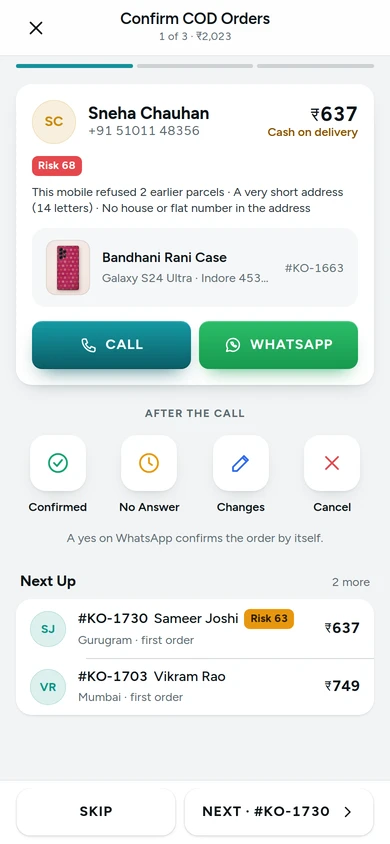
The Confirm COD queue with the risk reasons and the call's outcomes, on Kosha, a demo store on Mercayo. Ship and Print
On Orders, swipe an order and tap SHIP, or open it and use the bar at the bottom. Choose a courier in the ship sheet; the label opens as a PDF to share with your printer's app.
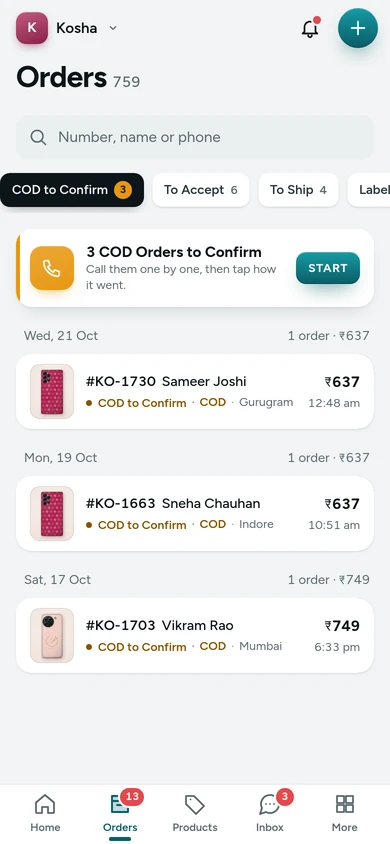
Orders by stage in the app, on Kosha, a demo store on Mercayo. Keep Stock Right
On Products, tap a product's pencil for Quick Edit, scan a barcode to find a product, or count stock with the camera.
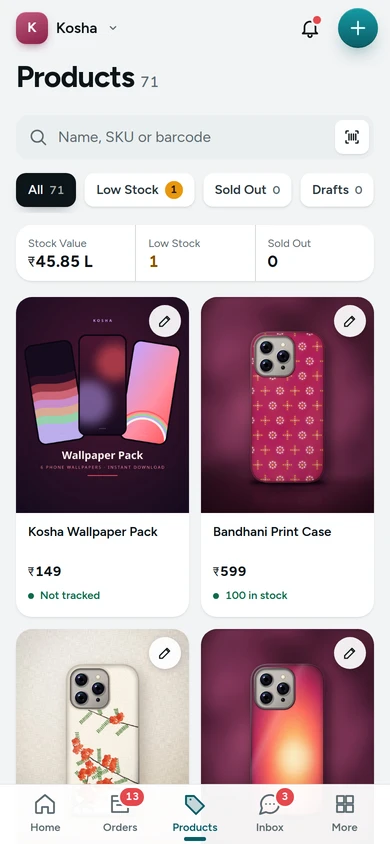
Products in the app with stock in words and the stock's value, on Kosha, a demo store on Mercayo. Turn On Alerts and Pick Your Sounds
In More → Alerts and Sounds, turn on Alerts on This Phone and choose a sound for each kind of alert. Your choice follows you on every phone you sign in on.


Settings
Settings You Control
All are under Settings → Admin App and Alerts → Mercayo Admin App.
Mercayo
Mercayo's Controls
Every setting of the app is your store's, and Mercayo's team can fix any of them for a store, with the reason shown in your admin. The app asks Mercayo's server for every right, exactly as the full admin does, so a role that cannot see customers sees no customers in the app either. Mercayo's demo stores never send alerts, and their Home says that its figures are samples.
Limits today
Good to Know Before You Start
- The app covers the daily jobs; settings, themes, discounts and reports open in the full admin from More.
- The Android app on Google Play is in testing and not yet listed for everyone; the app works today in the phone's browser.
- There is no iPhone app in the App Store; on an iPhone, use the app in Safari and add it to the Home Screen.
- Offline, only Home's last totals show and only stock and price edits wait; orders, shipping, calls and messages need the network.
- Labels go to your printer's own app as a PDF; the app does not print to a Bluetooth printer directly.
- Replies on WhatsApp are allowed only within 24 hours of the shopper's last message, as WhatsApp's own rules say.
Questions
About Mercayo Admin App
Is it a separate account or a separate admin?
No. It is your admin, with your sign-in, your store and your team's rights, laid out for a phone. Anything you do in the app is in the full admin at once.
Can I get it from Google Play?
The Android app, Mercayo Admin, is in testing on Google Play and not yet listed for everyone. Until it is, open admin.mercayo.com/app in your phone's browser and add it to your home screen: it is the same app.
Does a swipe ever ship or call by mistake?
No. Swiping a row only reveals CALL and SHIP; nothing happens until you tap one.
What does the app keep on my phone?
Only today's totals for Home and any stock or price edits waiting for the network. Nothing about a shopper is kept, and signing out clears the kept figures.
Can my staff use it with fewer rights?
Yes. Each person sees only the tabs and actions their role allows, and every action is checked by Mercayo's server as in the full admin.
Does the WhatsApp reminder go to every shopper I cannot reach?
Only when you tap No Answer with the WhatsApp Reminder setting on, and only through the same checks every WhatsApp message passes. You can switch the reminder off.
Help Centre
In the Help Centre
Related
Related Features
- Alert SoundsA sound for each kind of alert, from a till's cha-ching to a coin chime, or a short sound of your own, chosen for the store and by each person.
- Admin on Your PhoneEvery admin screen works on a phone: a bottom bar with your main screens, a More sheet with the rest, cards instead of tables, and touch and hold to select.
- Installable AdminInstall the admin like an app and get push alerts on each device for new orders, failed deliveries and returns, with your chosen sound for new orders.
- COD Confirmation CallMark new cash on delivery orders Unconfirmed until your team has phoned the shopper, with a warning when the shopper has refused parcels before.
- RTO ShieldEvery cash on delivery order gets a 0-100 risk score with plain reasons, and your store chooses what happens to risky ones: a call, a code or part payment.
- Shipping LabelsSelect orders and press GENERATE LABELS: each gets a courier by your rules and an AWB, and one PDF of labels in your look, printed on the paper you choose.
More in Admin on Your Phone: Orders · Products · Inventory · Import and Export · Collections and Categories · Order Alerts · Customers · Admin on Your Phone · Search and Command Palette · Setup Guide and Launch · Sample Data · Contact Inbox · Notification Credits · Plans and Billing · Draft Orders · Catalogue Tools · Media Library · Locations, Barcodes and Stock Counts · Installable Admin · Order Number Prefix · Alert Sounds
Try It on Your Own Store
Every feature is in every plan, free for 14 days.
