Notification Credits
One Prepaid Balance for Your Store's Messages, With Every Paisa Accounted For
Order emails, text messages and marketing emails cost money to send. Mercayo puts them on one prepaid balance in rupees, after the messages your plan includes, and shows you exactly where each paisa went.
- In every plan
- Free for 14 days


Kosha is a demo store on Mercayo. Its products, orders and customers are sample data.
In short
What It Does
Notification credits are your store's prepaid balance with Mercayo, in rupees, for the messages your store sends: order emails, text messages (SMS), WhatsApp messages and marketing emails. They are not the same as store credit, which is a shopper's balance in your store.
Every message is paid in the same order:
- What your plan includes. Each plan includes a number of order emails, SMS and WhatsApp order updates every month (see pricing). They are used first, and start again each month.
- Your balance. Beyond the bundle, the message's price is taken from your balance. Marketing messages are never in a bundle: they always come from the balance.
- A safety net for order emails. If the bundle is used up and the balance is empty, order and system emails still go out, free, up to 100 a month (not during the free trial), so a shopper is never left without the email for their order.
When the balance is empty, other messages stop: they are not sent and not charged, and the screen counts how many were stopped.
The Notification Credits screen (Wallet in the admin's menu) shows:
- the balance, with Healthy, Low or Empty, and what your plan includes;
- this month's use of each kind of message, as used of included;
- Cost per Channel: the price of one message of each kind, and what each kind cost this month and last;
- the statement: every top-up, gift, message and correction, newest first, with filters and a CSV download;
- Top-ups and Invoices, with Mercayo's GST tax invoice for each one;
- Balance Alerts: when to warn you.
For your store
Why It Matters
Messages are part of how an Indian store works: an order email the moment a shopper buys, a text for a cash order's code, a reminder for a bag left behind. Each one has a real cost, and a surprise bill at the end of the month is the last thing a small business needs.
A prepaid balance keeps that cost in your hands:
- You decide the spend. Nothing is charged beyond what you have added.
- You see every message. The statement shows each one, what it cost and the balance after it, so a busy festive week is easy to understand afterwards.
- A failed message costs nothing. If the email or SMS provider does not accept a message, it is not charged.
- Order emails keep flowing even on an empty balance, up to the monthly safety net, so the messages shoppers rely on are the last to stop.
- GST is done properly. Each top-up comes with a GST tax invoice you can claim if you are registered.
Step by step
How It Works
Start With What Your Plan Includes
During the free trial, your store has a small allowance to test with: 20 emails, 20 SMS and 20 WhatsApp messages, once, for the whole trial. Once you pay for a plan, its monthly bundle applies from the first full-price month; the numbers for each plan are on the pricing page. The balance card says which applies to you, and when the bundle starts again.
Add Money to the Balance
Press TOP UP on the Notification Credits screen. Choose ₹200, ₹500, ₹1,000 or ₹5,000, or type any amount from ₹200 to ₹1,00,000. The dialog shows what is added to your balance, the 18% GST, and what you pay. Only the store owner can top up. Where online payment is switched on for your store, you pay on Razorpay's own page, by UPI or card, and the credit appears as soon as the payment is confirmed. Otherwise the dialog says how to pay by bank transfer or UPI, and the credit appears once Mercayo records your payment.
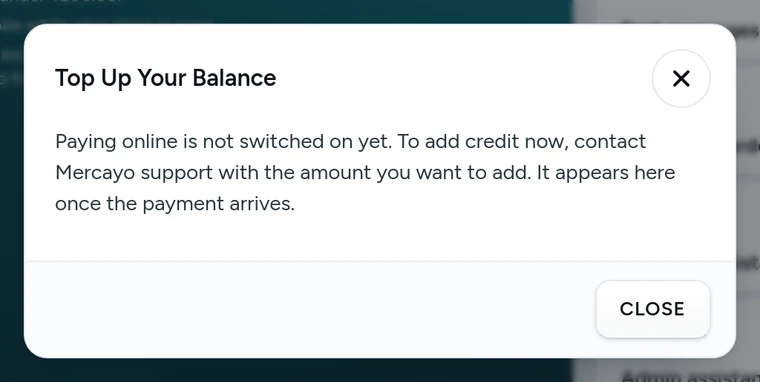
The Top Up Your Balance dialog, on Kosha, a demo store on Mercayo. Check What Each Message Costs
Cost per Channel lists each kind of message (order email, text message, marketing email and the rest) with its price, whether it comes from your plan's bundle first or always from your balance, and how many were sent and what they cost this month and last month. If Mercayo has set a price just for your store, it shows "Your price".
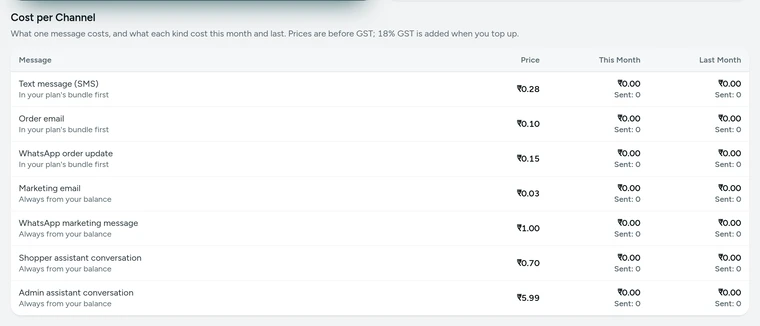
Cost per Channel on the Notification Credits screen, on Kosha, a demo store on Mercayo. Set Your Warning Level
In the Balance Alerts card, choose the balance under which you want a warning (₹100 to start with). When a message takes the balance under it, a strip appears across your admin with an OPEN button, the bell lists it, and, with Email me about a low balance on, the store owner gets one email. It warns again only after a top-up has lifted the balance above that level.
Read the Statement
The statement lists every change: Top-up, Gift from Mercayo, Used from plan, Used from balance, Put back, Correction. Each row says what it was for and the balance after it. Filter by type, by kind of message and by dates (in India time), or turn on Hide plan messages to see only what touched your balance. Download statement gives the same rows as a CSV file.
Download Your Invoices
Top-ups and Invoices lists each top-up with the amount added, the GST and the total paid, and an INVOICE button for Mercayo's GST tax invoice. It is split as CGST and SGST or as IGST, according to your state, and carries your GSTIN when your store has one in Settings → Taxes. The same invoice can be downloaded again at any time.


Settings
Settings You Control
All are under Wallet → Balance Alerts.
Mercayo
Mercayo's Controls
Prices and bundles are Mercayo's, and Mercayo's team can tailor them for one store: set the store's own price for a kind of message, change the bundle a store gets each month, run a launch offer (during which every message is paid from the balance), or stop charging a store for messages altogether, as it does for its own demo stores. It can also give credit or correct a balance, and record a payment made by bank transfer or UPI, which issues the GST invoice. Every one of these needs a written reason and is kept in Mercayo's audit log; gifts and corrections appear in your statement under their own names.
Mercayo's own notices to you, such as the low-balance email and top-up receipts, are never charged.
Limits today
Good to Know Before You Start
- A top-up is paid online through Razorpay where that is switched on for your store; otherwise by bank transfer or UPI, recorded by Mercayo.
- Automatic top-ups are not offered: the settings are kept, but nothing is charged by itself.
- The balance does not expire while your store is open, but it lapses when the store is closed, and an unused balance is not refunded.
- The assistant conversations listed in the price table are not used by any feature today, so nothing is charged for them.
- A trial's allowance is for the whole trial and does not carry over to the plan.
Questions
About Notification Credits
What happens when my balance reaches zero?
Messages beyond your plan's bundle stop: they are not sent and not charged, and the screen counts how many were stopped this month. Order and system emails still go out, free, up to 100 a month (not during the free trial). A strip across your admin says the balance is empty, with an OPEN button to top up.
Am I charged for a message that fails?
No. The price is held when a message is about to be sent and confirmed only when the email or SMS provider accepts it. If the provider refuses it, the hold is put back and shows in your statement as Put back. A message that is tried again is never charged twice.
Do I pay GST on top-ups?
Yes, 18% GST is added to the amount you choose, and you get Mercayo's GST tax invoice for every top-up, split for your state and with your GSTIN when your store has one. The full amount you chose is added to your balance; messages are then taken from it at the prices in Cost per Channel.
Can I top up online?
Yes, where online payment is switched on for your store: TOP UP opens Razorpay's page for UPI or card, and the credit and its GST invoice appear once the payment is confirmed. Otherwise the TOP UP dialog says how to pay by bank transfer or UPI, and the credit and its invoice appear once Mercayo records the payment.
Does my balance expire?
Not while your store is open, whatever the month or year. It lapses only when the store is closed; an unused balance is not refunded, so top up in amounts that suit how many messages you send.
Which messages always come from the balance?
Marketing messages, such as bag reminders and review requests by email, are never part of a plan's bundle: each one is paid from the balance. Order emails, SMS and WhatsApp order updates use the bundle first. Cost per Channel says for each kind which way it is paid.
Who on my team can see the wallet?
The store owner, and anyone whose role is given the right to see notification credits. Only the owner can top up. The Balance Alerts card shows to people who can see settings.
Related
Related Features
- Plans and BillingA free trial, then a monthly or yearly plan: your use against its limits, every payment with its GST invoice, and nothing deleted if a payment is late.
- Order AlertsAn email for each new order to the owner and up to 5 more addresses, an optional SMS, and the admin's bell listing new orders, failed deliveries and exchanges.
- Order EmailsShoppers get order emails in your store's name and colours, from placed to delivered; you switch each on or off, preview it and change its words.
- SMSMercayo sends your store's SMS through its own DLT-registered sender and templates, so you need no SMS account, header or registration of your own.
- Abandoned Bag RemindersUp to three reminders to shoppers who left at checkout, with a link that restores their bag, an optional code, quiet hours and recovered sales counted.
- WhatsAppOrder updates, COD confirmation buttons, bag reminders, back-in-stock alerts and offers on WhatsApp, in your store's name, from Mercayo's number or your own.
More in Admin on Your Phone: Orders · Products · Inventory · Import and Export · Collections and Categories · Order Alerts · Customers · Admin on Your Phone · Search and Command Palette · Setup Guide and Launch · Sample Data · Contact Inbox · Plans and Billing · Draft Orders · Catalogue Tools · Media Library · Locations, Barcodes and Stock Counts · Installable Admin
Try It on Your Own Store
Every feature is in every plan, free for 14 days.