Returns is the queue of shoppers asking to send items back for a refund. Each request moves through clear steps: you approve or decline it, the items come back (by a pickup you arrange, or a parcel the shopper sends), you check them and mark them received, then you refund the money on the order. Returns for a refund are off by default, because many Indian stores prefer exchanges only; switch them on in Settings › Returns and Exchanges when you want them. Open the queue with the Returns button at the top of Orders › Exchanges. Anyone who can see orders can read it; the step buttons need the right to process orders (the owner, admins and Order Manager).
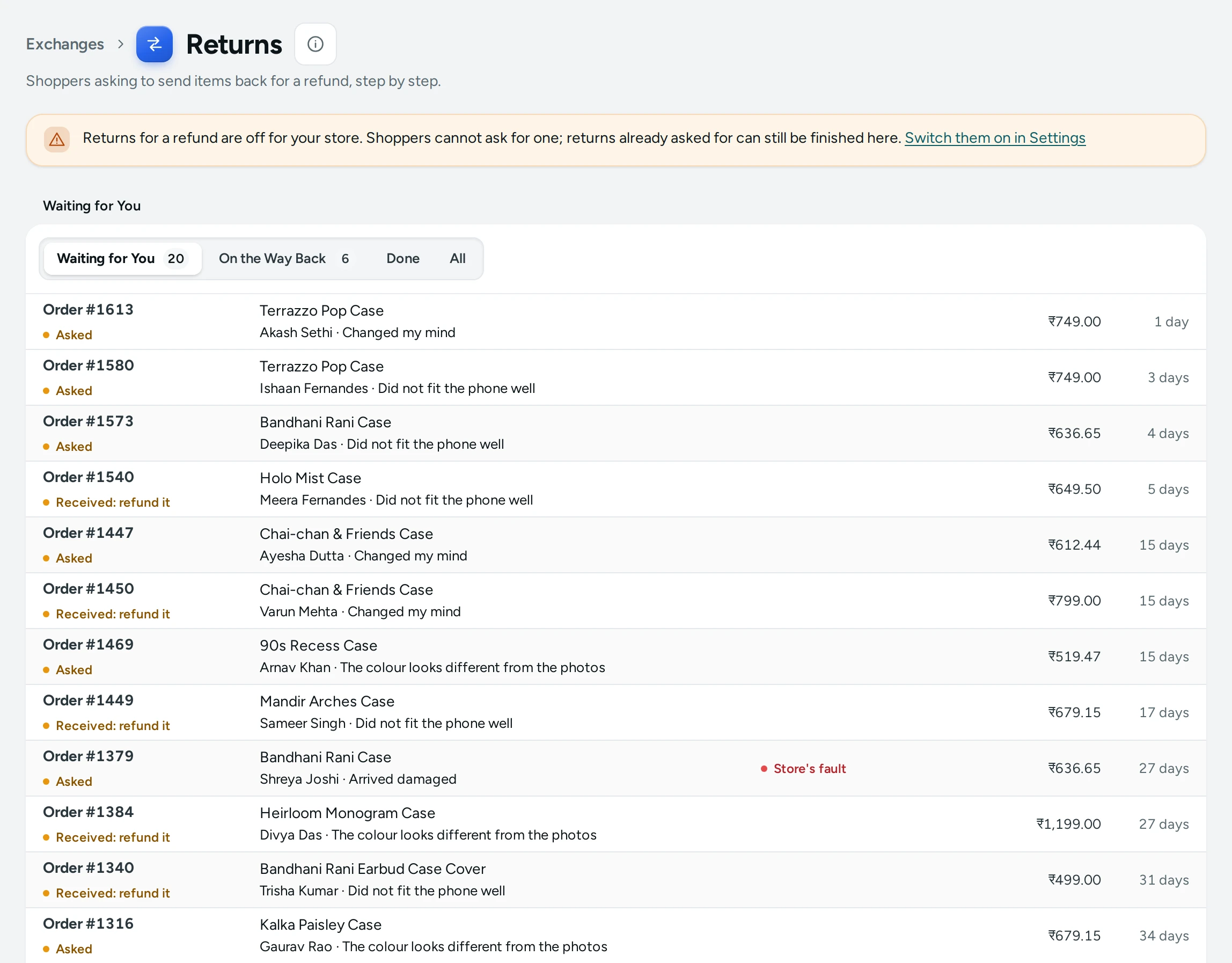
When Returns Are Off
While Returns for a Refund is off, the screen says: "Returns for a refund are off for your store. Shoppers cannot ask for one; returns already asked for can still be finished here." with a link to switch them on (for people who can see settings).
Tabs
| Tab | What It Holds |
|---|---|
| Waiting for You | New requests to approve or decline, and returns received and waiting for their refund. The tab shows a count |
| On the Way Back | Approved returns whose items are coming back. The tab shows a count |
| Done | Finished returns: refunded, declined or cancelled |
| All | Every return |
When Waiting for You is empty it says Nothing Waiting: "When a shopper asks to return items from a delivered order for a refund, it waits here for you."
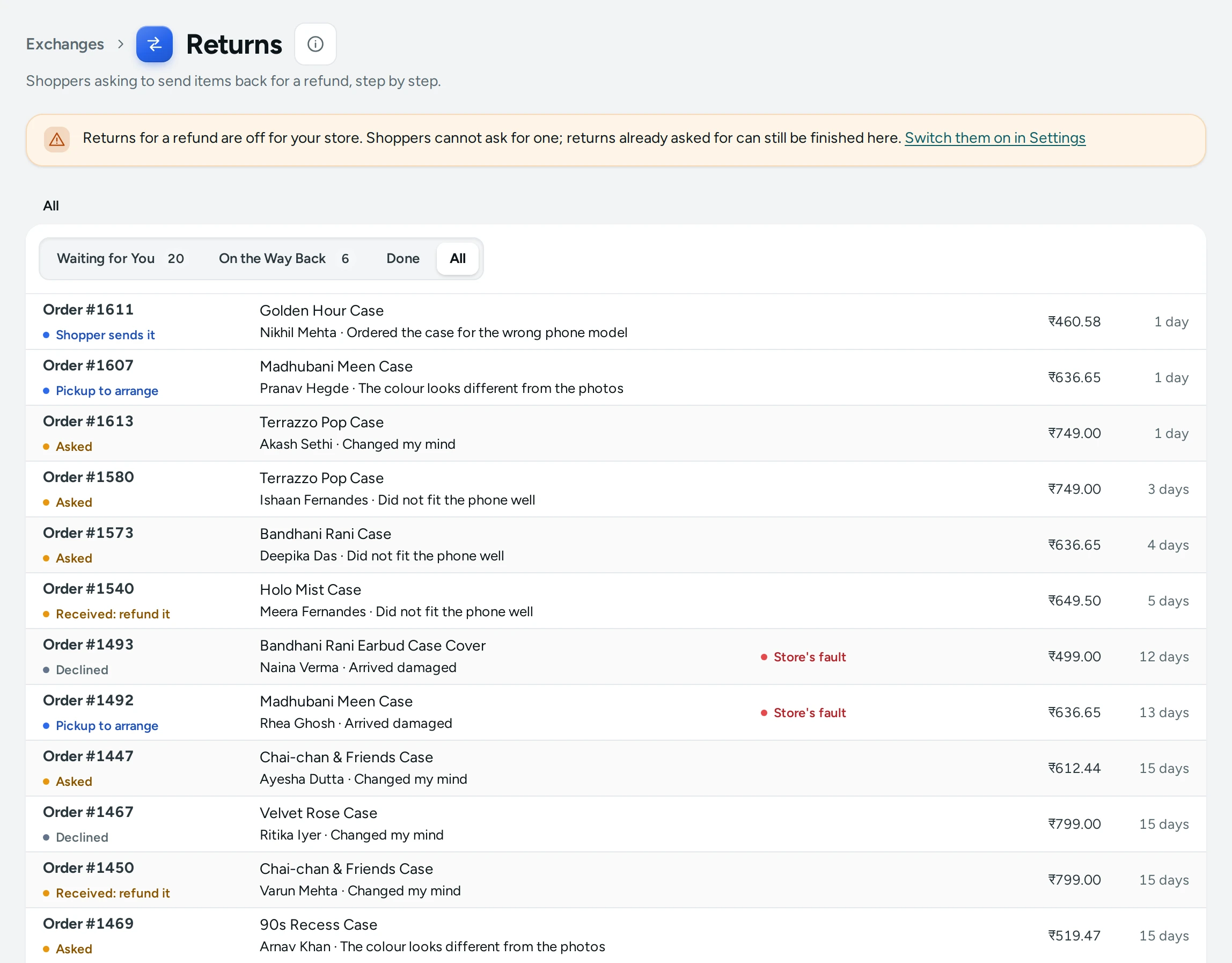
Each Return
A row shows Order #1042, the return's state, the first item ("+2" when there are more), the shopper's name and reason, a red Store's fault pill when the reason blames the store (wrong, damaged or faulty item), the refund amount and how long ago it was asked. Click the row to open it in place:
- the items and quantities with their amounts,
- Refund ₹1,598.00: what the shopper will get back,
- Note from the shopper: … when they wrote one,
- Sent with Delhivery, tracking 1234… once the shopper added their return parcel,
- Declined: … with your reason, for a declined return,
- Unboxing video, a link to the shopper's video when they gave one,
- the buttons for the next step.
States
| State | Meaning | Buttons |
|---|---|---|
| Asked | The shopper asked; waiting for you | APPROVE, DECLINE |
| Pickup to arrange | Approved, and the reason is the store's fault: you arrange the pickup | MARK RECEIVED, CANCEL RETURN |
| Shopper sends it | Approved, the shopper's reason: they send the items to you | MARK RECEIVED, CANCEL RETURN |
| On its way back | The shopper added the courier and tracking number | MARK RECEIVED, CANCEL RETURN |
| Received: refund it | You have the items back | REFUND ON THE ORDER, MARK REFUNDED |
| Refunded | Finished | None |
| Declined | You declined it, with a reason | None |
| Cancelled | Stopped | None |
How to Handle a Return
- Open Waiting for You and click the request.
- Read the items, reason and note, and open the Unboxing video if there is one.
- Press APPROVE, or DECLINE (see below).
- For a store's-fault reason the return moves to Pickup to arrange: book a reverse pickup with your courier.
- Otherwise it moves to Shopper sends it: the shopper sees your return address on their order page and adds the courier and tracking number once they send it.
- When the parcel reaches you, open it, check the items, and press MARK RECEIVED.
- Press REFUND ON THE ORDER. The order page opens; press REFUND, choose the items being returned and how the money goes back, and tick Put the items back into stock if they can be sold again. See Refunds.
- Back on Returns, press MARK REFUNDED to close the return.
How to Decline a Return
- Open the request and press DECLINE.
- Fill in Why Are You Declining It? ("The shopper reads this on their order page."), up to 300 characters, for example "The video shows the saree was used."
- Press DECLINE RETURN. BACK leaves without declining.
What Shoppers See
On a delivered order's page the shopper sees ASK FOR A RETURN and "You can ask for a return for a refund until 26 Oct." They choose the items and quantities, a reason from your list, add a note and, for a store's-fault reason when you require it, a link to an unboxing video. They are told "Refund of ₹1,598.00 once the store receives the items." and either "The store will arrange a pickup." or "You'll send the items back yourself. We'll show you the address once the store approves."
On Track (found by the order number and phone) they first confirm it is their order with a 6-digit code sent to the order's own phone or email; see Cancel an Order. Signed in, on the thank-you page or from the tracking link in your messages, nothing is asked.
After that their page shows each step: "The store will reply soon.", "Please send the items to … and add the courier and tracking number below.", "Your refund of ₹1,598.00 is being made." and finally "₹1,598.00 has been refunded to you.", or your reason if you declined.
Settings
| Setting (Settings › Returns and Exchanges) | What It Does | Default |
|---|---|---|
| Returns for a Refund | Lets shoppers ask to send items back for a refund after delivery. Off: exchanges only | Off |
| Days to Ask for a Return | Days after delivery in which a shopper may ask (1 to 60) | 7 |
The reasons shoppers choose from are your store's exchange reasons, with their store's-fault flag, and the unboxing video rule follows Unboxing Video for Claims. See Returns and Exchanges Settings and Exchange Reasons.
Mercayo Controls
Mercayo can switch returns on or off for your store, or hold the number of days in a range; a locked setting shows Mercayo's note in your settings.
Good to Know
- One request per order, and never beside an exchange: an order with an exchange cannot have a return, and the other way round.
- Only delivered orders can have a return, within the days you allow from delivery.
- The refund shown is what the shopper paid for each item after its offers, for the quantity returned.
- Every step goes into the order's history, so the order page's timeline shows the whole return.
- Mercayo sends no email or message for each return step; the shopper sees each step on their order page.
Questions
Can a shopper return just one of three items?
Yes. They choose the items and how many of each.
Who pays for the return parcel?
When the reason is the store's fault, you arrange the pickup. Otherwise the shopper sends the items to you; whether you pay them back for that is your policy.
Does Mercayo refund automatically when I mark a return received?
No. Make the refund on the order with REFUND ON THE ORDER, then press MARK REFUNDED.
I want exchanges only. What do I do?
Leave Returns for a Refund off (the default). Shoppers then see only the exchange option, when exchanges are on. See Exchanges.