The shipment page shows one parcel from the moment its label was made to the moment it was delivered or came back. Use it when a shopper calls asking "where is my order?", to print a label again, or to see why a parcel is stuck. Open it from a row on Shipments, or with OPEN PARCEL on the order's Parcel card. Anyone whose role can see orders can open it (the owner, admins, Order Manager and Customer Support).
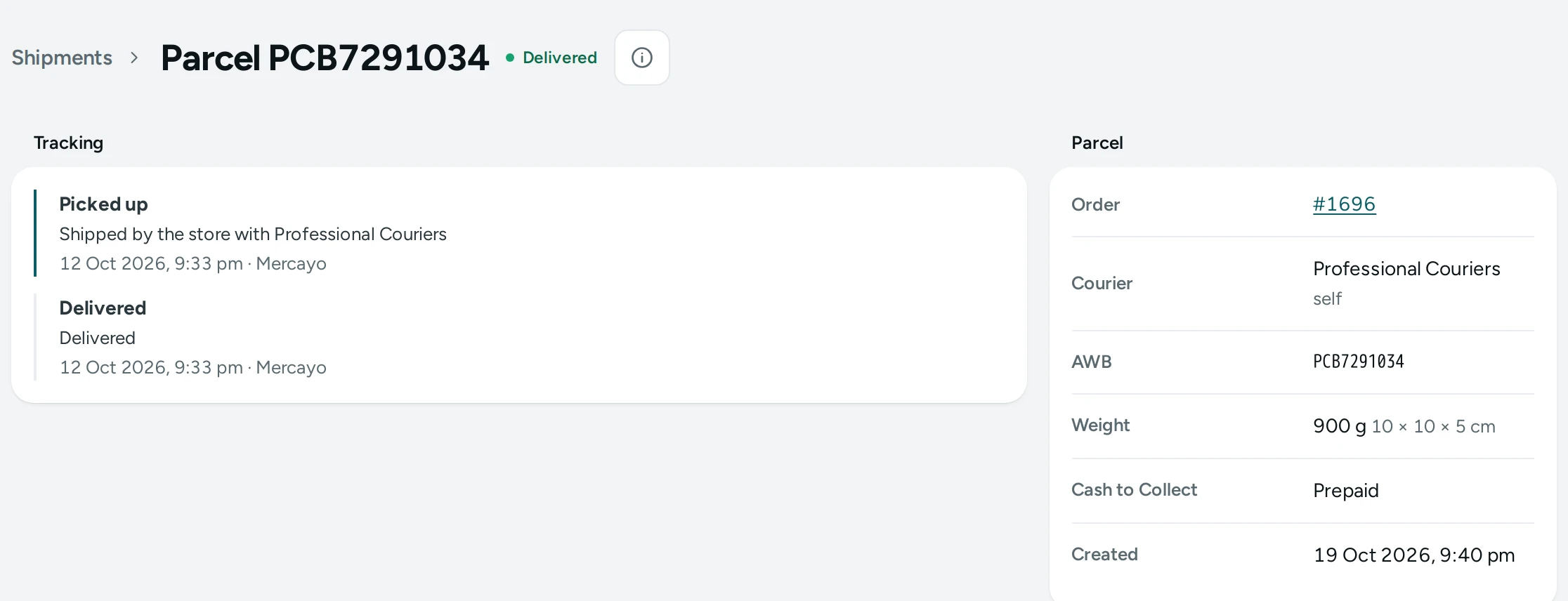
The Header
The title is Parcel with its AWB, for example Parcel 1234567890, a link back to Shipments, and the parcel's state as a pill (Label ready, In transit, Delivered, Delivery failed and so on). DOWNLOAD LABEL opens the courier's label so you can print it again.
Two banners can appear under it:
- Last problem: …, in amber, when the courier or Mercayo reported a problem with this parcel, in their words.
- Delivery failed: …, in red, when a failed delivery is waiting for your answer, with the courier's reason and the link Answer it in the NDR queue.
Tracking
The Tracking card lists every update, newest first. Each shows what happened in Mercayo's words (for example Out for delivery), the courier's own words under it, when it happened, and where. Updates Mercayo recorded itself (such as the label being made) are marked Mercayo. Before the first update it says "No tracking updates yet."
Parcel
| Field | What It Shows |
|---|---|
| Order | The order number, a link to the Order Page |
| Courier | The courier carrying it, with the courier account (Shiprocket or Shipway) beside it |
| AWB | The air waybill number the courier tracks it by |
| Expected By | The delivery date the courier gave, when it gave one |
| Weight | The weight sent to the courier, with the parcel's size in cm (length × breadth × height) |
| Cash to Collect | What the courier collects in cash, or Prepaid |
| Pickup | The courier's pickup reference, when a pickup was booked |
| Created | When the parcel was made |
Failed Deliveries
When the courier could not deliver, a Failed Deliveries card lists each attempt's case: the courier's reason ("The courier gave no reason" when none came), its state (Needs action, Sent to courier, Delivered, Returned, Closed) and when it was reported. Answer open cases in Failed Deliveries (NDR).
How to Answer "Where Is My Order?"
- Search the order on Orders by the shopper's phone or the order number.
- On its Parcel card press OPEN PARCEL.
- Read the top line of Tracking and Expected By to the shopper.
- If delivery failed, answer the case in the NDR queue while you have the shopper on the phone: a new phone number, a better address or a date to try again.
How to Print a Label Again
Press DOWNLOAD LABEL in the header. The courier's label opens in a new tab; print it from there.
Good to Know
- The page is always read fresh, never from memory.
- The weight comes from the products' variant weights, or your package weight when the items have none (see Labels and Pickups Settings).
- The parcel's states move forward only; a late or repeated update from the courier never moves a delivered parcel back.
Questions
The courier says delivered but the shopper says no. What do I do?
Check the Tracking card for where and when it was marked delivered, then raise it with your courier account's support, quoting the AWB.
Why is there no DOWNLOAD LABEL button?
The courier has not given Mercayo a label link for this parcel yet, or the parcel was cancelled.
Can I change the weight or size here?
No. Change the product's weight or your package size in Settings before making the next label.