COD Confirmation Call
Confirm Cash Orders With a Call
Many brands call before they ship a cash order. Mercayo makes that call part of the order: an Unconfirmed tab, one MARK CONFIRMED, and the shopper's history with your store in front of you while you call.
- In every plan
- Free for 14 days


Kosha is a demo store on Mercayo. Its products, orders and customers are sample data.
In short
What It Does
With Staff call to confirm COD orders switched on, every new cash on delivery order arrives marked Unconfirmed. It is still an order to ship, and nothing stops you shipping it; the mark tells your team a call is due.
- The Orders list gets an Unconfirmed tab, each such order carries an Unconfirmed or Confirmed badge, and the To Ship figure at the top says how many are "waiting for a call".
- Home lists "Cash on delivery orders to confirm" among the things that need you, with "Call the shopper before you ship".
- On the order page, the main button is MARK CONFIRMED while the call is due, and the order's steps show "Confirmed by Call" once it is done. You can add a call note of up to 500 characters, such as "wants delivery after 6 pm".
- From the list, select up to 100 orders and confirm them in one go from the bulk bar.
- The customer card shows the shopper's record in your store, found by the phone number: orders, money spent, and Returned, the parcels that came back to you undelivered, in red when there are any. While a cash order is still to ship, a shopper with returned parcels gets a warning ("Consider a call before shipping"), and the same warning shows in the MARK CONFIRMED dialog.
Confirming is written to the order's history with who did it and when. It sends the shopper nothing: the call was the message. If you also want your team told, the Email when a COD order is confirmed order alert (on to start with) emails your order alert addresses each time an order is marked confirmed.
Orders placed before you switched the call on are left as they are, and prepaid orders never need a call.
Three Ways an Order Becomes Unconfirmed, One Way to Confirm It
| What Marks It | Which Orders |
|---|---|
| Staff call to confirm COD orders | Every cash order placed while it is on |
| RTO Shield: Hold for a call | Only cash orders that score as risky; the history says "Held for a call (RTO risk)" |
| Neither | No order needs a call |
Whichever marked it, the order joins the same Unconfirmed tab, and MARK CONFIRMED (or the shopper's own yes on WhatsApp, once that is connected) clears it.
For your store
Why It Matters
A call before shipping catches what no form can: a shopper who ordered by mistake, an address the courier will not find, someone who will not be home this week. For a cash order, finding that out before the parcel leaves saves the trip both ways.
The call works best when it is easy. Your team should not keep a spreadsheet of who has been called: the Unconfirmed tab is the list, and the button is the record. The shopper's past returns are on screen, so your team knows which calls matter most.
For a small team, the call is also the first real conversation with a new shopper. Many shoppers in India expect it before a cash order, and a friendly call in their own language often settles a delivery time, a landmark or a size before the parcel leaves.
And with Order Clean-up, orders that never get confirmed do not sit in your list for ever.
Step by step
How It Works
Switch On the Call
Open Settings → Checkout and COD, card Order Clean-up, and switch on Staff call to confirm COD orders. From now on, new cash on delivery orders are marked Unconfirmed. Orders already placed are not changed.
Open the Unconfirmed Tab
In Orders, the Unconfirmed tab lists the cash orders waiting for a call, with the shopper's name, phone and total, and each order's RTO risk with its biggest reason. On a phone each order is a card you can tap, and a long press selects it.
Call With the Shopper's Record in Front of You
Open an order. The customer card shows their orders with your store, what they have spent, and how many parcels came back undelivered; on a phone, tap the number to call. If any of their parcels came back before, a warning suggests a call before shipping, and the RTO Risk card lists the other reasons to take care.
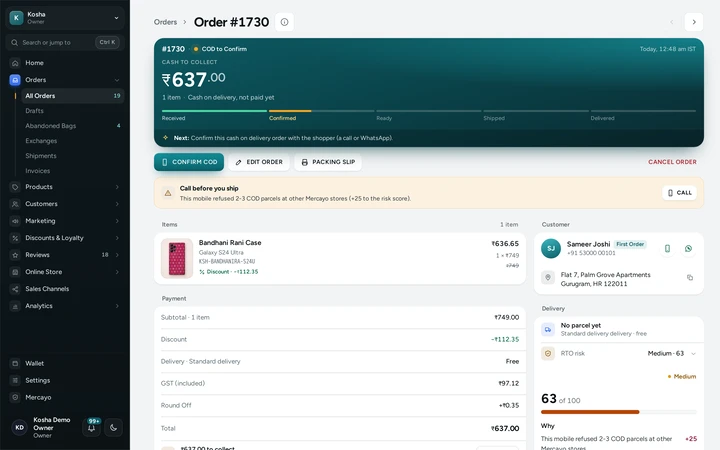
An order's page with its next step and the customer card, on Kosha, a demo store on Mercayo. Press MARK CONFIRMED
After the call, press MARK CONFIRMED and, if you like, write a call note. The order shows as confirmed, the history records who confirmed it and when, and the next step becomes making the label. Pressed it on the wrong order? The message that follows has UNDO for 10 seconds.
Confirm Many at Once
When you have called several shoppers, select their orders in the list and press MARK CONFIRMED in the bulk bar, up to 100 at a time, with one note for all of them if you want. Orders that cannot be confirmed (cancelled, shipped or prepaid) are counted, left alone and named in the result.
Cancel the Ones That Will Not Go
If the shopper no longer wants the order, or never answers, press CANCEL ORDER on the order page: its stock and any discount use go back, and the shopper gets the usual cancellation message. With Order Clean-up on, orders nobody confirms are cancelled for you after the days you choose.

Settings
Settings You Control
Each one is in your admin. A new store starts with the value shown.
Mercayo
Mercayo's Controls
Mercayo's team can switch the call on for a store, or keep it off, with a reason your admin shows beside the locked switch; the same goes for the WhatsApp question and RTO Shield's hold. Every change is in Mercayo's audit log. Who may press MARK CONFIRMED is decided by your own staff roles: it needs the right to edit orders, and the database itself checks it, not only the screen. Staff without that right see the Unconfirmed tab but no button. A confirmation can be taken back only within 10 minutes, and only by the person who made it or the store's owner or an admin. Mercayo never phones your shoppers.
Limits today
Good to Know Before You Start
- Mercayo does not place the call: your team phones the shopper from its own phone.
- A confirmation can be taken back only within 10 minutes, by the person who made it or the owner or an admin; after that it stays, because it records that a call happened.
- The shopper's record counts orders in your store only, matched by phone number; one store never sees another store's shoppers.
- The thank-you page tells every cash on delivery shopper that the order will be confirmed with them on their phone, whether or not your store uses the call.
- Confirming by a WhatsApp reply (CONFIRM ORDER and CANCEL ORDER buttons) reaches only shoppers who said yes to WhatsApp updates; the others need your call.
Questions
About COD Confirmation Call
Does an unconfirmed order stop me from shipping?
No. The order is still an order to ship, and you can make its label at any time. The mark only tells your team that a call is due.
Does the shopper get a message when I confirm?
No. Confirming sends nothing, because the call itself was the conversation. The shopper gets the usual messages when the order ships and is delivered.
What if I turn the call on while orders are waiting?
Orders already placed are not marked. Only orders placed after you switch it on need a call.
How does Mercayo know a shopper's parcels came back before?
From your own store's orders: orders that came back to you undelivered, matched by the shopper's phone number. It counts orders from accounts and from guests alike, whether they were paid online or in cash. Other stores' orders never count here.
Can I cancel an order after the call?
Yes. If the shopper no longer wants it, use CANCEL ORDER on the order page; its stock and any discount use go back.
I pressed MARK CONFIRMED by mistake. Can I undo it?
Yes, right away. The message after confirming one order has UNDO for 10 seconds, and the order is Unconfirmed again, with the undo in its history. A confirmation can be taken back for 10 minutes, by the person who made it or the owner or an admin. Confirmations made in bulk have no UNDO button.
How will the WhatsApp confirmation work?
With Ask COD Shoppers to Confirm on, a shopper who said yes to WhatsApp updates on the thank-you or order page gets a message with CONFIRM ORDER and CANCEL ORDER. CONFIRM ORDER counts as confirmed by your team. CANCEL ORDER cancels the order while the shopper may still cancel it themselves (24 hours to start with, before a label is made); after that it asks your team. It starts once Mercayo's WhatsApp account is connected.
Who gets the confirmed-order email?
The people on your order alerts: the store owner, if that is switched on, and up to 5 more addresses you add in Settings → Notifications → Order Alerts. Switch off Email when a COD order is confirmed if your team does not need it.
Related
Related Features
- Order Clean-UpOptionally cancel cash on delivery orders nobody confirmed or shipped after the days you choose, with their stock and coupon uses put back.
- COD Confirmation CodeShoppers confirm their mobile number with a 6-digit code before a cash on delivery order is placed, so orders with wrong numbers never happen.
- OrdersStatus tabs, saved views your team shares, search by number, phone or name, a money summary, bulk actions, and an order page with one clear next step.
- CustomersEvery customer with their orders, spending and returned parcels, guests included, ready-made segments like VIP and RTO-Prone, tags, notes, credit and export.
- WhatsAppOrder updates, COD confirmation buttons, bag reminders, back-in-stock alerts and offers on WhatsApp, in your store's name, from Mercayo's number or your own.
More in Cash on Delivery: Cash on Delivery · COD Confirmation Code · Part Payment for COD · Order Clean-Up · RTO Shield
Try It on Your Own Store
Every feature is in every plan, free for 14 days.