When you act on two or more parcels or orders with a courier, the work runs as a shipping job on Mercayo's servers instead of inside your screen: generating labels, requesting pickups, making a manifest or the courier's manifest, printing labels, checking couriers and cancelling shipments. The screen answers at once, you keep working, and the bell tells you when the job ends. Shipping Jobs lists your store's jobs with their live progress, and each job shows what happened to every parcel and the files it made. Open it from SHIPPING JOBS on Shipments, or from VIEW in the message a job shows when it starts. Anyone whose role can see orders can open it.
What Starts a Job
| Where | What Becomes a Job |
|---|---|
| Orders, with two or more orders chosen | GENERATE LABELS, REQUEST PICKUP, CANCEL SHIPMENT, COURIER'S MANIFEST |
| Shipments, with two or more parcels chosen | REQUEST PICKUP, MANIFEST, COURIER'S MANIFEST, PRINT LABELS, CHECK COURIER, CANCEL SHIPMENT |
| The phone app | SHIP for several orders |
One parcel at a time (on its own page, the order's parcel card or the phone app's ship sheet) is done at once, with the answer on the spot.
When a Job Starts
A message says what was asked, for example "Labels for 48 orders requested. We'll tell you when they're ready." or "Pickups for 19 parcels requested. We'll tell you when it's done.", with VIEW. The sheet you started it from watches it while it runs: "You can close this and keep working. The bell tells you when it is done."
- Labels, a manifest and a print take up to 100 parcels in one job and make one PDF. A bigger choice becomes several jobs ("48 parcels requested in 2 jobs."), each shown as Part 1 of 2 and so on.
- The other jobs take up to 1,000 parcels.
- A store can have at most 10 jobs waiting or running. An eleventh says "Ten jobs are already running. Wait for one to finish, then try again."
The Jobs List
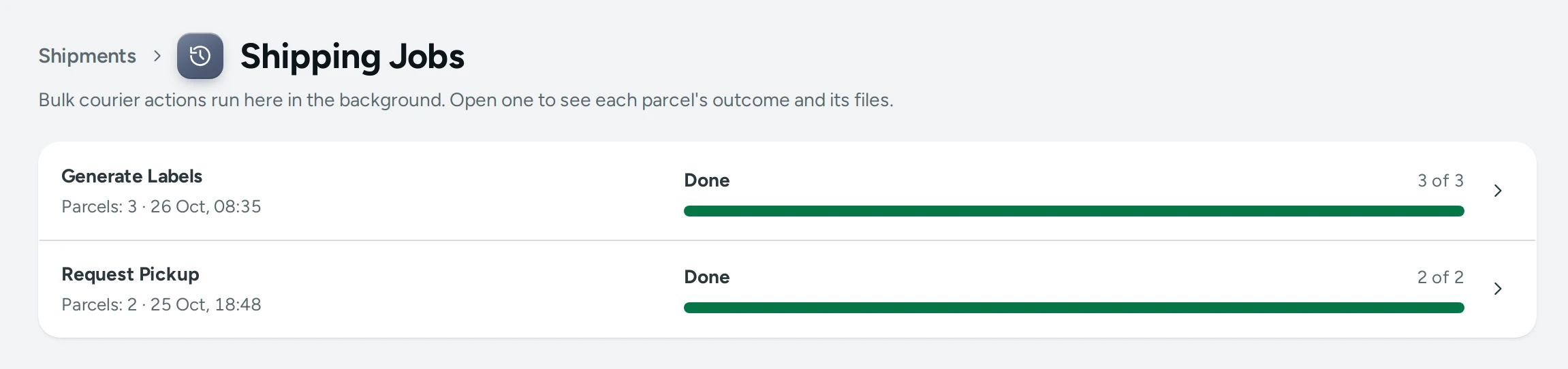
Each job shows what it is (Generate Labels, Request Pickup, Cancel Shipments, Check Courier, Manifest, Courier's Manifest, Print Labels), how many parcels it holds and when it started ("Parcels: 3 · 26 Oct, 08:35"), "by a teammate" when someone else started it, and its progress: a bar with "19 of 47" and its state.
| State | What It Means |
|---|---|
| Waiting to start | Accepted, not started yet |
| Working | Running now; the list updates by itself |
| Done | Every parcel went through |
| Done, with some failed | Some parcels went through and some did not |
| Failed | None went through |
One Job's Parcels
Open a job to see its progress (Done, Skipped, Failed counts) and Each parcel, filtered by All, Done, Skipped or Failed. Every row has the order and AWB and what happened:
- Done: "Label made", "Pickup requested", "Cancelled", "Booking taken over", "On the manifest", "Printed".
- Skipped, with why: "No label yet", "Already done", "The shipment is cancelled", "Already picked up", "Shipped with your own courier", "Never sent to a courier", "It already has its AWB", "No booking in the courier's panel", "This courier account makes no manifest".
- Failed, with the reason in the courier's or Mercayo's words.
The Job's Files
A label job's labels, a manifest or a print are one PDF: OPEN LABELS or OPEN MANIFEST. A label job's labels can be printed again on other paper. When your store prints the courier's own labels, the job lists COURIER'S LABELS instead. A courier's manifest job lists each account's manifest with OPEN MANIFEST, or says "Shipway makes no manifest of its own: use MANIFEST instead."
The Bell
When a job ends, the bell tells the person who started it: "Labels ready (46 of 48)", "Pickups requested (19 of 47)", "Shipments cancelled (2 of 3)", "Manifest ready (12 of 12)", with "Done 46, skipped 1, failed 1.", or "Request Pickup: none went through". Press it to open the job.
How to Fix What Failed
- Open the job and press Failed.
- Read each reason: a PIN code no courier serves, an address the courier refused, an account that needs reconnecting.
- Fix it (the order's address, the product's weight, Courier Accounts).
- Choose those parcels or orders again and run the action once more. What was done is never done twice: a parcel already labelled, booked or cancelled is skipped and says so.
Good to Know
- A job runs as the person who started it: their rights are checked at every step, so a job started by someone whose role changes stops doing what they may no longer do.
- If a job is interrupted (a server restart, for example), it carries on from where it stopped; parcels already done are not done again. After several tries, what is left fails with a reason, ready to run again.
- Finished jobs and their files are kept for 30 days.
- Inside a job, Mercayo asks your courier account a few parcels at a time, so the account's own limits are respected.
Questions
Can I close the browser while a job runs?
Yes. The job runs on Mercayo's servers. Come back to Shipping Jobs, or wait for the bell.
Why did a job skip some parcels?
They did not need the action: a pickup already booked, a label already made, a parcel already collected or cancelled, or one sent with your own courier. The row says which.
Where are the labels from GENERATE LABELS?
In the job: OPEN LABELS opens one PDF of the run's labels. Each parcel's own label is also on its Shipment Page.
Can two people run jobs at once?
Yes, up to 10 jobs for a store waiting or running. A store's jobs run one after another, so your courier account is never asked by two jobs at once. Everyone on the team sees every job; the bell tells each person about their own.